

OpenAI shuts down Sora video service
OpenAI just officially shut down Sora. The app, web, and API — all of it. Just six months after launch, no one saw this coming.

Hey — it's the Carat team. 🤗 Sora is gone, just six months after launch. We've also got a 3-tool design-to-video workflow, AI agents designing in Figma, and a prompt that replaces a $3,000 product shoot.
🔥 OpenAI shuts down Sora video service
OpenAI just officially shut down Sora. The app, web, and API — all of it. Just six months after launch, no one saw this coming.
The reason: compute costs. They need to redirect all the GPUs that were running video generation toward training their next-gen LLM. Sam Altman told employees directly that shutting down Sora would let them focus resources on the next model.
The shock doesn't stop there. Disney's $1 billion investment deal also fell through. The Sora team wasn't dissolved — they've pivoted to 'world simulation' research, training robots to understand the physical world.
Just on March 11, reports said Sora would be integrated into ChatGPT. Less than two weeks later, that plan was scrapped entirely.
📌 3 stories you should know
1️⃣ From Figma to video in 3 minutes flat
A 3-step workflow — design an app UI in Figma Make, feed that screenshot into Midjourney as an image prompt for high-quality rendering, then drop that image into Kling's image-to-video to add motion — is going viral on X.
In AI creator @viktoroddy's video, you can see the whole pipeline in action. Figma Make preserves the UI structure, Midjourney renders it into a polished visual, and Kling adds screen transition motion. The key is chaining all three tools in sequence.
2️⃣ Claude is now designing directly in Figma
AI coding tools have crossed into design territory. Claude Code now integrates with Figma, letting you create and arrange UI components with text commands alone.
AI builder @minchoi (365K followers) shared a demo showing the integration in action. The process of generating and placing Figma components via text is surprisingly smooth.
3️⃣ Teaching robots without robots — that era just arrived
NVIDIA senior researcher Jim Fan declared that "teleoperation is so 2025." 2026, he says, is all about scaling robot learning without robots.
The core idea is EgoVerse — an ecosystem that copies human behavior directly to train robots. It means you can generate thousands of hours of training data without a single physical robot.
🧪 Prompt tip of the day
A $3,000 product shoot — with one prompt
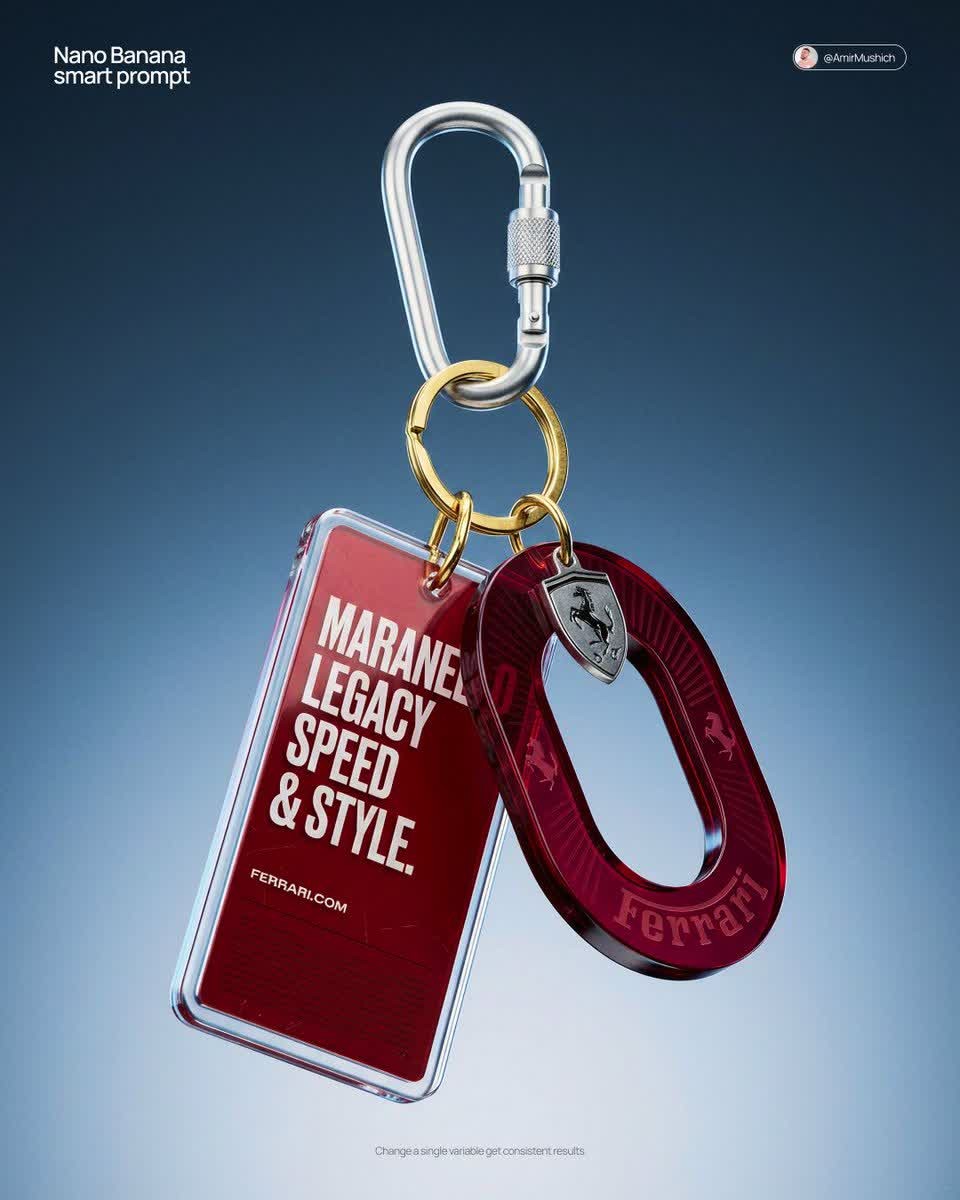
This prompt replaces a $3,000–5,000 CGI product shoot with a single generation.
Shared by designer @AmirMushich on X, this prompt specifies materials, lighting, camera angles, and post-processing at CGI studio level. The key is specifying real manufacturing specs — '3mm thick acrylic', 'gold-plated split ring' — which helps the AI render textures far more convincingly.
[BRAND NAME]
Act as a High-End CGI Product Photographer and 3D Render Artist
specializing in streetwear merch and limited-edition collectibles.

Create a photorealistic CGI product shot of a premium keychain set
suspended in mid-air against a neutral gradient studio background.

ELEMENT 1 — ACRYLIC TAG:
Rectangular acrylic charm (4:9 ratio, rounded corners, 3mm thick).
Clear gloss acrylic front panel over brand-colored background insert.
Bold condensed all-caps typography with brand-relevant phrase.

ELEMENT 2 — OVAL MEDALLION CHARM:
Die-cut oval hoop from tinted translucent acrylic resin.
Deep saturated jewel-tone translucency. Wordmark engraved in bold.
Subtle radial sun-ray pattern embossed on surface.

ELEMENT 3 — HARDWARE:
Silver anodized aluminum carabiner with knurled locking barrel.
Gold-plated brass split ring. Micro-scratches and machining marks.

LIGHTING:
Large octabox soft key light, top-right at 45 degrees.
Subtle rim light from bottom-left, cool temperature (5500K).
Background: gradient cyclorama — dark steel blue (#1a2535) to
pale silver-grey (#d0d8e0). No hard shadows.

COMPOSITION:
Levitation shot, centered with 10-15 degree rotation.
Camera slightly below eye-level, portrait 4:5.
DOF: f/4.0. Object occupies 55% of frame.

STYLE: High-end streetwear lookbook / limited drop product page.
Film grain overlay ISO 400. +5 clarity, -10 highlights.
NO white studio. NO flat lay. NO AI plastic sheen.
We ran this exact prompt on Carat with Nano Banana Pro. Here's the result: ⬇️
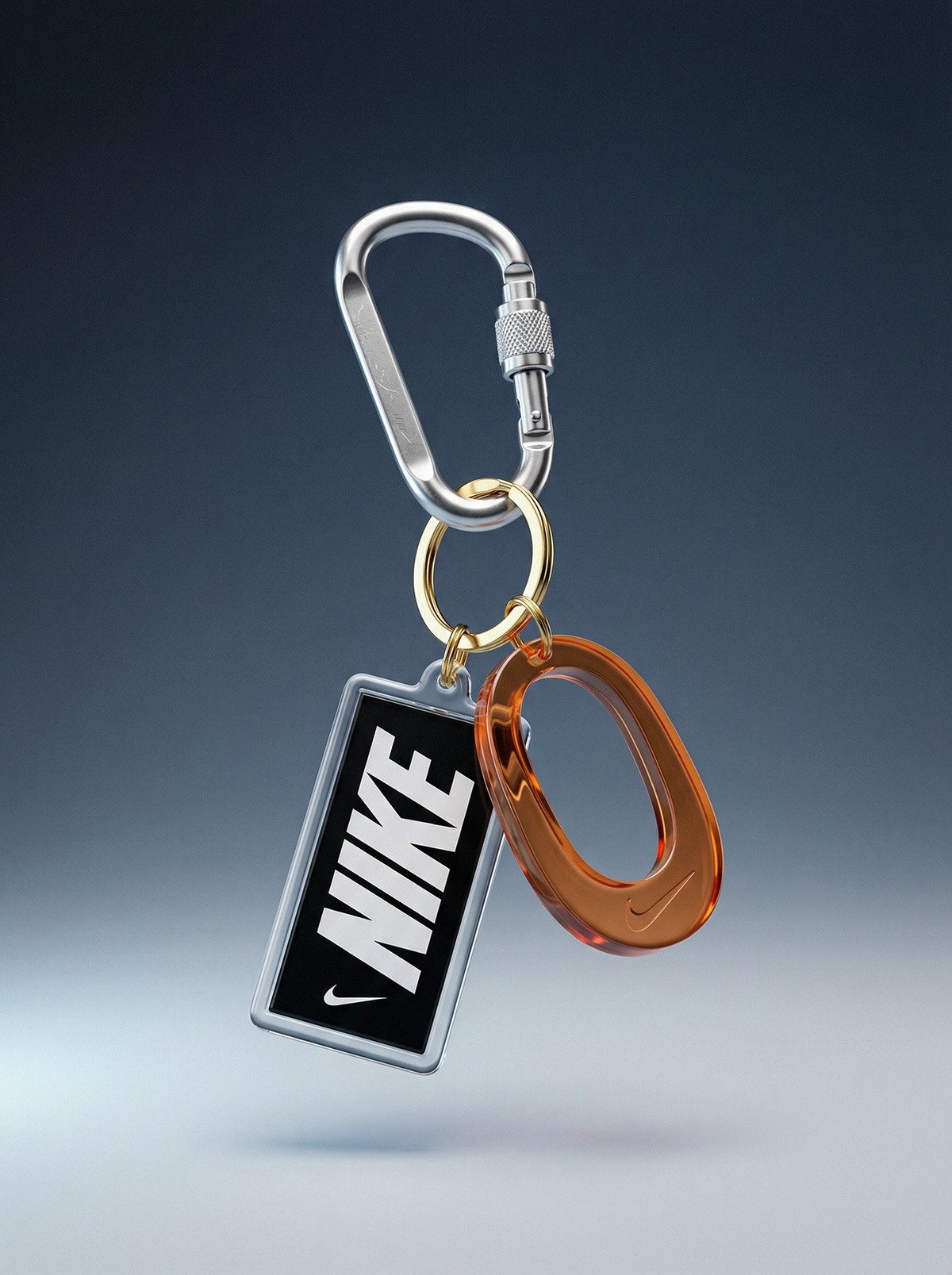
Three keywords that matter: "Levitation shot" (floating product), "micro-scratches and machining marks" (realism through imperfection), "NO AI plastic sheen" (kills the fake CGI look). Replace [BRAND NAME] with yours and try it on Carat with Nano Banana Pro.
Try the product shot prompt — swap in your brand name and see what comes out. You might be surprised ☺️
More articles
 GPT 6 Astra Prompt Guide | Official Traits, Task-Type Skeletons, and How to Prompt It Without StallsCarat Editor · 2026.09.18
 AI BL Drama Explained: Where to Watch and How to Make OneCarat Editor · 2026.09.17
 GPT 6 Astra Video Production and Editing: The Complete Guide | How to Use It, Render Models, CostCarat Editor · 2026.09.15