

How to Make AI K-Pop Idol Fancam Videos From Your Photo (Prompts Shared)
Following the baseball stadium fancam trend, K-pop idol fancam prompts are going viral. Full prompt guide from image to video.

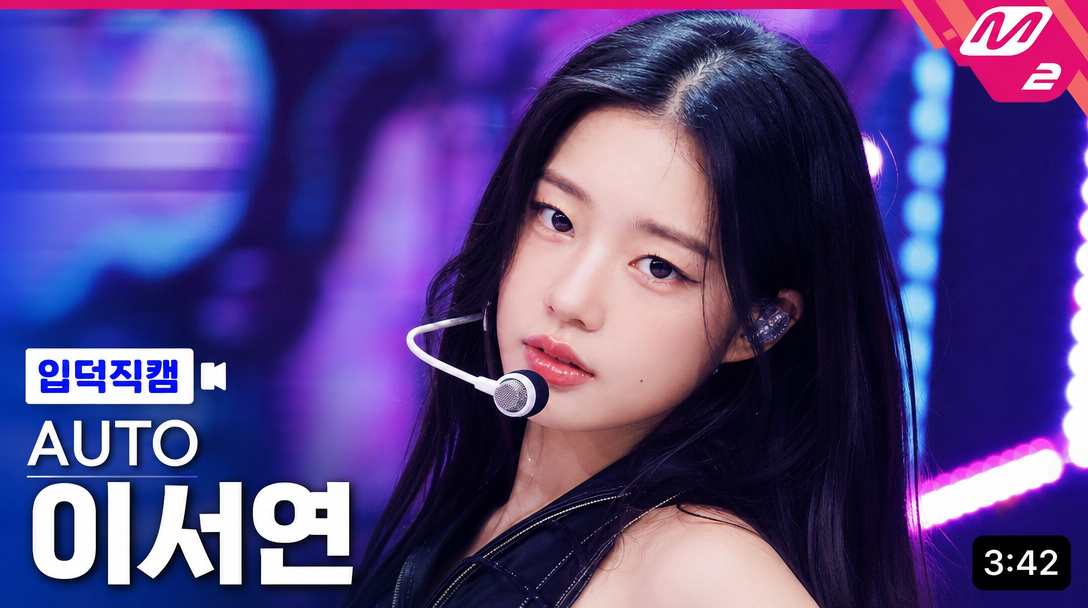
Hey, it's the Carat team. 🤗
Following the baseball stadium fancam trend, K-pop idol fancam prompts are now going viral. With just one selfie, you can create an Mnet-style fancam thumbnail and even an ending fairy video.
Try it yourself on Carat. 👉 Create on Carat
STEP 1. Create an Idol Fancam Image
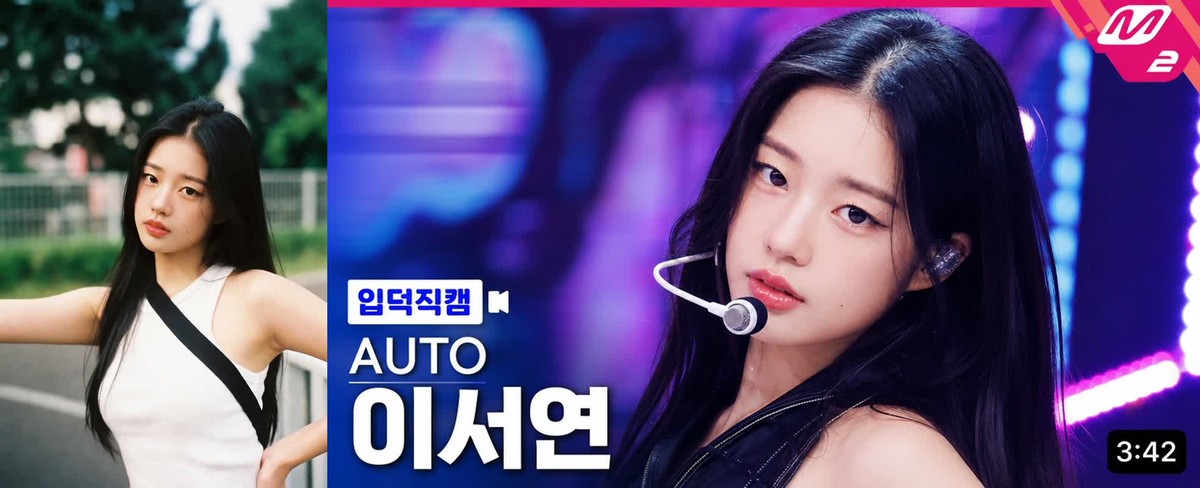
Upload your selfie to Carat's ChatGPT Images 2.0 and use the prompt below. Enter your group name in GROUP_NAME and your name in MEMBER_NAME. Leave them as AUTO for random generation.
[EDITABLE FIELDS — MODIFY HERE IF NEEDED]
[GROUP_NAME: AUTO]
[MEMBER_NAME: AUTO]
[TOP_RIGHT_BADGE_TEXT: M2]

Use the uploaded portrait as a reference for the subject’s overall vibe and impression.

Create a high-quality K-pop music show fancam thumbnail in a horizontal 16:9 format.

Main objective:
- The final image must closely follow the visual layout structure of a typical K-pop fancam thumbnail.
- The layout of the text and graphic elements should remain consistent and fixed.
- The person should appear as the clear main subject in a large close-up composition.
- The overall image should feel like a bright, polished, highly clickable YouTube music show thumbnail.

Editable field rules:
- If [GROUP_NAME] is filled, use it exactly.
- If [GROUP_NAME] is blank or AUTO, automatically generate a natural and stylish K-pop group name.
- If [MEMBER_NAME] is filled, use it exactly.
- If [MEMBER_NAME] is blank or AUTO, automatically generate a natural and stylish member name.
- If [TOP_RIGHT_BADGE_TEXT] is filled, use it exactly inside the top-right badge.
- If [TOP_RIGHT_BADGE_TEXT] is blank or AUTO, use “M2”.

Automatic rules:
- The bottom-left label text must always be “입덕직캠”.
- The video duration in the bottom-right corner should be automatically generated as a natural random time between 3:00 and 5:00.
- The stage concept, lighting, and facial expression should be automatically chosen based on the subject’s vibe.

Subject depiction:
- Use the uploaded portrait as a vibe and appearance reference, not as a strict one-to-one copy target.
- Preserve the overall impression, face shape, eyes, hairstyle, and soft identity cues.
- Reinterpret the subject as a K-pop idol in a music show close-up thumbnail.
- The face must be the strongest focal point in the frame.

Composition:
- Horizontal 16:9 thumbnail.
- Tight close-up or upper-body close-up.
- The subject should occupy most of the frame.
- The face should be centered or slightly right-centered, leaving clean text space on the left side.
- The subject’s expression should be vivid, attractive, and thumbnail-friendly.

Stage mood:
- Make it look like a real K-pop stage performance moment.
- Use glamorous concert lighting, LED background glow, and vivid stage colors.
- Preferred lighting colors may include pink, purple, blue, cyan, or neon tones.
- Background should support the idol but not overpower the face.

Styling:
- K-pop stage outfit styling.
- A headset microphone or in-ear monitor may be included naturally.
- Hair, makeup, and styling should feel polished, modern, and performance-ready.

STRICT GRAPHIC LAYOUT RULES:
The thumbnail must use a fixed, repeatable broadcast-style layout.

1) Top-right badge:
- Place a pink angular corner badge in the top-right corner.
- The badge should sit tightly inside the upper-right corner with a small margin.
- Put [TOP_RIGHT_BADGE_TEXT] inside the badge.
- The text should be bold, white, clean, and clearly readable.
- The badge should visually resemble a broadcast/music-show corner mark.
- Keep this badge small to medium in size, not too dominant.

2) Bottom-left label:
- Place a small “입덕직캠” label in the lower-left area.
- It should appear above the group name and member name.
- Use a compact rectangular or speech-bubble style box.
- The box should be white and blue or similar high-contrast broadcast styling.
- The label should be small but crisp and immediately readable.

3) Group name:
- Place [GROUP_NAME] directly below the “입덕직캠” label.
- Align it to the left edge of the label block.
- The group name should be medium-sized, bold, and white.
- It should be clearly readable but smaller than the member name.

4) Member name:
- Place [MEMBER_NAME] directly below the group name.
- Align it with the left-side text stack.
- This must be the largest text element in the thumbnail.
- Use bold white Korean typography with strong readability.
- The member name should dominate the lower-left text hierarchy.

5) Bottom-right duration:
- Place the time-duration box in the bottom-right corner.
- Use a small rounded black rectangle with white time text.
- The time should look like a typical YouTube duration marker.
- Keep it compact and neatly aligned to the lower-right edge.

Text hierarchy:
- Largest text: [MEMBER_NAME]
- Medium text: [GROUP_NAME]
- Small label text: “입덕직캠”
- Small badge text: [TOP_RIGHT_BADGE_TEXT]
- Small duration text: random time between 3:00 and 5:00

Typography style:
- All Korean text must be accurate, natural, and highly readable.
- Use bold, clean, broadcast-style typography.
- The member name should be especially thick and visually powerful.
- The layout should feel polished and consistent, as if taken from a real music-show thumbnail template.

Visual direction:
- Bright, sharp, saturated, broadcast-style image
- Highly clickable K-pop thumbnail energy
- Strong face focus
- Clean and consistent placement of graphic elements
- Realistic but polished idol-performance mood

Negative prompt:
low quality, blurry image, distorted face, incorrect Korean text, unreadable typography, messy layout, misplaced graphic elements, weak thumbnail composition, face too small, cluttered background, sloppy badge placement, inaccurate duration box, awkward text alignment, poor broadcast UI styling
Here's what we got when we fed a selfie into Carat's ChatGPT Images 2.0.
STEP 2. Convert the Image to Video
Convert the image above to video with the prompt below and you'll get an ending fairy-style stage clip.
Use the uploaded image as the main reference.
Create a realistic K-pop music show ending fairy shot.
The female idol is on a live stage right after finishing a performance, looking directly into the camera in a close-up broadcast-style shot.
She holds a natural ending pose with a soft, charming, and confident expression.

She performs one subtle and natural ending gesture, chosen freely like a real idol ending fairy moment.
Possible gestures include: a small wave near her face, a gentle finger heart, a V sign, lightly touching her cheek, softly brushing or tucking her hair, placing one hand near her lips, or a small playful pose with one hand slightly raised.
Only one or two minimal gestures should appear naturally, not all at once.

She softly blinks, slightly tilts her head, keeps gentle eye contact with the camera, and gives a small natural smile.
Her breathing is subtly visible through slight shoulder and chest movement after performing.
Her hair moves naturally in a light stage breeze.

The camera is a smooth and steady close-up fancam shot with a slight slow zoom-in.
Bright purple, pink, and blue LED stage lights glow in the background with soft bokeh.
High-quality music show broadcast look, realistic skin texture, glossy stage makeup, cinematic lighting, sharp focus on face.

Keep the person's face, hairstyle, outfit, makeup, and overall identity consistent with the reference image.
Do not change the facial features or face shape.
Do not add extra people.
Do not distort the hands, fingers, face, eyes, or mouth.
💡 Tips for Better Results
-
A slightly angled selfie looks more natural than a straight-on shot.
-
Entering GROUP_NAME and MEMBER_NAME manually ensures the exact names appear.
-
The video prompt works with other video models too, not just Kling AI.
Try it yourself on Carat. 👉 Create on Carat
More articles
 GPT 6 Astra Prompt Guide | Official Traits, Task-Type Skeletons, and How to Prompt It Without StallsCarat Editor · 2026.09.18
 AI BL Drama Explained: Where to Watch and How to Make OneCarat Editor · 2026.09.17
 GPT 6 Astra Video Production and Editing: The Complete Guide | How to Use It, Render Models, CostCarat Editor · 2026.09.15