GPT 6 Astra Video Production and Editing: The Complete Guide | How to Use It, Render Models, Cost
GPT 6 Astra video production and editing does not cover the render itself. This guide covers the four criteria for choosing a render model, what one video costs, and the points that only come up in Korean-language work.

"Astra really is something." After OpenAI released GPT 6 Astra on September 3, write-ups from people pointing it at video work piled up fast.
YouTube filled with clips about making video with Astra. One community post logged six out of six successful trims of a recording. On the previous generation the same job ran past 10 minutes or failed close to half the time. The official OpenAI announcement never mentions video generation. Astra is not a model that produces video, and video keeps coming out of it anyway.
This article covers how GPT 6 Astra video production actually works, how far Astra video editing goes, the criteria for choosing the model that handles the render, the points that only come up in Korean-language work, and how the cost of one video splits.
GPT 6 Astra video production runs tools instead of rendering video
The official OpenAI announcement lists computer use and browsing, software engineering, cybersecurity, and science as Astra's headline capabilities. Video generation is not on the list.
The official documentation does say Astra operates the programs people already use. It fills in online forms, updates records in a customer management tool, and builds a website then runs front-end quality checks. Video comes out the same way. The model does not draw the video. It clicks through the program that makes the video.
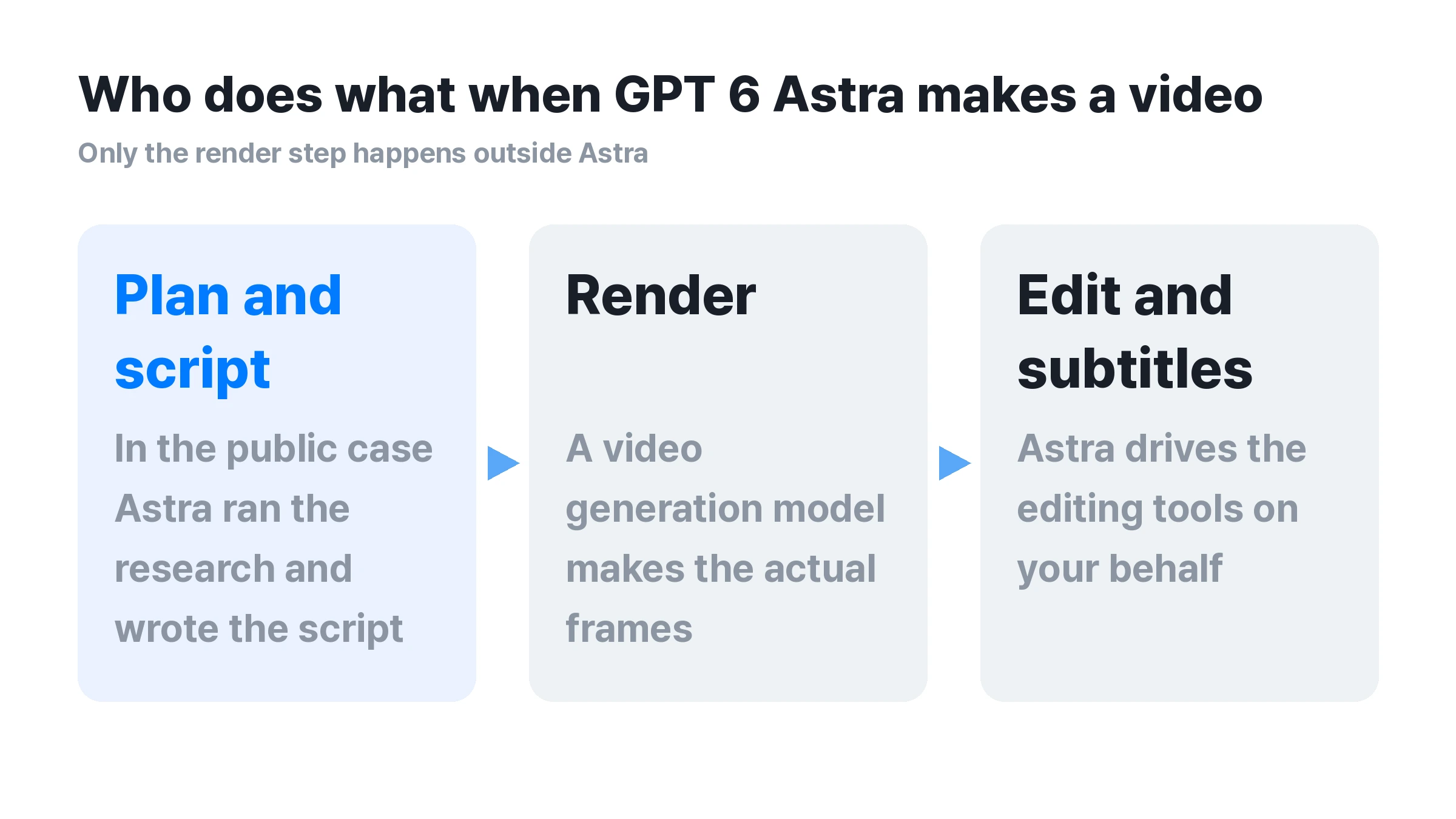
Video work splits into three stages. Astra can take planning and scripting, and in the published case it handled research and script writing as well. A video generation model does the render that produces the actual frames. Astra handles cut editing, subtitles, and merging by operating an editing tool.
The "50 minutes for about $60" video, and what actually happened
Most GPT 6 Astra video write-ups in search results point back to one case. Nate Herk published it as a YouTube video production run, and MindStudio wrote it up. Astra reportedly handled research, script writing, voice, editing, rendering, and review in sequence over about 50 minutes, at a cost of about 60 dollars. AI Matters, a Korean outlet, reported the same figure converted to about 80,700 won.
Three tools were involved. The avatar came from HeyGen Avatar V5, the voice from an ElevenLabs voice clone, and editing and assembly happened in HyperFrames. Astra moved between accounts on these three services and operated each screen in turn.
Several top-ranking articles cite this single run in common. Treat it as a reference point, not as an average.
GPT 6 Astra video editing measured, six out of six trims succeeded
Render reports vary widely. Video editing has at least one hands-on log that states its conditions. It was posted on Clien, a Korean community, and covers cleaning up recordings by trimming the padding off files captured with a TV tuner. Instead of a person marking the start and end points, the model found the range itself and issued FFMPEG commands.
Results differed sharply by model. GPT 5.6 Luna took more than 10 minutes with a low success rate. GPT 5.6 Sol finished in 6 to 10 minutes at roughly 60 to 70 percent success. GPT 6 Astra finished in 1 to 3 minutes and succeeded all six times. A follow-up attempt reportedly processed seven videos in about 16 minutes.
The author concluded that all the model did was issue FFMPEG commands. It did not create video. It decided where to cut. This log is also one person measuring in an uncontrolled setting. No repeat runs under the same conditions exist yet, so read it as a large generational gap in editing judgment rather than as a firm number.
What changes when GPT 6 Astra gets the browser
Avatar, voice, and editing features sit on different services, so the published cases wired each one up separately. Astra moves between them, logs into each account, and operates the screen. Once Astra has the browser, any service that runs on the web works without a desktop app or a plugin. The examples in the official documentation, filling online forms and updating records in a customer management tool, come from the same capability.
OpenAI published speed figures as well. In the OSWorld 2.0 delay simulation, Astra scored 72.6 percent at about 40 minutes per task, and GPT 5.6 Sol scored 65.7 percent at about 75 minutes. That is roughly a 47 percent cut in time per task. On Mind2Web, combined with Codex harness improvements, OpenAI reports about 1.9 times faster completion than GPT 5.6 Sol.
The video model that handles the render is a separate choice
GPT 6 Astra does not produce video itself. That means the model that draws the actual frames has to be chosen on its own.
Elser AI covered this stage under the title "planning is not rendering" and collected candidates such as Kling, Seedance, and Google Veo. Those three, along with PixVerse, which published reference values, also appear in Carat's video model list. For selection criteria, the recommended values PixVerse published for its own models are the most specific available.
How much the render model decides shows up in those PixVerse recommendations. It sets 4 seconds per shot, 12 seconds for a stitched sequence, 1280×720 resolution, and 24fps, and advises no more than two retries per shot. The same company lists common failures as wheels that float or slide, poses that collapse, and frame jitter. There is also a path that skips the render model. An OpenAI demo shows Astra building a house model in Blender and moving it into an Unreal Engine 5 scene, which leaves 3D output open as video source material.
Four criteria for choosing a render model
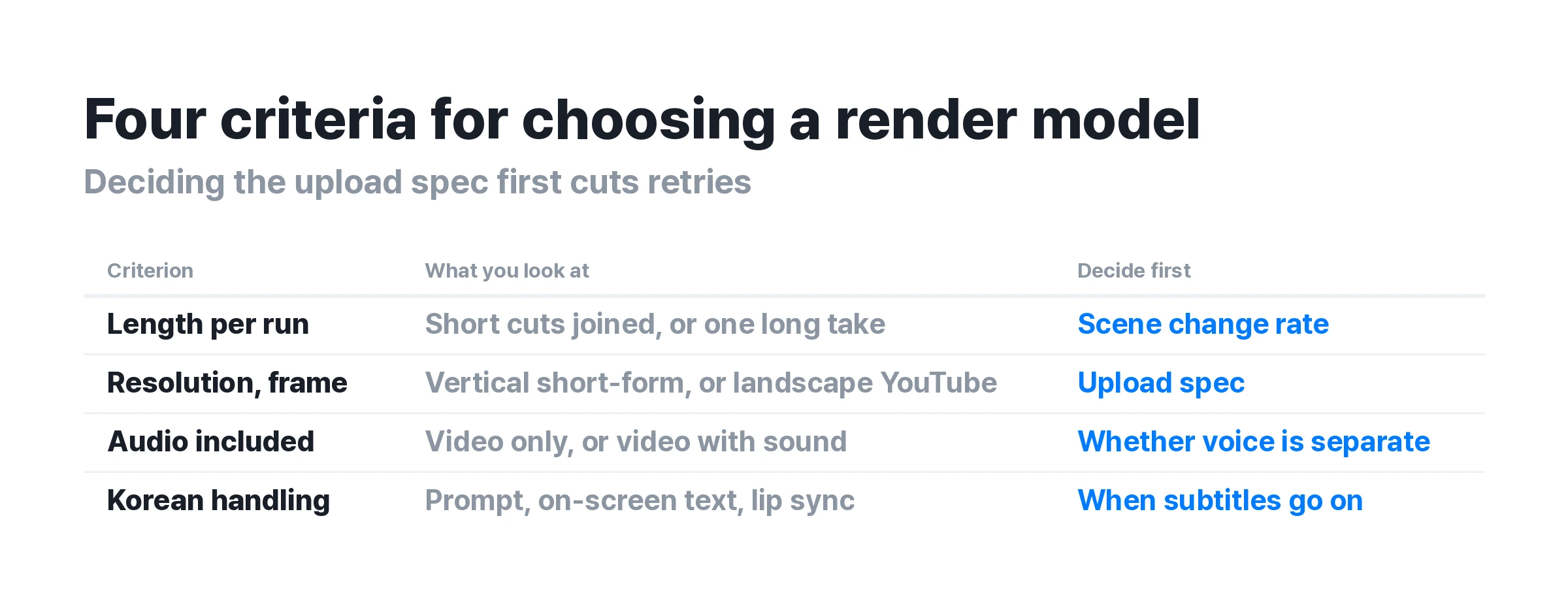
In GPT 6 Astra video production, pick the render model by output spec, not by feature list. Here are the four things to check, in order.
1. Clip length per generation
Each model caps how much video it makes in one pass. Cutting 4 second pieces and stitching them is a different workload from generating long clips directly. Frequent scene changes favor short pieces. A single continuous take favors long generation.
2. Resolution and frame rate
Vertical short form and horizontal YouTube ask for different specs. Fixing the upload spec first, then choosing a model to match, cuts retries. Raising quality later is possible, but a shaky source is hard to recover.
3. Whether audio comes with it
Some models output video only. Others generate sound at the same time. When audio is separate, voice and background music have to be made and attached on their own, which adds windows for Astra to move between.
4. How the model handles Korean
Whether the model takes Korean prompts as written, whether it can put Hangul on screen, and whether it can lip sync Korean dialogue all vary by model. In Korean-language work, this item often blocks before the other three do.
What splits only in Korean-language video production
English-language coverage barely touches this stage. A scan of the top Korean search results turned up about one line on problems specific to Korean-language work. It came from AI Matters, and the advice is to list the translationese phrasings that keep showing up so the model avoids them.
In practice, Korean-language video runs into three points.
Subtitle line length and sync
Korean carries the same meaning in a different number of characters. Line breaks set for English overflow or split phrases awkwardly. Setting a line length standard before subtitles go on reduces revisions.
Hangul inside the frame
When Korean text has to appear inside the video, decide in advance whether it goes in at the render stage or gets laid on as subtitles afterward. Some models smear the characters. Text that has to be exact, such as a logo or a title, is safer outside the render.
Korean voice and mouth shapes
The prep work depends on whether the generated voice carries natural intonation and pace, and whether mouth shapes can be matched to it. That is also why the published cases used a separate avatar service and voice service.
GPT 6 Astra video production cost, and how one video splits
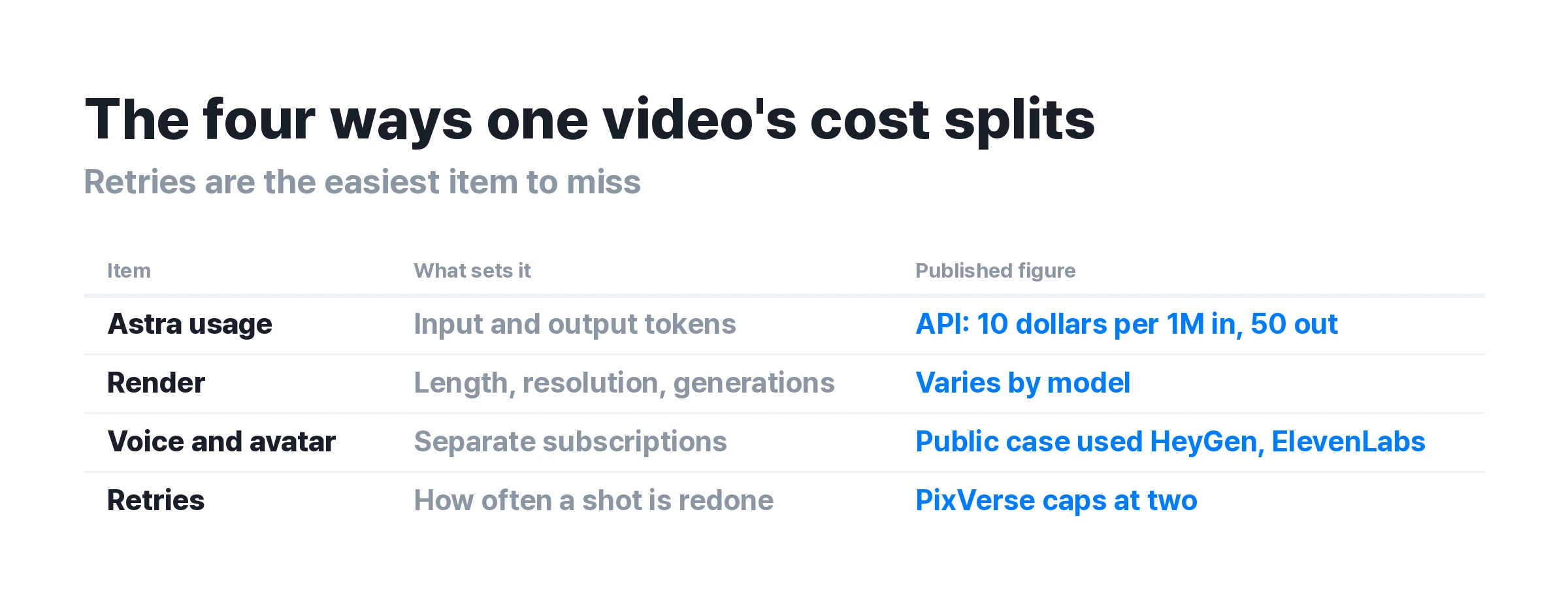
Only one number currently circulates as the cost of Astra video production, the roughly 60 dollars above. Coverage that breaks that number into parts is hard to find. Cost splits four ways, and only the first three are visible.
First is the price of Astra itself. On the OpenAI API it runs 10 dollars per million input tokens and 50 dollars per million output tokens, and fast mode costs double for up to double the speed. OpenAI states that Astra uses about 65 percent fewer output tokens than Opus 5 at the same maximum performance setting, which cuts token cost by that much on the same task. Through a ChatGPT subscription, usage comes out of the plan allowance, and going over means buying more.
Second is render cost. It applies every time a video generation model runs, and it moves with length, resolution, and number of generations. Third is voice and avatar. Separate services carry their own subscription fees.
One more item rarely gets counted, and that is retries. PixVerse caps retries at two per shot because this cost grows fast. A result that lands on the first try and one that lands on the third differ by a factor of three.
Where video production breaks
Render quality is inconsistent
The failure cases PixVerse published are the most specific on record. Objects float or slide, poses collapse, and frames jitter, over and over. However precisely GPT 6 Astra directs the work, the job stops where the render model cannot draw it.
Limits and interruptions apply
MindStudio documented that this run was split across several sessions while usage limits reset. OpenAI also states in its documentation that extra safety checks can slow or stop legitimate work. In ChatGPT and Codex this appears as a review request. On the API it appears as a halted task.
Handing over creative judgment is still early
The figures OpenAI published place Astra's strength in complex professional work with real software, not in deciding what to make. Choosing what to show still sits closer to the human side. So does choosing the render model and deciding which scenes to keep.
How to use GPT 6 Astra, and what to set up before starting
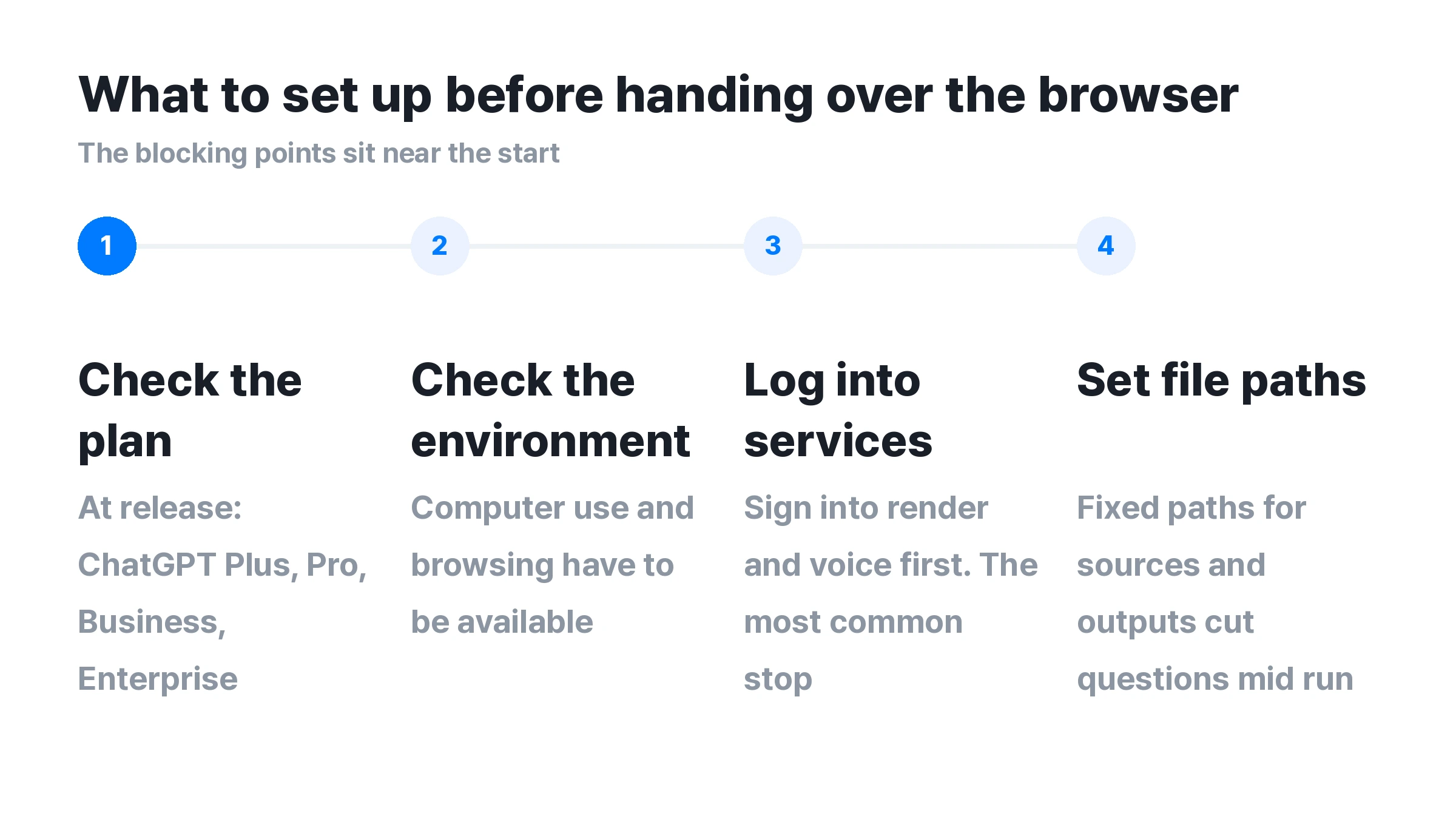
The places that actually block sit near the start.
-
Check the plan. At release, Astra shipped to ChatGPT Plus, Pro, Business, and Enterprise. Availability can change, so check OpenAI's own notice for the state at the time of reading.
-
Check that computer use and browsing are available in the environment. OpenAI states that on Enterprise these stay off by default until an admin turns them on.
-
Log into the render and voice services ahead of time. Login screens are the most common stopping point, so each added service adds another place to check.
-
Decide where sources and outputs go first. Without set paths, the model asks back more often mid-run.
Start with video editing, or start with video production
GPT 6 Astra video editing is usable right now
Finding cuts, trimming, and merging point the same way in both the Clien log and the official computer use figures. No render is involved, so there are fewer places to fail.
Making video from scratch starts with the render model
The right order is to decide what frames to produce first, not to pick Astra first. Astra sits in the seat that operates that model.
Choosing the video model directly on Carat
The case above split avatar, voice, and editing across three services. GPT 6 Astra logged into each of the three accounts in turn and moved between them. Carat keeps video generation together with lip sync, subtitle work and editing, video merging, and voice generation in one place. Given that login screens are the most common stopping point, the number of windows drops from three to one.
The four criteria above can be set in the same screen. Long video generation extends clip length, quality enhancement raises resolution, and first and last frames or camera movement can be specified. The video models include the ones named in this article, Google Veo, Kling, Seedance, Runway, and PixVerse, plus Midjourney, MiniMax, Vidu, Luma Ray, and Wan, for ten selectable models.
Carat runs in a web browser, so the setup matches the approach of handing Astra a browser. As above, there is no app or plugin to install, and one account covers the logins. Claude users can connect it from the chat window through the MCP connector. Models are chosen by typing the name in chat or picking from the icon next to the input box. Credit costs differ by model, so checking the screen before generating is safer on jobs with many retries.
Frequently asked questions
How do you use GPT 6 Astra?
Select Astra in ChatGPT, check that computer use and browsing are available in the environment, then log into the render and voice services in advance. In OpenAI's measurements it scored 72.6 percent at about 40 minutes per task, close to half the roughly 75 minutes GPT 5.6 Sol took. Video does not finish inside Astra alone, so without a render model chosen up front the work stops at the script stage.
Can GPT 6 Astra make video directly?
GPT 6 Astra video production does not cover the render itself. The official OpenAI announcement does not include video generation, and every case where video appears is Astra operating another video tool. Which tool to use is still a human decision, so choosing the video model for the render comes first. Carat lets you specify candidates like Veo, Kling, and Seedance in one place. A performance comparison of the models themselves is in Astra vs Fable 5.1.
Which video model should handle the render?
Split the decision four ways: clip length per generation, resolution and frame rate, whether audio comes with it, and how the model handles Korean. Fixing the upload spec first, then matching a model to it, cuts retries. Results still shift with prompt and length on the same model, so narrowing to two or three candidates and running the same prompt through each is the surer path. Carat can produce results from several models on one prompt, and the method is in the model comparison doc.