

Gemini 4 Argon: availability, API pricing, and output limits
Google announced Gemini 4 Argon on September 30, 2026. As of October 1, 2026, it is initially available to select security partners. The announcement gives no exact date for broader user access.

Google announced Gemini 4 Argon on September 30, 2026. As of October 1, 2026, it is initially available to select security partners. The announcement gives no exact date for broader user access.
This article explains when Gemini 4 will be available, its announced API prices, and its output limit. It also covers what to check once access becomes available.
Who can use Gemini 4 Argon now?
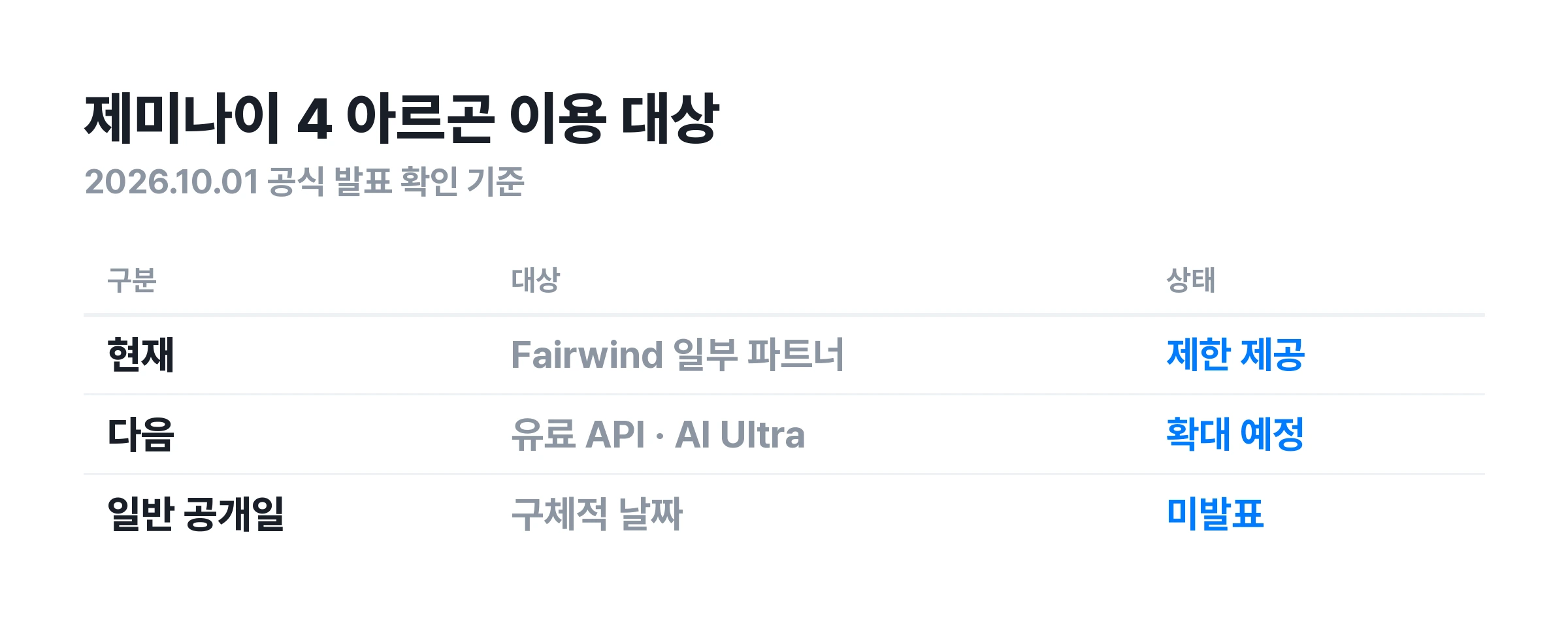
Google's official announcement distinguishes current access from planned access. Select trusted security partners in the Fairwind program have access now. Google plans to expand access next, starting with paid API customers and Google AI Ultra subscribers.
For general users
Before paying for a subscription, check which models your account can select and the plan's terms. A statement about future inclusion does not mean the model is available now.
For developers
Published pricing and the ability to make API calls need separate checks. Before integration, check the official model ID, project access permissions, and request limits. Use the exact identifier in the documentation instead of guessing a model name in code.
For security teams
The official Fairwind page describes its application and review process. It prioritizes defensive organizations, including governments, critical infrastructure, and core technology platforms. It reviews their security records and operating standards. This differs from applying for a general trial.
The official page also prohibits partners from reselling or redistributing access. Organizations should check their own eligibility instead of borrowing someone else's account. Submitting an application does not mean access has been approved.
Gemini 4 pricing: introductory and subsequent API rates
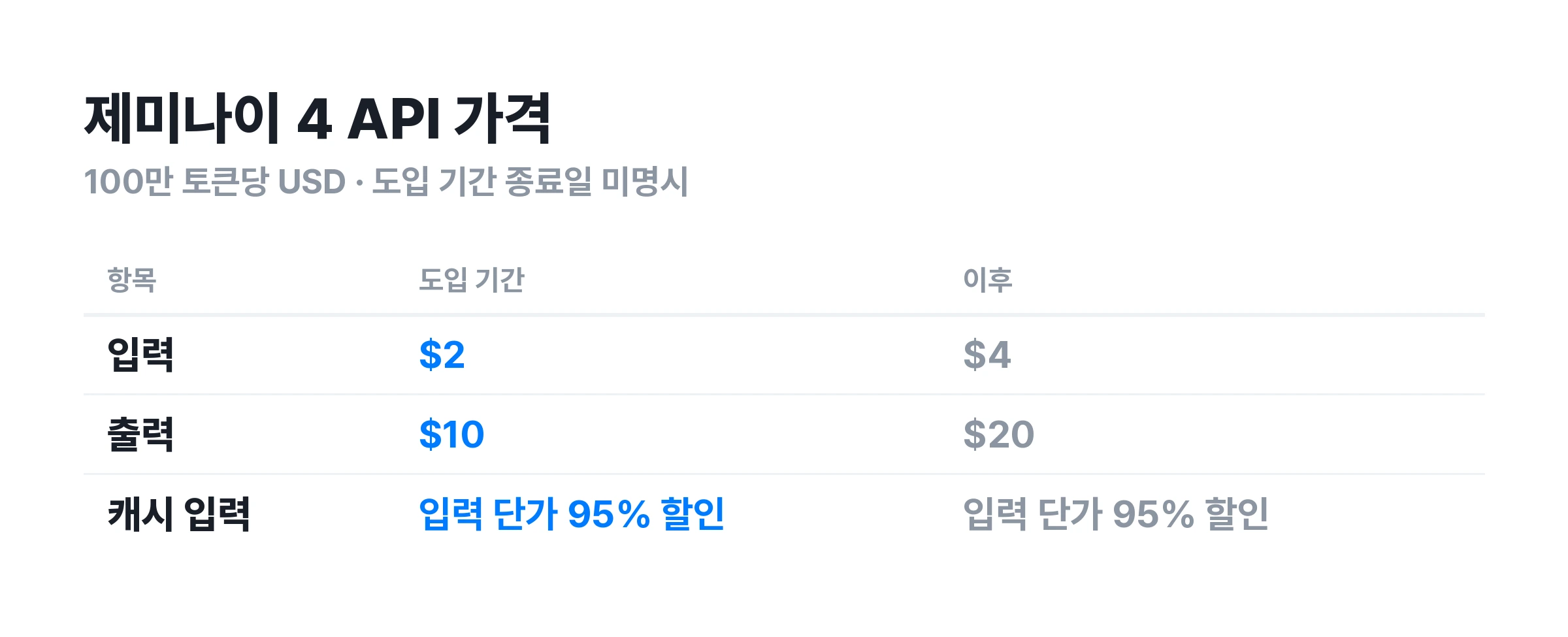
Google announced introductory API prices of $2 for input and $10 for output per 1 million tokens. After the introductory period, the rates will be $4 for input and $20 for output. Cached input receives a 95% discount on the input rate. Check the pricing terms in the announcement's main text and footnotes.
API rates and monthly subscriptions use different billing units
Per-token pricing measures usage sent to and received from the model. These figures are not Google AI Ultra's monthly subscription price. They also do not mean a subscription includes all API charges. Check the billing terms for the specific product.
Output length affects the cost of small requests too
Consider a hypothetical task using 100,000 input tokens and 20,000 output tokens, with no caching. At the announced introductory rates, input costs $0.20 and output costs $0.20, totaling $0.40. At the subsequent rates, the same usage costs $0.80.
This is an arithmetic example based on assumed token usage. It is neither a measured run nor a final bill. Retries, extra services, and the token categories actually billed may change the total. For currency conversion, check the terms that apply at payment time.
Include unsuccessful attempts in the budget
Repeated agent retries can accumulate usage before producing a final answer. Record the price of one request separately from the cost of completing a task. This makes comparisons easier. Tracking accuracy and editing time also helps establish whether a cheap call was inexpensive in practice.
Do not apply the cached rate to every input simply because a discount exists. Check usage records to see which input was billed as cached. The reviewed announcement does not specify when the introductory period ends.
The 1 million token output limit differs from input length
Google announced a maximum output limit of 1 million tokens, comparing it with the previous 64,000 token limit. Google describes the change as providing more room for reasoning and generation on complex, lengthy tasks. This figure is the output limit stated in the announcement.

An output limit is not a target answer length
The announced maximum output token limit differs from actual response length. Actual length may depend on the product and settings. For a short summary, specify the length and format first. Reducing output may better suit the task once reading and editing time are considered.
Avoid converting tokens into a fixed number of Korean characters or document pages. The relationship can vary with the mix of sentences, code, and symbols in the input and output. Use the service's reported token usage to check budgets and limits more accurately.
Divide long tasks so intermediate results can be reviewed
For a large code change, request the change plan, modified files, and verification results separately. For document work, separate the evidence list, draft, and final version. This can reduce the need to redo an entire result after an incorrect assumption appears midway.
An output limit alone cannot establish allowed input length, tool call counts, or answer length in the app. Check each against the actual product and API settings. One large number does not mean unlimited use of the entire service.
What to check when evaluating Gemini 4 performance
Google names software development, professional knowledge work, and cyber defense as Argon's use cases. This article is not a hands-on review by the Carat editors. The following suggested evaluation criteria can be used with the same materials and conditions once access becomes available.
Coding: check passing tests and the scope of changes
Choose a small project with one bug. Write down reproduction steps and expected behavior first. Run the same tests on the model's changes and check for unrelated file edits. Removing one error is difficult to count as success if other behavior breaks.
When comparing models, keep the original code, tool permissions, and retry counts the same. Giving error logs to only one model makes differences harder to assess. Record how often a person adds explanations to help assess the practical collaboration effort.
Research: check whether each statement can be traced to evidence
Start with a small set of materials whose answers can be checked in advance. Trace the result's figures to the original source. Check whether values from different periods have been mixed. Assess natural writing and factual support separately.
Also observe what happens when the question asks for information absent from the materials. Does the model fill gaps plausibly or state that it could not verify the answer? A source link does not guarantee that the associated statement is correct. Compare it with the actual source.
Long documents: check whether early requirements still hold near the end
Place conditions to verify near both the beginning and end of a document. Check whether the final result reflects both. This is more useful than simply checking whether it generated a long text. Also look for changes in names, dates, and units along the way.
Separate tasks with a single correct answer from tasks involving preferences. This makes evaluation criteria clearer. Score calculations and fact extraction for correctness, and writing style or structure against predefined criteria. One satisfying answer should not be generalized to performance across all tasks.
What to check once access becomes available
The sequence below is a preparation checklist for use after access is granted. It does not describe universal access to Gemini 4 today or unverified menu options.
-
Check the account and model. Record the model actually selected in the official service, the date, and the plan. These details help reconstruct comparison conditions if results change later.
-
Start with a small task. Use materials with known answers or expected results, rather than assigning bulk work immediately. Expand the material and scope gradually if results meet the criteria.
-
Specify the required output format. State the summary length, necessary evidence, and required items. Include what belongs in the result and how to handle information that cannot be verified. This makes review easier.
-
Set permissions and completion criteria. For file changes or external actions, define the allowed scope and points requiring human review. Distinguish writing a plan from actually completing the work.
-
Check results and usage together. Record accuracy, omissions, editing time, and token usage. Assess whether the model repeatedly meets your needs in actual work instead of simply keeping the first choice.
An example prompt for document review
The following is a writing example, not a performance demonstration verified on a specific model. Once access becomes available, it can be tested on a small set of public materials. Keep the materials and wording unchanged when comparing models.
Summarize the key claims using only the attached materials. For each claim, give the supporting document name and location. Mark anything the materials cannot verify as 'Unverified'. When figures conflict, explain the difference instead of arbitrarily choosing one. Finally, list the items a person should check again.
A longer prompt does not guarantee a better result. Find missing conditions in the first result and change one at a time. This makes it easier to identify useful requests. Keep the original and revised requests paired with their results.
Gemini 4 frequently asked questions
Is there a way to use Gemini 4 for free?
The reviewed official announcement does not describe a free access route for general users. Do not assume the existing Gemini service's free access terms apply unchanged to the new model. Check announcements about actual access groups and plans.
Are Gemini 4 Argon and Gemini 4 Pro the same name?
The official name in this announcement is Gemini 4 Argon. The name 'Pro' was not found in this announcement. Check the relevant documentation for names used in the actual service and API.
Can users access it immediately in their region?
The reviewed announcement alone does not establish when accounts in a given region will gain access. The overall announcement date and your account's availability date may differ. Check the actual product guidance, including language and regional conditions.
For new announcements and access terms, see Google's official Gemini news.
More articles
 Kling 4.0 Release Date: Preview, Pricing and Access GuideCarat Editor · 2026.09.28
 How to Make AI Infographics: 3 Prompts, Korean Text Fixes, and Tool ChoicesCarat Editor · 2026.09.28
 GPT 6 Astra Prompt Guide | Official Traits, Task-Type Skeletons, and How to Prompt It Without StallsCarat Editor · 2026.09.18