Genjutsu Character Replacement Guide: Motion Transfer, Object Swap and Prompts
Sometimes the movement in a video works, but the lead character needs to change. Genjutsu is an AI video editing feature from Higgsfield. It uses an existing video to change people, objects or scenes.

Sometimes the movement in a video works, but the lead character needs to change. Genjutsu is an AI video editing feature from Higgsfield. It uses an existing video to change people, objects or scenes.
Treating it as a tool that simply pastes on a face can lead to the wrong mode. Start by distinguishing Motion Transfer, which transfers movement to a new character, from Object Swap, which replaces a specific subject. This guide covers Genjutsu character replacement, source videos and reference photos, prompt examples and result checks.
🎬 What is Genjutsu? Replacing video characters beyond face swaps
Genjutsu starts differently from tools that create a new video from text alone. An existing video provides movement and timing. Reference images describe the appearance of the replacement subject. Its Korean name appears as both 젠주츠 and 겐주츠. The English name is Genjutsu.
Higgsfield's official introduction demonstrates changes to people, outfits, locations and objects in existing videos. Replacing a person with another character falls within that scope. This does not guarantee that every pixel of the original will stay unchanged in every scene.
For example, transferring movement from a dance video filmed by its creator to a fictional character requires more than a face swap. The character's build and outfit need to be defined alongside the face. Replacing only a product held in a finished advertisement calls for a different approach: retaining as much of the surrounding people and background as possible.
The prompts and checklists in this article are examples for preparing those tasks. They are not experimental findings from Genjutsu generations whose success rates the Carat editors measured. The explanatory diagrams should also be distinguished from actual before-and-after generation examples.
🔀 Motion Transfer or Object Swap: which mode fits character replacement?
The phrase “replace a person” is not enough to choose a mode. The deciding factor is how much of the original scene should remain. Higgsfield's editing guide distinguishes transferring movement into a new scene from replacing specific elements.

① Motion Transfer: animate a new character with the source movement
Consider this mode when transferring a dance or performance to a new lead character, with the option to reshape the scene. The original supplies the movement reference. The resulting character and surroundings may change according to the reference image and instructions. First decide whether preserving the original background is essential.
② Object Swap: define a specific replacement target
Consider this mode when replacing a particular subject, such as a person, outfit or product, while retaining the surrounding scene. Defining the target and scope, such as “the jacket on the person on the left,” also gives the review a clear standard. Check the result separately for changes outside the intended area.
③ Restyle: change the visual style rather than a character's identity
The official Restyle documentation describes a separate task that selects a video's visual style through presets. Replacing a character with the person in a particular photo differs from giving the entire video an animated style. For character replacement, compare the first two modes before considering Restyle.
Consider Motion Transfer to turn a solo dance video into a performance by a new character. Consider Object Swap to change one person's outfit while keeping the same stage and cast. Listing “elements to keep” and “elements to change” makes the choice easier than relying on mode names alone.
🖼️ Preparing the source video and reference photos
Higgsfield's usage guide describes a web workflow with one video, a duration of 4–30 seconds, up to 30 reference images and output up to 1080p. These figures apply to that guide. Do not assume the same limits apply to the current upload screen or other access methods.

Choose a source video for the movement to follow
For a first attempt, use a short segment with one person clearly visible. An action with a recognizable beginning and end, such as raising and lowering an arm, makes comparisons easier. Videos with rapid cuts require more review because the point where a problem starts must be identified.
Mark segments where the face is obscured or the body leaves the frame. These scenes will not necessarily fail. They are points to examine the face, limbs and appearance after an obstruction clears. When key movements happen outside the frame, the result alone may not show whether they transferred correctly.
Reference photos show the intended replacement appearance
If the plan includes changing the clothes and build as well as the face, prepare an image that shows them. Defining one appearance for this video makes the task easier to manage than supplying many photos with mixed hairstyles and outfits. Filling the maximum image allowance is not the goal.
For two characters, organize materials for A and B separately. Labels such as “left person” and “right person” in filenames or task notes can reduce confusion when revising prompts. These names do not guarantee automatic mapping, so also check how the interface connects references.
Check permission to publish the materials first
Start with original characters, personally filmed videos or materials used with permission. When using another person's face, confirm their consent and avoid descriptions that could make the result look like authentic footage. Check separately what permissions cover private testing, advertising and public posting.
🛠️ How to use Genjutsu for character replacement
The basic Higgsfield workflow is mode selection, video upload, reference setup, generation and result comparison. Button positions and available options may change. The steps below focus on the decisions at each stage rather than a particular screen layout.
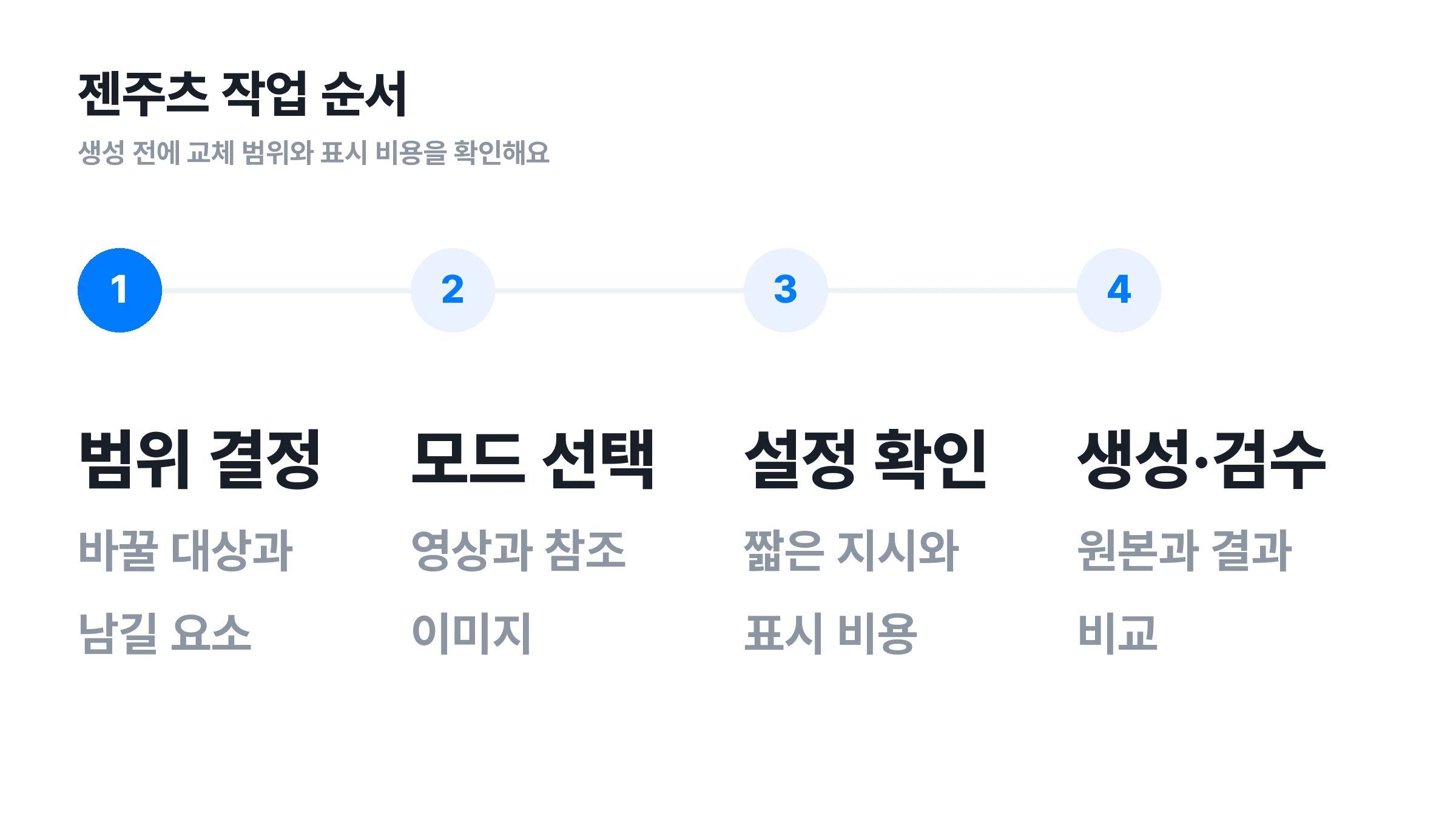
1. Write one sentence defining what to keep and what to change
For example: “Keep the dance movements and camera movement, and replace the lead with a fictional adult character.” This makes success easier to assess than “make the whole video look great.” Also decide whether expressions and clothing should change or retain their original appearance.
2. Choose the appropriate mode and upload the source
Choose a mode based on whether the task creates a scene for a new character or replaces a specific element in the existing scene. After uploading the source, check the duration, aspect ratio, and intended start and end points. If the video contains unnecessary footage at either end, use a trimmed copy first.
3. Connect reference images and add short instructions
Add images showing the replacement character or outfit. Use a preset if it fits the task, or add a short description for a more specific direction. Check that images or character descriptions left over from a previous task do not conflict with the current materials.
4. Check the resolution and displayed cost, then generate
For a draft that does not need the final publishing resolution, consider a short test within the available options. Generating long videos and multiple variations before assessing the result makes revision costs harder to predict. Check the actual charge shown in the interface immediately before generation.
5. Compare the source and result side by side, then download
Compare corresponding movements rather than checking only the face in the first frame. Look at moments when the head turns, a hand passes in front of the face or the character overlaps another subject. Check the final file's duration, resolution and presence of audio before editing or publishing.
✍️ Character replacement prompt examples
The following prompts are writing examples to adapt. They are not proven prompts validated through actual Genjutsu generations. Adjust them to the reference connections and selected mode. Their central principle is separating the replacement target from the elements to preserve.
Replacing the lead dancer with a fictional character
Replace the central person in the source video with the attached fictional adult character. Follow the original dance movements, movement sequence, timing and camera movement. Keep the character's face, hairstyle and outfit consistent with the attached image. Do not add new people or subtitles.
First decide whether to use the reference image's outfit or retain the original clothing. Including both instructions creates a conflict. If keeping the original background is essential, reconsider whether a Motion Transfer task that allows the scene to change fits the goal.
Changing only one person's outfit in the same scene
Replace only the jacket worn by the adult person on the left with the attached blue jacket. Keep the person's original face, hairstyle, trousers and shoes. Do not change the surrounding people, background, camera movement or action timing.
For a clothing-only change, do not also ask to replace the face with a new reference. To compare face replacement and outfit replacement in the same video, save them as separate tasks. This makes it easier to identify which request changed the result.
Replacing only a prop held by a person
Replace only the bottle held by the central person with the attached product bottle. Follow the movement of the hand holding the bottle and the product's position in the frame. Preserve the person's face and outfit, and the background. Keep the bottle's form consistent even when it overlaps the hand.
If an advertisement requires accurate logos and small lettering on the bottle, zoom in to check them in the generated video. Writing “accurately” in a prompt does not guarantee accuracy. Consider displaying any product name that viewers must read through separate captions or post-production.
🔍 What to check when a result looks wrong
The items below form a checklist for comparing edited results. They are not statistics measuring how often each error occurs in Genjutsu. Recording the timestamps of problems provides a consistent basis for reviewing later attempts.
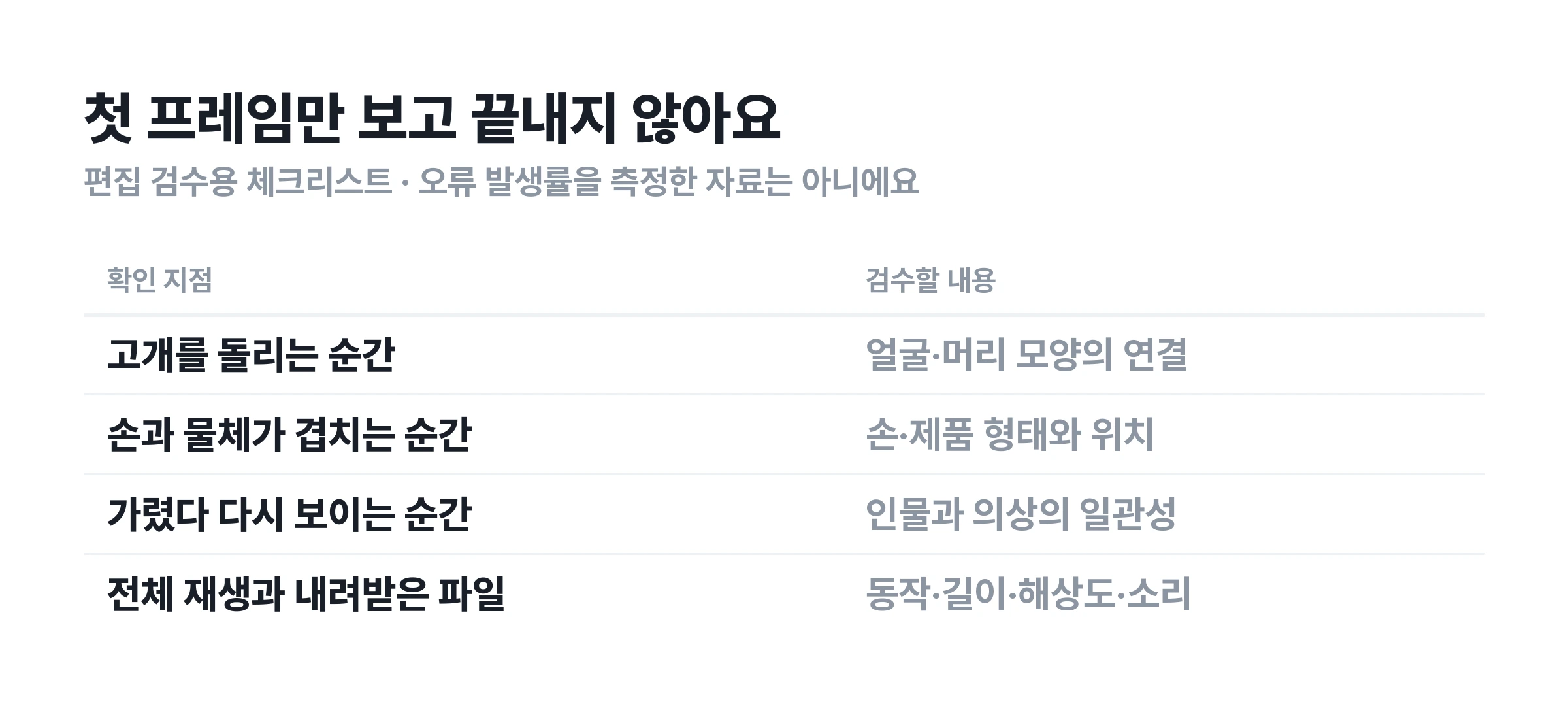
The face matches, but the body or clothing differs
Check whether the references show only the face and whether the prompt defines the build and outfit. Reread the instructions about keeping the original clothes or adding a new outfit. Establish the most important appearance details before changing several conditions at once. Save the before-and-after versions under different filenames.
Other people change, or replacement targets get mixed up
With multiple people, check that the replacement target is described clearly. Include identifying details such as screen position and clothing, and check whether each reference connects to the intended role. If several people must change at once, prepare separate materials for comparison with a single-person test.
The background or other unintended elements change
Check whether the selected mode rebuilds the scene. If background preservation matters but the prompt also requests changes to the entire scene, narrow the request first. Write separate sentences for elements to change and elements to retain. Play the source and result side by side to locate where they diverge.
The movement itself needs to change
For different choreography or a new physical interaction, preparing a new source better fits the task than trying to solve it through character replacement alone. Higgsfield also lists changes to movement, scene structure and interactions absent from the source as limits of partial editing. Distinguish these tasks from creating a different character performing the same movement.
💳 How to check Genjutsu free access and pricing
A stated number of free Genjutsu generations should not be treated as a permanent condition for every account. Signup promotions or plan descriptions may differ from the current interface. If free access is the goal, check the conditions that apply to the account before generating.
Higgsfield's official introduction includes past price examples based on duration and resolution. Those figures should not be treated as current charges. Check both the official pricing page and the generation screen. Use the displayed cost for the selected mode, duration and resolution.
API information and web subscription plans also need separate consideration. Do not directly equate API prices per second with web credits or assume web benefits automatically apply through other access methods. Start comparisons with the same duration, resolution and access method.
When budgeting, record draft and revision attempts separately instead of counting only one finished video. Note the duration, mode, resolution, displayed cost and required fixes to help define the next attempt. Pricing and credit conditions for Genjutsu on Carat have not yet been announced.
💎 Genjutsu on Carat is being prepared for launch
Carat is testing Genjutsu with the aim of introducing it soon. As of October 14, 2026, it is not yet an officially available feature. Do not assume Higgsfield's public features and Carat's future interface, supported scope and usage terms will all be identical.
Before launch, prepare reference images for the replacement character and the source video. Deciding which movements to keep and whether to change only the face or the outfit too can make starting easier once the feature becomes available. This article does not promise a confirmed launch date or a number of free generations.
Available Carat features can be found on the official Carat service. The create button on this page currently links to Carat's general creation interface. It does not run Genjutsu character replacement directly. Before launch, it can be used to prepare reference images for fictional characters.
❓ Frequently asked questions about Genjutsu
Do the Korean names 젠주츠 and 겐주츠 refer to the same feature?
In this article, both refer to Higgsfield Genjutsu. Checking the English name and provider alongside either Korean spelling helps avoid confusion. Genjutsu on Carat is a separate access option being prepared for launch.
Can a video be made with just one photo?
The character replacement workflow described here also requires a source video as the movement reference. The photo describes the replacement appearance. Its inputs differ from a typical image-to-video task that creates new movement from a photo alone.
Do longer prompts produce better results?
Length itself is not the goal. The official guide describes working with presets or short descriptions. First clearly state the replacement target and the elements to retain. Add specific conditions when the result shows what is missing.
Is Genjutsu available on Carat now?
Not yet. As of October 14, 2026, Genjutsu on Carat is in testing before launch. Distinguish the currently public Higgsfield instructions from news about Carat's launch preparations.