OpenAI's GPT-5.6: three models, one half the price
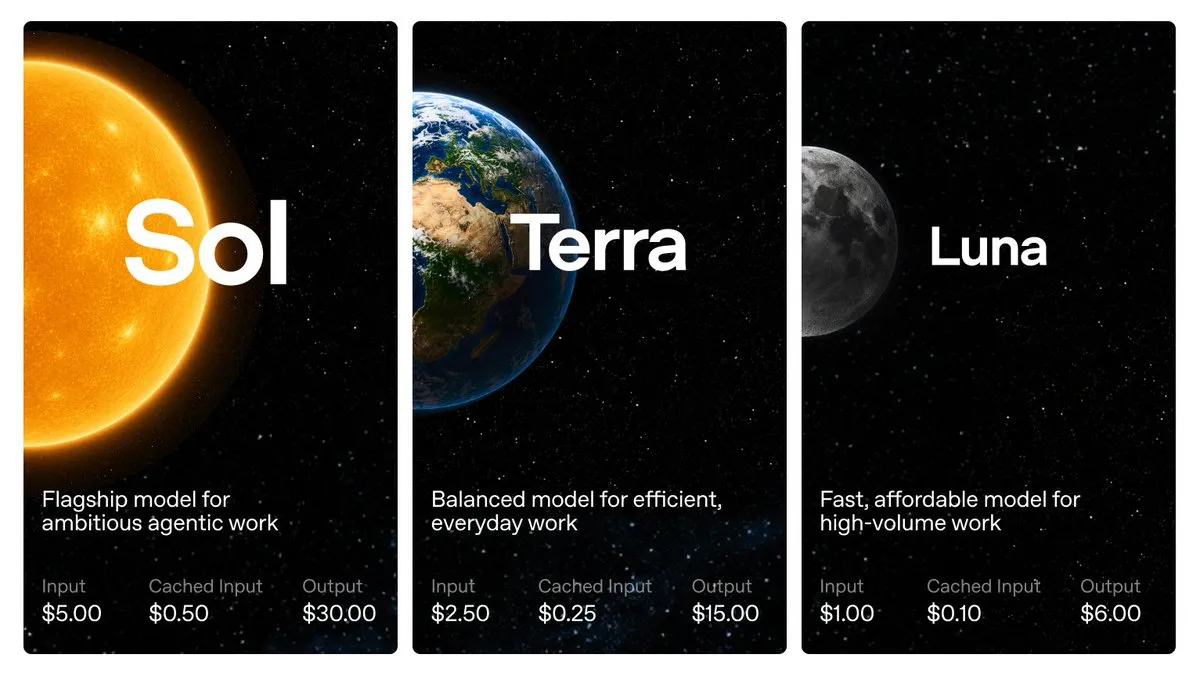
OpenAI just unveiled its new model, GPT-5.6. It comes in three flavors named after the sun, earth, and moon, Sol, Terra, and Luna, each tuned for a different mix of power, speed, and cost.

Hey, it's the Carat team. 🙂 Over the weekend OpenAI dropped three new models. We'll start there, then: a guy with no film training winning an AI festival's top prize, a green-screen clip turning into a blockbuster scene, and the data on when people reach for AI through the day.
🔥 OpenAI's GPT-5.6: three models, one half the price
OpenAI just unveiled its new model, GPT-5.6. It comes in three flavors named after the sun, earth, and moon, Sol, Terra, and Luna, each tuned for a different mix of power, speed, and cost.
Sol is the smartest flagship. Terra matches the previous GPT-5.5 on performance at half the price. Luna is the cheapest, built for high-volume work.
For now it's open to a handful of partners first, with a wider rollout to everyone in the coming weeks.
📌 Three things worth knowing today
1️⃣ No film training, and he wins with AI?
The winners of Runway's 2026 AI Festival are out. The Grand Prix went to a nonprofit worker with no formal film training, who took home $50,000 for an 8-minute short made with AI.
Ron Howard, the director of 'A Beautiful Mind', took the stage and said AI is opening up filmmaking to everyone. This year the festival added new categories too: advertising, fashion, and gaming.
You can make AI video with Runway on Carat too. 👉 Create on Carat
2️⃣ A green-screen clip became a blockbuster scene
A demo turning a plain green-screen shot into a full blockbuster scene is making the rounds. Seedance 2.0 keeps the subject's original motion and framing, then builds the rest of the scene from scratch.
What used to take a VFX team days now works with a single box on a green screen, and a ruined battlefield unfolds around it.
You can use Seedance 2.0 on Carat too. 👉 Create on Carat
3️⃣ News in the morning, sleep tips at 5am
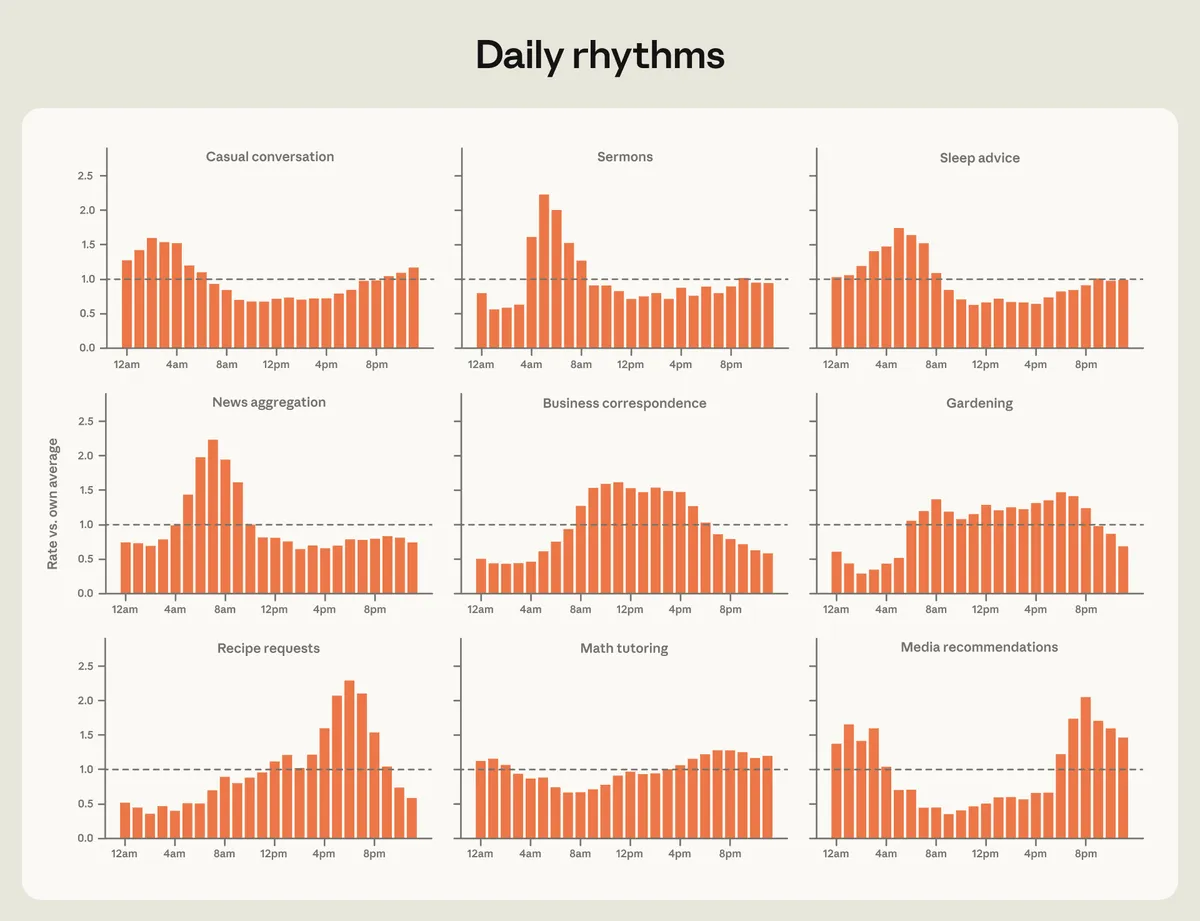
Anthropic shared a breakdown of when people turn to Claude through the day. News questions spike in the morning, while recipe requests peak in the evening.
Sleep advice clusters most around 5am, and some topics like gardening stay steady from dawn to dusk.
🧪 Prompt of the day
What if you showed up on the festival jumbotron?
mirrorworld.ai posted this reel on Instagram, and it crossed 9.28 million views. Drop in two photos, one of a person and one of the festival jumbotron scene, and you can put yourself up on the big screen as if the live camera caught you.
Here's what we made on Carat with the same prompt.
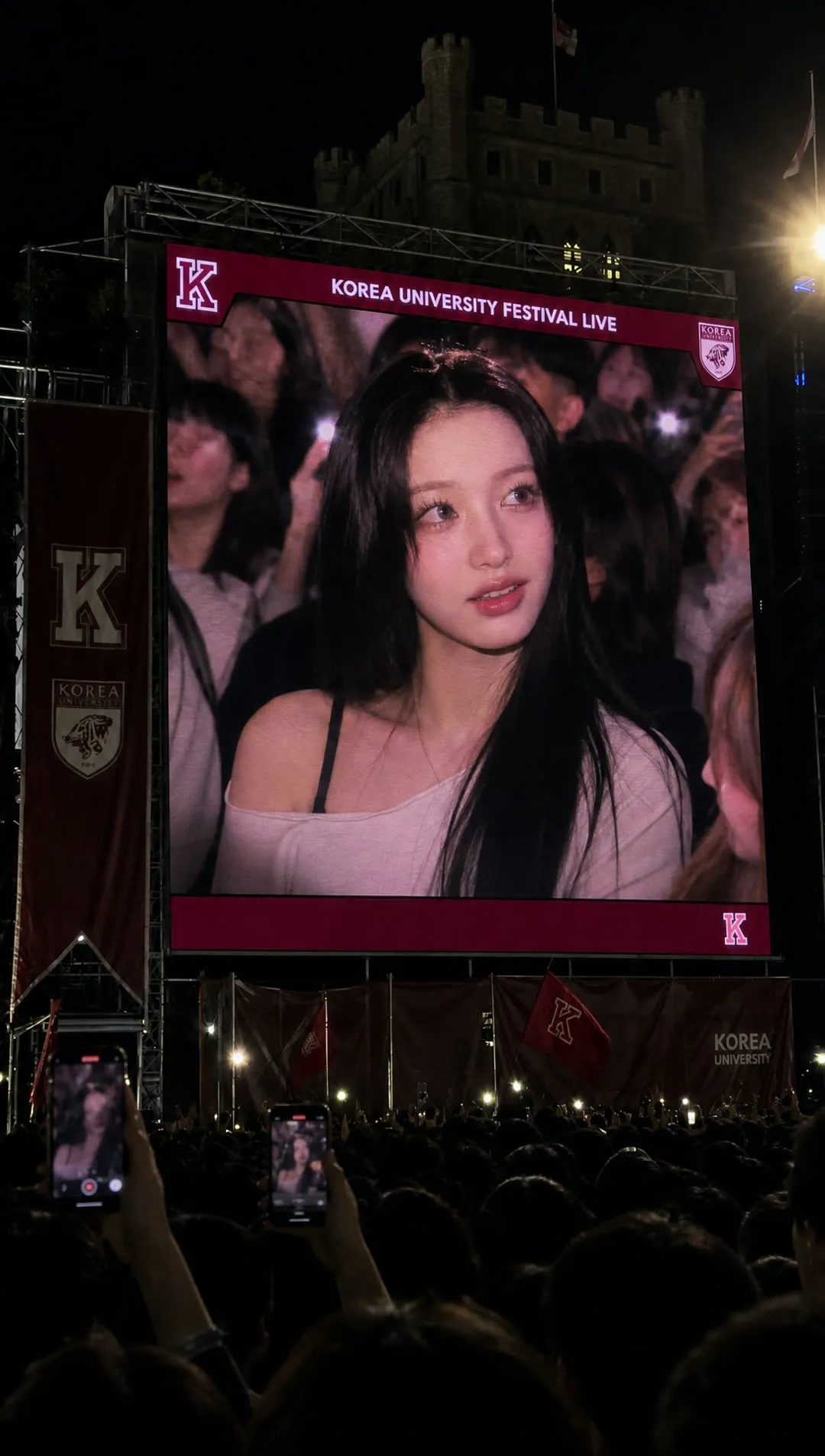
Use the Carat result above as your scene reference (Image 1) and a clear front photo of yourself as the identity reference (Image 2). Make the first frame with ChatGPT Image 2, then animate it into a moving video with Seedance 2.0. Feeding in two images works far more reliably than text alone.
Image prompt
Generate with ChatGPT Image 2 Medium. Prompt:
Image 1 (scene reference): https://assets.carat-api.im/upload_from_app/public/20260629/e6d7270e-7fee-4411-95d0-7030092b7e11.jpg
Image 2 (identity reference): attach a clear front photo of yourself

Use Image 1 as the composition and scene reference. Use Image 2 as the identity reference for the person shown on the jumbotron.

Create one photorealistic vertical 9:16 first-frame image for an AI video.

Match Image 1 closely for the overall scene: nighttime Korea University campus festival, huge burgundy LED jumbotron, castle-like campus building silhouette behind it, crowd in the lower foreground, burgundy KU flags or banners, realistic festival-night lighting, and handheld phone-camera perspective.

Replace the person shown on the jumbotron with the person from Image 2. Preserve the real identity from Image 2: face shape, facial proportions, skin tone, hair, eyes, nose, lips, and natural expression. The person should appear only inside the LED jumbotron screen, not as a real person standing in the foreground.

The jumbotron should show the person as if they were naturally caught by the live festival camera. They are watching the stage rather than posing for the viewer, looking slightly upward and 25-45 degrees off-camera, with a soft surprised smile. Keep the face clear and recognizable while still integrated into the LED screen with subtle pixel texture, scanlines, screen glow, and low-light exposure.

Keep the Korea University atmosphere from Image 1: deep crimson and burgundy lighting, realistic outdoor concert glow, dark student crowd, warm stage lights, subtle haze, LED texture, and phone-camera noise. If visible text fits naturally, use simple readable text such as "KOREA UNIVERSITY FESTIVAL LIVE".

Keep phones sparse and realistic. Only a few smartphones should be visible in the lower foreground, around 3 to 5 total. Visible phone screens should show a tiny blurred view of the same jumbotron scene, with natural glare and exposure differences. Avoid dense phone clusters, large foreground phones, black blank phone screens, bright phone flash dots, baseball/stadium broadcast elements, glossy advertising poster look, watermark, or extra captions.
Video prompt (Seedance 2.0, 1080p · 8s)
Use @image_1 as the exact first frame and main scene reference. Use @image_2 as the expression reference for the subject shown on the jumbotron.

Create a realistic vertical video of a nighttime Korea University festival. The camera is filming from inside the crowd, looking up at a huge burgundy LED jumbotron near a castle-like campus building silhouette. The jumbotron shows the subject from @image_2 as if they were naturally caught by the live festival camera. Keep the crimson university atmosphere, large outdoor screen, dense student crowd, stage lighting, and handheld phone-camera perspective from @image_1.

The subject on the jumbotron is watching the stage at first. They hear the crowd reaction, realize they are on the big screen, look slightly surprised, then smile shyly and naturally. Add a small head movement, subtle hair movement, and a gentle brief wave. The expression should feel like a real candid festival moment.

The students below the screen are active throughout the video. They raise phones, cheer, wave, point at the jumbotron, move shoulders, and record the moment. Phone screens glow across the audience. Stage lights sweep through the crowd. The LED texture, slight pixel grid, screen bloom, and live-camera feel remain visible.

Camera motion: realistic handheld phone footage with a slow push-in toward the jumbotron. Keep the scene lively, warm, and believable, like a real Korea University festival clip that someone captured on their phone.
Make yours on Carat right now. 👉 Create on Carat
Today we covered new models, AI film, VFX, and usage data. If one of these caught your eye, go make something with it on Carat. See you tomorrow with more. 😊