

Korean Baseball Trend: AI Fan Cam Photos & Prompts Guide
The Korean baseball trend is taking over social media. Make your own AI fan cam photos and videos with these prompts.
Hey, it's the Carat team. 🤗
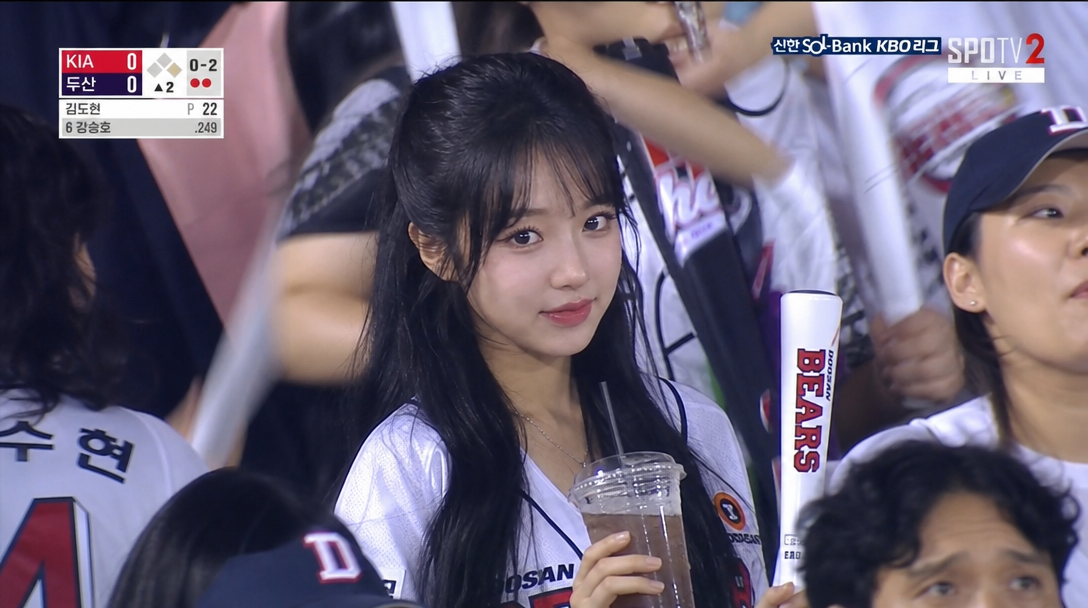
The Korean baseball trend is all over social media. People are using AI to create photos that look like they got caught by a live broadcast camera at a KBO game. The key is that natural, candid vibe as if a broadcast camera spotted you in the crowd.
We covered this Korean baseball trend in a Carat newsletter recently, but since people keep asking for it, here's the complete AI prompt guide from image to video.
STEP 1. Create a Baseball Stadium Fan Cam Image
Upload your selfie to Carat and use the prompt below.
Generate an image using ChatGPT Images 2 Medium model.

Use the uploaded reference image as the strongest identity anchor. The person must look like the exact same person from the reference image. Preserve their exact facial identity with high priority: same face shape, same eyes, same nose, same lips, same skin tone, same expression style, same hair. Create an ultra-realistic candid KBO baseball broadcast screenshot of this person accidentally caught by a live TV camera in the spectator seats.

Important:
Their face should remain close to the reference image. Do not change them into another person.

They are seated among a lively Korean baseball crowd, holding an iced drink and a cheering stick, wearing a clean white baseball jersey over a casual top. They notice the camera and give a small natural smile, slightly surprised but composed.

Use a realistic broadcast camera look:
telephoto compression, mild video softness, slight motion blur in the crowd, stadium lighting, natural skin texture, imperfect candid framing, 16:9 horizontal TV broadcast composition.

Background: crowded Korean baseball stadium seats, cheering fans, bright stadium lights, LED boards softly out of focus.
Try it yourself right now. 👉 Become the star of a baseball fan cam
STEP 2. Convert the Image to Video
If you like the image you made, use the prompt below to convert it into a video. The stadium atmosphere comes alive and feels much more vivid.
Convert this to a video using the following prompt.

Realistic Korean baseball broadcast audience shot, a person sitting in stadium crowd during evening game, candid reaction while watching the field, subtle blinking, natural breathing, slight hair movement from stadium breeze, tiny head movement, telephoto sports broadcast lens, shallow depth of field, surrounding crowd slightly blurred and moving naturally, yellow cheering towels waving softly, beer cups on seats, realistic stadium LED lighting, live TV compression artifacts, slight motion blur, authentic KBO broadcast atmosphere, live camera style, documentary realism, handheld broadcast camera micro shake, not posing, not looking at camera. Do not alter, remove, or change any text or graphics visible in the original image. All text overlays, scoreboards, and broadcast UI must remain exactly as they appear in the source image.
For a quick and affordable result, use Carat Video. For broadcast-quality realism, try Seedance 2.0.
Both models include audio natively, so you get sound without any extra work.
🎨 More Popular Prompts
Same Korean baseball trend, different vibes depending on the AI prompt you use. Here are 3 more popular prompts from social media.
1. Real Person Style (No Over-Editing)
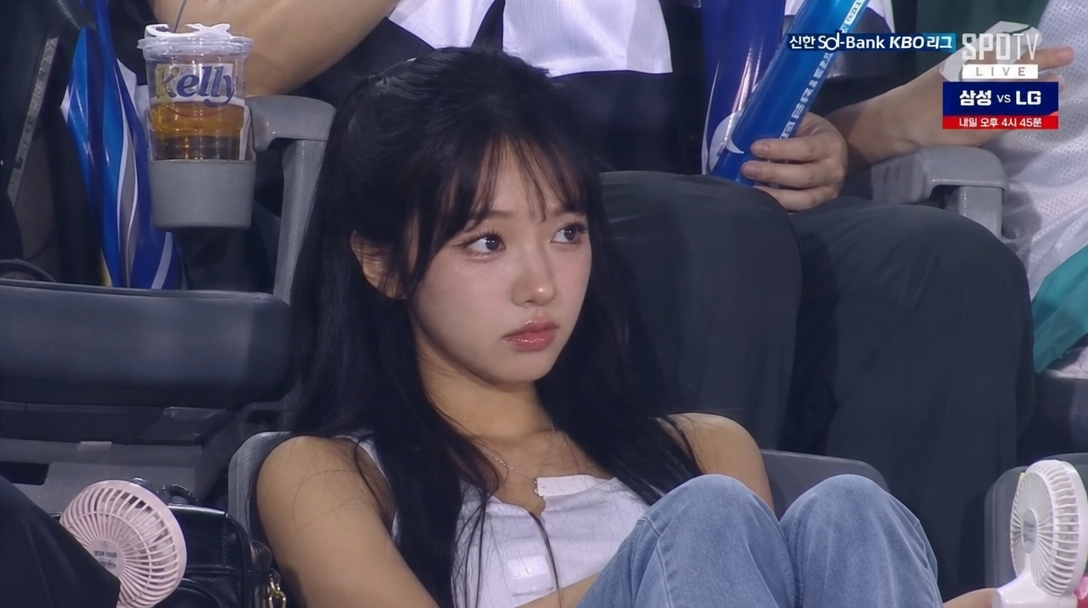
업로드한 인물 얼굴은 실제 그대로 유지하고, AI 미남/미녀 느낌 말고
"진짜 KBO 생중계 카메라에 우연히 잡힌 일반인 관중"처럼 자연스럽게 생성.

SPOTV/KBO 방송 캡처 느낌,
관중석 직캠 구도,
주변 관중·맥주컵·응원도구·선풍기 자연스럽게 배치.

중요:
- 얼굴 과보정 금지
- 눈 키우기 금지
- 턱 보정 금지
- 피부 뽀샤시 금지
- 화보 느낌 금지
- 인플루언서 느낌 금지

실제 방송처럼 약간 흐린 생중계 화질, 압축 노이즈,
미세한 모션블러, 현실적인 피부결,
잔머리와 땀광 표현.

다리 꼬고 편하게 경기 보는 모습,
카메라 의식한 듯 안 한 듯한 자연스러운 표정.

"AI가 만든 사람"이 아니라 "진짜 방송에 잡혀 화제된 일반인" 처럼 만들어줘
2. Portrait-Focused Documentary Style (4:3)
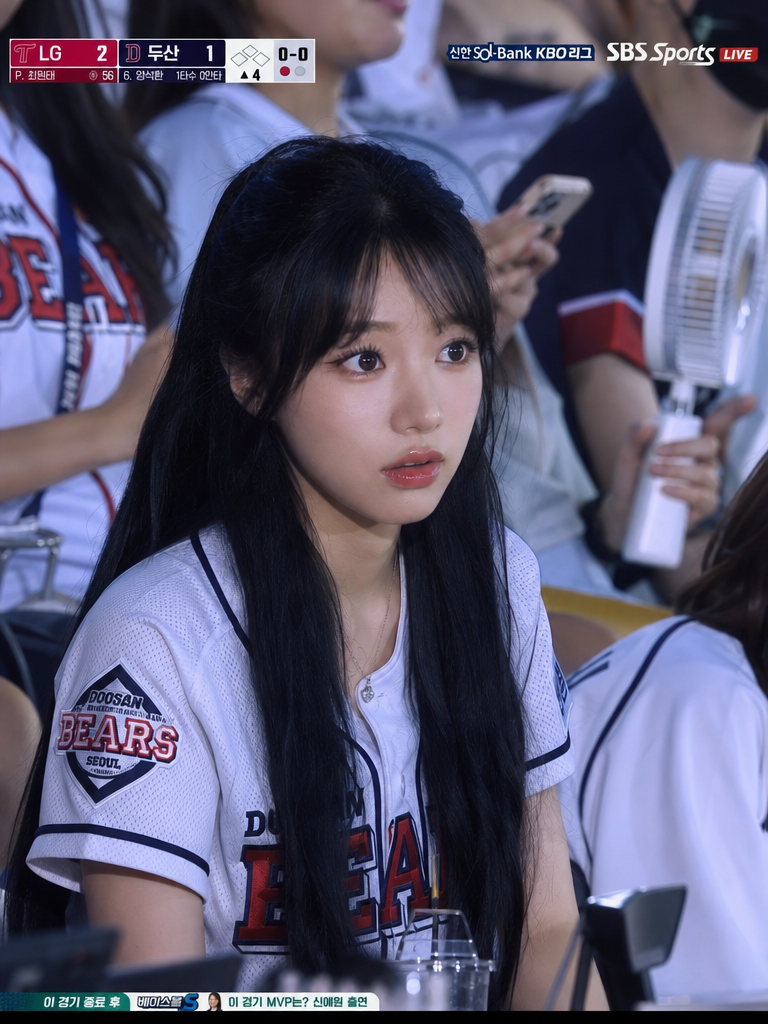
한국 프로야구(KBO) 경기장 관중석에서 촬영한 초 현실적인 스포츠 중계 스타일 프레임, 다큐멘터리 스타일의 이미지.

피사체는 세련되고 섬세한 얼굴 특징을 가진 사람으로, 군중 속에 앉아 있습니다. 얼굴은 특정 연령이나 성별에 강하게 얽매이지 않는 부드럽고 균형 잡힌 구조를 가지고 있습니다. 이들의 표정은 놀라움과 집중력이 미묘한 혼합을 보이며, 경기장을 바라보며 자연스럽게 반응합니다. 마치 실제 생방송 중에 포착된 것처럼 솔직하고 즉흥적이며 포즈를 취하지 않은 듯한 느낌을 줍니다.

정통 [팀 이름] (KBO) 팀 유니폼을 입고 있으며, 참조 이미지에서 정확한 디자인, 색상 구성 및 시각적 세부 사항을 충실히 보존합니다.

앉은 자세는 상체가 미묘하게 기울어진 채 약간 앞으로 기울어져 있습니다.

환경은 자연스러운 그림자와 하이라이트를 드리우는 부드러우면서도 방향성 있는 조명으로 현실감 있는 KBO 경기장 조명을 반영합니다. 주변 좌석은 관중, 일부는 팀 유니폼을 입고, 다른 일부는 스마트폰이나 휴대용 선풍기를 들고 있어 자연스럽고 몰입감 넘치는 관중석을 형성합니다.

배경이 약간 흐릿하고 깊이가 얕아 환경 맥락을 보존하면서 피사체 분리를 강화합니다.

프레임은 야구 스코어보드 오버레이와 프레임 상단에 배치된 한국 스포츠 방송 스타일의 그래픽을 포함하여 라이브 TV 시청자 클로즈업 샷과 유사합니다.

미묘한 방송 압축 아티팩트가 라이브 전송의 현장감을 높여줍니다.

화면 비율: 4:3으로 사진을 만들어 줘
3. Short Prompt Version
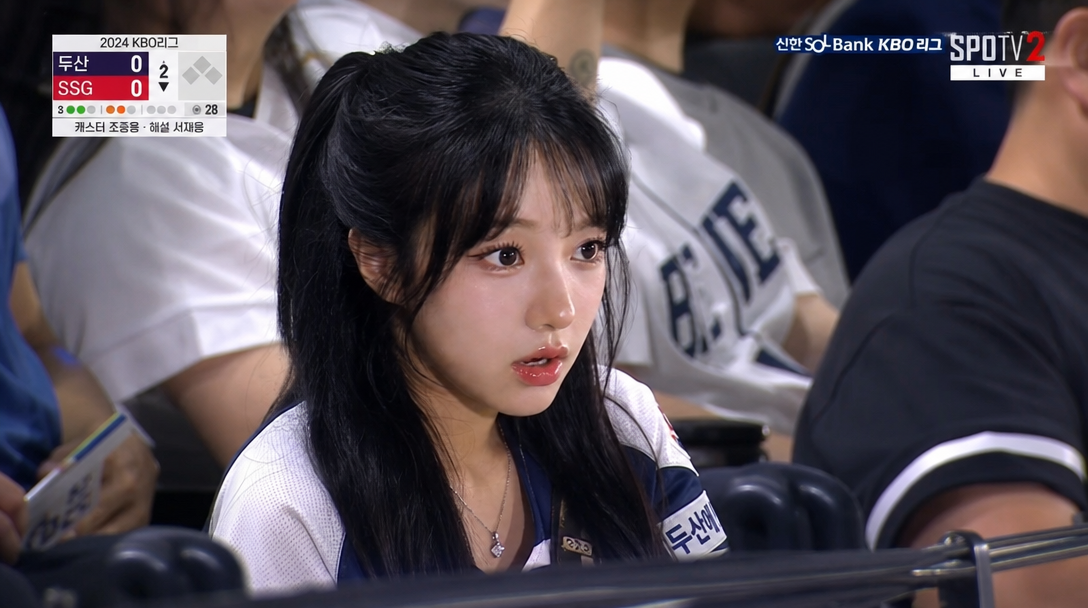
realistic sports broadcast screenshot-style documentary photo set in the spectator stands of a Korean professional baseball game.
Analyze an attached image and the person in the image is sitting in the stadium seats. delicate facial features, and a surprised yet focused expression as his/her looks toward the field. the person wears a with a KBO team, [enter desired outfit] design jersey.
OUTPUT:
horizontal 16:9 broadcast frame, realistic TV capture quality, NOT portrait orientation.
🎬 Video Conversion Prompt
A Kling-specific prompt you can use to convert the image above into a video.
@image1 = character identity reference only (face, hairstyle, proportions).
Preserve exact face, hairstyle, skin texture, and identity. Do NOT stylize or beautify.

Output: single continuous live sports broadcast shot, 4-5s, 16:9, 1080p, no cuts.

SUBJECT:
A person based on @image1, sitting in a KBO baseball stadium audience.
Hands resting naturally on lap or lightly placed on the seat.
Neutral, slightly distant expression.
Natural breathing, minimal movement.

ENVIRONMENT:
KBO stadium crowd during live game.
Plastic seats, fans around wearing team jerseys.
Background slightly out of focus.
Realistic stadium lighting.
Slight haze from broadcast compression.

MOOD:
Unstaged, candid, real broadcast moment.
No cinematic drama. Pure live TV capture.

CAMERA:
Telephoto broadcast lens (120-150mm).
Long-distance zoom from upper stands camera.
Strong compression, shallow depth of field.
Eye-level, very slight upward tilt.
Subtle micro-shake from broadcast stabilization.

ACTION (4-5s):
[0-2s] Sits still, blinks once. Hands resting naturally.
[2-4s] Subtle weight shift, naturally adjusting posture.
[4-5s] Small hand reposition on lap or seat. Slight head turn toward the field.

DETAILS:
No posing. No eye contact with camera.
Skin texture realistic, no smoothing or beautification.
Slight motion blur on background crowd.
Faint broadcast scoreboard UI visible in corner.
💡 Tips for a More Natural Look
-
A slightly angled selfie looks more natural than a straight-on shot.
-
Want to change the team uniform? Just add it to your prompt. (e.g., "Search for a Doosan Bears uniform and apply it.")
Try it yourself right now. 👉 Become the star of a baseball fan cam
More articles
 GPT 6 Astra Prompt Guide | Official Traits, Task-Type Skeletons, and How to Prompt It Without StallsCarat Editor · 2026.09.18
 AI BL Drama Explained: Where to Watch and How to Make OneCarat Editor · 2026.09.17
 GPT 6 Astra Video Production and Editing: The Complete Guide | How to Use It, Render Models, CostCarat Editor · 2026.09.15