

Kling 4.0 Release Date: Preview, Pricing and Access Guide
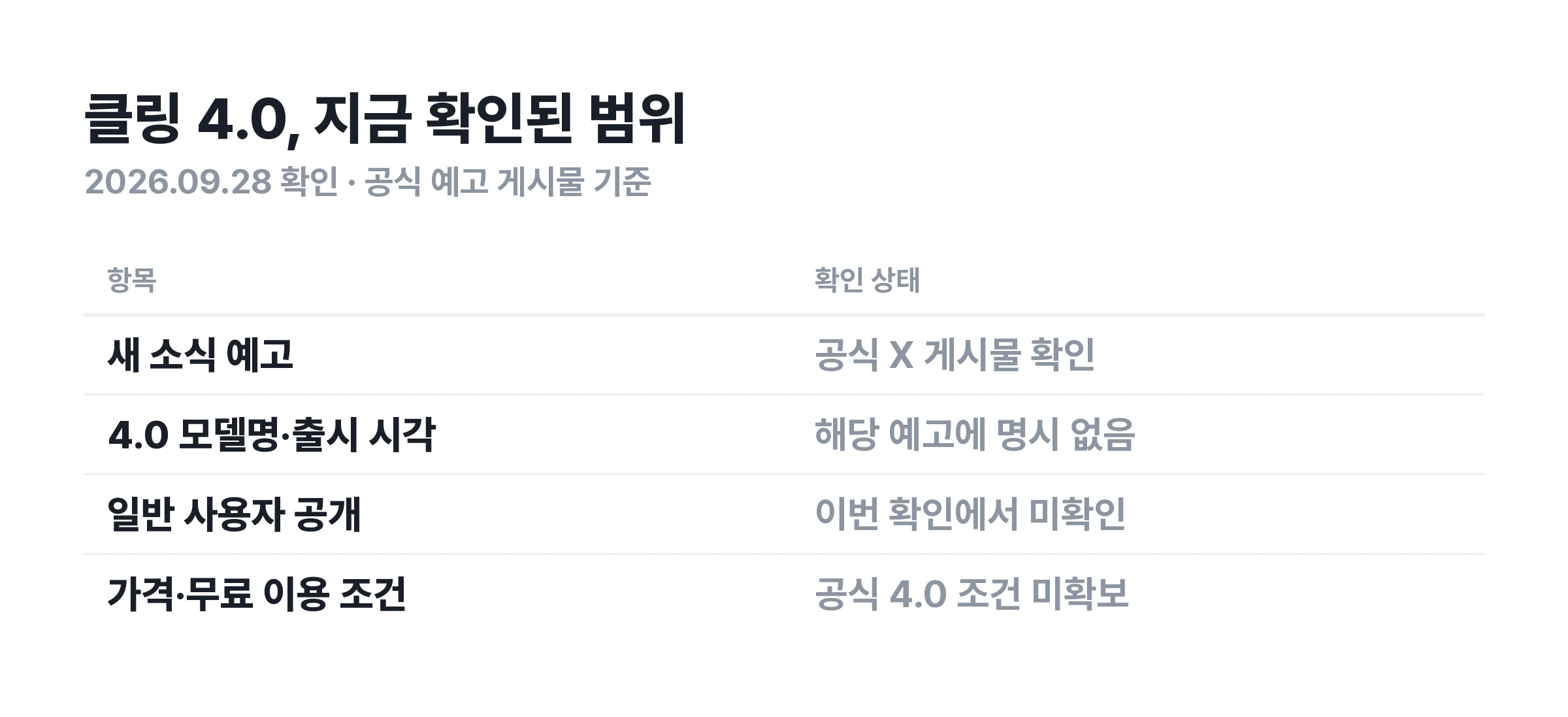
As of September 28, 2026, an official release date for Kling 4.0 has not been confirmed. The official Kling AI X post checked on September 28 teased news, but did not name a 4.0 model or specify a release time.

As of September 28, 2026, an official release date for Kling 4.0 has not been confirmed. The official Kling AI X post checked on September 28 teased news, but did not name a 4.0 model or specify a release time.
Search results already mention Preview, Flash, 30-second video, and 4K. A product introduction page alone, however, does not establish that Kling 4.0 is available now. This guide covers what the official teaser confirms, where to check access, pricing and free use, and how to compare it with 3.0.
Kling 4.0 release date: what has been officially announced?
The official account has teased news
The official Kling AI X post reads “CLING ON! We’ve got news.” Its accompanying image says “YOU CALL THE SHOTS”. The wording suggests filming or directing, but it does not confirm any specific feature.
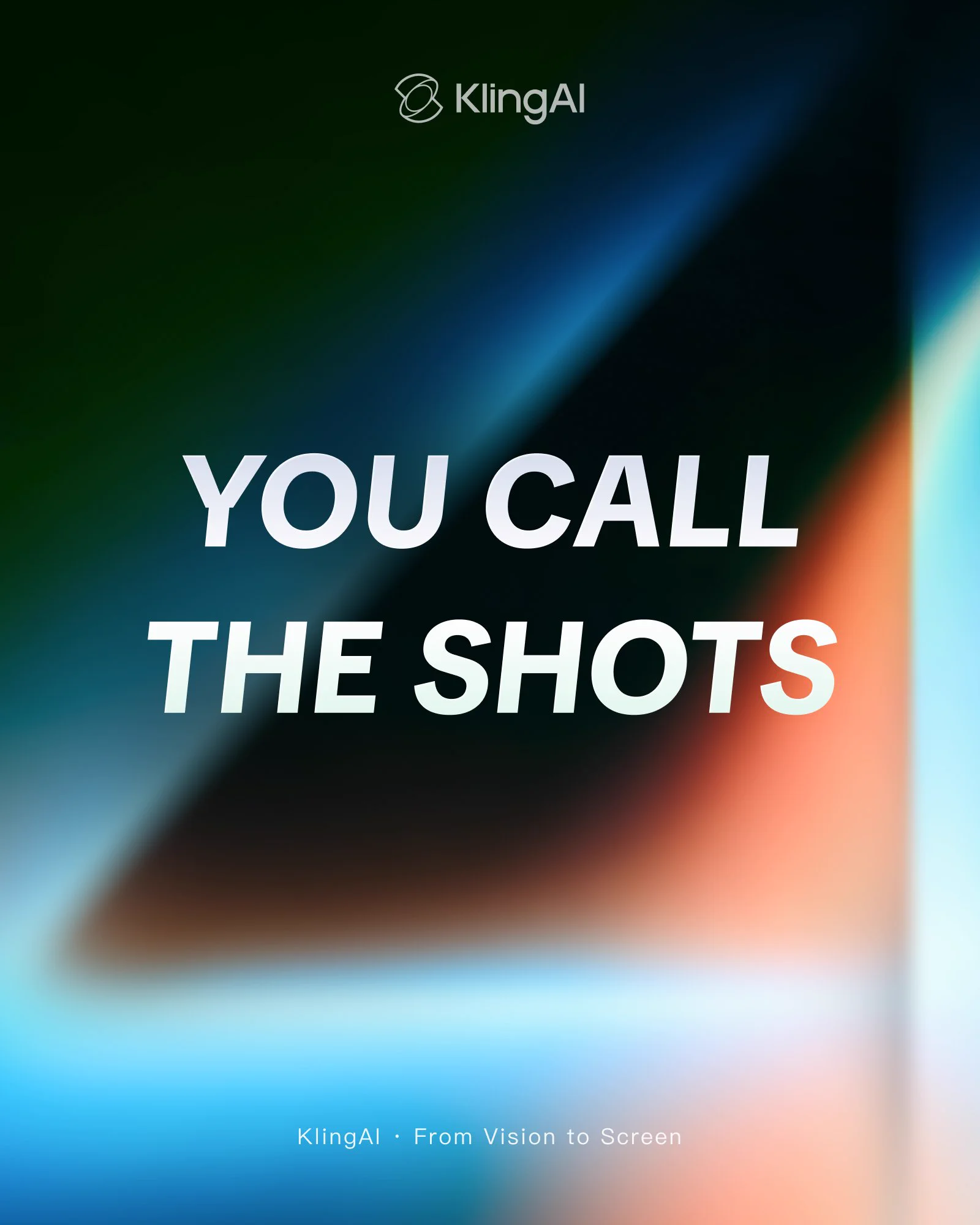
Neither the post nor its image names Kling 4.0, Preview, or Flash. They also omit a release date and time, free access eligibility, video length, and pricing. Expectations of news today should be distinguished from an announcement that 4.0 has officially launched today.
Check the official website's model information too
At the time of checking, the official Kling AI website focused on the 3.0 series. The absence of 4.0 on the homepage does not rule out limited testing. However, evidence that it is available to all users has not yet been established either.
When checking a release date, separate the announcement date, limited preview access, and general availability. If an official post later provides a date, check which release stage it refers to. Do not assume API access will begin on the same date as website access.
Are Kling 4.0 Preview and Flash specifications confirmed?
Longer videos and more detailed scene control stand out in prerelease information. OpenArt's 4.0 preview page lists videos up to 30 seconds, up to 10 keyframes, and up to 15 references. However, the page says the model is coming soon. These details should not be treated as Kling's confirmed final specifications.
The same page lists up to 4K HDR for standard 4.0, and 720p with approximately 3–20-second videos for Flash. Whether these conditions will match the official release, and which accounts and services will offer them, requires further confirmation. No videos were generated with these settings for this article.
Preview may refer to a preview stage. Flash may distinguish a product or model mode, but its name alone does not establish speed, pricing, or maximum length. Check the official information for that version and the actual generation interface for final conditions.
Settings screenshots found online depend on when they were taken and the account's permissions. An option visible to some accounts may not be available to everyone. Remaining trial generations shown on a screen may also be account-specific, so they should not be described as a universal free allowance.
Check the source and mode for 30 seconds, 4K, and keyframe counts
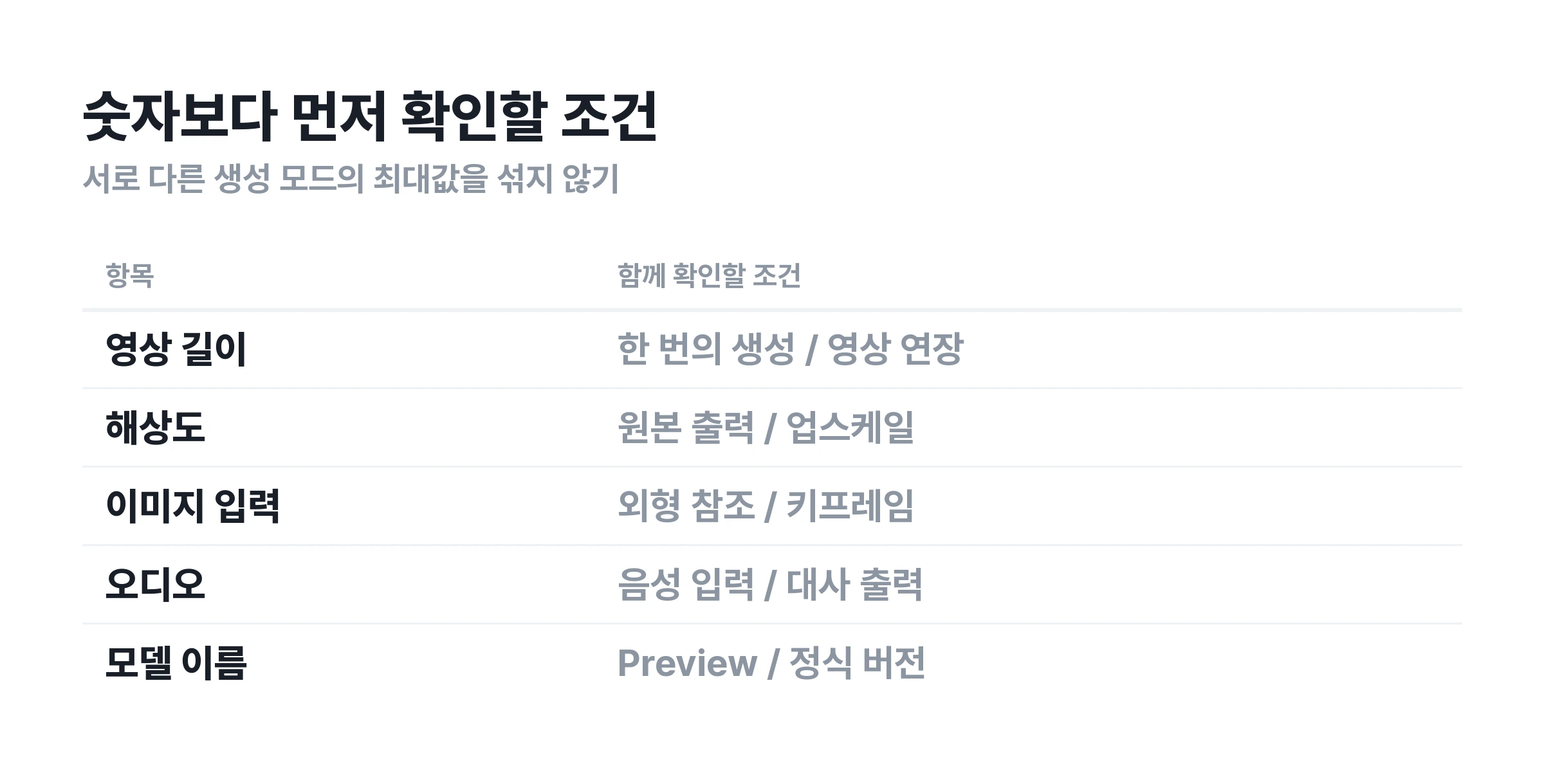
Before comparing video length and resolution, check whether the feature generates video from text, animates an image, or extends an existing video. Combining maximum values from different modes into one model specification may create a combination that cannot actually be selected.
A keyframe specifies what should appear at a particular moment in a video. A reference image can provide information about a person's or product's appearance. More image inputs do not necessarily mean that the same number of scene changes can be specified directly.
Video extension and a single generation should also be considered separately. Joining short clips into a longer video differs from generating a long sequence in one pass. Do not read an extension limit or an editing tool's total output length as the model's limit for a single generation.
How to use Kling 4.0: where to check access
To use Kling 4.0, first check whether the model appears in the actual generation interface. At the time of checking, a dedicated 4.0 generation workflow available to all users could not be verified. Follow these steps to check availability yourself.
1. Open the generation interface from the official website
Go to the generation service from the Kling AI website. If using a search ad or a similarly named site, check who operates it first. A domain containing kling or 4 is not necessarily an official service operated by Kling AI.
2. Check the name in the model selector
The model used for generation matters more than the page title. An introduction page may mention 4.0 while its button opens a different model. Check the name in the model selector and the settings immediately before generating.
3. Check your account's access conditions and generation cost
Even when a model is selectable, conditions may vary by subscription tier, trial access, or region. Review the length, resolution, and audio options available to your account, along with the estimated charge. If prompted to upgrade, first check whether the new model is included.
4. Record the model name and settings for your first result
Save the prompt, references, model name, length, resolution, and audio settings together. This makes it possible to identify changed conditions when comparing versions later. Saving only the output video makes it harder to tell whether a difference comes from the model or its settings.
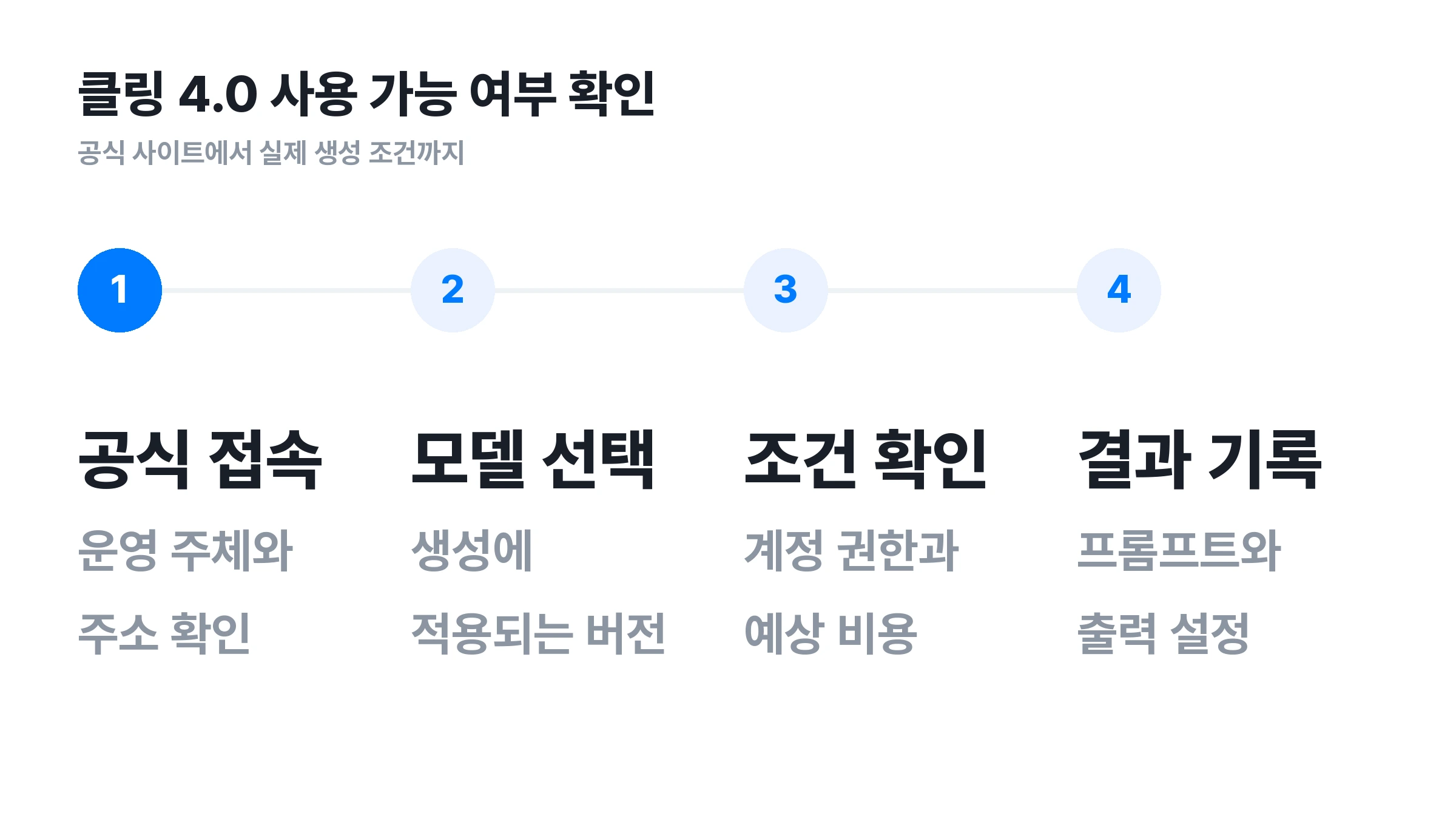
A button does not necessarily provide immediate access to 4.0
At the time of checking, OpenArt's Kling 4.0 introduction page said the model was coming soon at the top, while its use button linked to a Kling 3.0 Omni generation route. This is a specific example of the advertised model differing from the model available immediately.
Services that combine models make comparisons convenient. However, offering a model from a particular brand does not automatically include its latest version. Choose based on the model name actually applied to generation.
Kling 4.0 pricing and free access: what is known now?
Official Kling 4.0 pricing and free access conditions applicable to all users were not established in this check. Existing model rates or another service's subscription fees should not be presented as confirmed 4.0 pricing. Before paying, check the model-specific conditions of the service you plan to use.
A monthly subscription and the cost of one video are different
When comparing plans, check whether the new model is included and how much each setting costs, as well as the subscription fee. Different video lengths, resolutions, and audio options change the basis of comparison. The cheapest setting may not reflect the cost of your intended final output.
Free registration and free generation are different too
A free sign-up button does not necessarily mean generation with a particular model is free. Check eligible trial models, credit conditions, expiration dates, watermarks, and download conditions. Separate information is needed to establish whether existing free credits also apply to 4.0.
Check output conditions in the pricing details
A lower resolution may be enough for reviewing drafts. For advertising or client delivery, check whether the resolution, watermark, and usage conditions meet your needs. Comparing the final files you will receive is more accurate than comparing plan names alone.
For API use, check web subscriptions and API pricing separately. Signing up for the standard generation service does not necessarily include developer API access or usage. Developers should check supported models and pricing on the official developer platform.
Kling 3.0 vs. 4.0: check what is already available
When waiting for a new version, first identify which features are absent from the existing model. Describing existing features such as audio or multi-shot generation as exclusive 4.0 benefits would distort the comparison. The official 3.0 guide provides a starting point.
The official Kling VIDEO 3.0 guide describes video lengths of approximately 3–15 seconds, native audio, multi-shot generation, and element references. Supported speech languages include Korean. These are official feature descriptions, not guarantees of equal quality in every scene.
Multi-shot generation does not require waiting for 4.0
The official 3.0 guide already describes storytelling across multiple shots. To assess a new version, compare how consistently it maintains characters and spaces, and how well it follows specified sequences and actions. The presence of a multi-shot label alone is not enough.
The term 4K does not identify a model generation
The official homepage already includes information about a native 4K update. Seeing 4K in an output or advertisement does not establish that it was generated with 4.0. Check the original generation model, output settings, and whether upscaling was applied.
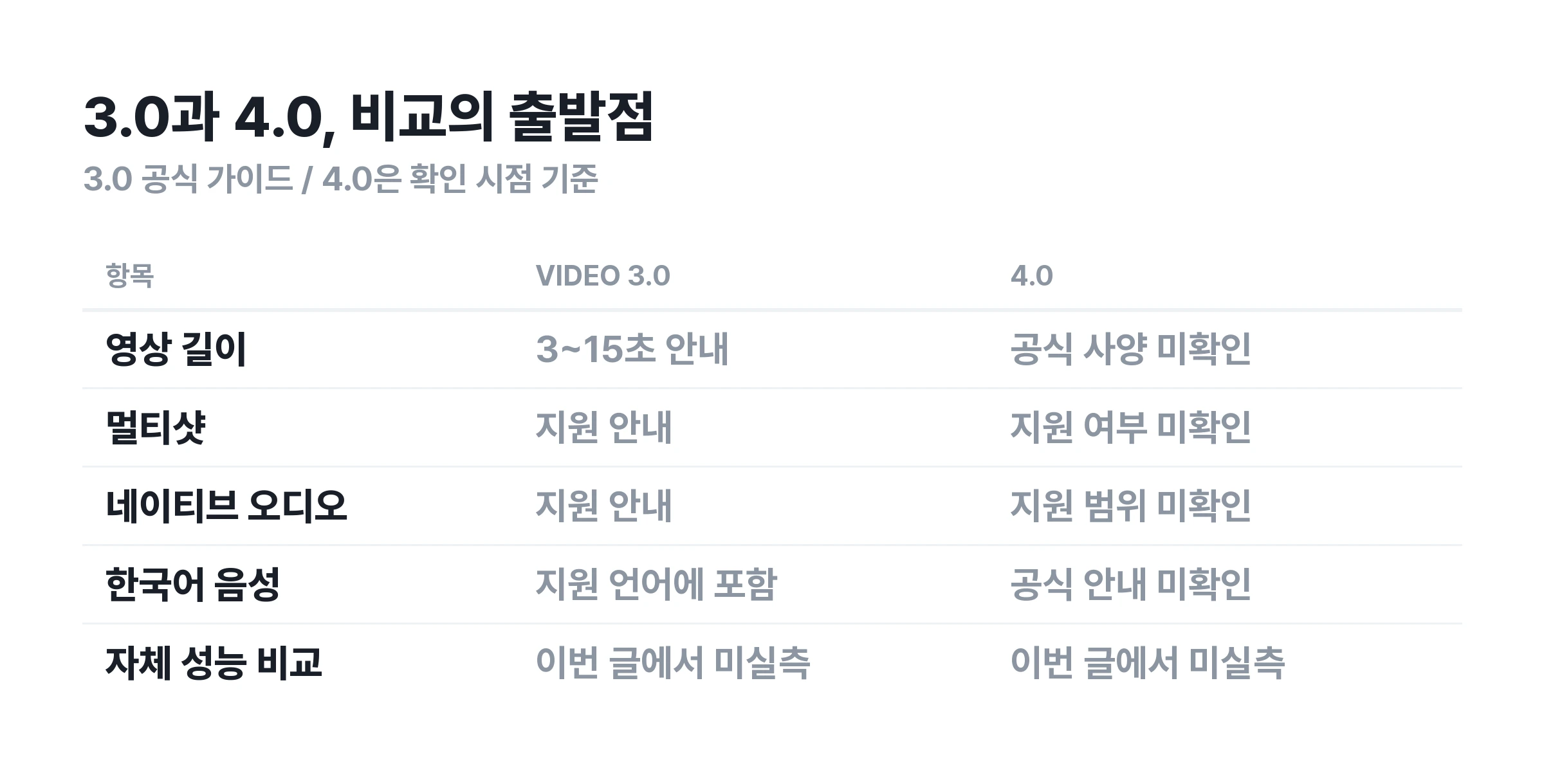
Decide whether to start or wait based on the features you need
If the available lengths and input methods suit your project, an existing model can be used to create a draft. If a longer single generation or a specific control feature is essential, confirm official support before scheduling production. There is no need to base a delivery schedule on unconfirmed specifications.
Prompts and checks for comparing the model after release
A comparison under matching conditions is more useful than one attractive video when assessing a new model. The examples below are evaluation drafts for checking scene consistency and instruction following after release, not prompts tested on Kling 4.0. Adjust them to the lengths and input methods supported by your chosen model.
Product video: does the product retain its shape during motion?
A single unbranded blue perfume bottle sits on a white table. The camera slowly moves from the front to the right. The perfume bottle remains still, and its shape and cap size stay identical throughout. Soft window light, a calm product advertisement mood. No new objects or text appear.
In this scene, inspect the glass bottle's outline, the proportions of its cap and body, and where it touches the table. If the bottle rotates or objects appear despite instructions for camera movement only, the result differs from the requested action. Even if a still frame looks good, watch the entire sequence for changes in shape.
Character scene: do the face and clothing remain consistent before and after an action?
An adult woman wearing a beige coat sits by a cafe window. She notices someone opposite her, raises her head, and smiles gently. The camera maintains a fixed medium shot. Her face, hairstyle, and coat color do not change. The action continues naturally in one movement, with no cuts or subtitles.
Compare the eyes, mouth, hairstyle, and coat color before and after she raises her head. Check whether the background shakes as she moves, or whether unrequested cuts appear. If using a reference image, provide the same file to both models for an easier comparison.
Korean dialogue: do the speaker and lip movements match?
A medium close-up showing the face of one adult man in a quiet room. Looking at the other person, he calmly says in Korean, "오늘은 여기서 기다릴게." There are no other voices or background music. Keep the camera fixed and maintain a single scene.
Use this example only in a mode that supports audio. Check for omitted dialogue, unwanted words, and mismatches between lip movements and speech. Support for Korean and delivery of the intended emotion and pronunciation are separate questions.
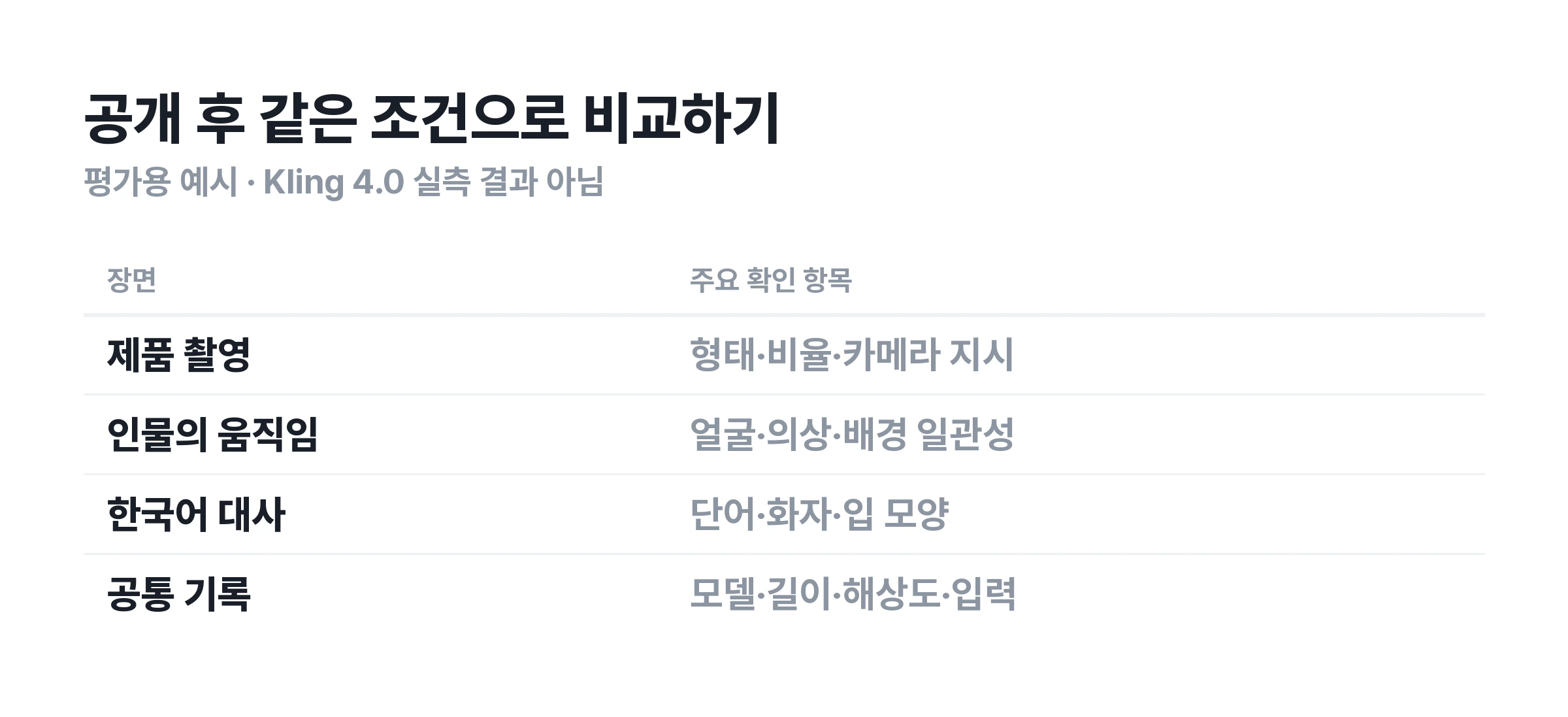
Use the same prompt and references for each model, with matching lengths and resolutions available to both. If identical settings are unavailable, record the difference. Comparing results when only one uses a higher resolution mixes model differences with output conditions.
If you revised the prompt several times, save the wording actually used for the final video. Alongside the best results, consider what needed revision and how much. This helps identify which model suits the work. Generation time depends on queues and service conditions, so one measurement cannot establish speed.
Kling 4.0 FAQ
Did Kling 4.0 launch today?
The official X post checked on September 28 is a teaser for news. That post alone cannot confirm an official 4.0 launch or availability for every account. Check subsequent official announcements alongside the model name in the actual generation interface.
Does Kling 4.0 Preview mean it is the final release?
A Preview label does not guarantee the same access conditions as the final release. Check whether it is a limited test, which accounts can access it, and whether its specifications match the final model. If it is selectable in your interface, follow the information applicable to your account.
How much does Kling 4.0 cost, and what free credits are available?
This check did not establish an official 4.0 price list or free credit conditions applicable to all users. Applying existing 3.0 rates or another service's trial allowance to 4.0 would be inaccurate. Check the conditions for your chosen model before paying.
Can you use Korean prompts and dialogue?
The officially supported scope for 4.0 requires further confirmation. The existing official 3.0 guide lists Korean speech support. Giving scene instructions in Korean and having a character speak Korean are different capabilities. Check each one according to your needs.
Is the Kling 4.0 API available immediately?
Web availability and API access must be checked separately. Official developer documentation needs to specify the model identifier, inputs, and access conditions before integration availability can be assessed. The word API in a blog or a prerelease information page does not establish that actual calls are supported.
Can you use Kling 4.0 on Carat?
Check the generation interface on Carat for currently selectable models. If looking for 4.0, first check whether that version is explicitly included in the model name.
More articles
 How to Make AI Infographics: 3 Prompts, Korean Text Fixes, and Tool ChoicesCarat Editor · 2026.09.28
 GPT 6 Astra Prompt Guide | Official Traits, Task-Type Skeletons, and How to Prompt It Without StallsCarat Editor · 2026.09.18
 AI BL Drama Explained: Where to Watch and How to Make OneCarat Editor · 2026.09.17