Image Upscaler
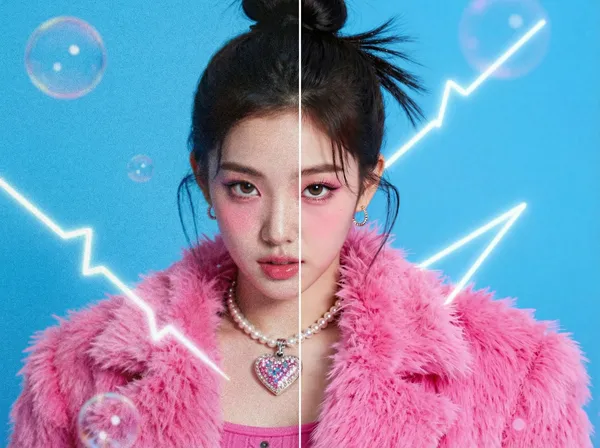
Example results
AI Image Upscaler
How to upscale an image
A photo that looked fine on your phone can fall apart the moment you enlarge it: soft edges, blocky pixels, smeared text. Carat's AI image upscaler fixes that from a single upload. Add the image you want to enhance, and the AI rebuilds the edges, textures and fine detail that a low resolution throws away, restoring the picture up to stunning 4K quality. Traditional resizing only stretches the pixels you already have, so the result gets blurrier the bigger it gets. An AI upscaler predicts the missing detail instead, so faces, hair, fabric and lettering stay crisp. There are no scale factors or export menus to work through. You upload, press Create, and get an enhanced image back.
01
Upload your original image
Add the photo you want to enhance in the Original Image field.
02
Press Create
The AI analyzes your picture and rebuilds sharpness and resolution.
03
Download the upscaled result
Compare it with the original and save the enhanced image.
What you can do with it
Restore old family photos and scanned prints so they look clear again
Sharpen product shots for online stores, listings and marketplace thumbnails
Turn small web images or screenshots into files big enough for slides and print
Upscale AI-generated art and illustrations to 4K for wallpapers and posters
FAQ
What is an image upscaler?
×
It is a tool that raises an image's resolution and uses AI to fill in the detail that a bigger image needs, so the result looks sharp instead of stretched.
How is AI upscaling different from resizing?
+
Standard resizing (bicubic, for example) copies and blends neighboring pixels, which makes enlarged images look soft. AI upscaling redraws edges and textures, so the enlarged image actually gains clarity.
Can it fix blurry or pixelated photos?
+
In most cases it noticeably improves them. If the original is extremely small or badly damaged, there is less information to work from, so the improvement can be more limited.
Do I need to choose a scale factor or file format?
+
No. There are no options to set. Upload your image, press Create, and the AI enhances it up to 4K quality.
Can I upscale several images at once?
+
The tool processes one image at a time. For more photos, download your result and upload the next image.
Will upscaling change what is in my photo?
+
It keeps the same people, objects and composition and focuses on resolution and clarity. Because the AI rebuilds fine detail, very small faces or text can come out slightly different, so give the result a quick look before you use it.


© 2026 Paradot Inc. All rights reserved.


