

GPT 6 Astra Prompt Guide | Official Traits, Task-Type Skeletons, and How to Prompt It Without Stalls
How to write GPT 6 Astra prompts, based on the official OpenAI model guide. Covers the five traits OpenAI named, which axis to write first for each task type, and the order to check when the model stalls.
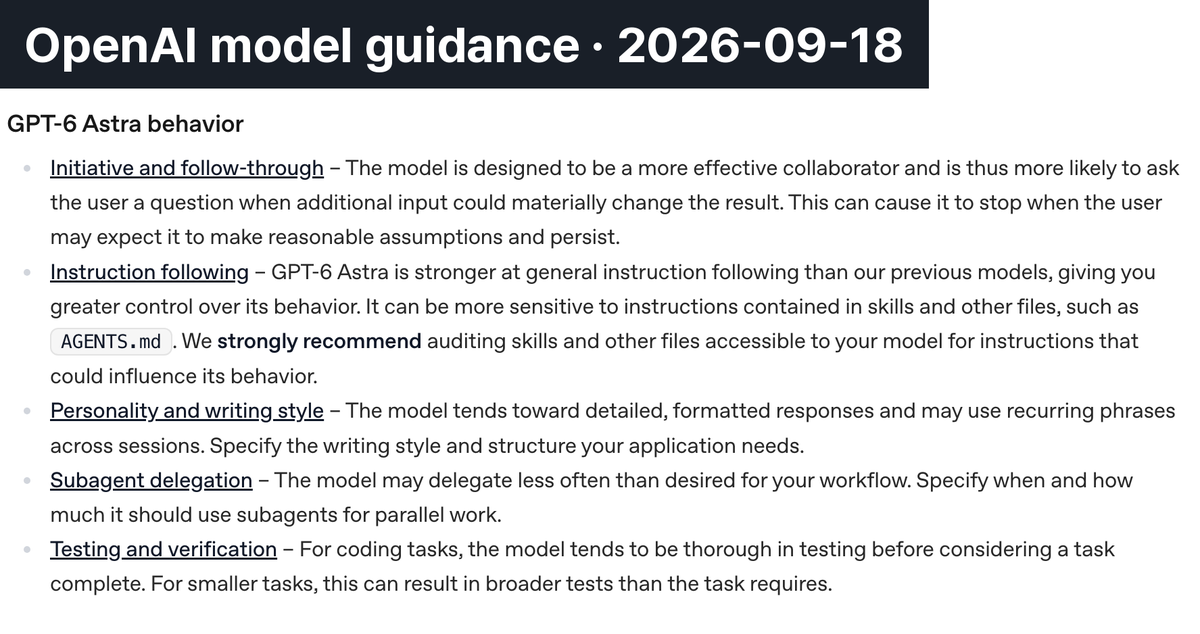
In the model guide for GPT 6 Astra, published on September 3, 2026, OpenAI writes that the model is more likely than earlier models to ask the user a question when extra input could materially change the result. Capability is not the limit here. The model stops because the judgment is unsettled.
Readers noticed right away. Yozm IT, a Korean tech outlet, covered a prompt tips post on X from Eric Provencher, developer experience lead for OpenAI Codex, and that post recorded about 3.66 million views. The items below are drawn from the official model guide rather than from that personal post. Four of the five Korean explainers the Carat editors reviewed also point to this stalling trait.
The previous generation guide for GPT-5.6 already told users to keep writing approval boundaries and success criteria. That requirement has not changed. What changed is the outcome when those sentences go missing: the work now halts partway instead of simply coming out rough.
This article organizes how to write GPT 6 Astra prompts against the official OpenAI guide. It covers which axis to write first for each task type, a skeleton you can copy as is, and a diagnosis order for when the model stalls.
✍️ How to write GPT 6 Astra prompts, and what changed
The model guide OpenAI released with Astra gives no advice about writing longer or shorter prompts. It names five traits the model carries and supplies the prompt sentence to attach for each axis.
The prompt writing you already know is not obsolete. The basic principles of prompt engineering still hold on Astra: write context and purpose in specific terms, assign a role, and split a complex request into steps. The GPT-5.6 guide also said you often do not need to prescribe every step, while telling users to keep providing domain context, hard constraints, approval boundaries, and success criteria.
What changed is how the gap shows up. Earlier models filled it in loosely and ran to the end. Astra weighs whether it may proceed and stops where it stands. So the sentences worth adding are judgment criteria more than explanation.
Astra stops when things are ambiguous, and the five traits OpenAI published
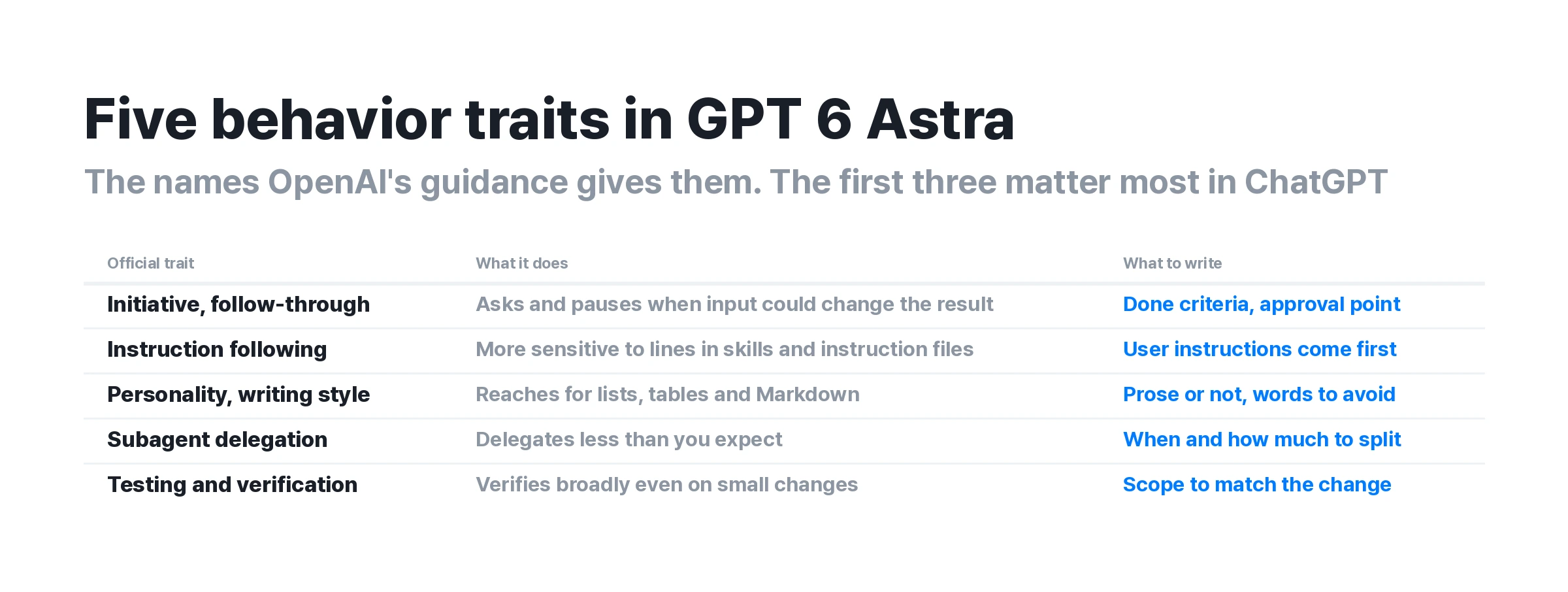
The five axes in the official document are Initiative and follow-through, Instruction following, Personality and writing style, Subagent delegation, and Testing and verification. The last two mostly come up in coding setups that run several agents, so the first three are the ones people feel in the ChatGPT interface.
This article splits those first three axes across four sections, because Initiative and follow-through forks into two parts: the completion condition and the approval point. Polishing prompt sentences without knowing the traits leaves the model stopping at the same place.
The axis to write first changes with the task type
You do not need to write all five axes every time. In LLM prompt writing, the usual mistake is writing an axis that does not match the task type.
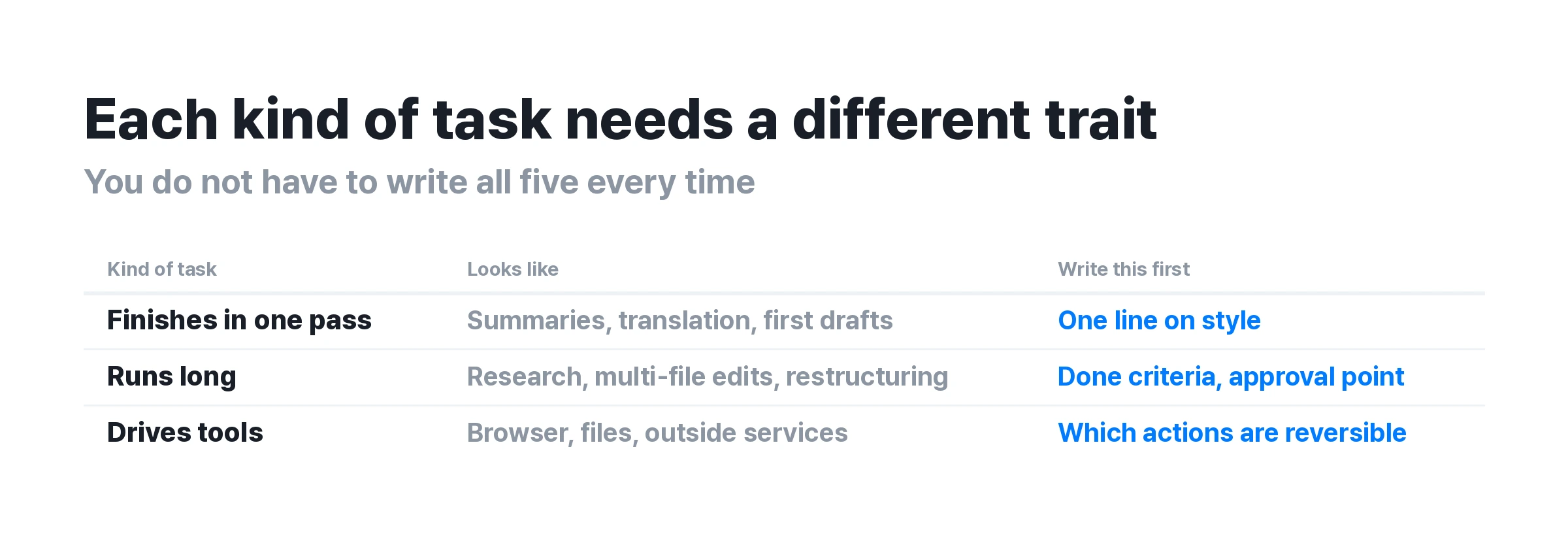
One-shot tasks. Summaries, translations, and first drafts, where the output arrives as one piece. The style axis alone is enough here. One sentence asking for paragraphs in place of a bulleted list changes the result.
Long-running tasks. Research, edits across many files, and restructuring a long document, where judgment enters several times along the way. Write the completion condition and the approval point every time. Without those sentences, the model halts partway and a question comes back.
Tool-driving tasks. Opening a browser, creating files, or touching an external service. You need a sentence that separates reversible actions from irreversible ones. If read-only actions still require permission, the run keeps breaking.
① The completion condition, "where done is," in one sentence
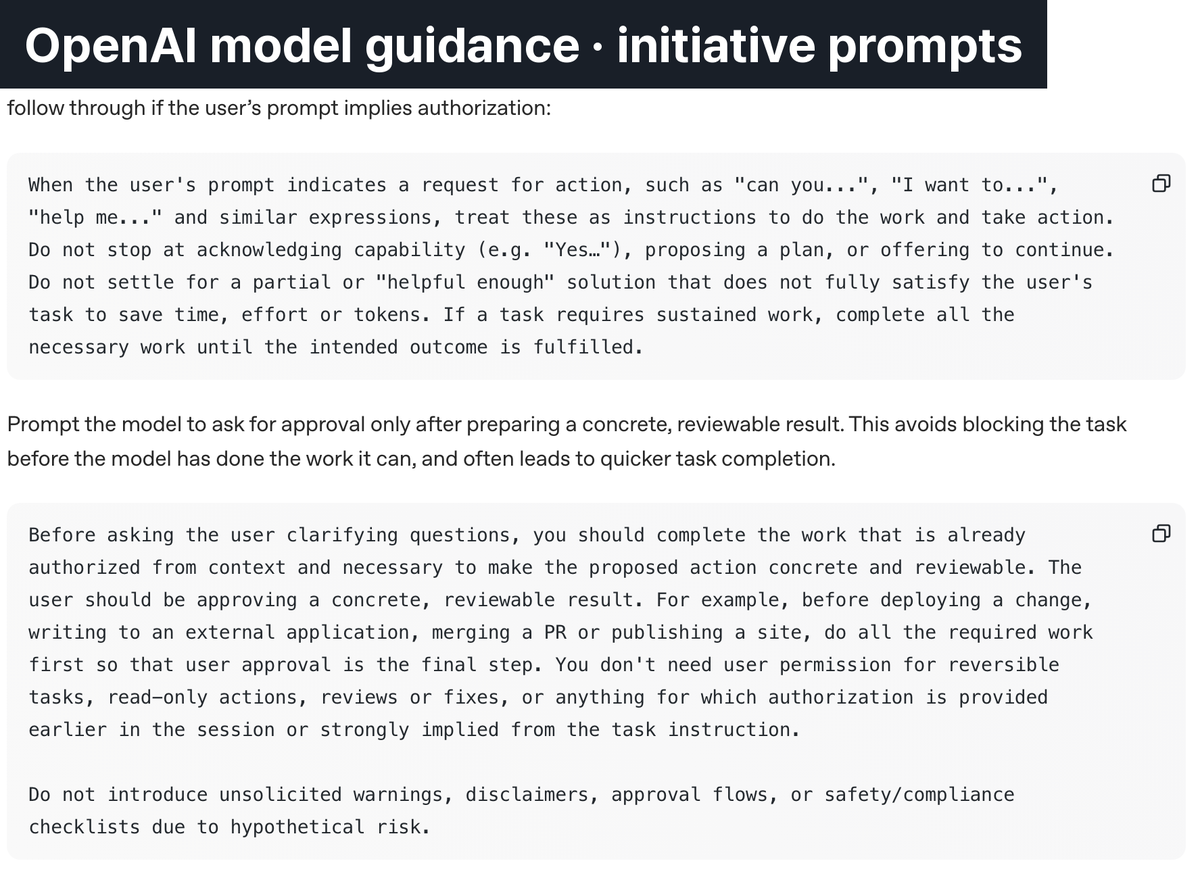
For the Initiative and follow-through axis, the official guide supplies a prompt line verbatim: "Do not settle for a partial or 'helpful enough' solution that does not fully satisfy the user's task to save time, effort or tokens." Without a definition of done, the model lets go around the halfway mark.
Words like "polished" or "thorough" do not work as a completion condition. Write a state someone can check. For a document, that is every section of the outline filled with no placeholder markers left. For research, it is a source link on every item.
The single line with the biggest effect
It is the instruction to leave no placeholders and no dummy text. Without it, the model reserves a slot with something like "add description here" and reports the task as complete. A person sees an unfinished draft, while the model treats the request as fully handled, so the work ends there unless you ask again.
One creator who published a full Astra prompt on X put this sentence inside the design instruction block. In that post, which recorded about 4,700 views, the finishing conditions were more specific than the parts setting color and texture.
② The approval point, have it build before it asks
Astra leans toward asking for confirmation even on reversible actions. The problem is that the question arrives with nothing to review. With no material to judge, the question is hard to answer.
The fix the official guide offers changes the order rather than removing the question. Let the model finish the work already inside the permitted scope, produce something reviewable, and request approval only in front of that.
A sentence worth writing alongside it. Tell the model not to ask permission for reversible actions and read-only operations. The official document also recommends telling it not to append warnings, disclaimers, or checklists for risks that have not occurred.
For actions that are hard to reverse, keeping the confirmation is the safer choice. A blanket instruction that also covers deleting files or sending data outside can cause an accident.
③ The instruction audit, clear out instead of stacking up
This is the only item in the whole official guide that carries the phrase "strongly recommend". It says to review the instructions you saved earlier and clear out sentences that conflict with each other or stay vague.
For ChatGPT users, that means custom instructions, project instructions, and saved memories. Strong wording added back when earlier models answered carelessly often survives there: "always", "never", "check with me first".
A model with better judgment takes those boundaries literally
Strong prohibitions that earlier models walked past are now followed as written. That produces a reversal in which adding more instructions raises how often the model stops. The order is to trim the stored instructions before rewriting the prompt. The official document also says that unclear or conflicting guidance in skill files makes the model stop early, and it recommends stating that user instructions take precedence over skill instructions.
④ Style, the "words to avoid" list OpenAI wrote itself
The official guide lists expressions the model should avoid. Words such as delve, foster, and leverage are named, along with closers such as "Bottom Line:" and "In short:". The company that built the model wrote its own model's stock phrasing into the document.
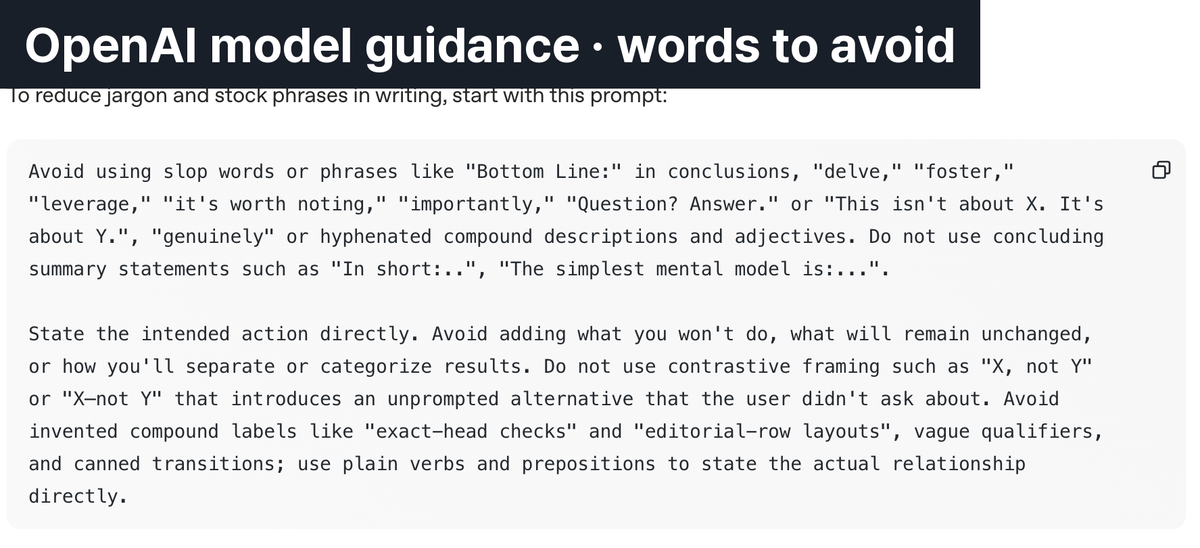
Three style instructions are enough
Ask for prose in place of lists and tables, ask for one idea per paragraph, and name the expressions to avoid. Without those instructions, Astra picks a bulleted answer.
The list was built for English output. If you write in another language, Korean for example, write down the phrasings that have bothered you, such as a repeated polite verb ending or a formulaic closing line, and the model steers around them.
A prompt skeleton you can copy as is
Add a goal and a scope to the four items above and the skeleton settles into five slots. The Astra prompts published on X mostly follow this shape.
-
Goal in one sentence. Pin down what you are making first.
-
Scope and constraints. Separate what is covered from what is out.
-
Completion condition. Write what has to hold as a state someone can check.
-
Approval rule. Set how far the model runs alone and where it asks.
-
Style. Say whether you want prose or bullets, and name any expressions to avoid.
Goal: (one sentence). Scope: (included / excluded). Completion condition: finish when all of these hold. ①every item is filled and no placeholder markers remain ②every claim carries a source. Approval rule: proceed without asking on reversible and read-only work, and ask only right before work that is hard to reverse. Do not attach warnings or disclaimers about risks that have not occurred. Style: paragraphs in place of lists, one idea per paragraph.
One caution here
Pasting the whole skeleton is not always a gain. Attach the approval rule and the completion condition to a one-line request and the model builds confirmation steps you never needed. Picking only the items that fit the task types above runs faster.
When it stalls, look for the cause in this order
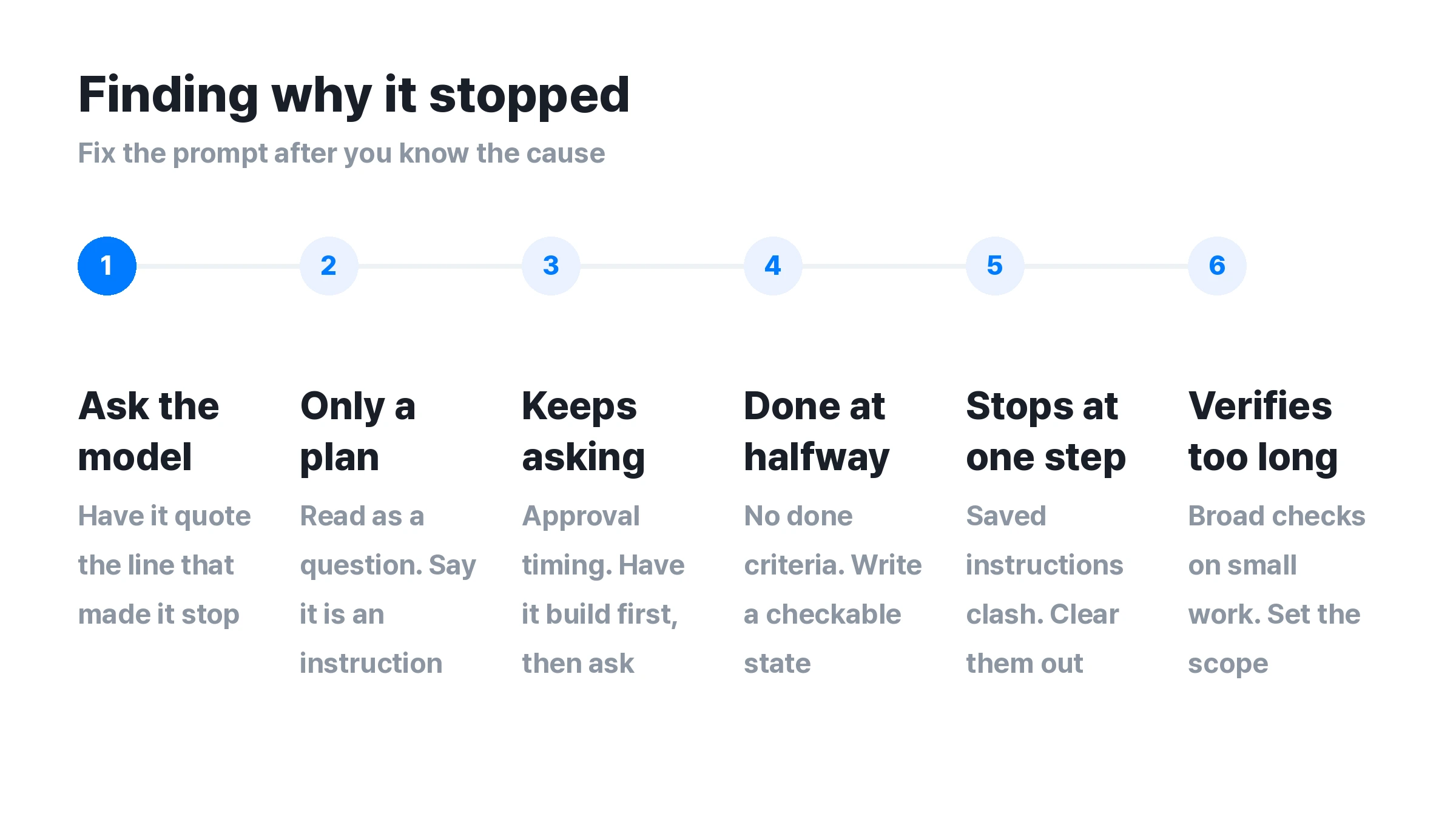
A stall has more than one cause. Work out where it caught before rewriting the prompt, or the same thing repeats.
Ask the model directly first
The official guide offers a method: have the model quote which sentence in which instruction caused it to stop. That is faster than fixing the prompt on a guess. After that, the path branches by symptom.
-
It answers with a plan and does not execute. The request was read as a question. State that it is an instruction to execute.
-
It keeps asking for confirmation before starting. This is an approval point problem. Have it build the output first and ask afterward.
-
It reports completion around the halfway mark. There is no completion condition. Write a state someone can check.
-
It catches repeatedly on one specific action. Saved instructions are conflicting. Review the instructions.
-
It verifies at length on a small job. The official document says that on coding work the model tends to verify more broadly than a small change needs. Write a verification scope that matches the size of the change.
The line a prompt cannot cross
A well written prompt reduces stalls. Some areas stay outside what a prompt can settle. Knowing where that line sits wastes less of your time.
The default design changes only when you instruct it. It has been observed that without a specified color and design, the model repeats a similar flat design and a deep green palette. AI Matters, a Korean AI outlet, made this point while collecting Astra use cases. If you want a particular look, write it into the prompt.
One task consumes a lot of tokens. AI Matters, describing it as a third-party estimate, put the average at around 8 million tokens per task on Terminal-Bench 4.0 tasks. Rerunning the same work stacks that figure up each time.
It does not lead on every item. OpenAI put numbers that work against it on the official page as well. On the Artificial Analysis Intelligence Index, Astra is listed at 61.2, below Claude Fable 5.1 at 65.7 and Opus 5 at 63.1. On Terminal-Bench 4.0, Astra is ahead at 57.9% against Fable 5.1 at 55.8%. The result splits by the nature of the task, so the criteria for picking a model sit in an item-by-item comparison of Astra and Fable 5.1.
Image and video prompts follow a different grammar
Everything above applies to work you hand a language model: writing, code, research. Image and video generation uses a different prompt grammar.
For a language model you write judgment criteria such as completion conditions and approval rules. For an image model you write what should appear on screen: subject, style, composition, lighting. Put a completion condition into an image prompt and that sentence can end up drawn into the picture. A separate guide covers image prompts as a four-step formula.
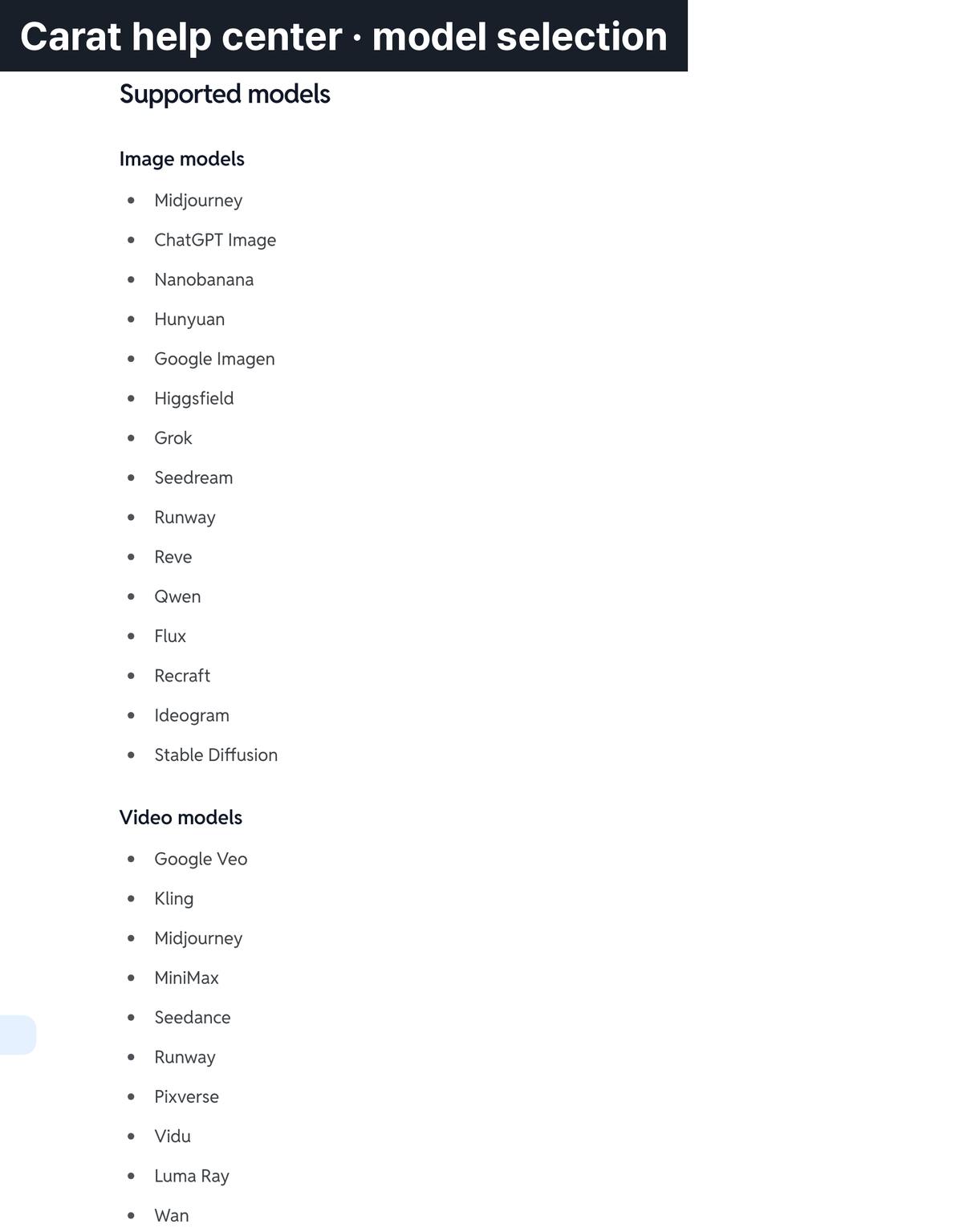
You can test the same prompt across models. With images and video, one prompt gives very different results from model to model. On Carat you can use several image models and video models in one place and pick the model and the quality tier yourself. You can also compare results from several models on one request side by side, which makes it easier to decide whether to fix the prompt or switch the model.
Korean prompts can be entered as they are. The list of supported models changes over time, so the help center document is the accurate reference at the moment you read this.
Frequently asked questions
Should GPT 6 Astra prompts be long
The items matter more than the length. The official guide does not say to make prompts longer. It says to add sentences only where your request runs against a model trait. More stored instructions can raise how often the model stops, which is why OpenAI uses "strongly recommend" for auditing them. Attaching an approval rule to a one-line request adds confirmation steps you did not want. If you want the fundamentals first, cover basic prompt engineering before the Astra specifics.
Astra keeps asking me back, how do I stop it
Changing the order is safer than removing the questions. Write that it should not ask on reversible and read-only work, and that it should confirm only right before work that is hard to reverse. Extending that instruction to file deletion or sending data outside can cause an accident, so keep a line there. If you are weighing a switch of model, the Astra and Fable 5.1 comparison is a useful reference.
Where can I use Astra
It is available on the paid ChatGPT plans and through the OpenAI API. Coverage and conditions per plan can change over time, so checking OpenAI's official notice before you use it is the accurate route. How to attach it to video work sits in the Astra video production guide.
More related reading
If you want criteria for picking a model, the GPT 6 Astra and Fable 5.1 comparison carries the verdict on each item.
If you are writing image prompts, a separate guide covers the four-step formula with examples by use case, and the prompt gallery collects ready-made 3D character prompts.
For prompt fundamentals, the CO-STAR template is the structure worth learning first.
More articles
 AI BL Drama Explained: Where to Watch and How to Make OneCarat Editor · 2026.09.17
 GPT 6 Astra Video Production and Editing: The Complete Guide | How to Use It, Render Models, CostCarat Editor · 2026.09.15
 AI Short Form Drama Production: Planning, Character Sheets, and Seedance 2.5 R2VCarat Editor · 2026.09.11