Nano Banana 2.5 Guide: 2.1 Updates, Release Status and What to Check
Nano Banana 2.5 is a name appearing in public reports and X posts about Google's next image model. Recent reports also describe a “Nano Banana 2.1” label observed in Google Flow. The similar name of the existing Gemini 2.5 Flash Image makes these distinctions important.


Nano Banana 2.5 is a name appearing in public reports and X posts about Google's next image model. Recent reports also describe a “Nano Banana 2.1” label observed in Google Flow. The similar name of the existing Gemini 2.5 Flash Image makes these distinctions important.
As of October 6, 2026, the main finding is a change in naming. Public posts describe traces of 2.5 Flash, a switch to the 2.1 label, and observations in Flow. These do not amount to an official launch announcement confirming the final name, the model actually running, and its new specifications.
This article covers news about Nano Banana 2.5 and 2.1, differences from existing models, what to check before use, and image prompts. It excludes pricing and performance figures without public evidence.
📰 Nano Banana 2.5 release news: the timeline on X
Early September: references in Gemini desktop code
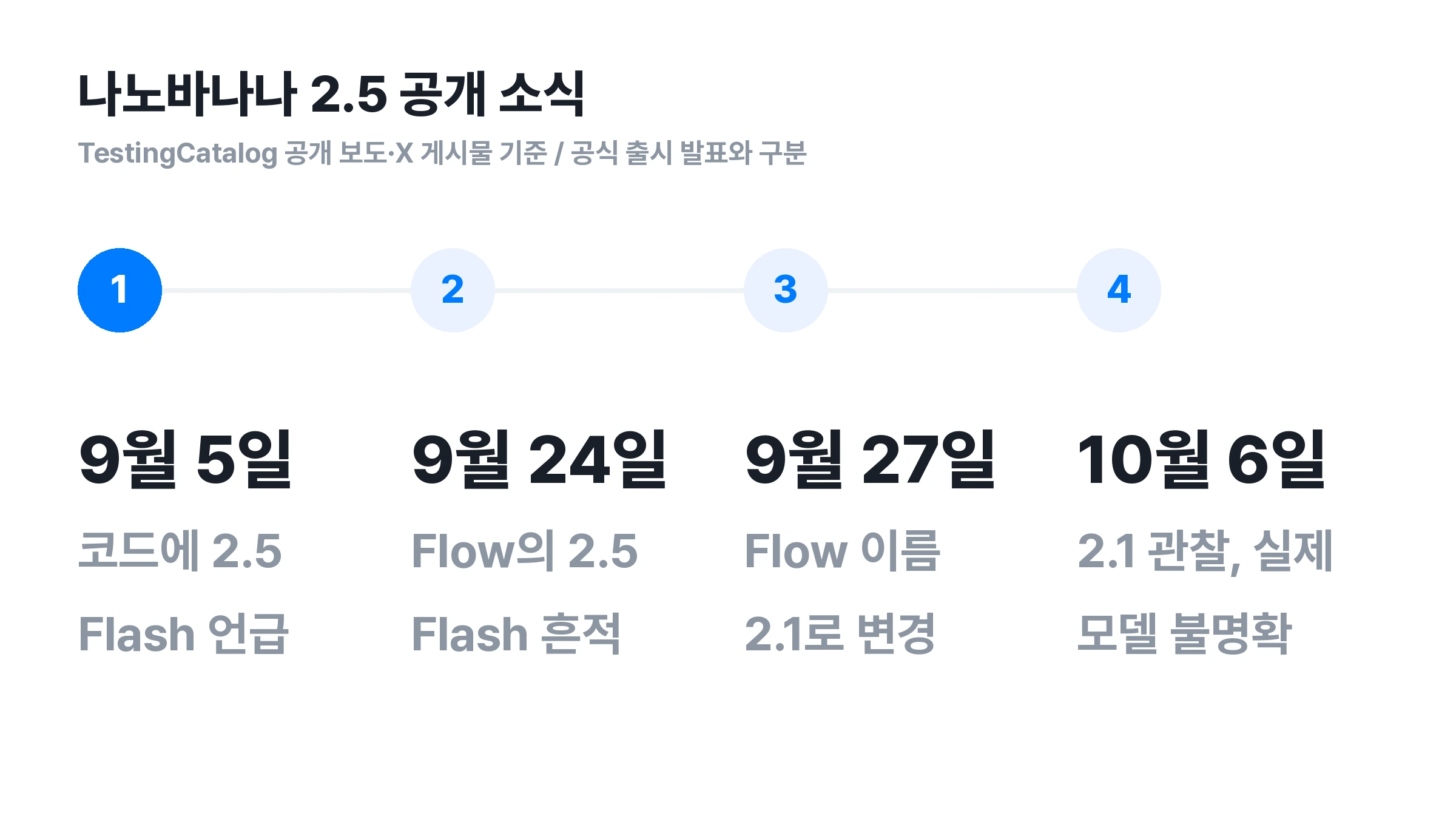
TestingCatalog reported on September 5 that code mentioned “Nano Banana 2.5 Flash” in its coverage of Gemini desktop development. The report describes private testing and says the timing of general availability remains unclear. It provides evidence of the name, not an announced release date.
September 24: a 2.5 Flash label observed in Google Flow
In a September 24 X post, TestingCatalog reported signs of Nano Banana 2.5 Flash in Google Flow. An on-screen name should be distinguished from a model actually available to every account.
September 27: reports of a rename to Nano Banana 2.1
A subsequent September 27 report said the “2.5 Flash” label had changed to “2.1” in Flow's web build. This raises the possibility that both names refer to the same update. It does not mean Google has confirmed a final product name.
October 6: a new observation of 2.1 in Flow
An October 6 X post says Nano Banana 2.1 appears to be available in Flow. However, it also notes that results resemble Nano Banana Pro, leaving uncertainty about whether requests actually reach a new model.
This observation alone cannot establish an official 2.5 release or its performance against Pro. A comparison requires confirmation of how the selected name relates to the model generating the image. The Carat editors have not verified actual generation with 2.5 or 2.1.
🧩 Are Nano Banana 2.5 and 2.1 the same model?
Public reporting links the names through Flow's apparent change from 2.5 Flash to 2.1. A name change alone cannot confirm whether the labels refer to exactly the same model or separate versions. Different version numbers also cannot quantify a performance improvement.
Searching for “Nano Banana 2.5,” “Nano Banana 2.5 Flash,” and “Nano Banana 2.1” can help surface related news. Check publication dates and sources to see whether results under different terms repeat the same observation.
🍌 Distinguishing the existing Nano Banana, 2, and Pro names
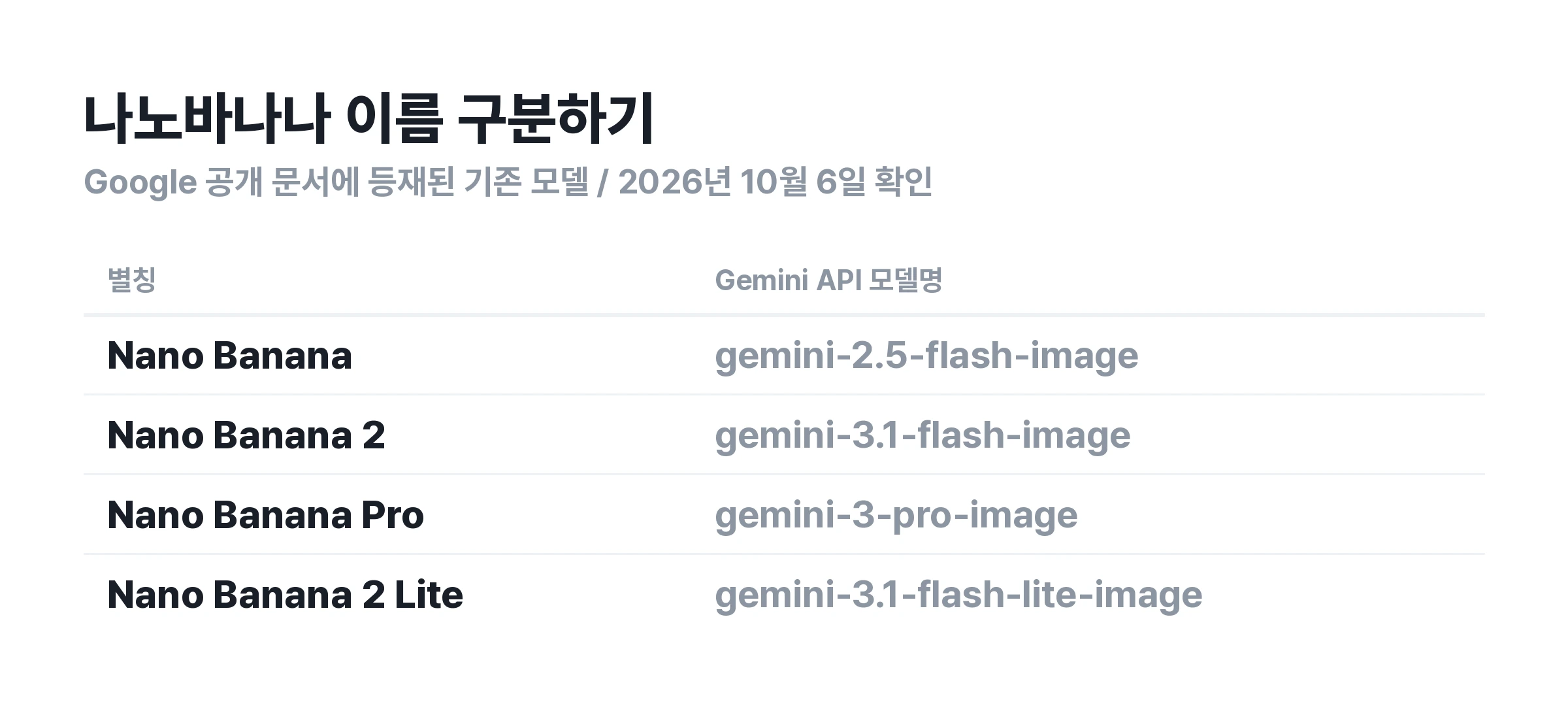
Gemini 2.5 Flash Image is the official model name of the existing Nano Banana. Google's image generation documentation lists its API identifier as gemini-2.5-flash-image. Here, 2.5 is part of the Gemini model name.
The phrase “Nano Banana 2.5” in search results is not enough to identify a model. Check the official name and access method in the article to see whether it adds 2.5 to an existing model description or covers a separate new model.
Nano Banana and Nano Banana 2
Nano Banana 2 uses the API identifier gemini-3.1-flash-image. Numbers in model aliases differ from those in Gemini model names. Selecting gemini-2.5-flash-image does not mean you have used the new “Nano Banana 2.5.”
Nano Banana Pro and Nano Banana 2 Lite
Google's documentation identifies Nano Banana Pro as gemini-3-pro-image and Nano Banana 2 Lite as gemini-3.1-flash-lite-image. Checking actual model names alongside aliases can also reduce confusion when reading comparisons.
🔎 What to check before using Nano Banana 2.5
A model name in a page title does not mean generation is immediately available. Check the model selector, generation button, and official announcement together.
Official announcements and actual availability
Use public announcements from the model provider to confirm release dates and access methods. A live page can change even while its description remains in search results. Distinguish preview pages from interfaces available to general users.
The model selected in the generation interface
Check whether the site title matches the model selected for generation. A title may introduce a new model while the interface selects an existing one. Without identifying the actual model, it is easy to mistake an older model's output for new-model performance.
The generation button and cost information
A “coming soon” label or access request form does not mean anyone can use the model immediately. Missing prices also do not mean it is free. Check the terms shown after login and the information displayed before payment.
Conditions behind sample images
An appealing image is separate from verified model performance. Check which model produced it, whether reference images were supplied, and whether it received further editing. Even with identical prompts, different conditions make model comparisons difficult.
✍️ Prompts for image generation and editing
The following are example inputs written by the Carat editors. They are not verified outputs from Nano Banana 2.5 and do not guarantee any model's supported features or performance. Once the model is available, they can serve as consistent inputs for comparison.
Product photography: specify the subject and placement
Product photography depends on the container shape and label as well as the background. When using a reference image, state separately what should remain and what should change.
Place the white serum container from the reference image in the center of the frame. Keep its height, width, cap shape, and label text unchanged. Change only the background to a light gray studio, with soft light coming from the upper left. Leave empty space at the top for an advertising headline.
Compare the container outline and label lettering with the original. Natural lighting cannot make a changed product shape suitable for an actual product image. Specify the affected area when requesting a correction.
Korean posters: define the wording and line breaks
Put the exact text you want on a poster in quotation marks. Specify its position and number of lines, and ask the model not to add sentences.
Create a vertical poster announcing an autumn reading group. Use exactly "책 읽는 토요일" for the title at the top and exactly "오후 3시, 작은 책방" for the information at the bottom. Keep the title within two lines. Use one brown book and a cream background. Do not add other text or logos.
Check Korean characters, spacing, and punctuation in the finished image. Even a pleasing design needs correction if the wording is wrong. For work requiring precise typography, creating the image and typesetting the text separately is another option.
Portrait editing: separate changes from elements to preserve
Avoid mixing requests to change a person's face and clothing. Use a photo you have permission to use, and specify the scope of the edit.
Preserve the facial outline, eye and nose shapes, hairstyle, and expression of the person in the reference photo. Change only the top to a dark navy knit sweater. Keep the pose, camera position, and background unchanged, and render natural shadows that match the new clothing.
Compare the resulting face beside the original. Even if the clothing edit works, a changed expression or hairline calls for another request. Separating edits makes results easier to assess than changing several elements at once.
Repeated editing: check that earlier changes remain
When continuing to edit one image, check whether previous requests remain intact. For example, after changing the background and then adjusting the lighting, verify that the revised background remains in the new result.
In the image just created, change only the lighting to warm late-afternoon natural light. Preserve the navy knit sweater and background from the previous edit, along with the person's face and pose. Do not add new props or text.
Google described photo compositing, clothing changes, and conversational editing when introducing the existing Nano Banana. These uses appear in the official introduction to the existing model. They do not demonstrate the extent of improvements in a new model.
🖼️ What to look for when comparing with Nano Banana 2
To compare Nano Banana 2 with a new model, first align the conditions needed for your task. Record the prompt, reference images, and available output settings, then examine the results side by side.
Whether the requested change appears
For background replacement, check whether the background changed as requested. For text editing, check whether the specified wording appears correctly. Do not judge success solely by the image's overall mood.
Whether preserved elements stayed unchanged
Product edits require checking the label and shape. Portrait edits require checking the face and expression. If protected elements change, further editing is needed. Keeping both successful and unsuccessful examples helps with choosing a model for actual work.
The revisions needed to reach a final result
Record how much editing it takes to produce a usable image, beyond the first result's impression. However, a few generations cannot establish that one model leads across all tasks. Results can differ between product photography and portraits.
Current public Nano Banana 2 features are described in Google's Korean image generation overview. Until new-model outputs are available, there is no basis here to conclude that it outperforms the existing model.
💳 How to check free access and pricing
Model API pricing and service subscription fees are different charges. Even published API prices do not establish a particular service's free allowance or subscription benefits.
Whether free use is available
If a service advertises free access, check whether the model is included. Trial credits on an account can differ from permission to use a new model. Check generation limits, output conditions, and time restrictions too.
Conditions for comparing prices
When comparing the cost of a generation, align stated conditions such as image count and resolution. A lower monthly subscription fee does not necessarily mean the same task costs less. Check the service's current information for final charges.
Whether it is available on Carat
Availability of Nano Banana 2.5 on Carat must be checked through the actual model selector and public information. This article is not a launch announcement of Carat support for the model. Check subscription terms in the Carat plan guide at the time of reading.
💬 Frequently asked questions
Is the Nano Banana 2.5 release date confirmed?
The public sources reviewed for this article do not establish a confirmed release date. An October 6 observation describes 2.1 appearing in Flow, but includes a caveat about the actual model running. Check both official announcements and availability on each service.
Do Nano Banana 2.5 and Gemini 2.5 mean the same thing?
The wording alone should not be treated as equivalent. Gemini 2.5 Flash Image is the model name of the existing Nano Banana. To find a new model, check the model actually selected and official announcements rather than a service title.
Can I use a Nano Banana 2.5 generator that appears in search results?
Appearing in search results does not confirm availability. Check the model selector and generation button on the page. It may be a preview or an interface generating with another model.
For ideas using the existing model family, see the Nano Banana Pro prompt resource.