AI Hair Studio
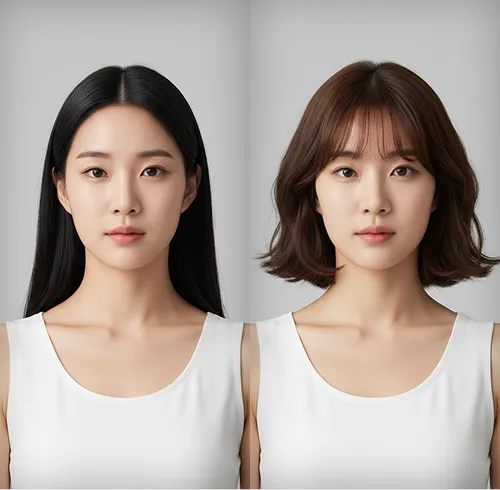
Example results
AI Hairstyle Changer: Try a New Look on Your Photo
How to try on a hairstyle
Not sure a new cut will suit you? Carat's AI hairstyle changer lets you try it on your own photo before you book the salon. The AI analyzes your face shape and features, then applies the hairstyle you pick, so the preview is built on your face rather than a stock model. Choose from seven looks (long wavy hair, long straight hair, bangs, a bob, dyed hair, a layered cut or a short cut) and compare them to see which one actually works for you.
01
Upload a front-facing photo
Use one clear photo where your face and hairline are fully visible.
02
Pick one of 7 styles
Choose long wavy, long straight, bangs, bob, dyed, layered or short cut, then press Create.
03
Compare and save
Check the result against your original photo and save the look you like.
What you can do
Preview a big change, like going from long hair to a bob or a short cut, before anything is cut.
Settle the bangs question by seeing yourself with a fringe first.
Save a reference image to show your stylist exactly the look you mean.
Run the same photo through several styles and ask friends which one suits you best.
FAQ
How does the AI hairstyle changer work?
×
It reads your face shape and features from the photo you upload, then renders the chosen hairstyle on your own face and hairline.
Which hairstyles can I try on?
+
Seven: long wavy hair, long straight hair, bangs, bobbed hair, dyed hair, a layered cut and a short cut.
Will it tell me what haircut suits me?
+
You choose the style yourself. Because the AI fits each style to your face shape, trying a few and comparing them is an easy way to see what suits you.
Can I change my hair color?
+
There is no color picker for choosing a specific shade. The "dyed hair" option shows you a preview of a colored look.
Does it work for men?
+
Yes, it works with any clear photo of a face. There are no dedicated men's cuts such as fades, and no beard styles; you choose from the same seven styles, including the short cut and the layered cut.
What kind of photo works best?
+
A well-lit, front-facing photo with your full hairline visible. Hats, hands, heavy shadows or side angles make the result less accurate.


© 2026 Paradot Inc. All rights reserved.


