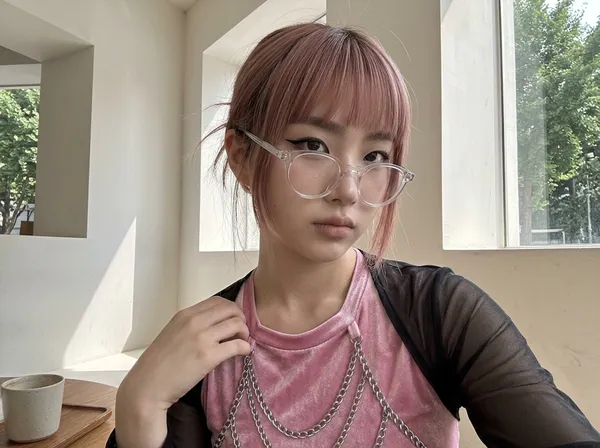
iPhone Portrait Photo
Example results
AI Selfie Generator: Realistic iPhone-Style Photos
How to make an AI selfie
The photos that feel most real online are rarely the polished ones. They are the quick selfie in a café window, the mirror shot before heading out, the full-body snap a friend took on the street. Carat AI's iPhone portrait tool is an AI selfie generator built around exactly that look. You don't write a prompt and you don't upload a photo: pick a gender and an age range, and it creates a realistic person in a casual, phone-camera style. When you want more control, every other detail is optional. Set the ethnicity, vibe, hair style and color, makeup, expression, fashion style, location, season and weather, then choose how the shot is framed. Each image is a brand-new, AI-generated person, which makes it a practical way to build lifestyle content, AI influencer concepts and realistic mockups without a photo shoot.
01
Choose gender and age
Select a gender and an age range: late teens, 20s, 30s, 40s, 50s or 60s+. That's all you need for a natural iPhone-style portrait; everything else can stay on default.
02
Style the look and the scene (optional)
Open Optional Settings to pick a vibe (natural, cute, idol, baby face and more), a hair style such as a bob, bangs, layers, a hush cut or a hime cut, plus hair color, makeup, expression and a fashion style like old money, Y2K street or office chic. Then set the place (café, convenience store, street, park, subway, beach, home, school, rooftop, parking lot and more), the season and the weather, from golden hour to rain. Add extra direction in your own words if you like.
03
Create your iPhone-style photo
Choose a shot type (Selfie, Mirror Selfie, Upper Body or Full Body), an aspect ratio (3:4, 4:5, 1:1, 9:16, 16:9 or 4:3) and how many images you want, then generate.
Ways to use it
Test the look and feed of an AI influencer account with everyday scenes like cafés, streets and beaches
Create realistic people for social ad concepts, mood boards and fashion or beauty pitches
Fill app screens, landing pages and presentations with natural-looking example people
Get a visual reference for a character's age, style and vibe when developing a story, comic or video
FAQ
What makes these look like iPhone photos?
×
Instead of studio lighting and posed editorial shots, the images look like casual phone snapshots taken in everyday places and natural light. Choosing Selfie or Mirror Selfie gives you the hand-held framing people recognize from real camera rolls.
Do I have to fill in every setting?
+
No. Only gender and age are required. Everything else is optional, so you can leave it blank and let the AI decide, or set just the details you care about.
Can I upload my own selfie?
+
No. This tool doesn't edit or restyle your photo. It generates a new, AI-made person from the settings you choose.
Can I keep the same face across photos?
+
Each generation creates a new person, so an identical face isn't guaranteed. Keeping the same settings will give you images with a similar look, style and mood.
Which aspect ratio should I pick?
+
4:5 or 1:1 suits an Instagram feed, 9:16 fits Stories, Reels and TikTok, and 3:4 matches a typical iPhone photo. Use 16:9 or 4:3 for landscape layouts.
Can I post these photos on social media?
+
The people in these photos are AI-generated and don't exist. Follow each platform's rules for labeling AI content, and don't present them as real people or use them to mislead anyone.


© 2026 Paradot Inc. All rights reserved.


