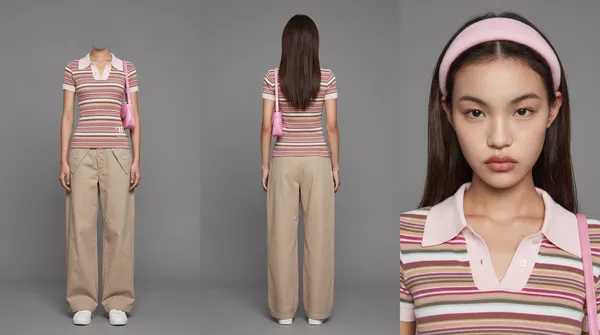
Character Sheet
Example results
AI Character Reference Sheet Generator
How to make a character reference sheet
Carat's AI character reference sheet generator turns a single photo or a short description into a clean reference sheet of a person, creature, prop or location. When you generate a series of AI images or video shots, the same character tends to drift: the face shifts, the hair changes length, the jacket swaps color. A character reference sheet fixes that. It collects the look of your subject in one image, so every new scene starts from the same source. No drawing skills, commissions or hours of turnaround art required. Make the sheet once, then reuse it whenever your character appears again.
01
Add a photo or description
Upload a photo of your character, write a few sentences about how they look, or use both.
02
Pick a sheet type
Choose the type that fits your subject (person, creature, prop or location) or leave it on Auto.
03
Create and reuse it
Hit Create, then add the finished sheet as a reference image in your next video or image project.
What you can do with it
Keep the same face, outfit and colors in every shot of an AI video or ad.
Lock in an original character (OC) before you start a comic, webtoon or storyboard.
Give a brand mascot or virtual creator one consistent look across a whole campaign.
Make sheets for props and locations so key objects and sets match from scene to scene.
FAQ
What is a character reference sheet?
×
It is a single image that records how a character or object looks, so artists and AI tools can reproduce it the same way every time. You may also see it called a model sheet, character design sheet or turnaround.
What makes a good reference sheet?
+
It should be easy to read at a glance, show the subject consistently, and make signature traits and colors obvious. Writing those traits into the description helps the sheet capture them.
Do I need to draw anything?
+
No. One photo or a short text description is enough to start. If you already have a sketch of your OC, you can upload that instead.
Can I make sheets for things other than people?
+
Yes. You can create reference sheets for animals, fantasy creatures, props and locations as well as people.
How do I use the sheet afterward?
+
Add it as a reference image when you generate new images or videos in Carat. The model then has one fixed source for the subject, which keeps it consistent across shots.
What does the Auto sheet type do?
+
Auto lets the AI pick the sheet type that suits your subject, so you can start without deciding whether it is a person, creature, prop or location.


© 2026 Paradot Inc. All rights reserved.


