Video Upscaler
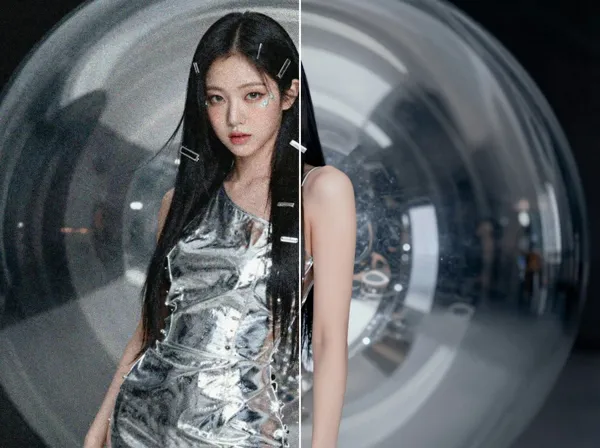
Example results
AI Video Upscaler & Video Quality Enhancer
How to upscale a video
Old phone footage, a clip that has been downloaded and re-uploaded until it turned to mush, a screen recording that looks soft on a big monitor: low-quality video is everywhere. Carat's AI video upscaler fixes it from a single upload. Add the original video you want to enhance, and the AI rebuilds the edges, textures and fine detail that low resolution and heavy compression wash away, then gives you back a sharper, high-definition version. Changing the resolution in a regular editor only stretches the pixels you already have, so the picture gets bigger but stays blurry. An AI video enhancer predicts the missing detail frame by frame instead, so faces, hair, fabric and on-screen text read more clearly. There are no scale factors or export presets to work through. You upload, press Create, and download the enhanced video.
01
Upload your original video
Add the clip you want to enhance in the Original Video field.
02
Press Create
The AI analyzes your footage and rebuilds sharpness and resolution.
03
Download the enhanced HD video
Compare it with the original and save the upscaled result.
Ways to use it
Bring old family videos and early phone footage back to life for today's screens
Clean up Shorts, Reels and TikToks that lost detail after being re-uploaded and compressed again and again
Sharpen product demos and ad clips so they look crisp on store pages and social feeds
Raise the quality of AI-generated clips so they sit naturally next to camera footage in the same edit
Frequently asked questions
How does an AI video upscaler work?
×
It analyzes the frames of your video and raises the resolution while filling in detail that was lost, such as edges and textures. This is called AI upscaling, or super resolution, and it is why the result looks genuinely sharper rather than just bigger.
How is this different from changing the resolution in a video editor?
+
A standard resize copies and stretches existing pixels, so blur and blockiness come along with it. An AI video quality enhancer redraws the missing detail, and that is what makes the improvement visible.
Can it fix blurry, compressed or very old videos?
+
In most cases you will see a clear improvement. If the original is extremely low resolution or badly damaged, the AI has less information to work with, so the difference may be smaller than you hope.
Do I need to choose a resolution or other settings?
+
No. The app has a single field for your original video. Upload it, press Create, and the AI enhances it to HD quality for you.
Will the AI change what happens in my video?
+
The goal is to keep the people, scenes, framing and motion of the original and only improve clarity. Because the AI redraws fine detail, very small faces or text can look slightly different, so review the result before you publish it.
Can I enhance photos here too?
+
This tool is built for video. For photos and other still images, use Carat's Image Upscale app instead.


© 2026 Paradot Inc. All rights reserved.


