carat

Galeria de prompts

/

Dramatic Lighting

Entrar
Cadastrar

Dramatic Lighting

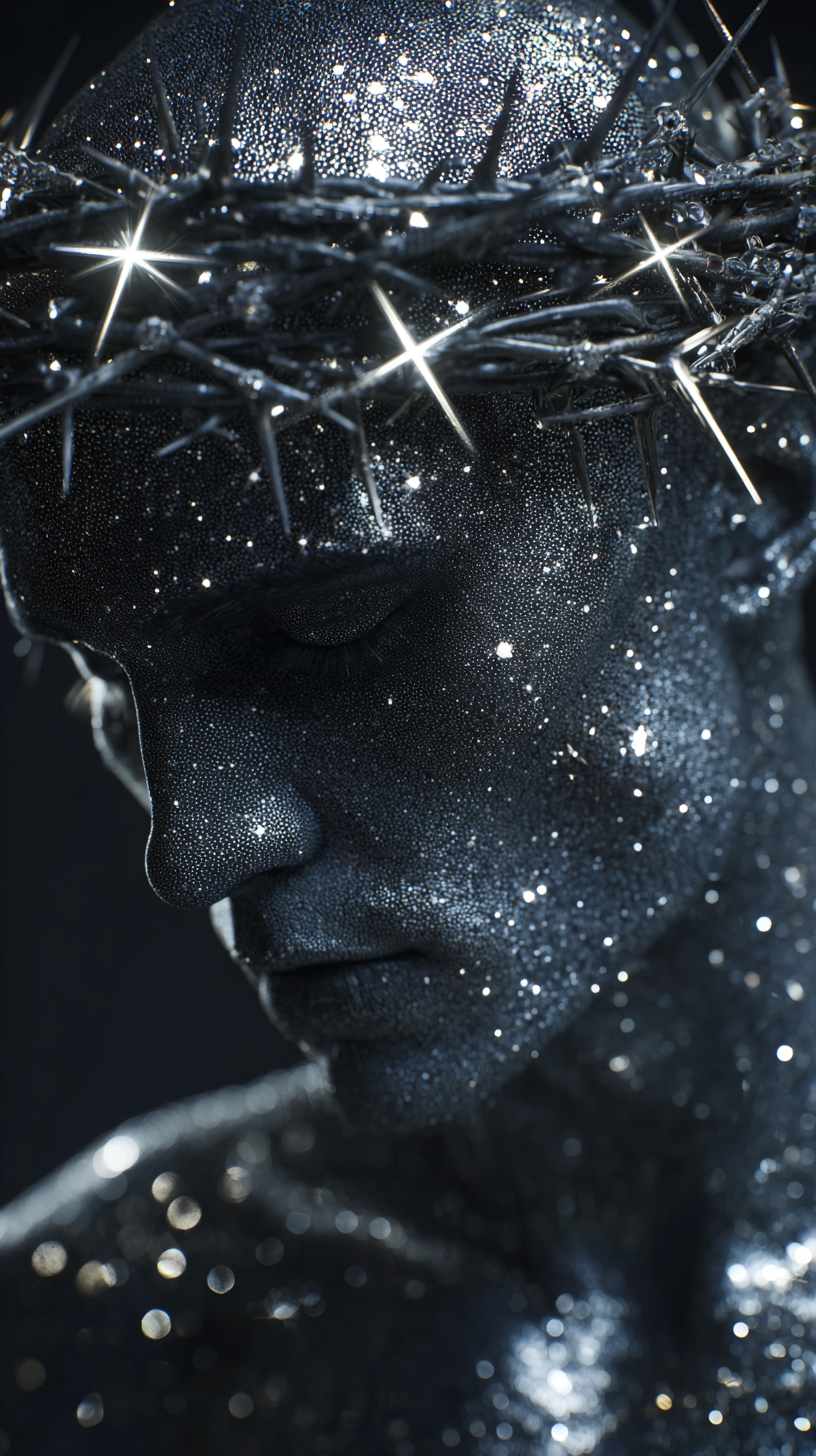
Dramatic lighting AI prompts you can use right away for striking portrait photography. Quickly create spotlight studio portraits or black-and-white rim-light silhouette shots.

2026.07.08

Faça “Dramatic Lighting” exatamente do jeito que você querCrie o seu próprio “Dramatic Lighting”

É só pedir com suas palavras — a Carat gera imagens e vídeos otimizados para você.

Comece agora com 100 créditos grátis por dia

·

Object Replacement in an Oil Painting Video

Gemini Omni Flash· Vídeo
Replace the bottle with an apple on this oilpainting video
@fal.ai

Dawn Fog Duel Cinematic Video

Gemini Omni Flash· Vídeo
Create a cinematic movie where it is about life or death
@fal.ai
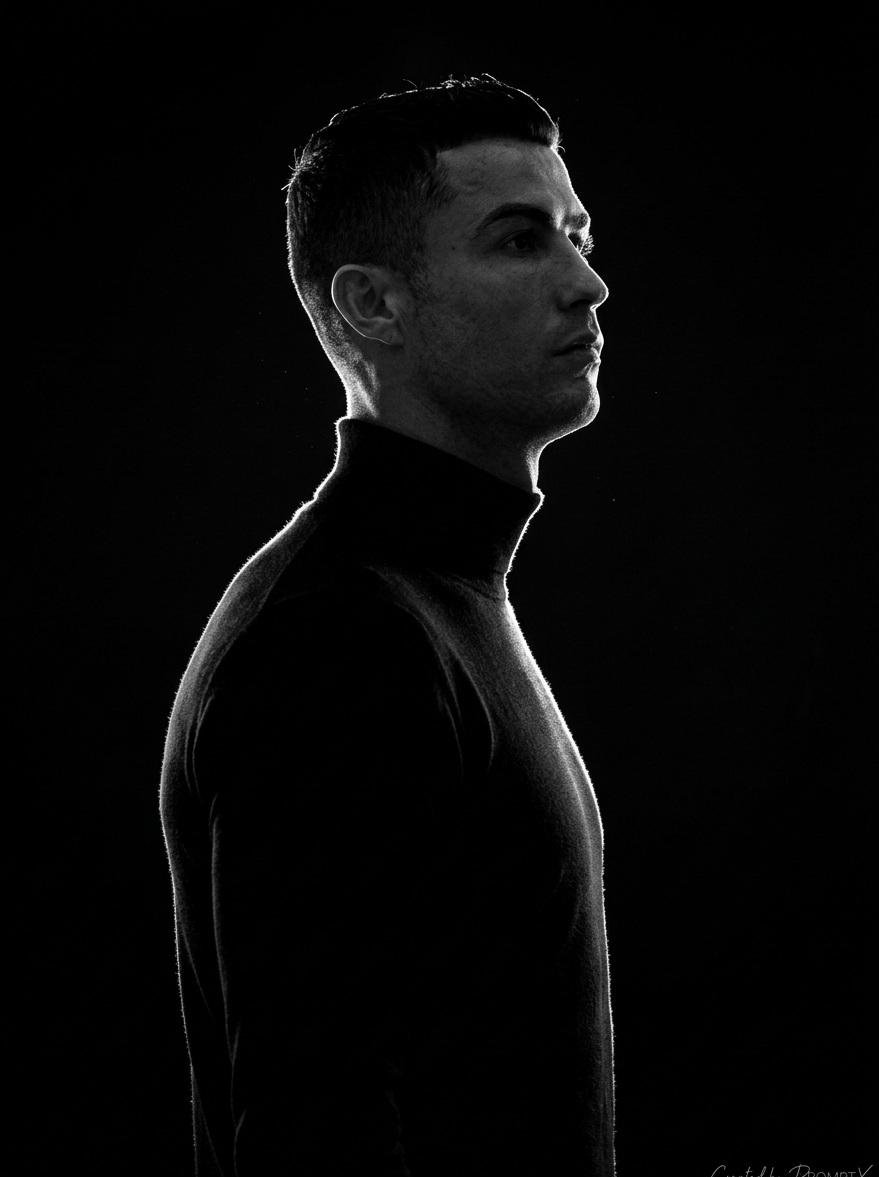
AI-generated Black-and-White Rim-Light Silhouette Portrait made with GPT Image 2

Black-and-White Rim-Light Silhouette Portrait

GPT Image 2· Imagem
A stark, high-contrast, black-and-white (monochromatic) side-profile portrait of a person (gender-neutral, perhaps male or ambiguous) emerging from absolute darkness. The figure is almost entirely a silhouette, defined solely by a very intense, narrow rim light (edge lighting) that traces the outline of their head, back, and arm. They are wearing a dark, form-fitting turtleneck or sweater, which completely disappears into the pure black background, emphasizing the glowing contour. The person is looking slightly upwards and to the side, conveying contemplation or a sense of aspiration. Subject: Gender-neutral or male figure, short hair, clean profile. The face is mostly in shadow, but the sharp line of light defines the jawline and brow. Lighting: Single, very hard, concentrated light source positioned directly behind and slightly to the side of the subject, creating a bright, glowing halo effect.
@Kashberg_0
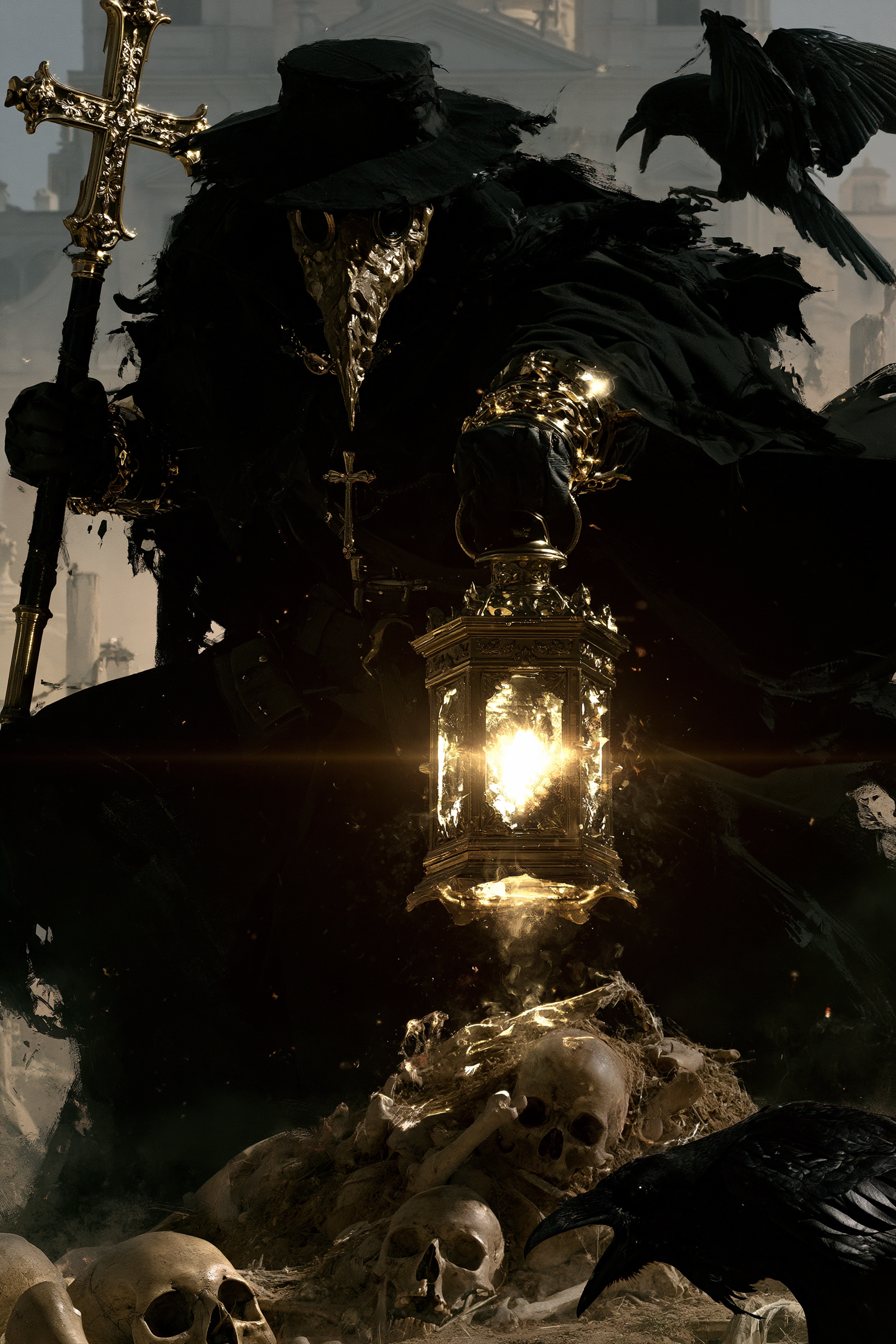
AI-generated Plague Doctor in a Graveyard made with Midjourney

Plague Doctor in a Graveyard

Midjourney· Imagem
A plague doctor with a textured mask, holding a lantern and a staff with a cross, standing in a graveyard, dynamic pose, surrounded by skulls and remains, Raven, hazy architectural background, dramatic high contrast lighting, realistic 4K --chaos 11 --ar 2:3 --exp 35 --raw --sref 931379730 3600739026 2856554496 2403970710 --profile gw85t4j rxbd514 --hd --preview
b5dc213527df2ee94adde656a8c477f2
AI-generated Vertical 9:16 photorealistic full-body portrait, nostalgic Taiwanese i… made with Midjourney

Pink Bob Qipao Portrait

Midjourney· Imagem
Vertical 9:16 photorealistic full-body portrait, nostalgic Taiwanese idol drama style, early-2000s analog flash photography, soft highlight bloom, gentle halation, dreamy blur, film grain, slight noise. A young East Asian woman with a short pink bob haircut and blunt bangs wears a fitted red qipao with subtle floral jacquard texture and matching red high heels. She has a cool, cocky, rebellious expression and looks directly at the camera. Full-body composition, head-to-toe framing, her entire body visible including both legs, feet, and red high heels. Slight low-angle wide-lens perspective to make the legs look long and stylish while keeping realistic anatomy. She stands at the entrance of a nostalgic Taiwanese snack shop with vintage Chinese signage, warm ambient light, old storefront textures, retro street atmosphere, and worn 2000s idol-drama mood. Pose: both arms extended toward the camera, forming the classic C-BLOCK “以下范上” gesture. Left hand higher, palm inward, index and middle fingers pressed together pointing upward, thumb extended sideways. Right hand lower, palm inward, index and middle fingers pressed together pointing downward, thumb extended sideways crossing near the left thumb. Hands are closer to the lens but not too huge, face clearly visible between or above them. Keep fingers straight, natural, and readable. Preserve hand skin texture and clear finger details. Do not overexpose the hands. Avoid loose peace signs, single-finger pointing, claw-like hands, distorted anatomy, cropped feet, hidden shoes, or hands covering the face.
1a3ec7fbfee4702b8f550ef8d9c98b7d
AI-generated Design a premium app icon presentation board for a children's mobile g… made with GPT Image 2

Design a premium app icon presentation board for a children's mobile g…

GPT Image 2· Imagem
Design a premium app icon presentation board for a children's mobile game icon, inspired by Apple Human Interface Guidelines, Google Material Design documentation, and professional Behance case studies. Use a clean editorial layout with a minimalist white background, subtle light-gray construction grids, generous whitespace, and modern Swiss-inspired typography. The presentation should feel like it was created by a senior brand designer at a top mobile game studio. Place the final app icon as the hero element in the center, occupying approximately 60–70% of the page. Surround it with elegant technical annotations connected by thin gray leader lines. Include labels such as Safe Area, Adaptive Icon Mask, Optical Center, Visual Weight, Focal Point, Padding Zone, Keyline Grid, and Recommended Crop Area. Overlay a precise construction grid consisting of circles, squares, alignment guides, center lines, diagonal guides, proportional geometry, and adaptive icon boundaries. The grid should be subtle, using thin cyan or light-blue lines with low opacity, similar to Apple's icon construction documentation. Around the hero icon, include clean presentation sections with consistent spacing:Hero Icon ShowcaseConstruction GridSafe Area & Adaptive Icon MaskOptical AlignmentVisual Hierarchy DiagramColor Palette Swatches with HEX valuesTypography & Annotation StyleIcon Breakdown (Outline → Base Colors → Shading → Final Artwork)Small Size Preview (1024px, 512px, 256px, 128px, 64px, 48px)Platform Preview (Square, Rounded Square, Circle, Squircle)Use elegant monochrome labels, thin divider lines, subtle spacing, and professional alignment throughout the page. Typography should resemble modern design documentation with lightweight sans-serif fonts, small uppercase section titles, and minimal captions. The overall aesthetic should communicate precision, craftsmanship, and premium product design rather than marketing. Avoid gradients, decorative backgrounds, heavy shadows, colorful graphics, unnecessary icons, or visual clutter. The presentation should look like an official design specification created for a world-class mobile game studio and be suitable for Behance, Dribbble, or an AAA game design portfolio. Ultra-clean, highly organized, modern editorial design, perfect spacing, museum-quality layout, premium UI/UX presentation style. Focus entirely on a clean professional icon specification sheet.
aacc56f2eccdceb35eb26a505aeb3232
AI-generated Hyperrealistic studio photograph of a majestic octopus with iridescent… made with GPT Image 2

Sunglasses Octopus Business Photo

GPT Image 2· Imagem
Hyperrealistic studio photograph of a majestic octopus with iridescent blue-grey mottled skin, wearing sleek minimal black sunglasses, positioned confidently on a glossy black obsidian pedestal in a seated, executive-like pose. Four tentacles each perform a distinct task simultaneously: one typing on a matte-black MacBook laptop, one holding a glowing smartphone displaying an upward revenue graph, one gripping a translucent holographic globe with pulsing connection nodes, one balancing a small stack of gold coins mid-transfer. Behind the octopus, five ultra-thin curved monitor screens arc in a 180-degree semi-circle, displaying SaaS dashboard interfaces, analytics charts, and a world map with glowing user-activity dots. Pure matte black studio background, no clutter, no extra props. Octopus skin rendered with ultra-fine photorealistic texture, subtle wet sheen on the suction cups. Shot on ARRI ALEXA 65 with a 50mm prime lens, shallow depth of field with the subject tack-sharp and the background screens falling into soft bokeh, dramatic single-source cool blue-white rim light from upper left, subtle warm red accent bounce light from lower right (hex ee4650), high-contrast chiaroscuro, glossy obsidian surface reflecting faint screen glow, ultra-detailed, 8k, commercial advertising photography --ar 4:5 --v 6.1 --style raw
2fd8674802b8a6aa04be8392eaa488d2
AI-generated 面容特写, 异色眼睛瞳孔内呈现红色,皮肤质感细腻,层次感油腻光,厚斜刘海,长直发,侧光透过镜头外缝隙在脸上形成独特唯美花纹阴影效果,轻质感纱… made with Midjourney

Red-Eyed Anime Face Close-up

Midjourney· Imagem
面容特写, 异色眼睛瞳孔内呈现红色,皮肤质感细腻,层次感油腻光,厚斜刘海,长直发,侧光透过镜头外缝隙在脸上形成独特唯美花纹阴影效果,轻质感纱巾缠绕脖子,游戏CG,电影质感,阴影描边,二次元,日系,梦幻,唯美,微风,动态模糊,明暗对比强烈,暗色系 --ar 9:16 --profile zrondri --hd
d0b7d9fda92227198bea07638a2e18cf
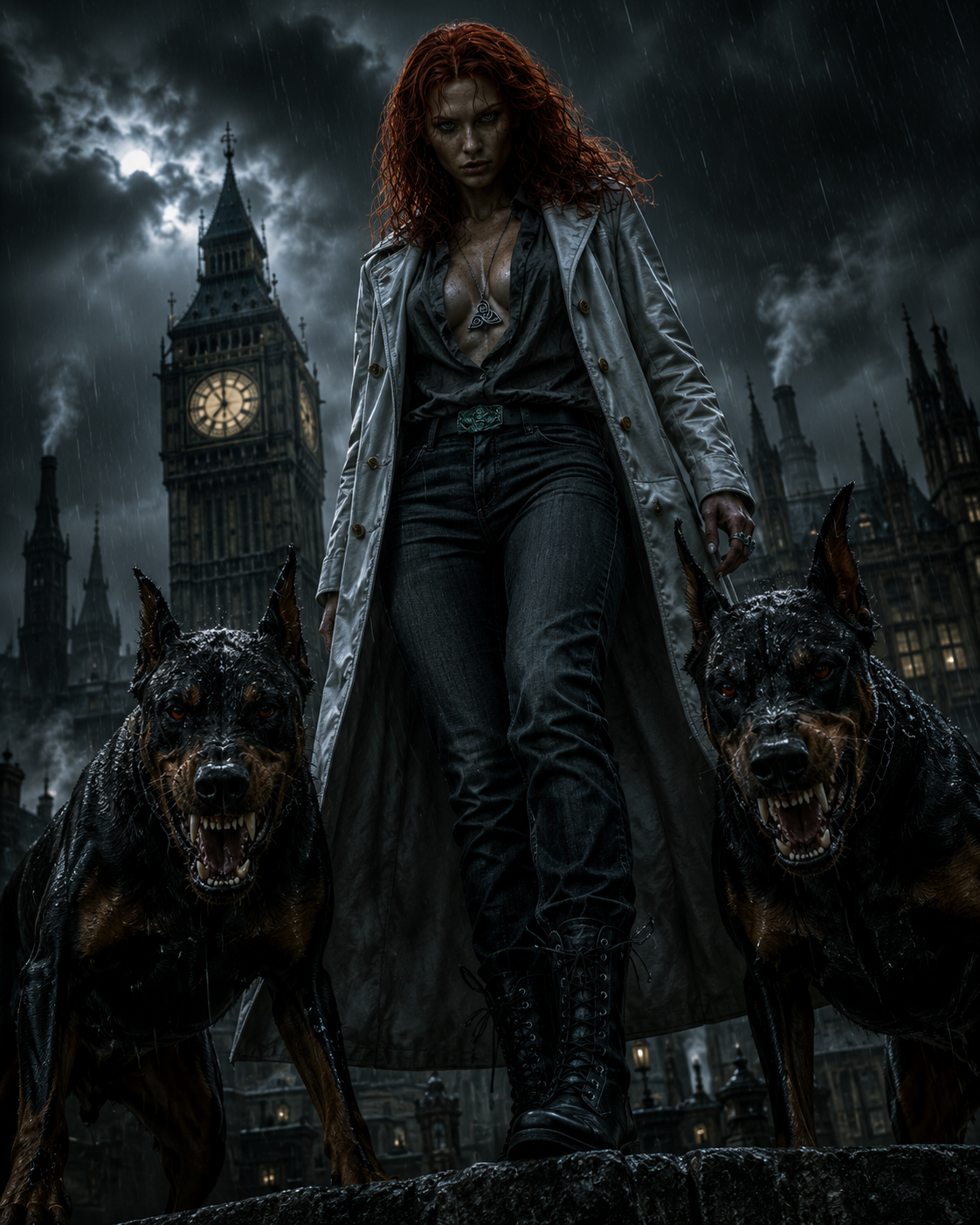
AI-generated Dystopian Big Ben Woman with Dobermans made with GPT Image 2

Dystopian Big Ben Woman with Dobermans

GPT Image 2· Imagem
A scene unfolds atop a Gothic tower in industrial, foggy 19th-century London, with Big Ben rising among Gothic and industrial buildings. A striking dystopian London scene under relentless rain, photorealistic style. In the foreground, a woman faces the camera with rain-soaked medium-length red hair. A low-angle shot shows her flanked by two terrifying Dobermans in an aggressive stance, with bared fangs. She wears a light gray leather coat with gold buttons, a dark gray shirt, a triskele pendant, dark jeans, a thin black belt with a silver buckle and greenish-copper relief, and small black lace-up boots.
c2506f350d962afe570cf97864f9597f
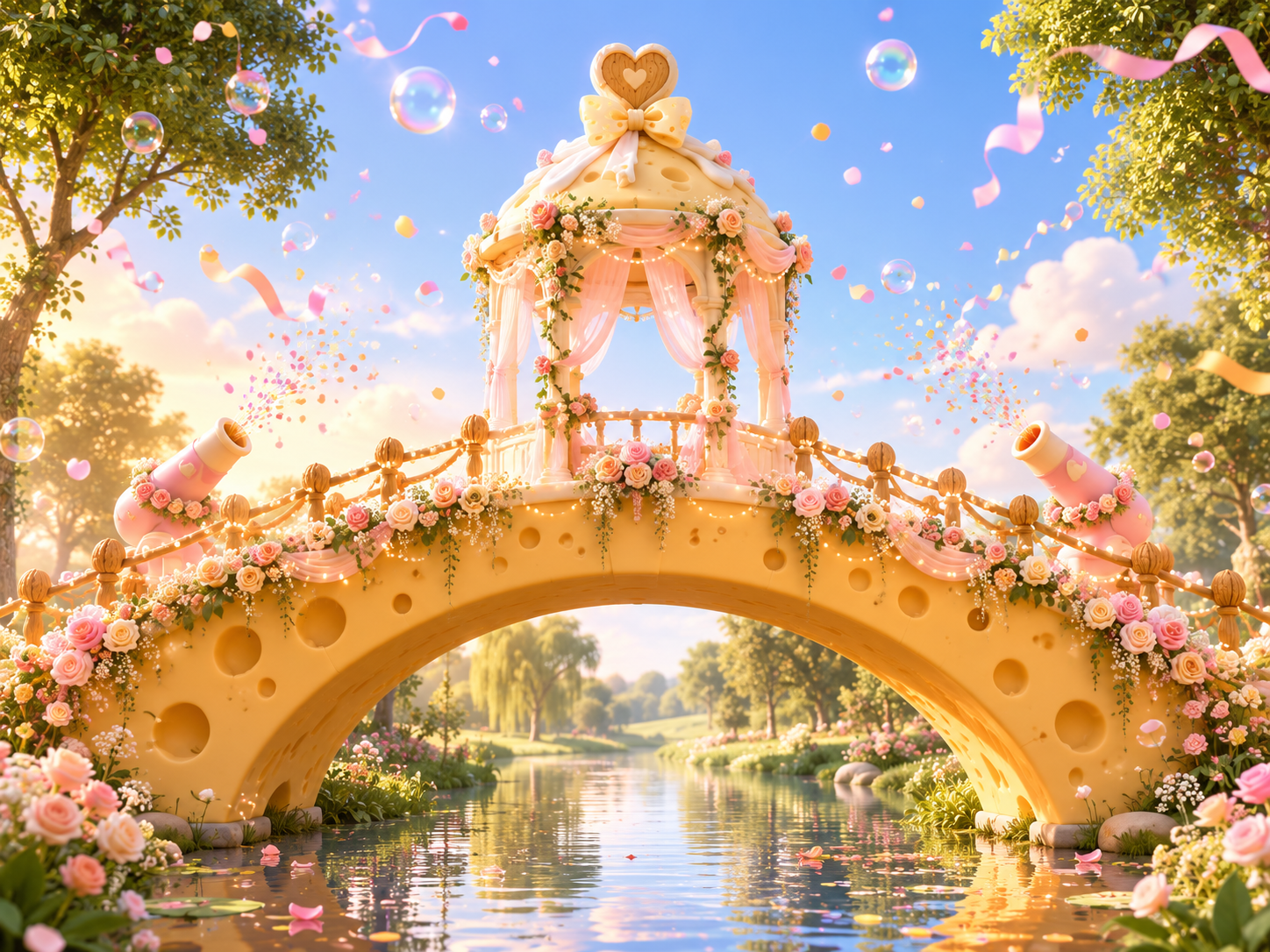
AI-generated Cheese Arch Bridge Wedding Pavilion made with GPT Image 2

Cheese Arch Bridge Wedding Pavilion

GPT Image 2· Imagem
[Overall Composition] A horizontal panoramic view, focusing the visual attention on the giant cheese arch bridge in the center of the image, with a symmetrical composition and an open panoramic perspective. [Bridge Body] An arch bridge made of cheese, with a creamy yellow cheese material on the bridge body; low nut shell railings on both sides of the bridge, spaced loosely, made from whole nut shells. [Central Ceremony Pavilion] A domed ceremony pavilion is built in the center of the arch bridge, with wedding decoration inspired by a warm forest-themed wedding style, hanging soft gauze curtains and wrapped floral decorations. [Pavilion Top Decoration] A heart-shaped wooden carving with flowing cream and a cheese-textured bow. [Bridge Surface Details] Warm light strings, cream and pink floral decorations, and cartoon confetti cannons. [Aerial Atmosphere] Transparent bubbles, colorful candy beads, and flowing matte ribbons create a lively festive atmosphere. [Style and Texture] Rounded Disney-like 3D cartoon animation style, soft warm golden diffused light, wide-angle lens, physical model, blind box toy, smooth delicate 3D rendering, no text, no logos.
https://promptsref.com/tool/AI-Image-Generator?share_id=e1ebba392cc856aff767691ae9f306df&show=true
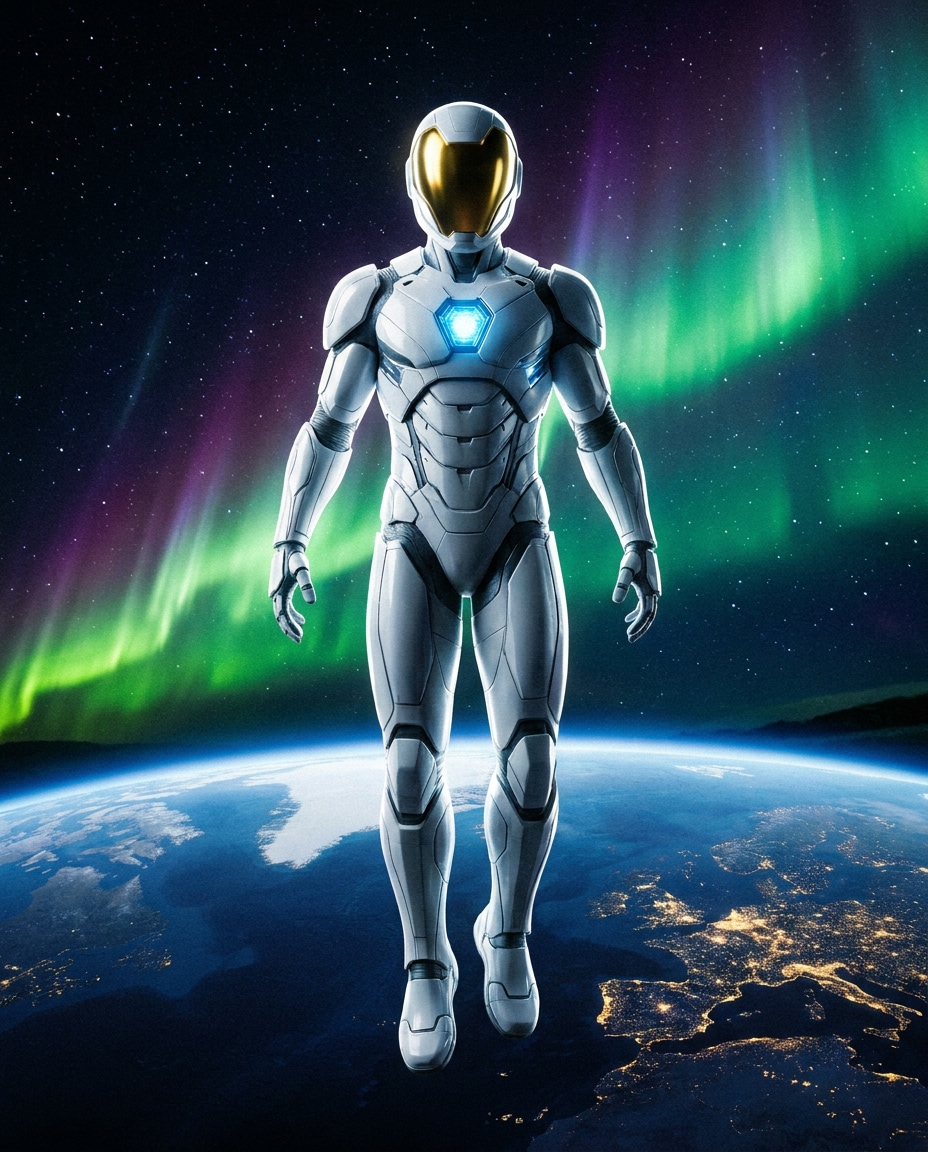
AI-generated Spaceborne Protector made with Nano Banana Pro

Spaceborne Protector

Nano Banana Pro· Imagem
A futuristic superhero floating in low orbit above Earth, sleek white suit with reflective visor and glowing chest core, stars and aurora behind, Earth curve visible, calm heroic pose, shot in a realistic cinematic style, 35mm perspective, full-body centered composition, crisp highlights, realistic materials, high resolution sci-fi poster lighting, dramatic contrast --ar 4:5
media.io:Spaceborne Protector
AI-generated 1. json prompt version ```json { "subject": { "description": "A croppe… made with Midjourney

Eyes in Editing Interface Close-up

Midjourney· Imagem
1. json prompt version ```json { "subject": { "description": "A cropped, low-resolution digital image of a person's eyes inside a rectangular selection box, resembling an image-editing canvas or screenshot. Only the eye area and eyebrows are visible; the rest of the face and body are cut off.", "mirror_rules": "Not a mirror selfie. Preserve the screen-capture / interface-editing feel rather than treating it as a conventional portrait.", "age": "adult or young adult, exact age unclear due to extreme crop and pixelation", "expression": { "eyes": { "look": "wide, direct, slightly tense gaze", "energy": "alert, uncanny, quietly confrontational", "direction": "looking straight toward the viewer" }, "mouth": { "position": "not visible", "energy": "not applicable" }, "overall": "fragmented and decontextualized, with the eyes carrying all emotional weight" }, "face": { "preserve_original": "Preserve the exact cropped eye-band framing, visible eyebrows, dark pupils, low-resolution halftone texture, and slight pink-gray screen tint.", "makeup": "No clear makeup is visible. The face should read as a raw, pixelated screen image rather than a polished beauty portrait." } }, "hair": { "color": "not visible", "style": "not visible", "effect": "not applicable" }, "body": { "frame": "not visible", "waist": "not visible", "chest": "not visible", "legs": "not visible", "skin": { "visible_areas": "Only a narrow strip of facial skin around the eyes, eyelids, under-eye area, bridge of the nose, and brow region is visible. No shoulders, chest, waist, hips, legs, back, or arms are visible.", "tone": "pale pink-gray skin tone distorted by screen pixels and scanline-like color separation", "texture": "The skin appears roughened by digital pixel structure, like it would feel visually grainy or screen-printed rather than physically smooth; any natural skin texture is obscured by the low-resolution display pattern.", "lighting_effect": "The skin is not lit by natural photographic light; it appears illuminated through a flat digital screen or screenshot, with no realistic shadow depth, only pixel-level contrast and faint magenta-gray banding." } }, "pose": { "position": "Only the eyes are framed horizontally inside a selected rectangular crop.", "base": "No body pose visible.", "overall": "The composition feels like a fragment being actively selected, edited, or dragged inside a design interface." }, "clothing": { "top": { "type": "not visible", "color": "not visible", "details": "not visible", "effect": "not applicable" }, "bottom": { "type": "not visible", "color": "not visible", "details": "not visible" } }, "accessories": { "device": "Implied computer interface or editing software canvas", "prop": "Multiple oversized black-and-white mouse cursor arrows surrounding and pointing toward the selected eye image" }, "photography": { "camera_style": "Not a traditional photograph; a screenshot-like digital collage or UI-capture aesthetic with a pasted low-resolution eye image.", "angle": "Straight-on, flat frontal view with no perspective depth.", "shot_type": "Extreme close-up crop of eyes embedded in a graphic interface composition.", "aspect_ratio": "Overall image is near 4:5 vertical canvas; the selected eye strip is a long horizontal rectangle.", "texture": "Visible pixel grid, moire-like vertical RGB scanlines, compressed low-res texture, hard-edged UI elements, clean white canvas background.", "lighting": "Flat screen illumination, no cinematic lighting, no natural directionality; contrast comes from the digital image and interface overlay.", "depth_of_field": "No optical depth of field; all elements appear flattened like a graphic screenshot." }, "background": { "setting": "Minimal white digital workspace or blank canvas", "wall_color": "white", "elements": [ "bright cyan-blue rectangular selection outline", "round blue resize handles on corners and midpoints", "small dark floating size tooltip near the top-right edge", "several repeated mouse cursor arrows arranged around the eye crop", "large empty white space above and below the selected image" ], "atmosphere": "Sparse, internet-art, meme-adjacent, slightly uncanny and obsessive", "lighting": "Pure digital white background with no physical environmental light" }, "the_vibe": { "energy": "hyper-focused, intrusive, glitchy", "mood": "uncanny, anxious, surveillance-like, absurdly intimate", "aesthetic": "early internet collage, screenshot art, low-res UI manipulation, digital found-image surrealism", "authenticity": "Should feel like an imperfect screenshot taken during editing, not a clean vector recreation or polished poster.", "intimacy": "The extreme eye crop creates uncomfortable closeness while the interface elements keep it emotionally detached.", "story": "It feels as if someone had been selecting a stranger's gaze on a blank canvas, and the repeated cursors are still converging on it.", "caption_energy": "something that was clicked too many times, a gaze trapped inside an editing box" }, "constraints": { "must_keep": [ "white blank background", "horizontal rectangular crop containing only both eyes and eyebrows", "cyan-blue selection box with circular resize handles", "visible pixelated / scanline texture across the eye image", "multiple large black-and-white cursor arrows pointing toward or around the eyes", "small size-tooltip near the upper right of the selection box", "flat screenshot-like composition", "uncanny direct gaze" ], "avoid": [ "do not turn it into a full-face portrait", "do not add visible body, clothing, hair, or environment", "do not make the image high-fashion or cinematic", "do not remove the UI selection handles", "do not smooth out the pixel grid", "do not replace the cursors with realistic hands or objects", "do not add dramatic shadows or realistic depth" ] }, "negative_prompt": [ "full body", "full face", "beauty portrait", "cinematic lighting", "realistic background", "smooth skin", "high resolution glamour", "fashion editorial", "hands", "extra facial features", "removed cursor arrows", "removed selection box", "3D depth", "polished vector art" ] } ``` 2. Natural language prompt Create a flat, screenshot-like digital collage on a mostly blank white canvas. In the center, place a long horizontal rectangular crop showing only a person's eyes, eyebrows, eyelids, under-eye area, and a narrow strip of pale pink-gray facial skin. The gaze should look straight at the viewer, wide and slightly tense, with an uncanny, alert emotional residue. Do not show the full face, mouth, hair, body, clothing, shoulders, chest, waist, hips, legs, arms, or any physical environment. The eye crop should look low-resolution and screen-captured, with visible pixel grid, vertical RGB scanline texture, faint moire, compression artifacts, and a slightly gray-magenta digital tint. The skin should not look polished or naturally lit; it should feel visually grainy, like a rough screen-printed or monitor-textured surface rather than smooth real skin. Lighting should be flat screen illumination with no realistic shadows, no cinematic directionality, and no depth-of-field blur. Surround the eye strip with a bright cyan-blue editing selection rectangle, including circular resize handles on the corners and midpoints. Add a small dark size-tooltip near the upper-right edge of the selected rectangle, as if the image is actively being resized in editing software. Place several oversized black-and-white mouse cursor arrows around the eye crop, some pointing toward the eyes and some overlapping the area below, creating a repetitive obsessive clicking energy. The composition should remain front-facing, flat, and graphic, with a near 4:5 vertical canvas and a large amount of empty white space above and below the selected eye strip. Preserve the imperfect screenshot feeling: slightly awkward placement, low-res texture, hard UI edges, and a casual internet-art quality. The image should feel as if someone had been selecting a stranger's gaze on a blank canvas, and the cursors are still converging on it. Avoid turning it into a full portrait, beauty shot, fashion editorial, cinematic scene, polished vector poster, or realistic environment. Keep the selection box, cursor arrows, pixelation, flat white background, and direct uncanny gaze as the core visual identity.

d1f13b0062b253274393e0ac28bf3555

What Are Dramatic Lighting AI Prompts?

Dramatic lighting uses strong contrast and directional light to heighten the mood of a photo. This tag covers prompts that bring that cinematic lighting feel to studio portraits and character shots.

Where You'll Use It

  • Spotlight studio portrait photography
  • Black-and-white rim-light silhouette portraits
  • Window-light portraits with strong contrast
  • Neon-colored mood lighting shots
  • Shadow-heavy, mysterious portrait looks

Why This Tag Is Useful

A portrait shot under flat lighting can look plain, but dramatic lighting keywords instantly give it an editorial, magazine-style feel. You get the look of a professional studio shoot without any actual lighting gear.

Tips for Crafting Prompts

  1. Specify the light direction, like side light or backlight.
  2. Name the contrast level directly, such as "high contrast."
  3. Describe where and how the shadows fall.
  4. Include the light's color temperature, warm or cool.

The more specific you are about light direction and contrast, the more dramatic the portrait will look.

Perguntas frequentes

Prompts relacionados

Character

Character

363 prompts

Poster

Poster

575 prompts

3D Cartoon

380 prompts

Illustration

Illustration

788 prompts

Galeria de prompts da Carat

Crie na hora os prompts de IA em alta

Prompts

  • Logo
  • Design de apresentação
  • Miniatura
  • Pôster
  • Capa de webnovel
  • Foto 3x4
  • Caricatura
  • Página de produto
  • Banner

Modelos

  • GPT Image 2
  • Seedance 2.0
  • Nano Banana Pro
  • Nano Banana 2

Carat

  • Começar
  • Sobre
  • Blog
  • Carreiras
  • Contato
  • Parcerias
  • Termos
  • Privacidade

© 2026 Paradot.Inc All rights reserved.