Nano Banana 2.1 Guide: How to Use It, Pricing and Pro Comparison
Learn how to use Nano Banana 2.1, check free access and API pricing, and compare it with Nano Banana 2 and Pro. Includes Gemini and Flow steps plus ready-to-use prompts.

Nano Banana 2.1 is Google's officially released image generation and editing model. Its API model name is gemini-nano-banana-2.1. As the successor to Nano Banana 2, it improves image design, local editing, and consistency for the same people and products.
Google revealed the 2.1 name in its official X announcement at 1 a.m. on October 7, 2026, Korean time. This article has also been fully updated from its earlier coverage of “Nano Banana 2.5” before launch to reflect the official name and published specifications.
A key goal of this update is to reduce edits where changing only the background also changes the product's shape. This guide covers how to use Nano Banana 2.1, how to check free access, API pricing, differences from Nano Banana 2 and Pro, and prompts you can copy.
🍌 Nano Banana 2.1 release date and official model name
The Gemini API release notes record October 6, 2026, as the official release date for 2.1. The October 7 date displayed on the official X post in Korea reflects the time difference. The model is now officially available, beyond the announcement and leak stage.
How Nano Banana 2.5 relates to 2.1
If you were searching for “Nano Banana 2.5” before launch, 2.1 is the official product name to check now. However, distinguish it from gemini-2.5-flash-image, the API name of the original Nano Banana. Reading the Gemini version number as the Nano Banana product version can confuse different models.
The Google DeepMind model card describes 2.1 as based on Gemini 3.6 Flash. “Nano Banana 2.1” is the product name, “Gemini 3.6 Flash” describes its base model, and gemini-nano-banana-2.1 is the name specified in the API.
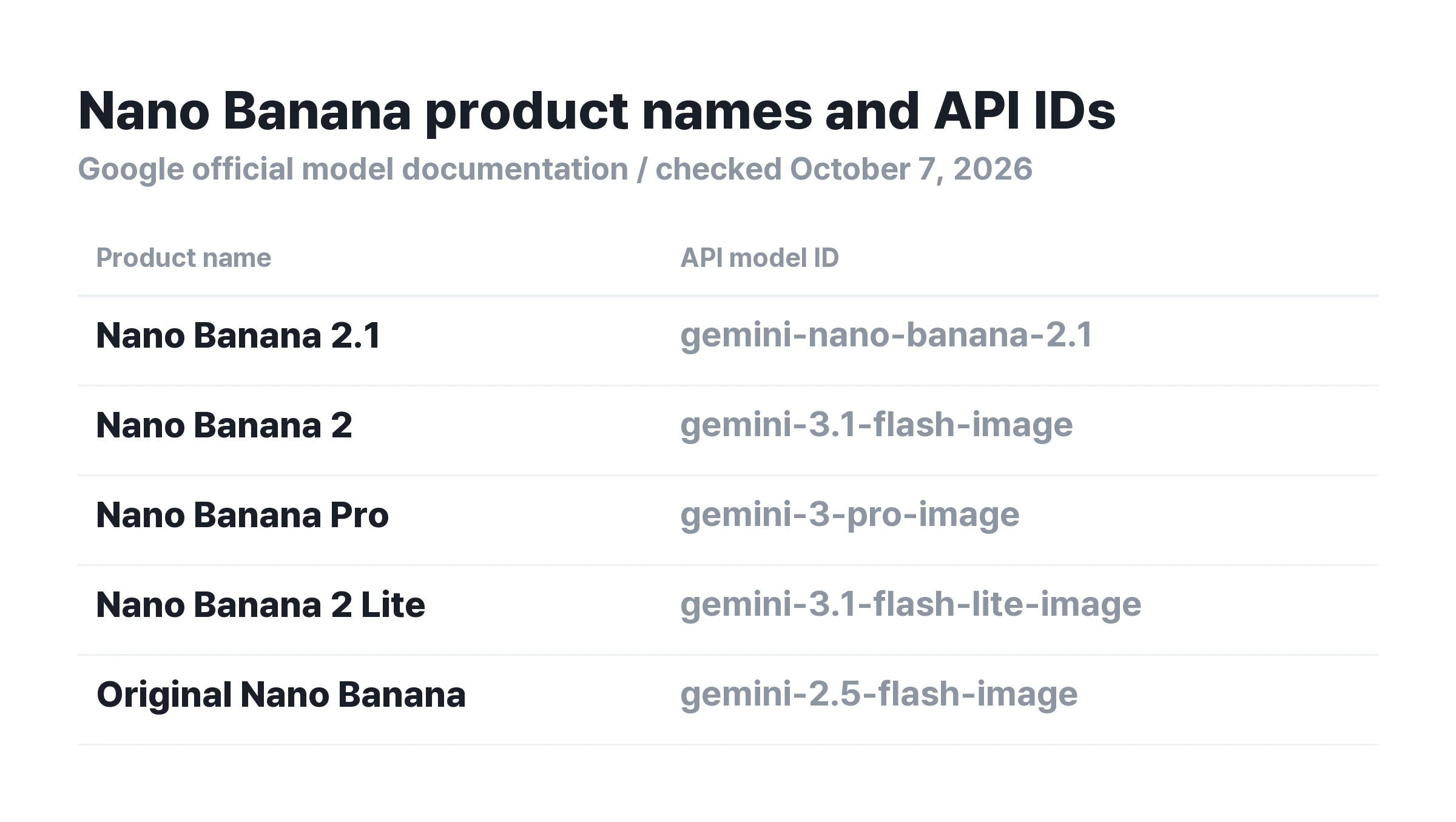
When checking a model name, look beyond the words “Nano Banana” on the screen. Check whether you have selected 2.1, 2, Pro, or Lite. A service offering several models can return different results through the same input field.
✨ What has changed in Nano Banana 2.1?
Google DeepMind's official introduction lists visual design, mask-based editing, subject consistency, and natural-looking images as key improvements. The descriptions below apply the official announcement to practical tasks. They are not Carat's own performance measurements.
① Visual design for posters and product pages
The model improves layouts combining text and images. For a café poster, specify the title, date, and price separately, and describe where attention should focus. Defining the required information and the purpose of empty space makes results easier to evaluate than asking for an attractive design.
② Editing only the area that needs changing
Mask-based editing lets you specify the area to change. Examples include changing the surrounding background while preserving a product, or editing a particular part of an image. If your service offers an area selection tool, make the selected area match the target described in your prompt.
③ Keeping the same person or product through repeated edits
This improvement applies to tasks such as keeping the same bag or character across several advertising concepts. Use the face, clothing, or product label you like in the first image as the reference. Then specify changes one at a time in subsequent requests. After each edit, also check the parts you asked to preserve.
④ Korean and English text, and wide images
The 2.1 model documentation describes improvements to text rendering and infographic layout. It also describes a fix for tiling errors that produced repeating patterns in some elongated 2K and 4K aspect ratios. This does not guarantee error-free Korean text, so compare business names, dates, and prices with the source before publishing.
⚖️ Differences from Nano Banana 2, Pro, and Lite
Nano Banana 2.1 is a candidate when you want one model for image creation and repeated editing. Existing models support different tasks, however. Version numbers alone cannot rank them across every kind of work.
Moving from Nano Banana 2
The 2.1 API supports 1K, 2K, and 4K output, with 1K as the default. According to the image generation developer guide, 2.1 does not support the 512px output offered by Nano Banana 2. If you generate drafts in bulk at low resolution, review the settings before copying them over.
2.1 accepts up to 14 reference images. The official specifications describe character consistency for up to 4 people and shape preservation for up to 10 objects. Support for 14 reference images does not mean it preserves the identity of 14 different faces.
If you already use Nano Banana Pro
Google's image model guide describes Pro as an option for complex visual tasks and professional production. If existing Pro outputs pass your brand review, compare a few representative images with 2.1 results under the same conditions before switching. An official improvement announcement does not establish that it beats Pro on every prompt.
When Nano Banana 2 Lite fits
Lite focuses on quick, simple image generation. Gemini Help explains that Lite is not intended for multiple reference images or repeated editing. A single concept sketch and a sequence of product images featuring the same bag call for different model selection criteria.
🛠️ How to use Nano Banana 2.1: Gemini, Flow, and AI Studio
Consider Gemini for creating and editing photos through conversation, or Flow for managing assets within a project. AI Studio and the Gemini API offer a way to check and specify the model ID and resolution directly.
① Create images in Gemini
Follow the Gemini link on the official model introduction page and sign in with a Google account. In the image generation interface, describe the scene you want. Alternatively, upload a photo and enter your editing request. You can continue requesting background, color, and composition changes in the same conversation.
Immediately after launch, documentation and account interfaces may show different labels. The Gemini image help page checked on October 7 still used “Nano Banana 2.” If you cannot clearly identify 2.1 in the app, do not assume every generation uses 2.1. Try another access option that displays the model name.
② Select a model and generate in Flow
Following Flow's image generation instructions, open a project, click the model name in the prompt field, and select Image. Check for Nano Banana 2.1 in the model list. Then set the aspect ratio and output count, and enter your prompt. Add reference photos if needed.
The Flow model help page lists 2.1 as the standard image generation and editing model. Before generating, check the active model, resolution, and estimated credits. Distinguishing automatic model selection by Agent from manually selecting 2.1 makes results easier to compare.
③ Check the model name in AI Studio and the API
Use the Google AI Studio link in the official model documentation. Check that the selected model is gemini-nano-banana-2.1. Developers connecting through the API can specify the same identifier. The prices below apply to this Gemini API, separate from consumer app subscriptions.
💰 Is Nano Banana 2.1 free? Pricing explained
Nano Banana 2.1 has no free tier in the Gemini API. Check app trials and subscription benefits separately from API charges. The absence of a free API tier does not mean every app charges for access.
The official Google API pricing page lists Standard image output at $0.0336 per 1K image, $0.0504 per 2K image, and $0.0756 per 4K image. These are roughly half the Nano Banana 2 image output costs at the same resolutions.
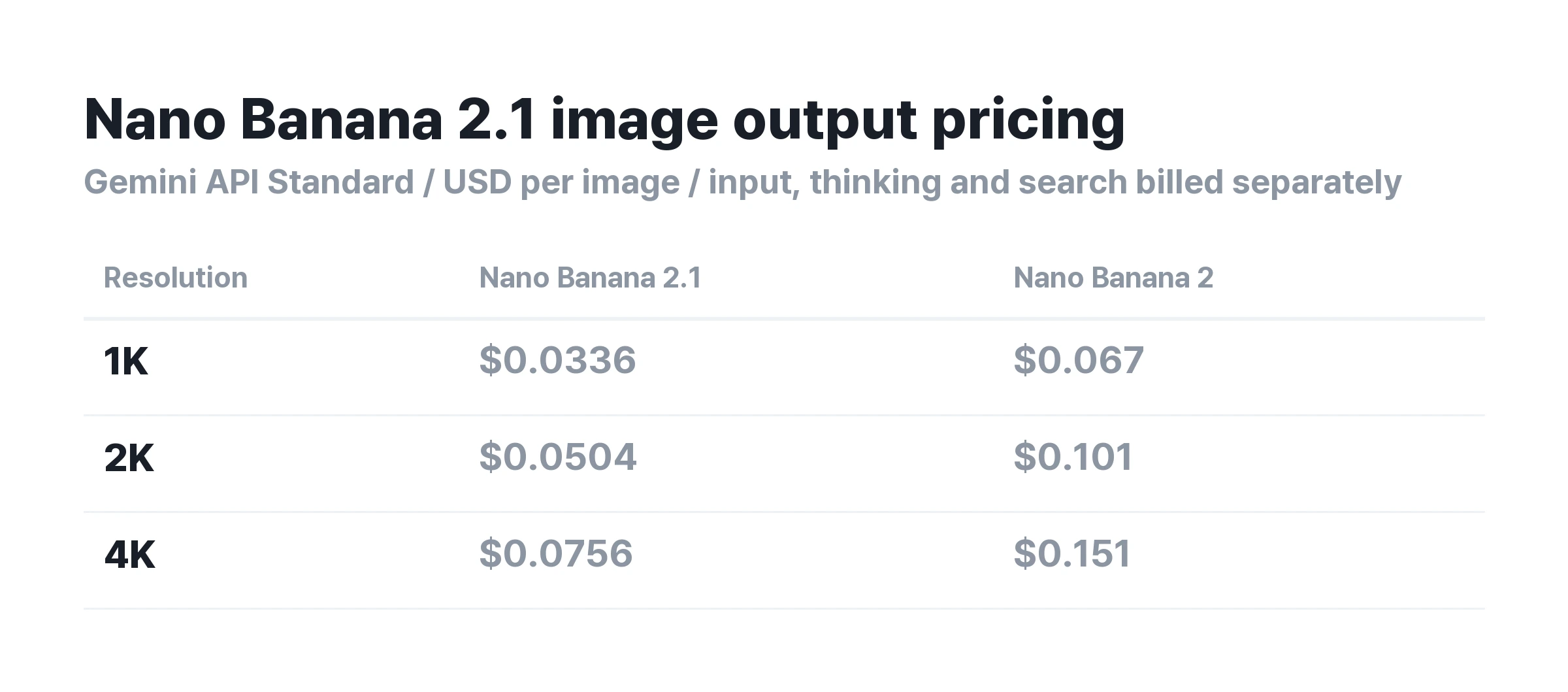
“Half the price” does not mean half the total bill
The amounts above cover image output. Input text and images, text and thinking output, and additional search usage charges are calculated separately. Standard input costs $1.50 per 1 million tokens, higher than Nano Banana 2's $0.50. Check the total cost for long editing conversations or tasks with many reference images.
For example, generating 100 images at 1K costs $3.36 for image output. At 2K, 100 images cost $5.04, and at 4K, 100 cost $7.56. These examples multiply the official unit prices. They are not final quotes including input and thinking costs.
How to check free access
In Gemini or Flow, first check the model name displayed in your account. Review usage limits and cost information before generating. A free image generation button does not mean unlimited 2.1 access. Flow Help lists Nano Banana 2 Lite as its free default model.
Do not infer the API price or model from a service's “free Nano Banana” wording alone. Carat's terms are also available in its current plan guide. Service subscription prices and Google API rates should not be compared as though they were the same pricing schedule.
📝 Nano Banana 2.1 prompt examples
These prompt templates are written for posters, product photography, characters, and local edits. They are not examples generated by Carat with 2.1 or guarantees of performance. Replace the bracketed fields for your task, generate an image, and revise the parts that need attention.
① Korean café poster
Create a vertical 4:5 café event poster. Write only the exact Korean text “[event name]” at the top, “[date]” in the middle, and “[price]” at the bottom. Use a warm cream background and place one glass of iced latte in the center. Make the title the largest text, with the date and price smaller. Make all text readable from the front. Do not add extra wording or invented logos.
During review, first check that the event name, date, and numbers match the source, before judging the mood. If text is wrong, specify the correction, such as “keep everything else and change only the date.” You do not need to describe the whole design again. A person should compare the text before final printing.
② Change the background while keeping the same product
Create an advertising image based on the attached [product] photo. Preserve the product silhouette, cap, label lettering, logo position, and colors. Change only the background to a bright gray studio, with soft light coming from the upper left. Place the product in the lower center and leave the top 25% empty for an advertising headline to be added later. Use a 4:5 aspect ratio.
For a second version, follow up with “keep the same product and composition, and change only the background to dark green.” Zoom in on the labels and caps in both results to check whether the product changed with the background. Correct differences from the actual product before publishing.
③ Continue scenes with the same character
Preserve the face shape, eye shape, hairstyle, and clothing colors of the character in the reference image. Create a 16:9 scene of the character [action] at [location]. Use an eye-level medium shot from the waist up. Change the expression to [expression] and blur the background naturally. Include one person and do not add new accessories.
For the next scene, change only the location and action. When including several people, explain who appears in each reference image. Liking one result does not verify consistency across a whole series. Compare the scenes side by side to check faces and clothing.
④ Local edits while preserving empty space
In the attached image, change only [area to edit] to [desired state]. Preserve all other people, products, composition, background colors, and lighting. Do not add text or objects to the empty area at the top. Make the edges and shadows of the edited area blend naturally with the surrounding image.
If the editing interface supports area selection, also mark the area to change. Check both whether the target changed and whether new elements filled the surrounding background or empty space. If you requested several changes at once, separate them to identify which condition failed.
For ideas to adapt these prompts to other tasks, see the Nano Banana prompt library. Use examples for earlier models as starting points for scene descriptions. Do not assume they will produce identical results in 2.1.
🔧 API migration and output review checklist
If you use the existing Nano Banana 2 API, start by planning the transition. According to Google's shutdown schedule, gemini-3.1-flash-image is scheduled to shut down on October 29, 2026. The recommended replacement is gemini-nano-banana-2.1. This date applies to that specific API model.
① Check the model ID you call and test representative prompts with 2.1. ② Replace any 512px output setting with a supported resolution. ③ Compare input, image output, and thinking costs together. ④ Check each actual use case, such as banners, Korean posters, and repeated edits.
❓ Nano Banana 2.1 frequently asked questions
Has Nano Banana 2.1 officially launched?
Yes. Google's official announcement and the Gemini API record confirm the October 6 release. The official X post is dated October 7 in Korean time. Earlier descriptions saying there was no official model name no longer reflect the current status.
What should I do if Nano Banana 2.1 does not appear?
Check the app's image generation menu and model selection interface. Labels and account access can vary by service. If you need to specify the exact model, check for gemini-nano-banana-2.1 in AI Studio through the official documentation link.
Is Nano Banana 2.1 free with unlimited 4K?
Free access and unlimited use cannot be promised together. The Gemini API has no free tier. App generation limits and download resolutions depend on the service's account terms. Support for 4K model output is different from every app offering free 4K downloads.
Does Nano Banana 2.1 completely replace Pro?
Not necessarily. 2.1 offers improved generation and editing capabilities and efficiency. Google also continues to describe Pro as a model for professional production. Choose by comparing your existing quality requirements and costs.
How can I use it for product pages or advertising?
Start with background concepts based on a product photo. Use separate prompts for posters that require text. Compare product facts and prices with the original materials, and check faces, labels, and typography before using the finished output. Start by filling in what to preserve and what to change in the prompts above.
Last checked: October 7, 2026. Updated using Google's official announcement, the DeepMind model card, Gemini API documentation, and Flow Help.