carat

Prompt Gallery

/

교육 영상

Login
Sign Up

교육 영상

교육 영상 제작에 활용할 수 있는 실전 프롬프트와 구성 기준을 확인하세요.

2026.07.22

·

제임스 웹 우주망원경 궤도 설명 영상

플럭스 3· Video
A hand-painted storybook animation explaining where the James Webb Space Telescope sits: a flat illustrated solar diagram with a large orange sun on the left, Earth in the middle, and the gold-mirrored telescope on a straight line beyond it. Cut to the telescope drawn in detail above a cloudy blue Earth, sunshield layers spread wide. Then the view pulls back to deep blue space with painted nebula clouds, and the telescope traces a looping halo orbit around a small glowing point, the path drawn as thin cream-colored ellipses that build up loop by loop. Textured paper-and-gouache look, gentle parallax. Audio: calm narration with soft ambient music.
@bfl_ai
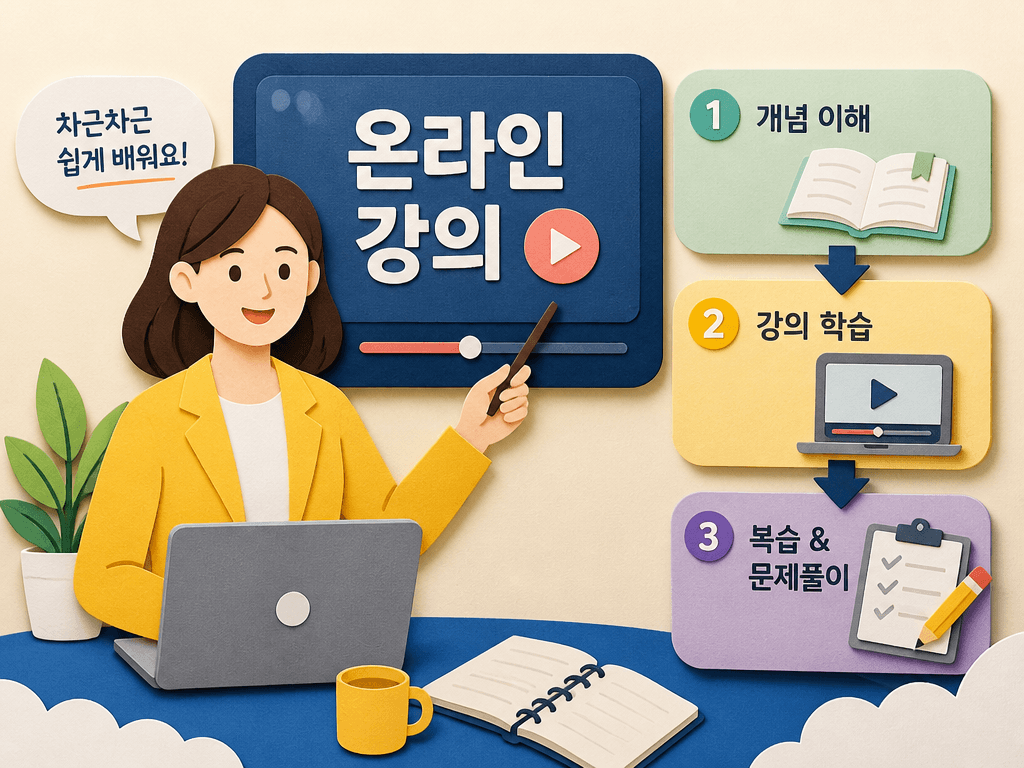
GPT 이미지 2로 생성한 교육 영상

교육 영상

GPT 이미지 2· Image
온라인 교육 영상의 대표 이미지, 강사와 학습 구조를 명확하게 보여주는 장면. handmade paper-cut illustration, tactile layers, soft shadows, crafted visual rhythm. three-quarter view with clear silhouette and subtle depth. bright friendly palette suitable for Korean mobile UI. Make the subject immediately recognizable at thumbnail size. Use clean composition, purposeful details, and no watermark. Choose the medium intentionally; do not default to any single decorative style.

조명 기법 15종 비교 영상

씨댄스 2.5· Video
This is a technical showcase of 15 lighting techniques. A cute girl sits in a studio with a black background facing the camera. She remains still while different lighting styles cycle through in rapid cuts. Stationary camera. One continuous shot. [1s] Key Light from left. The text "Key Light" appears at the bottom center of the frame. [1s] Fill Light is added from right. The text "Fill Light" appears at the bottom center of the frame. [1s] Both lights shuts off and back light turn on. The text "Back Light" appears at the bottom center of the frame. [1s] Key light and fill light both turn on again while the backlight remains on. The text "Three Point Light" appears at the bottom center of the frame. [1s] Change to High Key Light from the front. The text "High Key Light" appears at the bottom center of the frame. [1s] Dim to Low key lighting from the front. The text "Low Key Light" appears at the bottom center of the frame. [1s] Change to Rembrandt lighting from the right. The text "Rembrandt Lighting" appears at the bottom center of the frame. [1s] Chagne to Butterfly lighting. The text "Butterfly Lighting" appears at the bottom center of the frame. [1s] Chagne to Silhouette with strong light from behind. The text "Silhouette" appears at the bottom center of the frame. [1s] Change to Chiaroscuro Lighting. Extremely high contrast between light and dark areas. The text "Chiaroscuro" appears at the bottom center of the frame. [1s] Change to Left side lighting. The text "Side Lighting" appears at the bottom center of the frame. [1s] Change to rim lighting. The text "Rim Lighting" appears at the bottom center of the frame. [1s] Change to top lighting. The text "Top Lighting" appears at the bottom center of the frame. [1s] Change to bottom lighting. The text "Bottom Lighting" appears at the bottom center of the frame. [1s] All lights turn off, the backdrop falls to reveal a window with bright sunlight shining in from the outside. Camera tracks the girl turning to look outside and smile. The text "Natural Light" appears at the bottom center of the frame. Must show all lighting techniques precisely as noted. The character is a professional model.
@PocketScreenAI

주제 이해

교육 영상을 기획할 때는 장면의 목적과 시청자가 얻을 정보를 먼저 정리해야 합니다. 썸네일에서 핵심 대상이 즉시 보이고, 본편에서는 시선이 자연스럽게 다음 정보로 이동하도록 구성합니다. 이 페이지의 프롬프트는 주제, 화면 비율, 중심 요소, 여백, 색상과 질감을 한 번에 점검할 수 있도록 설계했습니다.

구성 설계

첫 장면에는 한 가지 메시지만 배치하고, 보조 요소는 계층을 만들 정도로만 사용합니다. 화면 중앙의 주제와 주변의 설명 영역을 분리하면 작은 모바일 화면에서도 의미가 흐려지지 않습니다. 인물, 도형, 보드, 아이콘 같은 시각 요소는 서로 겹치지 않게 배치하고, 다음 컷으로 이어질 방향성을 남겨야 합니다.

프롬프트 활용

생성 전에 목적, 대상, 분위기, 화면비, 금지 요소를 문장으로 적어 보세요. 원하는 결과가 나오지 않으면 모든 조건을 한꺼번에 바꾸지 말고 구도, 색상, 정보 밀도 중 하나만 수정합니다. 같은 조건으로 여러 변형을 만들면 비교가 쉬워지고, 선택한 결과를 기준으로 세부 장면을 확장할 수 있습니다.

품질 점검

작은 크기로 축소했을 때 주제가 알아보이는지, 텍스트처럼 보이는 가짜 기호가 메시지를 방해하지 않는지, 가장자리 요소가 잘리지 않는지 확인합니다. 인물이나 손, 도형의 연결부가 자연스러운지도 살펴보세요. 배경과 중심 대상의 명도 차이를 확보하면 피드에서 더 안정적으로 보입니다.

실전 적용

교육 콘텐츠, 브랜드 채널, 쇼츠 커버, 캠페인 시리즈처럼 반복 제작이 필요한 작업에서는 공통 팔레트와 여백 규칙을 먼저 고정하는 것이 좋습니다. 완성된 이미지는 실제 게시 환경에서 확인하고, 제목과 설명이 시각적 약속과 일치하는지 검토하세요. 관련 프롬프트를 함께 비교하면 다음 제작의 기준을 빠르게 만들 수 있습니다.

Frequently Asked Questions

Related Prompts

종이 질감 텍스처

종이 질감 텍스처

2 prompts

행성 일러스트

행성 일러스트

4 prompts

과학 일러스트

과학 일러스트

6 prompts

우주 일러스트

우주 일러스트

6 prompts

Carat Prompt Gallery

Create trending AI prompts instantly

Prompts

  • Logo
  • PPT Design
  • Thumbnail
  • Poster
  • Web Novel Cover
  • ID Photo
  • Caricature
  • Product Detail Page
  • Banner

Models

  • GPT Image 2
  • Seedance 2.0
  • NanoBanana Pro
  • NanoBanana 2

Carat

  • Get started
  • About
  • Blog
  • Careers
  • Contact
  • Partnership
  • Terms
  • Privacy

© 2026 Paradot.Inc All rights reserved.