Why OpenAI Is Spending on AI Jobs
OpenAI Foundation says it will put $250 million toward jobs and economic shifts shaped by AI. Sam Altman said AI should dramatically improve people’s quality of life and individual freedom around the world.
Hey, it's the Carat team. 🤗 Today: OpenAI Foundation’s plan for the AI economy, Google’s AI-powered inbox, conversational YouTube search, and Perplexity’s speed upgrade.
Why OpenAI Is Spending on AI Jobs
OpenAI Foundation says it will put $250 million toward jobs and economic shifts shaped by AI. Sam Altman said AI should dramatically improve people’s quality of life and individual freedom around the world.
The money will go toward labor transitions, measuring AI’s impact on the economy, and finding ways to spread the upside more widely. The AI race is no longer just about model quality. It is also becoming a question of who absorbs the cost of the shift, and how.
📌 Today’s 3 AI Updates
1️⃣ What if your inbox handled your to-do list first?
Google introduced an AI Inbox update for Gmail. It surfaces important emails, time-sensitive tasks, and follow-ups users might otherwise miss.
An inbox used to be something people had to sort and search by hand. Now AI is starting to pull the important work to the top. For many people, workplace AI may feel most useful in these small organizing moments, not in a flashy chatbot.
2️⃣ What if you could ask YouTube a full question?
Google introduced a conversational search feature called Ask YouTube. Instead of typing a few keywords, users can ask more specific questions, like planning a California coast trip or finding tips for teaching a kid to ride a bike.
The results feel less like a plain list of videos and more like a mix of videos and Shorts chosen for the question. Video search is moving from keywords to context.
3️⃣ Slow AI answers are not just a model problem
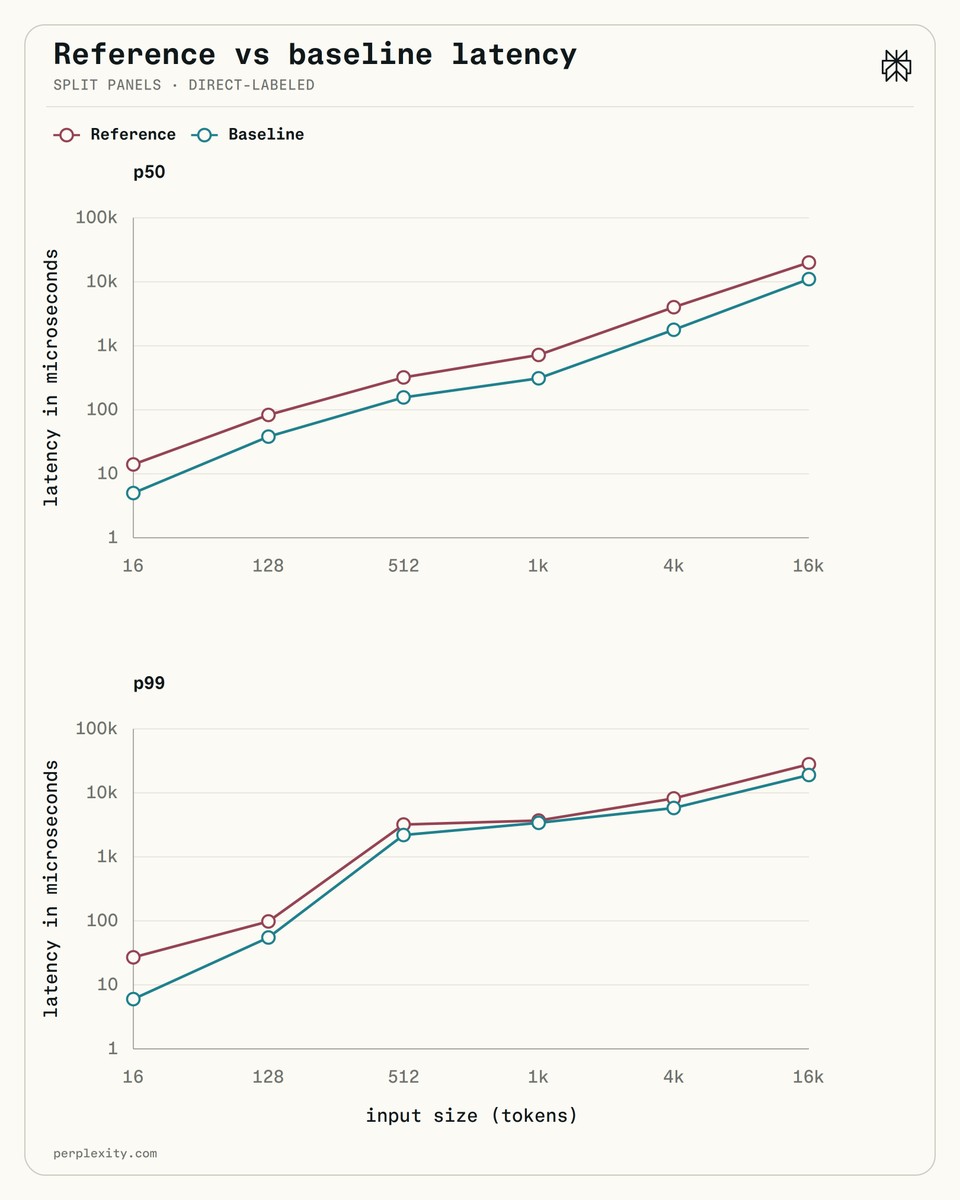
Perplexity open-sourced an internal tool used in its AI search stack. The company says it cut CPU usage by 5 to 6 times in the process of breaking text into smaller pieces AI can handle.
It may sound like a small technical detail, but these invisible steps shape answer speed and operating costs. Faster, cheaper AI services do not come only from larger models. They also come from improving the parts around them.
🧪 Today’s Prompt Tip
Turn one photo into a retro pixel icon
This tip is inspired by a retro pixel food icon prompt from foodibear_, which received 1,000 likes on Threads. The original prompt was made for food photos, so on Carat, we slightly adapted it into a portrait-friendly version.

This is what we made on Carat.

Paste the prompt below into Carat and upload the portrait photo you want to turn into a pixel icon.
Use the ChatGPT Images 2.0 Medium model with the prompt below to create an image.

Use the uploaded photo as a reference and turn the person in the photo into a cute retro pixel icon.
Do not recreate it as a realistic portrait. Reinterpret it as a small, crisp pixel artwork, like a 1990s game item icon or character profile icon.

Important:
- Reference the person's facial impression, hairstyle, and clothing colors.
- Turn the overall mood of the person into a cute, soft pixel icon.
- Keep the background white or a very light solid color.
- Use a square icon composition.
- Place the person large in the center.
- Use bold, clear pixel outlines.
- Keep the colors warm and vivid.
- Add only a few small decorations, such as tiny stars, sparkles, or hearts.
- The overall image should feel like a cute retro game icon.

Style rules:
- Retro pixel art
- 16-bit game graphic mood
- Cute icon-style character
- Simple, easy-to-read silhouette
- No excessive detail
- No semi-realistic style
- Soft, charming mood

Avoid:
- Photorealism
- Semi-realism
- Complex backgrounds
- Anime style with overly large eyes
- Changing the outfit into something unrelated to the photo
- Random extra props
- Blurry low-resolution look
Try it on Carat. 👉 Create on Carat
That’s it for today. We’ll be back tomorrow with more AI updates. ☺️