Saltar al contenido principal

Black and White

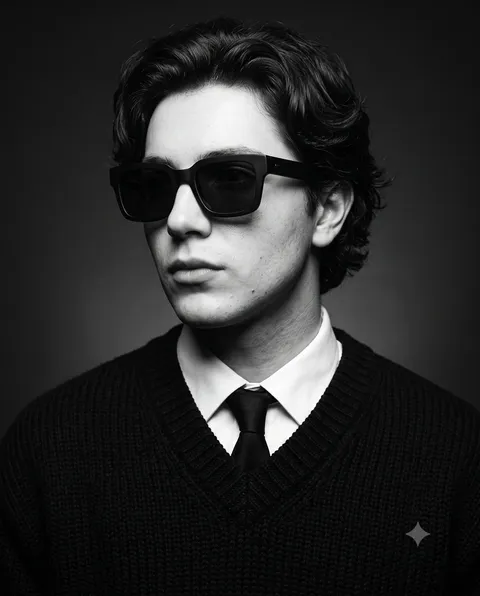
Black-and-white AI prompts you can use right away for profile photos and editorial concepts. Quickly create paper-sculpture portraits, contact sheet editorials, or monochrome portraits.

2026.07.08

Haz “Black and White” justo como lo quieresCrea tu propio “Black and White”

Pídelo en lenguaje natural: Carat genera imágenes y vídeos optimizados para ti.

Empieza ya con 100 créditos gratis al día

·

Shape morphing through UI states

Claude Opus 5.5· Vídeo
<inputs> Ask me for: 8 to 12 UI states I want the shape to become (e.g. button, loader, player, slider, toggle, tabs, chart, command palette, toast), pure black and white or one accent color, and a royalty-free song around 120 BPM (e.g. Mixkit, free for commercial use). </inputs> <direction> Dribbble-level UI motion. One shape, never cut: every state is the same element morphing its size, radius and color while its content swaps with a short blur. A cursor drives every change with real clicks and drags. Light warm-gray canvas, black and white components, one clean UI font (Geist). Springs everywhere, a tiny overshoot at most. The camera zooms so each state fills the frame. The last frame is the first frame, so it loops. Banned: bouncy easing, particle bursts, glows, gradients on UI chrome, mismatched icon strokes, dead time, anything that looks like a template. </direction> <structure> 120 BPM, 7 bars, something happens on every beat. Button → loader → check → dynamic island → music player with a play/pause morph → scrub the progress bar → it becomes a volume slider that stretches when dragged past max → a toggle flips on the beat → the knob becomes a liquid tab indicator → the tabs open into a chart that draws itself, with a tooltip on hover → it collapses into ⌘K → type to filter → enter → toast → back to the button. </structure> <build> 1. One HTML file, square 1440x1440. Every style is computed from time inside seek(t): no CSS transitions, no timers, no state carried between frames. 2. Springs are closed-form step responses. A value that changes target many times is the sum of one spring per change, so it stays a pure function of time. 3. The tab indicator's two edges ride different springs, so the leading edge stretches ahead of the trailing one. Same trick for the toggle knob. 4. Drags are direct manipulation: while the cursor is held, the value is computed from its position. On release it springs back from wherever it was. 5. Analyze the song with numpy for the beat grid and start on a downbeat. Place every UI sound by its measured peak. 6. Render with Playwright: 4 subframes per frame, blended with ffmpeg tmix for motion blur at 60fps. 7. Render one frame per beat before the full render. Fix anything off the grid, cramped or hard to read. </build> <gotchas> Never put will-change on anything the camera scales or the text renders blurry. Text that swaps inside a morphing container needs its own enter and exit timing or it overlaps. Make the last frame identical to the first, cursor position and speed included, or the loop stutters. </gotchas> <start> Ask me for the inputs, then show me the state list on the beat grid before you write any code. </start>
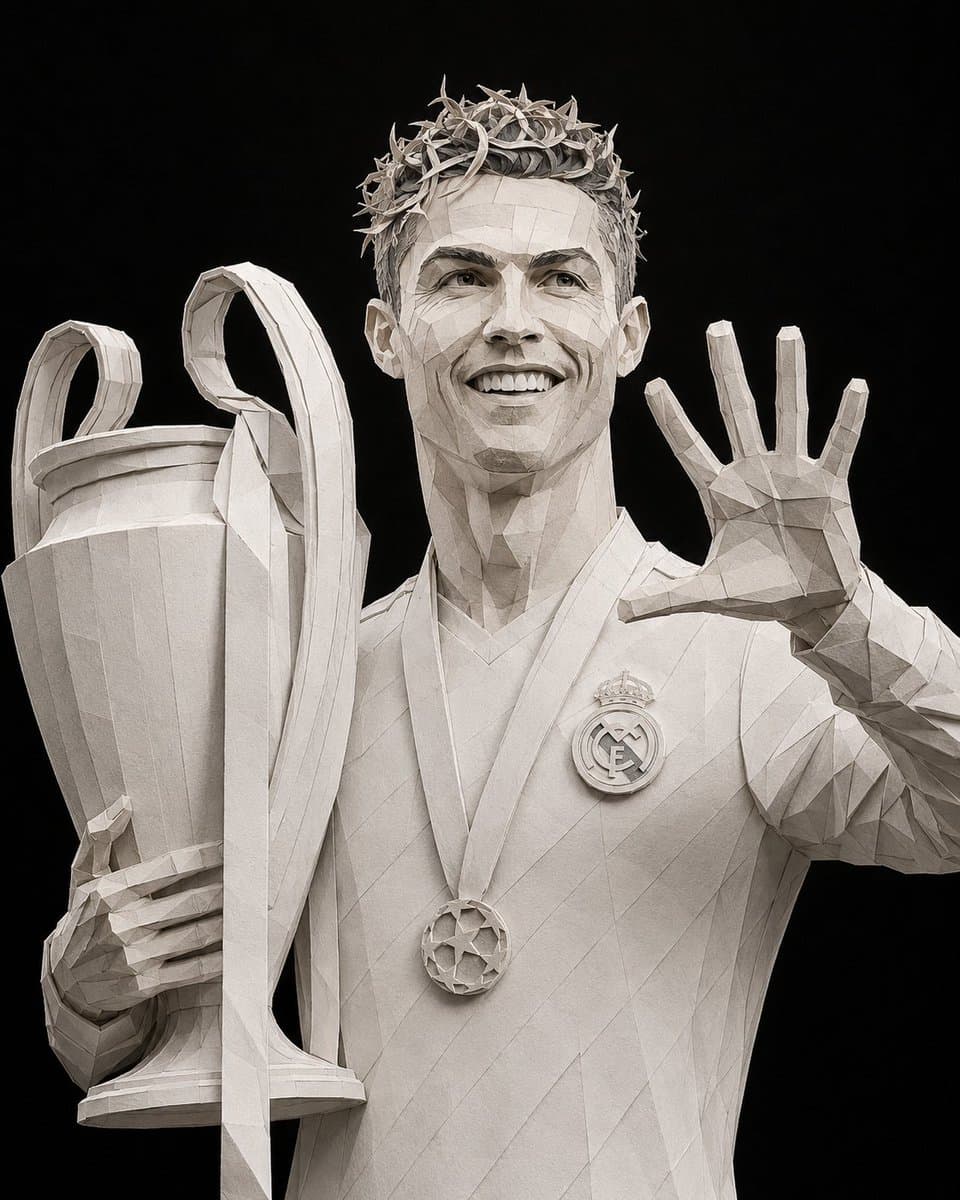
AI-generated Paper Identity Portrait made with GPT Image 2

Paper Identity Portrait

GPT Image 2· Imagen
Transform the uploaded reference photo into an ultra-premium Paper Identity portrait while preserving the subject's identity with exceptional facial accuracy. The person must remain instantly recognizable, with the exact facial structure, expression, hairstyle, facial hair, skin proportions, pose, body proportions, clothing, and every defining feature faithfully preserved. Recreate the entire portrait as if handcrafted by a master paper sculptor using hundreds of individually cut, folded, layered, curled, and assembled pieces of premium matte cardstock. Every visible element—including the face, hair, clothing, hands, accessories, and all objects—must be built entirely from layered paper with realistic thickness, crisp cut edges, subtle paper fibers, folded details, and handcrafted depth. The facial likeness is the highest priority. Use only a monochromatic palette of paper white, ivory, light gray, charcoal, graphite, and black. No colors, paint, plastic, metal, or CGI. Light the sculpture with soft professional studio lighting that enhances the paper layers and realistic shadows. Replace the background with a pure solid black backdrop for a premium editorial presentation. Compose the image in a 4:5 vertical ratio, maintaining the original pose. The final result should be ultra-high-resolution, museum-quality, and convincingly resemble a real handcrafted paper sculpture photographed in a professional studio. Do not add or remove anything from the original image. No text, logos, watermarks, borders, glowing effects, vector art, anime, cartoons, glossy materials, metallic finishes, or any element that breaks the illusion of a handcrafted paper masterpiece.
AI-generated Luxury Menswear Contact Sheet Portrait made with Nano Banana 2

Luxury Menswear Contact Sheet Portrait

Nano Banana 2· Imagen
Create a single 2×3 editorial contact sheet featuring the same gentleman photographed six times, with every frame maintaining identical identity, wardrobe, grooming, lighting, camera settings, background, composition style, monochrome treatment, and editorial quality. The only difference between the six panels should be the pose and hand gesture. The finished image should resemble an exclusive luxury menswear contact sheet from The Rake, Brioni, or a vintage GQ editorial, not a collage, poster, mood board, graphic design layout, or AI-generated montage. The subject is an elegant European gentleman aged 24–32 with a lean athletic build, soft oval face, naturally defined jawline, balanced masculine chin, fair skin rendered in monochrome, visible natural skin texture with preserved pores, natural matte finish, calm and composed presence, medium-thick eyebrows, straight refined nose, medium-full lips, very light designer stubble, and a classic medium-length gentleman hairstyle with soft layered waves. His expression remains consistently calm, thoughtful, disciplined, refined, and understated throughout all six photographs. He wears exactly the same luxury tailoring in every frame: a white Egyptian cotton dress shirt with French cuffs and classic silver cufflinks, a striped silk necktie tied with a traditional four-in-hand knot, a tailored Italian wool waistcoat with a slim bespoke fit, and a minimalist Swiss dress watch. The styling embodies Savile Row tailoring, heritage menswear, old money sophistication, European elegance, and quiet luxury. Photograph the entire series inside a professional portrait studio against a seamless medium-gray matte paper backdrop. Use a 105mm portrait lens, slight portrait compression, aperture f/4, moderately shallow depth of field. Illuminate using a large octabox as the soft key light, a white reflector fill, medium contrast, sculptural but soft shadows, inspired by Irving Penn, Richard Avedon, Peter Lindbergh, and Norman Parkinson. Render as a classic silver gelatin monochrome photograph with rich charcoal blacks, clean luminous whites, smooth tonal transitions, fine analog film grain, a Leica Monochrom aesthetic using Kodak Tri-X 400 and Ilford HP5 Plus tonal characteristics. Arrange the six photographs in a perfectly aligned 3-column × 2-row grid. Panel 01: adjusting French cuff. Panel 02: fastening waistcoat button. Panel 03: straightening tie knot. Panel 04: adjusting watch strap. Panel 05: hands clasped behind back. Panel 06: three-quarter side profile, head lowered. The final image should feel like a complete luxury heritage menswear campaign captured during one uninterrupted studio session, with every detail consistent across all six frames except body pose and hand gestures.

What Are Black and White AI Prompts?

Black and white AI prompts strip away color so an image reads through light, shadow, and texture alone. For portraits, this keeps attention on expression and composition instead of skin tone or background color. Carat's black and white prompts turn that effect into ready-to-use text, covering looks like paper-cutout portraits and contact sheet editorials.

Where You'll Use It

  • Profile photos and headshots for resumes or portfolios
  • Editorial lookbooks and brand photoshoot concepts
  • Analog-style contact sheet layouts
  • Artwork for social media feeds and profile pictures
  • Posters, album covers, and print materials

Why This Tag Is Useful

Removing color cuts out visual noise and puts the focus on facial expression, composition, and light contrast. Because the monochrome tone is already built into these prompts, you get consistent black and white results without extra color grading or post-processing. That consistency matters most for portrait editorials and brand visuals where a unified tone is the whole point.

Tips for Crafting Prompts

  1. State the tone directly with keywords like black and white, monochrome, or grayscale.
  2. Add lighting contrast (hard light, soft light) and texture cues (film grain, paper texture) to shape the mood.
  3. For portraits, describe the expression, gaze, and pose so the character comes through clearly.
  4. For a contact sheet look, add layout keywords such as 6-frame grid or film strip.

Copy a prompt below and swap in your own subject or concept. You can have a striking black and white image ready in seconds.
Preguntas frecuentes