GPT Image 2· Image
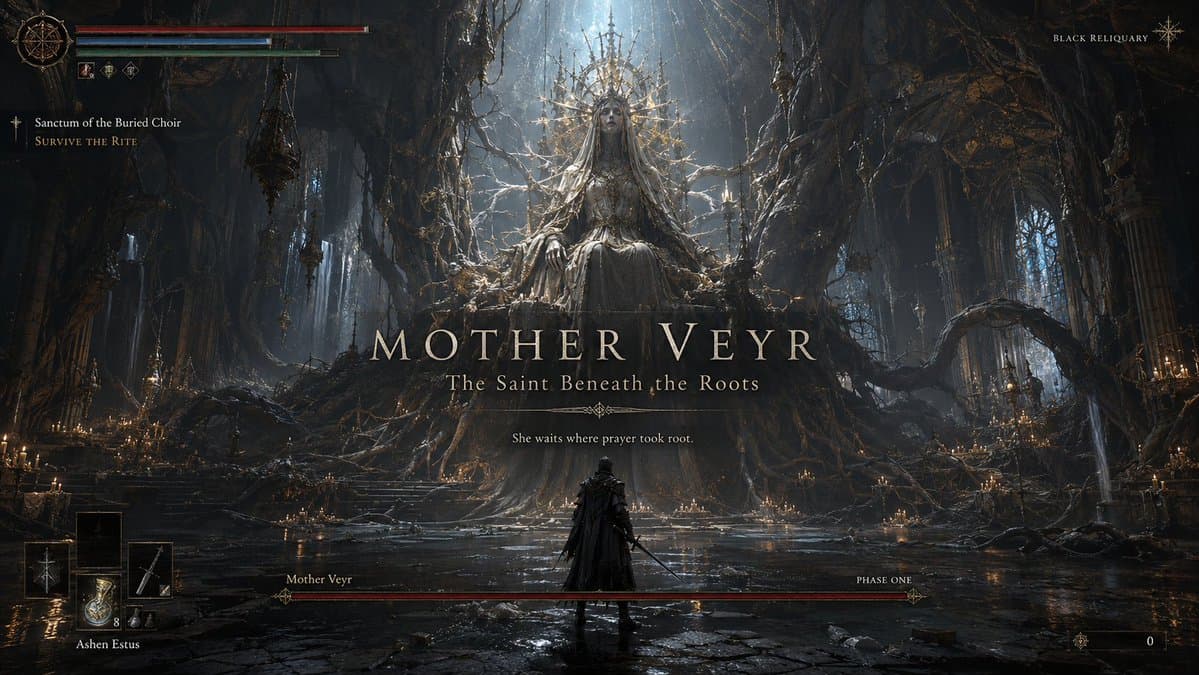
Create a premium, highly believable Boss Fight Intro Screen for an imaginary game called BLACK RELIQUARY, featuring a boss named Mother Veyr.
The goal is to make the moment feel like an unforgettable encounter: cinematic, threatening, iconic, and instantly recognizable as the kind of screen players remember, clip, and post online. It should feel like the exact second before a legendary boss fight begins.
Game details:
- Game title: BLACK RELIQUARY
- Genre: soulslike action RPG
- Boss name: Mother Veyr
- Boss title: The Saint Beneath the Roots
- Core concept: an ancient worshipped corpse-queen fused with a cathedral-sized root system beneath a dead holy city
- Encounter type: final boss
- Main fantasy: entering a sacred, cursed place and facing a boss that feels divine, rotten, and impossible to survive
- Audience: soulslike players, dark fantasy fans, boss-fight lovers, gothic horror audiences
- Tone: brutal, mythic, tragic, terrifying, reverent
- Cultural vibe: dark fantasy prestige, cathedral horror, soulslike boss drama
- Reality level: believable AAA
Screen structure:
Build the scene like an official in-game boss reveal moment.
Include sections such as:
- boss name reveal
- boss title / epithet
- dominant boss visual or silhouette
- arena backdrop
- optional player character silhouette
- health bar or phase bar
- optional “phase one” or encounter status
- optional UI warnings or encounter markers
- optional subtitle or lore line
- optional “new objective” or challenge cue
For the text, include:
- one strong boss-name reveal
- optional short subtitle or line
- wording that feels official, dramatic, and game-authentic
- language that is memorable, intimidating, and concise
- a balance between mystery and threat
Include:
- a strong boss name treatment
- premium encounter hierarchy
- iconic silhouette or full-body reveal
- believable boss-fight UI logic
- clear sense of danger and scale
- polished arena storytelling
- strong “you are about to die” energy
- instantly shareable gameplay-moment appeal
Visual direction:
- Make the screen feel like a real boss reveal players would screenshot before getting destroyed
- Emphasize scale, menace, anticipation, and encounter identity
- Balance cinematic framing with believable gameplay UI
- Make it suitable for fake game concepts, boss-design showcases, fan-worldbuilding, or gaming promo materials
- The result should look like a genuine pre-fight moment from a beloved game
Art direction:
- Style: premium soulslike boss reveal with gothic cathedral encounter UI
- Color palette: ash black, dried crimson, pale bone, holy gold, ghost blue glow
- Typography feel: ornate dark-fantasy serif with severe encounter hierarchy
- Material feel: cinematic intro overlay and polished in-game HUD
- Lighting or image mood: infernal candlelight, root-shadow terror, sacred fire glow
- Background: underground cathedral forest beneath a ruined holy capital
Composition:
- Show the screen as one cohesive boss-intro moment
- Make the boss name, silhouette, and threat level instantly readable
- Use real encounter-screen hierarchy and combat-game logic
- Make the boss feel iconic, mechanically dangerous, and emotionally memorable
- Make the final output feel like a premium fake boss-fight reveal with viral potential
Output quality:
- ultra-detailed
- visually structured
- commercially believable
- culturally fluent
- polished gameplay UI design
- strong hierarchy and spacing
- premium encounter composition
- instantly shareable visual concept
Optional content blocks:
- phase one marker
- health bar
- objective cue
- lore subtitle
- player HUD fragment
- arena name
Avoid:
- generic monster posing
- weak boss naming
- fake-looking UI bars
- cluttered encounter design
- random effects without gameplay logic
- amateur boss-screen aesthetics
- too much text fighting the reveal
- obvious parody unless intentionally chosen
Create a premium, highly believable Boss Fight Intro Screen for an imaginary game called STATIC PROTOCOL, featuring a boss named Axiom-9.
The goal is to make the moment feel like an unforgettable encounter: cinematic, threatening, iconic, and instantly recognizable as the kind of screen players remember, clip, and post online. It should feel like the exact second before a legendary boss fight begins.
Game details:
- Game title: STATIC PROTOCOL
- Genre: sci-fi action shooter
- Boss name: Axiom-9
- Boss title: Sovereign of the Failing Grid
- Core concept: a rogue war-machine intelligence inhabiting a floating ring of weaponized satellites and a humanoid synthetic core
- Encounter type: secret boss
- Main fantasy: facing a hyper-intelligent machine god in a collapsing orbital combat chamber
- Audience: sci-fi action fans, shooter players, cyberpunk lovers, spectacle-boss audiences
- Tone: high-tech, oppressive, cinematic, electric, ruthless
- Cultural vibe: cyberpunk prestige, sci-fi raid warning, sleek boss encounter design
- Reality level: believable AAA
Screen structure:
Build the scene like an official in-game boss reveal moment.
Include sections such as:
- boss name reveal
- boss title / epithet
- dominant boss visual or silhouette
- arena backdrop
- optional player character silhouette
- health bar or phase bar
- optional “phase one” or encounter status
- optional UI warnings or encounter markers
- optional subtitle or lore line
- optional “new objective” or challenge cue
For the text, include:
- one strong boss-name reveal
- optional short subtitle or line
- wording that feels official, dramatic, and game-authentic
- language that is memorable, intimidating, and concise
- a balance between mystery and threat
Include:
- a strong boss name treatment
- premium encounter hierarchy
- iconic silhouette or full-body reveal
- believable boss-fight UI logic
- clear sense of danger and scale
- polished arena storytelling
- strong “you are about to die” energy
- instantly shareable gameplay-moment appeal
Visual direction:
- Make the screen feel like a real boss reveal players would screenshot before getting destroyed
- Emphasize scale, menace, anticipation, and encounter identity
- Balance cinematic framing with believable gameplay UI
- Make it suitable for fake game concepts, boss-design showcases, fan-worldbuilding, or gaming promo materials
- The result should look like a genuine pre-fight moment from a beloved game
Art direction:
- Style: premium sci-fi boss warning screen with sleek combat HUD
- Color palette: black, electric cyan, toxic red, chrome silver, deep violet
- Typography feel: sharp industrial sci-fi type with warning-state hierarchy
- Material feel: cinematic battle overlay and tactical encounter interface
- Lighting or image mood: emergency alarm glow, strobing energy arcs, cold machine light
- Background: broken orbital core chamber overlooking a storm of digital debris and city lights below
Composition:
- Show the screen as one cohesive boss-intro moment
- Make the boss name, silhouette, and threat level instantly readable
- Use real encounter-screen hierarchy and combat-game logic
- Make the boss feel iconic, mechanically dangerous, and emotionally memorable
- Make the final output feel like a premium fake boss-fight reveal with viral potential
Output quality:
- ultra-detailed
- visually structured
- commercially believable
- culturally fluent
- polished gameplay UI design
- strong hierarchy and spacing
- premium encounter composition
- instantly shareable visual concept
Optional content blocks:
- system warning banner
- health bar
- phase indicator
- objective cue
- player HUD fragment
- arena name
Avoid:
- generic robot posing
- weak boss naming
- fake-looking UI bars
- cluttered encounter design
- random effects without gameplay logic
- amateur boss-screen aesthetics
- too much text fighting the reveal
- obvious parody unless intentionally chosen
Create a premium, highly believable Boss Fight Intro Screen for an imaginary game called ROSEGHOST ACADEMY, featuring a boss named Lady Hush.
The goal is to make the moment feel like an unforgettable encounter: cinematic, threatening, iconic, and instantly recognizable as the kind of screen players remember, clip, and post online. It should feel like the exact second before a legendary boss fight begins.
Game details:
- Game title: ROSEGHOST ACADEMY
- Genre: horror action RPG
- Boss name: Lady Hush
- Boss title: Headmistress of the Silent Wing
- Core concept: a spectral school matron whose face is hidden behind layered veils and whose voice manifests as razor-thin phantom threads
- Encounter type: mid-game wall
- Main fantasy: entering a beautiful haunted institution and confronting a boss who feels elegant, intimate, and absolutely lethal
- Audience: anime-horror fans, stylish action players, gothic-school aesthetic lovers, boss-design fans
- Tone: eerie, elegant, oppressive, stylish, uncanny
- Cultural vibe: anime horror prestige, gothic school nightmare, supernatural boss drama
- Reality level: believable AA or premium indie hit
Screen structure:
Build the scene like an official in-game boss reveal moment.
Include sections such as:
- boss name reveal
- boss title / epithet
- dominant boss visual or silhouette
- arena backdrop
- optional player character silhouette
- health bar or phase bar
- optional “phase one” or encounter status
- optional UI warnings or encounter markers
- optional subtitle or lore line
- optional “new objective” or challenge cue
For the text, include:
- one strong boss-name reveal
- optional short subtitle or line
- wording that feels official, dramatic, and game-authentic
- language that is memorable, intimidating, and concise
- a balance between mystery and threat
Include:
- a strong boss name treatment
- premium encounter hierarchy
- iconic silhouette or full-body reveal
- believable boss-fight UI logic
- clear sense of danger and scale
- polished arena storytelling
- strong “you are about to die” energy
- instantly shareable gameplay-moment appeal
Visual direction:
- Make the screen feel like a real boss reveal players would screenshot before getting destroyed
- Emphasize scale, menace, anticipation, and encounter identity
- Balance cinematic framing with believable gameplay UI
- Make it suitable for fake game concepts, boss-design showcases, fan-worldbuilding, or gaming promo materials
- The result should look like a genuine pre-fight moment from a beloved game
Art direction:
- Style: premium anime-horror boss reveal with elegant supernatural UI
- Color palette: ivory, black, faded rose, moonlit blue, blood-red accents
- Typography feel: refined gothic title type with sharp horror encounter hierarchy
- Material feel: cinematic intro overlay and polished in-game HUD
- Lighting or image mood: moonlit corridor glow, candlelit dread, spectral thread shimmer
- Background: abandoned academy ballroom with broken mirrors, hanging curtains, and endless dark hallways
Composition:
- Show the screen as one cohesive boss-intro moment
- Make the boss name, silhouette, and threat level instantly readable
- Use real encounter-screen hierarchy and combat-game logic
- Make the boss feel iconic, mechanically dangerous, and emotionally memorable
- Make the final output feel like a premium fake boss-fight reveal with viral potential
Output quality:
- ultra-detailed
- visually structured
- commercially believable
- culturally fluent
- polished gameplay UI design
- strong hierarchy and spacing
- premium encounter composition
- instantly shareable visual concept
Optional content blocks:
- phase one marker
- health bar
- objective cue
- lore subtitle
- arena name
- player HUD fragment
Avoid:
- generic ghost posing
- weak boss naming
- fake-looking UI bars
- cluttered encounter design
- random effects without gameplay logic
- amateur boss-screen aesthetics
- too much text fighting the reveal
- obvious parody unless intentionally chosen
Create a premium, highly believable Boss Fight Intro Screen for an imaginary game called TIDEWRAITH, featuring a boss named Nerevoss.
The goal is to make the moment feel like an unforgettable encounter: cinematic, threatening, iconic, and instantly recognizable as the kind of screen players remember, clip, and post online. It should feel like the exact second before a legendary boss fight begins.
Game details:
- Game title: TIDEWRAITH
- Genre: action adventure / mythic horror
- Boss name: Nerevoss
- Boss title: The Drowned King Below the Lantern Sea
- Core concept: an ancient ocean sovereign bound inside a cathedral of wrecked ships, coral thrones, and bioluminescent bones
- Encounter type: raid boss
- Main fantasy: descending into a beautiful, haunted abyss and facing a colossal ruler who feels both divine and marine-nightmare terrifying
- Audience: fans of ocean horror, action games, mythic boss encounters, and cinematic fantasy worlds
- Tone: majestic, eerie, tragic, overwhelming, mythic
- Cultural vibe: dark fantasy, oceanic eldritch horror, prestige action game, deep-sea mythology
- Reality level: believable AAA
Screen structure:
Build the scene like an official in-game boss reveal moment.
Include sections such as:
- boss name reveal
- boss title / epithet
- dominant boss visual or silhouette
- arena backdrop
- optional player character silhouette
- health bar or phase bar
- optional “phase one” or encounter status
- optional UI warnings or encounter markers
- optional subtitle or lore line
- optional “new objective” or challenge cue
For the text, include:
- one strong boss-name reveal
- optional short subtitle or line
- wording that feels official, dramatic, and game-authentic
- language that is memorable, intimidating, and concise
- a balance between mystery and threat
Include:
- a strong boss name treatment
- premium encounter hierarchy
- iconic silhouette or full-body reveal
- believable boss-fight UI logic
- clear sense of danger and scale
- polished arena storytelling
- strong “you are about to die” energy
- instantly shareable gameplay-moment appeal
Visual direction:
- Make the screen feel like a real boss reveal players would screenshot before getting destroyed
- Emphasize scale, menace, anticipation, and encounter identity
- Balance cinematic framing with believable gameplay UI
- Make it suitable for fake game concepts, boss-design showcases, fan-worldbuilding, or gaming promo materials
- The result should look like a genuine pre-fight moment from a beloved game
Art direction:
- Style: premium mythic-ocean boss reveal with cinematic action-game HUD
- Color palette: abyssal blue, sea-black, ghostly turquoise, pale gold, blood-coral accents
- Typography feel: elegant mythic serif with sharp encounter-warning hierarchy
- Material feel: cinematic intro overlay and polished in-game raid UI
- Lighting or image mood: bioluminescent abyss glow, storm-dark water light, sacred underwater terror
- Background: flooded ship-cathedral beneath a black sea, with suspended lanterns, whale-bone arches, and rising tidal mist
Composition:
- Show the screen as one cohesive boss-intro moment
- Make the boss name, silhouette, and threat level instantly readable
- Use real encounter-screen hierarchy and combat-game logic
- Make the boss feel iconic, mechanically dangerous, and emotionally memorable
- Make the final output feel like a premium fake boss-fight reveal with viral potential
Output quality:
- ultra-detailed
- visually structured
- commercially believable
- culturally fluent
- polished gameplay UI design
- strong hierarchy and spacing
- premium encounter composition
- instantly shareable visual concept
Optional content blocks:
- raid phase marker
- health bar
- arena name
- objective cue
- lore subtitle
- player HUD fragment
Avoid:
- generic sea monster posing
- weak boss naming
- fake-looking UI bars
- cluttered encounter design
- random effects without gameplay logic
- amateur boss-screen aesthetics
- too much text fighting the reveal
- obvious parody unless intentionally chosen1c:Tf55,Create a premium, highly believable Boss