Japanese Photo Booth
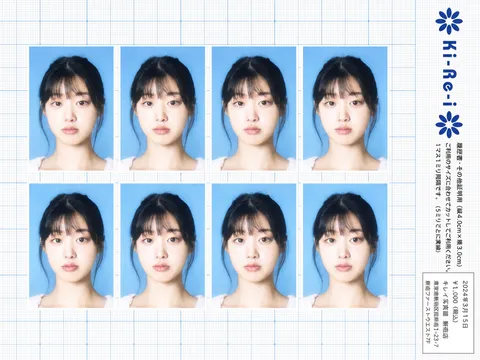
Japanese photo booth AI prompts ready to turn your selfie into a booth print. Quickly create a Ki-Re-i eight-photo ID sheet on a graph paper background with an early 2000s digicam profile look.
2026.06.11
Fais « Japanese Photo Booth » exactement comme tu veuxCrée ton propre « Japanese Photo Booth »
Demande-le simplement — Carat génère pour toi des images et des vidéos optimisées.

Commence maintenant avec 100 crédits gratuits par jour
Emotion Becomes a Guardian Beast

Ki-Re-i ID Photo Sheet
What Are Japanese Photo Booth AI Prompts?
Japanese photo booth prompts recreate the print sheet from a Ki-Re-i (キレイ) ID photo booth, the kind found in Japanese convenience stores and train stations. The sheet places eight identical ID photos in a 2-row by 4-column grid over a graph paper background, with a rotated logo, guidance text, and a receipt box along the right strip. In Carat you feed in your own selfie and the GPT Image 2 model transforms it into this sheet, then you can keep refining it by changing the ratio or editing details.
Where You'll Use It
- Turn your selfie into a Ki-Re-i ID photo sheet to share on social media
- Make ID photo sheets as fan merchandise for a favorite idol or celebrity
- Create Y2K aesthetic profile pictures and feed images
- Style Japan travel keepsake photos to look like a real booth print
- Produce retro photo sheets to split and share with friends
Why This Tag Is Useful
The Japanese photo booth style is instantly recognizable thanks to a few strong signals: the graph paper background, the eight-photo grid, and the soft, hazy glow of early 2000s digicam output. You can capture that mood from a single selfie without visiting a real booth, which makes it a great fit when you want retro, cute content fast. The clearer and more frontal your input face is, the more natural all eight photos come out.
Tips for Crafting Prompts
- Provide a selfie with a clear, frontal face so the subject's features carry across all eight photos.
- Spell out the core layout: graph paper background, an eight-photo 2x4 grid, and a blue ID photo background.
- Add soft focus, slight overexposure, and creamy skin tones to bring back the digicam feel.
- Specify the right info strip with the logo, guidance text, and receipt box to read like a genuine print.
Once your sheet is ready, keep working in Carat by adjusting the ratio or fine-tuning colors and details for social profiles, merchandise, and keepsakes.
Questions fréquentes
They create a print sheet that looks like output from a Japanese Ki-Re-i ID photo booth. Eight ID photos sit in a 2x4 grid over a graph paper background, with a logo, guidance text, and a receipt box along the right side.
Yes. This is an image-to-image (i2i) style that transforms your own selfie, so the person in your uploaded photo appears in all eight photos.
A selfie with a clear, frontal face works best. Even if your photo is not a 3:4 ratio, it is automatically cropped centered on the face so it fits naturally.
It is generated with the GPT Image 2 model, which preserves the subject's face and features while producing all eight photos in the same ID photo style.
Soft focus, slight overexposure, creamy skin tones, and a gentle bloom glow recreate the hazy, softly processed feel of early 2000s Japanese digital cameras.
Yes. In Carat you can change the aspect ratio or refine colors and details, making it easy to reuse the result for profiles, merchandise, or keepsakes.
It works well for social profiles and feeds, fan merchandise, Japan travel keepsakes, and retro photo sheets you can split and share with friends.