News Studio Background
Create professional news studio backgrounds with anchor desks, screens, and broadcast lighting using AI prompts.
2026.07.07
Fais « News Studio Background » exactement comme tu veuxCrée ton propre « News Studio Background »
Demande-le simplement — Carat génère pour toi des images et des vidéos optimisées.

Commence maintenant avec 100 crédits gratuits par jour
News Studio Background
What Are News Studio Background AI Prompts?
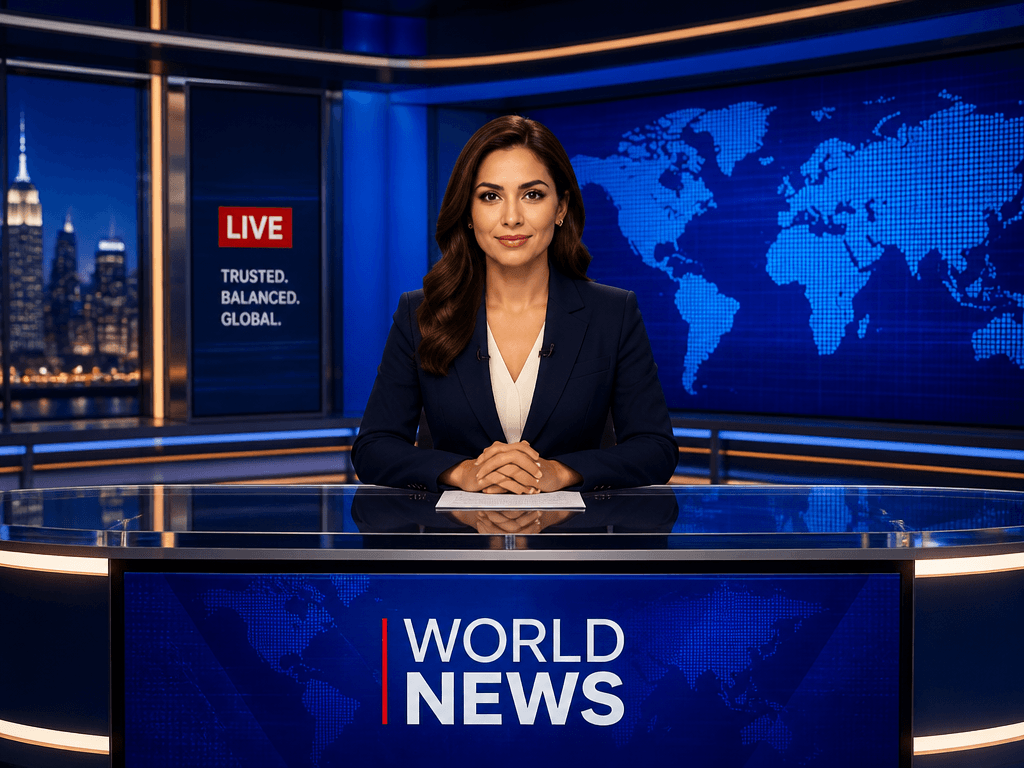
News Studio Background AI prompts generate broadcast-quality studio backdrops featuring anchor desks, large display screens, world maps, and professional blue lighting, all from a text description. Whether you run a YouTube news channel, produce corporate communications, or need a polished backdrop for a webinar, GPT Image 2 creates studio-grade visuals in seconds without the cost of building a physical set or licensing stock imagery.
Common Use Cases
- Virtual studio backgrounds for YouTube news and current affairs channels
- Corporate promotional videos and internal newsletter content backdrops
- Zoom meeting and webinar virtual backgrounds
- Educational video and lecture content professional backgrounds
- Game and metaverse broadcast studio scenes
Why This Tag Is Useful
A news studio background is one of the most effective visuals for conveying credibility and professionalism. But building a physical studio set costs thousands, and stock images come with licensing restrictions. AI prompts let you customize colors, logo placement, and aspect ratio to match your channel identity in minutes. Creating seasonal or topical variations to rotate is equally simple.
Related Prompts
Prompt Crafting Tips
- List key elements like anchor desk, large display, and world map to build a classic news studio scene.
- Specify the lighting color temperature (cool blue, warm amber) to set the studio mood.
- Describe what appears on the screens (maps, graphs, logos) to have them rendered on the displays.
- Choose a camera angle (front, side, high angle) to control the composition for your intended use.
Questions fréquentes
Yes. Generate at 16:9 ratio, and the image works directly as a YouTube thumbnail or video background. Including an anchor desk and large screens gives viewers a sense of news-channel credibility.
Yes. Generate at 16:9, and you can set it as a Zoom virtual background. Specifying 'desk in center, screens on sides' leaves space for your video feed to sit naturally.
Specify lighting colors and background panel colors in the prompt to create a studio backdrop that matches your brand identity. For example, 'deep blue with gold accents' creates a premium feel.
Yes. Add 'large screen showing world map and data graphs' to the prompt, and visual content will be rendered on the displays. You can customize for news, finance, or weather themes.
Specify bright, clean white tones and soft lighting for a friendly studio backdrop suitable for educational content. Simpler compositions improve viewer focus compared to complex graphics.
GPT Image 2 supports text rendering. Include your channel name in the prompt for desk or screen placement, and the text will appear directly in the generated background image.
Yes. Specify camera positions like front, side, or high angle in the prompt to generate studio backgrounds from different perspectives. Using multi-angle backgrounds in a video series enhances immersion.