
Anime Hand Drawing
Create structured hand pose references and expressive gestures with anime hand drawing prompts.
2026.07.15
Fai «Anime Hand Drawing» esattamente come lo vuoiCrea il tuo «Anime Hand Drawing»
Chiedilo con parole tue: Carat genera per te immagini e video ottimizzati.

Inizia subito con 100 crediti gratis al giorno
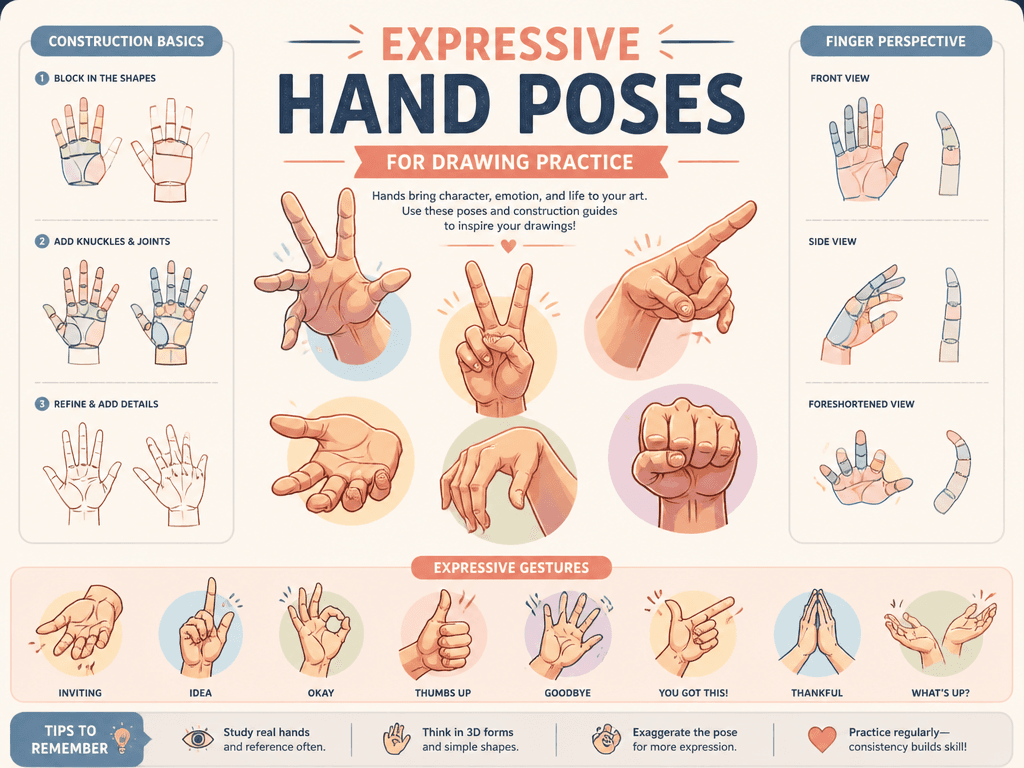
Animated Hand Drawing
What are anime hand drawing prompts?
Anime Hand Drawing prompts are structured instructions for creating purposeful visual assets rather than generic decorative pictures. They define hand poses, finger joints, thumb placement, wrist direction, and readable gestures. A clear prompt makes composition and style choices repeatable, which is useful when several variations must belong to one project.
Practical uses
Use these prompts for gesture studies, character acting, storyboards, webtoon panels, and animation key poses. Keeping the central composition fixed while changing palette, lighting, or rendering treatment helps teams compare directions without losing the original idea. The approach also supports study sheets and portfolio experiments.
Building a reliable structure
State the subject and action first, then specify camera direction, layout, lighting, and rendering. Count five fingers, inspect joint direction, separate overlapping poses into clear panels, and compare palm and back views. Give every important element enough space and describe which feature should attract attention first. Concrete visual instructions are more useful than broad praise words.
Prompt refinement tips
Set the output purpose and aspect ratio before adding style. Ask for a strong silhouette for thumbnails and controlled detail for larger artwork. Review anatomy, edges, text, and repeated objects at full size. When something fails, correct one variable at a time so the next result reveals whether the change worked.
Related prompts
Avoid copying a living artist or an existing image. Describe period, medium, line behavior, texture, and color relationships instead. Save successful structure separately from changeable subject details so it can be reused across a coherent series without producing identical images.
Domande frequenti
You can create hand-pose studies and expressive gesture references. Specify the purpose, composition, and rendering method for more reliable results.
The gallery prompts can be copied freely. Generating an image may consume credits depending on the model and service used.
Yes. Start from an example and change only the subject, palette, or composition. Adjusting one variable at a time makes results easier to evaluate.
an image model with crisp line and form control is a practical choice. Compare several outputs because interpretation varies across models.
Clarify camera direction, subject count, background complexity, and features that must remain. Regenerate after correcting one problem at a time.
They can support concepts and production, but check model terms and the rights of any included brands, people, or references before final use.
Keep the subject and main composition fixed, then rotate palette, lighting, and material one by one to preserve consistency.

