Vai al contenuto principale

Loop Animation

Plan animation loops that connect their first and last frames. Check shapes, UI states and cursor motion across the repeat boundary.

2026.10.07

Fai «Loop Animation» esattamente come lo vuoiCrea il tuo «Loop Animation»

Chiedilo con parole tue: Carat genera per te immagini e video ottimizzati.

Inizia subito con 100 crediti gratis al giorno

·

Cycle of life animation

Claude Opus 5.5· Video
make a dynamic 20-second motion graphics and animation video that shows what an incredible motion designer and animator you are, like it's your showreel for a résumé. make it about the cycle of life showing the same individual going from childhood to adolescence to the 9-5 cycle, to family life to elder life and death, then cutting ready to loop to the beginning. go all out , use whatever you need.

Morphing UI states loop

Claude Opus 5.5· Video
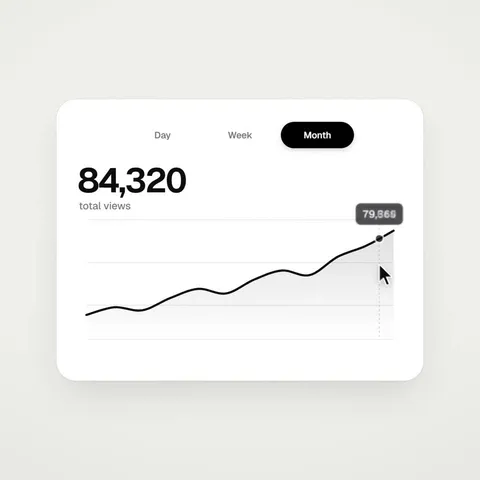
<inputs> Ask me for: 8 to 12 UI states I want the shape to become (e.g. button, loader, player, slider, toggle, tabs, chart, command palette, toast), pure black and white or one accent color, and a royalty-free song around 120 BPM (e.g. Mixkit, free for commercial use). </inputs> <direction> Dribbble-level UI motion. One shape, never cut: every state is the same element morphing its size, radius and color while its content swaps with a short blur. A cursor drives every change with real clicks and drags. Light warm-gray canvas, black and white components, one clean UI font (Geist). Springs everywhere, a tiny overshoot at most. The camera zooms so each state fills the frame. The last frame is the first frame, so it loops. Banned: bouncy easing, particle bursts, glows, gradients on UI chrome, mismatched icon strokes, dead time, anything that looks like a template. </direction> <structure> 120 BPM, 7 bars, something happens on every beat. Button → loader → check → dynamic island → music player with a play/pause morph → scrub the progress bar → it becomes a volume slider that stretches when dragged past max → a toggle flips on the beat → the knob becomes a liquid tab indicator → the tabs open into a chart that draws itself, with a tooltip on hover → it collapses into ⌘K → type to filter → enter → toast → back to the button. </structure> <build> 1. One HTML file, square 1440x1440. Every style is computed from time inside seek(t): no CSS transitions, no timers, no state carried between frames. 2. Springs are closed-form step responses. A value that changes target many times is the sum of one spring per change, so it stays a pure function of time. 3. The tab indicator's two edges ride different springs, so the leading edge stretches ahead of the trailing one. Same trick for the toggle knob. 4. Drags are direct manipulation: while the cursor is held, the value is computed from its position. On release it springs back from wherever it was. 5. Analyze the song with numpy for the beat grid and start on a downbeat. Place every UI sound by its measured peak. 6. Render with Playwright: 4 subframes per frame, blended with ffmpeg tmix for motion blur at 60fps. 7. Render one frame per beat before the full render. Fix anything off the grid, cramped or hard to read. </build> <gotchas> Never put will-change on anything the camera scales or the text renders blurry. Text that swaps inside a morphing container needs its own enter and exit timing or it overlaps. Make the last frame identical to the first, cursor position and speed included, or the loop stutters. </gotchas> <start> Ask me for the inputs, then show me the state list on the beat grid before you write any code. </start>

Shape morphing through UI states

Claude Opus 5.5· Video
<inputs> Ask me for: 8 to 12 UI states I want the shape to become (e.g. button, loader, player, slider, toggle, tabs, chart, command palette, toast), pure black and white or one accent color, and a royalty-free song around 120 BPM (e.g. Mixkit, free for commercial use). </inputs> <direction> Dribbble-level UI motion. One shape, never cut: every state is the same element morphing its size, radius and color while its content swaps with a short blur. A cursor drives every change with real clicks and drags. Light warm-gray canvas, black and white components, one clean UI font (Geist). Springs everywhere, a tiny overshoot at most. The camera zooms so each state fills the frame. The last frame is the first frame, so it loops. Banned: bouncy easing, particle bursts, glows, gradients on UI chrome, mismatched icon strokes, dead time, anything that looks like a template. </direction> <structure> 120 BPM, 7 bars, something happens on every beat. Button → loader → check → dynamic island → music player with a play/pause morph → scrub the progress bar → it becomes a volume slider that stretches when dragged past max → a toggle flips on the beat → the knob becomes a liquid tab indicator → the tabs open into a chart that draws itself, with a tooltip on hover → it collapses into ⌘K → type to filter → enter → toast → back to the button. </structure> <build> 1. One HTML file, square 1440x1440. Every style is computed from time inside seek(t): no CSS transitions, no timers, no state carried between frames. 2. Springs are closed-form step responses. A value that changes target many times is the sum of one spring per change, so it stays a pure function of time. 3. The tab indicator's two edges ride different springs, so the leading edge stretches ahead of the trailing one. Same trick for the toggle knob. 4. Drags are direct manipulation: while the cursor is held, the value is computed from its position. On release it springs back from wherever it was. 5. Analyze the song with numpy for the beat grid and start on a downbeat. Place every UI sound by its measured peak. 6. Render with Playwright: 4 subframes per frame, blended with ffmpeg tmix for motion blur at 60fps. 7. Render one frame per beat before the full render. Fix anything off the grid, cramped or hard to read. </build> <gotchas> Never put will-change on anything the camera scales or the text renders blurry. Text that swaps inside a morphing container needs its own enter and exit timing or it overlaps. Make the last frame identical to the first, cursor position and speed included, or the loop stutters. </gotchas> <start> Ask me for the inputs, then show me the state list on the beat grid before you write any code. </start>
Generatore di video in loop →Crea video in loop senza interruzioni aggiungendo semplicemente due immagini.

What Are Loop Animation AI Prompts?

These briefs bring the last state back to the first for repeated playback. The UI example starts with a button, passes through several interactions and returns to the same button.

Where You'll Use It

  • Repeating interface demos
  • Button and toast cycles
  • Beat-aligned state sequences
  • Interaction loops with cursor paths
  • Start-to-end frame checks

Why This Tag Is Useful

Matching the first and last images is only part of the loop. Cursor position and speed also affect the boundary. The original prompt calculates each frame as a function of time instead of carrying state between frames.

Tips for Crafting Prompts

  1. Make the first and last states identical.
  2. Match cursor position and speed at the boundary.
  3. Give entering and exiting text separate timing.
  4. Replay the boundary several times to check for stutters.

The example gathers UI inputs and asks to review the beat grid first. Select Opus 5.5 manually in the Carat agent before using it.

Domande frequenti