Speech Bubble
Generate clean speech bubble design elements for card news, webtoons, and presentation slides.
2026.07.07
Faça “Speech Bubble” exatamente do jeito que você querCrie o seu próprio “Speech Bubble”
É só pedir com suas palavras — a Carat gera imagens e vídeos otimizados para você.

Comece agora com 100 créditos grátis por dia
말풍선
What Is a Speech Bubble Prompt?
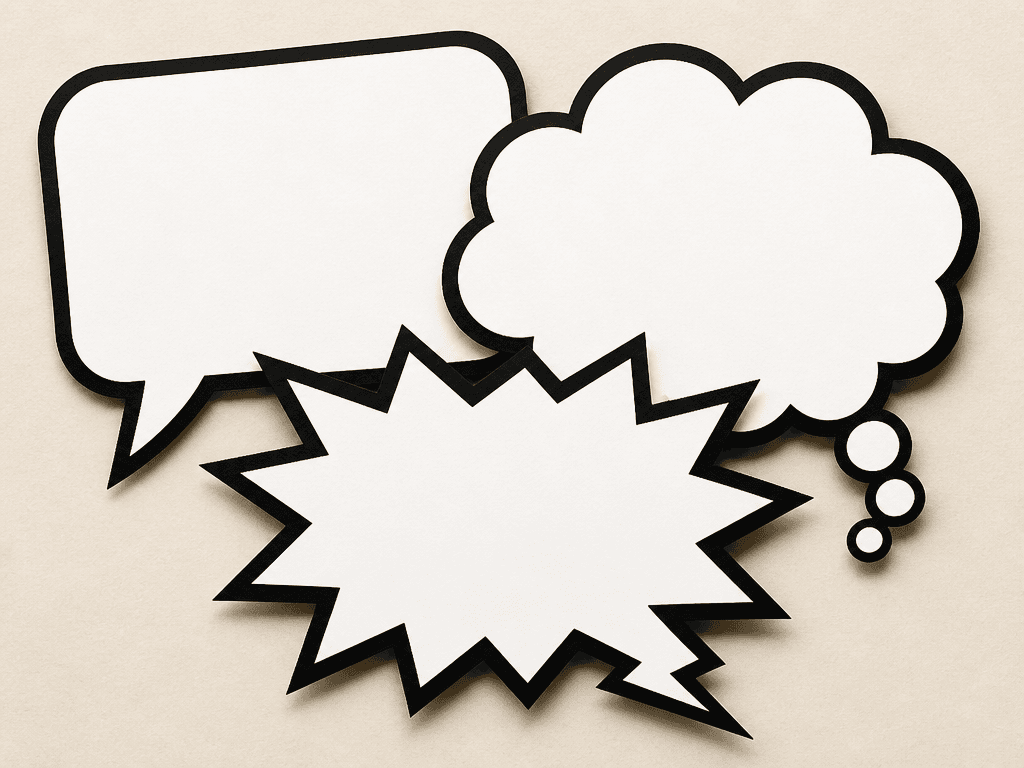
A speech bubble prompt generates various bubble shapes — rounded rectangles, cloud-shaped thought bubbles, jagged shout bubbles — using AI image generation. These elements are widely used in card news, webtoons, presentation slides, and social media graphics to display dialogue, quotes, or key messages. Instead of typing text directly into the AI, you can generate empty bubble templates and add your own text in Canva or Photoshop for precise control.
Common Use Cases
- Card news backgrounds that frame quotes or key takeaways
- Webtoon and manga dialogue bubbles for character speech
- Presentation slides (PowerPoint, Google Slides) with decorative emphasis boxes
- Social media posts wrapping a friend's quote or a motivational saying
- YouTube thumbnail text boxes that grab attention
Why This Prompt Is Useful
Speech bubbles are one of the most frequently used design elements in content creation, but drawing them by hand or searching stock sites every time is time-consuming. This prompt generates flat-design bubbles with clean white fills and bold outlines in a single step, ready for text overlay in any design tool. The paper-cut texture adds a handcrafted feel, while the high-contrast palette ensures the outline stays crisp even at small sizes.
Customization Tips
The most effective way to adapt this prompt is to change the shape, color, and tail direction. Rounded rectangles work for normal dialogue, cloud shapes for thoughts or imagination, and jagged edges for shouting or surprise. Specifying the tail direction — left, right, or downward —暗示 where the speaker is positioned. Adding transparent background produces overlay-ready PNGs. Switching to a pastel palette softens the tone for gentle card news layouts. Multiple overlapping bubbles can simulate a conversation scene, which is useful for dialogue-driven content.