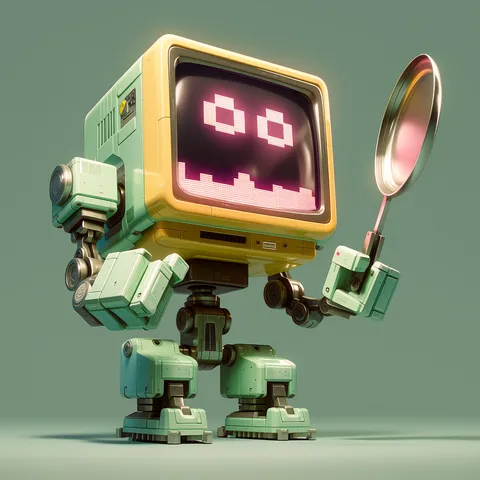
Robot Character
AI prompts for designing friendly robot characters in various styles.
2026.07.08
把「Robot Character」做成你想要的样子做一个你自己的「Robot Character」
用大白话说出来就行——Carat 会为你生成合适的图片和视频。

每天 100 免费积分,现在就开始

Robot Character
What Are Robot Character Prompts?
Robot character prompts help you create various styles of robot characters using AI. By describing the shape, material, color, expression, and purpose in a sentence, GPT Image 2 generates friendly and appealing robot characters in seconds. These prompts are ideal for game characters, app mascots, educational characters, merchandise design, and sci-fi content.
Key Use Cases
- Mobile and indie game character design
- App and service mascot characters
- Educational robot content characters
- IT company merchandise and brand characters
- Sci-fi themed illustrations and webtoon characters
Why This Tag Is Useful
Robots are in demand across gaming, apps, education, and IT branding. However, designing robot characters manually requires understanding of mechanical structure, material rendering, and proportion sense. AI prompts let you specify the shape and style in text: "round body, glowing eyes, metallic texture, cute companion robot," "angular body, walkie-talkie antenna, retro sci-fi style" and get polished character designs instantly. This is especially valuable for game developers, app designers, content creators, and marketers who can generate series across different shapes and colors to build a character lineup.
Related Prompts
Prompt Composition Tips
- Specify the shape: "round body," "angular form," "small companion," "large mech" to define the overall silhouette.
- Define material and color: "metallic texture," "glossy plastic," "matte metal," "pastel colors" as material greatly changes the impression.
- Set expression and eyes: "glowing round eyes," "LED display eyes," "curious expression" to convey the robot's emotion.
- Add purpose and style: "friendly mascot," "combat robot," "retro sci-fi," "modern minimalist" to define the robot's role and design tone.
Try creating a series with different shapes and colors. This works great for game or app character lineups.
常见问题
You can create cute round companion robots, angular retro sci-fi robots, combat mechs, and many other styles. Describing the shape, material, color, and expression in the prompt produces robot characters matching your desired aesthetic.
Yes. Specifying "game sprite style," "friendly mascot look," and "exaggerated proportions" produces robot characters suitable for mobile or indie games. Creating multiple robots as a lineup works well.
Yes. Specifying "minimalist design," "round shape," "bright colors," and "simple background" produces robot characters perfect for app or service mascots. Adjusting colors to match brand identity creates a cohesive look.
These prompts are designed for GPT Image 2. Text descriptions alone produce robot characters, and attaching a reference image enables more accurate design style rendering.
Yes. Specifying "friendly expression," "soft colors," and "simple shape" produces robot characters suitable for children's educational content or coding materials. Creating a series with different emotions makes them even more useful.
Yes. Specifying "metallic texture," "glossy plastic," "matte metal," or "pastel colors" in the prompt lets you control the robot's material and color. Choose materials that match the robot's purpose.
You can copy robot character prompts from the Carat prompt gallery for free. However, generating actual images from those prompts requires credits or a paid plan.