GPT Image 2· Image
1. json prompt version
```json
{
"subject": {
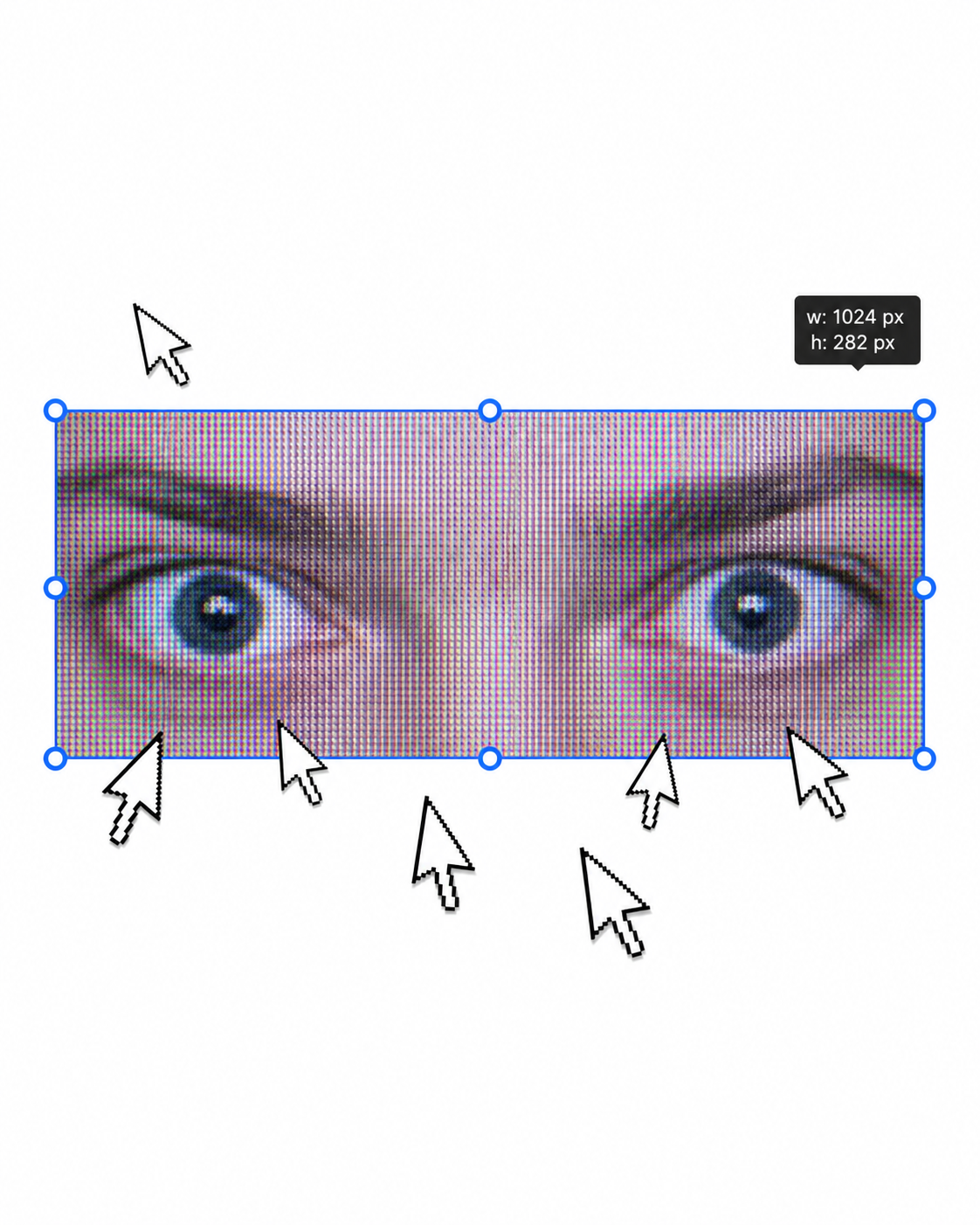
"description": "A cropped, low-resolution digital image of a person's eyes inside a rectangular selection box, resembling an image-editing canvas or screenshot. Only the eye area and eyebrows are visible; the rest of the face and body are cut off.",
"mirror_rules": "Not a mirror selfie. Preserve the screen-capture / interface-editing feel rather than treating it as a conventional portrait.",
"age": "adult or young adult, exact age unclear due to extreme crop and pixelation",
"expression": {
"eyes": {
"look": "wide, direct, slightly tense gaze",
"energy": "alert, uncanny, quietly confrontational",
"direction": "looking straight toward the viewer"
},
"mouth": {
"position": "not visible",
"energy": "not applicable"
},
"overall": "fragmented and decontextualized, with the eyes carrying all emotional weight"
},
"face": {
"preserve_original": "Preserve the exact cropped eye-band framing, visible eyebrows, dark pupils, low-resolution halftone texture, and slight pink-gray screen tint.",
"makeup": "No clear makeup is visible. The face should read as a raw, pixelated screen image rather than a polished beauty portrait."
}
},
"hair": {
"color": "not visible",
"style": "not visible",
"effect": "not applicable"
},
"body": {
"frame": "not visible",
"waist": "not visible",
"chest": "not visible",
"legs": "not visible",
"skin": {
"visible_areas": "Only a narrow strip of facial skin around the eyes, eyelids, under-eye area, bridge of the nose, and brow region is visible. No shoulders, chest, waist, hips, legs, back, or arms are visible.",
"tone": "pale pink-gray skin tone distorted by screen pixels and scanline-like color separation",
"texture": "The skin appears roughened by digital pixel structure, like it would feel visually grainy or screen-printed rather than physically smooth; any natural skin texture is obscured by the low-resolution display pattern.",
"lighting_effect": "The skin is not lit by natural photographic light; it appears illuminated through a flat digital screen or screenshot, with no realistic shadow depth, only pixel-level contrast and faint magenta-gray banding."
}
},
"pose": {
"position": "Only the eyes are framed horizontally inside a selected rectangular crop.",
"base": "No body pose visible.",
"overall": "The composition feels like a fragment being actively selected, edited, or dragged inside a design interface."
},
"clothing": {
"top": {
"type": "not visible",
"color": "not visible",
"details": "not visible",
"effect": "not applicable"
},
"bottom": {
"type": "not visible",
"color": "not visible",
"details": "not visible"
}
},
"accessories": {
"device": "Implied computer interface or editing software canvas",
"prop": "Multiple oversized black-and-white mouse cursor arrows surrounding and pointing toward the selected eye image"
},
"photography": {
"camera_style": "Not a traditional photograph; a screenshot-like digital collage or UI-capture aesthetic with a pasted low-resolution eye image.",
"angle": "Straight-on, flat frontal view with no perspective depth.",
"shot_type": "Extreme close-up crop of eyes embedded in a graphic interface composition.",
"aspect_ratio": "Overall image is near 4:5 vertical canvas; the selected eye strip is a long horizontal rectangle.",
"texture": "Visible pixel grid, moire-like vertical RGB scanlines, compressed low-res texture, hard-edged UI elements, clean white canvas background.",
"lighting": "Flat screen illumination, no cinematic lighting, no natural directionality; contrast comes from the digital image and interface overlay.",
"depth_of_field": "No optical depth of field; all elements appear flattened like a graphic screenshot."
},
"background": {
"setting": "Minimal white digital workspace or blank canvas",
"wall_color": "white",
"elements": [
"bright cyan-blue rectangular selection outline",
"round blue resize handles on corners and midpoints",
"small dark floating size tooltip near the top-right edge",
"several repeated mouse cursor arrows arranged around the eye crop",
"large empty white space above and below the selected image"
],
"atmosphere": "Sparse, internet-art, meme-adjacent, slightly uncanny and obsessive",
"lighting": "Pure digital white background with no physical environmental light"
},
"the_vibe": {
"energy": "hyper-focused, intrusive, glitchy",
"mood": "uncanny, anxious, surveillance-like, absurdly intimate",
"aesthetic": "early internet collage, screenshot art, low-res UI manipulation, digital found-image surrealism",
"authenticity": "Should feel like an imperfect screenshot taken during editing, not a clean vector recreation or polished poster.",
"intimacy": "The extreme eye crop creates uncomfortable closeness while the interface elements keep it emotionally detached.",
"story": "It feels as if someone had been selecting a stranger's gaze on a blank canvas, and the repeated cursors are still converging on it.",
"caption_energy": "something that was clicked too many times, a gaze trapped inside an editing box"
},
"constraints": {
"must_keep": [
"white blank background",
"horizontal rectangular crop containing only both eyes and eyebrows",
"cyan-blue selection box with circular resize handles",
"visible pixelated / scanline texture across the eye image",
"multiple large black-and-white cursor arrows pointing toward or around the eyes",
"small size-tooltip near the upper right of the selection box",
"flat screenshot-like composition",
"uncanny direct gaze"
],
"avoid": [
"do not turn it into a full-face portrait",
"do not add visible body, clothing, hair, or environment",
"do not make the image high-fashion or cinematic",
"do not remove the UI selection handles",
"do not smooth out the pixel grid",
"do not replace the cursors with realistic hands or objects",
"do not add dramatic shadows or realistic depth"
]
},
"negative_prompt": [
"full body",
"full face",
"beauty portrait",
"cinematic lighting",
"realistic background",
"smooth skin",
"high resolution glamour",
"fashion editorial",
"hands",
"extra facial features",
"removed cursor arrows",
"removed selection box",
"3D depth",
"polished vector art"
]
}
```
2. Natural language prompt
Create a flat, screenshot-like digital collage on a mostly blank white canvas. In the center, place a long horizontal rectangular crop showing only a person's eyes, eyebrows, eyelids, under-eye area, and a narrow strip of pale pink-gray facial skin. The gaze should look straight at the viewer, wide and slightly tense, with an uncanny, alert emotional residue. Do not show the full face, mouth, hair, body, clothing, shoulders, chest, waist, hips, legs, arms, or any physical environment.
The eye crop should look low-resolution and screen-captured, with visible pixel grid, vertical RGB scanline texture, faint moire, compression artifacts, and a slightly gray-magenta digital tint. The skin should not look polished or naturally lit; it should feel visually grainy, like a rough screen-printed or monitor-textured surface rather than smooth real skin. Lighting should be flat screen illumination with no realistic shadows, no cinematic directionality, and no depth-of-field blur.
Surround the eye strip with a bright cyan-blue editing selection rectangle, including circular resize handles on the corners and midpoints. Add a small dark size-tooltip near the upper-right edge of the selected rectangle, as if the image is actively being resized in editing software. Place several oversized black-and-white mouse cursor arrows around the eye crop, some pointing toward the eyes and some overlapping the area below, creating a repetitive obsessive clicking energy.
The composition should remain front-facing, flat, and graphic, with a near 4:5 vertical canvas and a large amount of empty white space above and below the selected eye strip. Preserve the imperfect screenshot feeling: slightly awkward placement, low-res texture, hard UI edges, and a casual internet-art quality. The image should feel as if someone had been selecting a stranger's gaze on a blank canvas, and the cursors are still converging on it.
Avoid turning it into a full portrait, beauty shot, fashion editorial, cinematic scene, polished vector poster, or realistic environment. Keep the selection box, cursor arrows, pixelation, flat white background, and direct uncanny gaze as the core visual identity.