
Fire Prevention Poster
Create clear fire prevention posters for schools, workplaces, homes, and public facilities with AI prompts structured around practical safety actions.
2026.07.16
Haz “Fire Prevention Poster” justo como lo quieresCrea tu propio “Fire Prevention Poster”
Pídelo en lenguaje natural: Carat genera imágenes y vídeos optimizados para ti.

Empieza ya con 100 créditos gratis al día
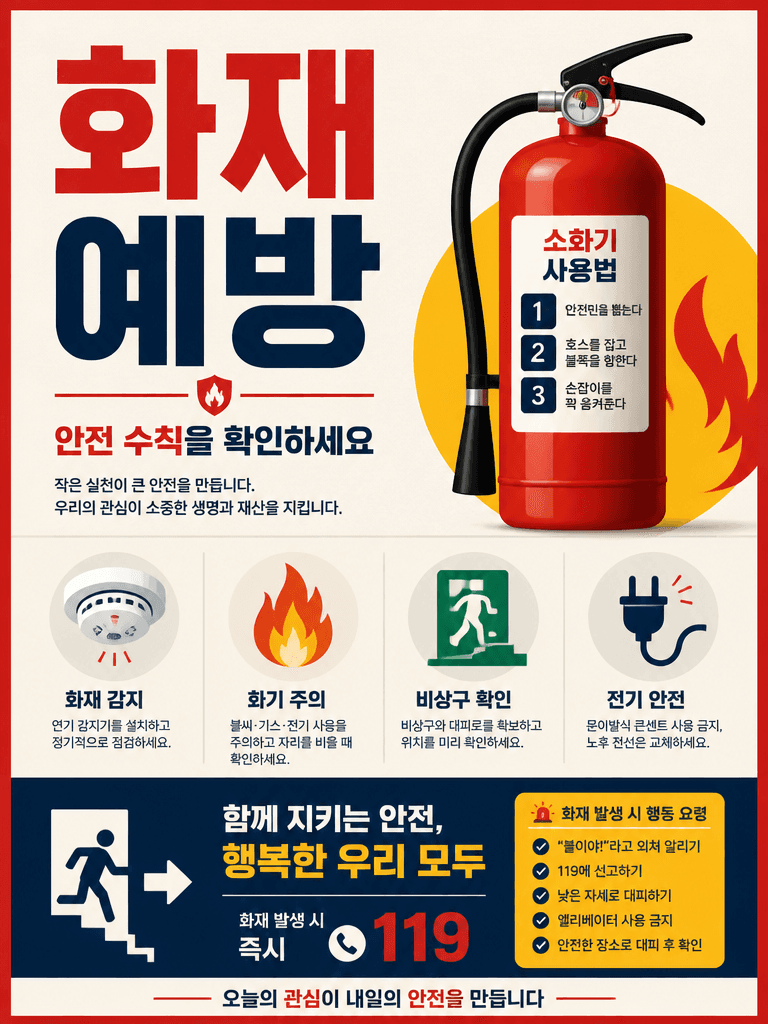
Fire Safety Poster
What Is a Fire Prevention Poster AI Prompt?
A fire prevention poster AI prompt is a structured instruction for turning critical safety guidance into a clear educational visual. It can organize extinguisher use, smoke alarm checks, electrical precautions, evacuation routes, and emergency actions without overwhelming the viewer. Begin by defining the location and audience because a home, school, kitchen, warehouse, and office face different hazards. Divide the poster into a headline, warning signs, prevention actions, and emergency response. The most effective result encourages a specific behavior rather than using dramatic flames only to create fear.
Designing the Core Safety Elements
For homes, include smoke detectors, overloaded outlet prevention, cooking supervision, and extinguisher placement. A school poster may show students lining up, staying low under smoke, and following marked exits. Workplace materials can add hot-work permits, combustible storage, and unobstructed corridors. Reserve red for warnings and prohibited actions, then separate recommended actions with blue or green panels. Numbered diagrams and arrows help when sequence matters, such as pulling an extinguisher pin before aiming at the base of a fire.
Adapting the Poster to Place and Audience
Preschool designs should rely on large symbols and one action per sentence. Adult workplace posters can include inspection checklists, responsible departments, and local contact areas. Mention the installation point, such as a corridor, dormitory, elevator lobby, or commercial kitchen, so scale and viewing distance are appropriate. In multilingual facilities, combine concise translations with widely recognized safety pictograms. Seasonal versions can focus on heaters, wildfire risk, holiday cooking, or temporary event equipment while retaining the same visual system.
Related Prompt Pages
Mandatory Verification After Generation
AI-generated safety content is not a substitute for official fire codes or facility procedures. Verify extinguisher steps, emergency numbers, exit directions, terminology, and accessibility requirements with the responsible authority. Never publish distorted text or ambiguous icons. Print a test at the actual display size and confirm that secondary instructions remain readable from the expected distance. Ensure decorative flames do not cover exit symbols or numbered actions. The final poster should match the building layout and support drills, staff training, and posted emergency plans.
Preguntas frecuentes
Show location-specific hazards, prevention actions, evacuation behavior, and the location or basic use of safety equipment.
School posters need larger illustrations and shorter actions, while workplace versions can include inspections and procedural details.
Gallery prompts can be copied and adapted. Image generation may require credits depending on the selected model.
No. Verify every emergency number, exit direction, equipment step, and term against official guidance and facility rules.
Use red selectively for danger and prohibition, then separate recommended actions with blue or green information areas.
Use one action per panel, large pictograms, short familiar words, and a clear sequence that can be practiced during drills.
Test text size, icon meaning, emergency contacts, and whether evacuation arrows match the actual building layout.


