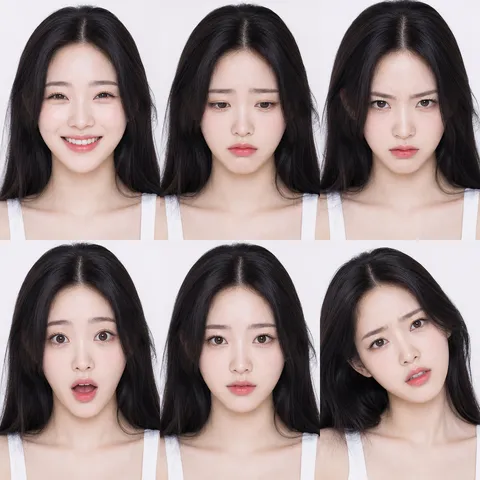
Expression Prompt
Master emotion-led facial prompts that produce stable expressions for portrait, avatar, and character workflows.
2026.07.26
Make “Expression Prompt” exactly the way you wantCreate your own “Expression Prompt”
Just ask in plain language — Carat generates optimized images and videos for you.

Start now with 100 free credits daily

얼굴 표정 시트
What expression prompts should do
Expression prompts are for making emotion readable at a glance. In portrait, character, and profile workflows, a small change in eyes or mouth can shift the whole mood, so this page focuses on structured prompts that lock emotional intent while allowing repeatable variation. The goal is not to chase randomness but to define a reliable baseline for each mood.
Build emotional layers in prompts
Instead of using one broad phrase such as 'happy' or 'sad', define layers. You can combine core emotion, eye behavior, mouth geometry, and eyebrow direction so generation follows a shared emotional grammar. For example, 'mild smile with relaxed eyes and gentle cheek lift' makes the expression look natural rather than forced. This pattern reduces mismatched outputs in batch production.
Lighting and camera support for expression
The same expression token can look very different under different lighting. Use explicit constraints like 'soft directional light', 'moderate contrast', and 'clean eye highlights' to keep expression intensity stable. If you want a restrained mood, avoid aggressive shadows and keep the palette neutral. These lighting rules help preserve clarity of facial micro-movements where emotion is actually decided.
Apply across image genres
The same core prompt stack works for realistic portrait and stylized characters if you add a final style suffix. Realistic outputs benefit from texture and eye detail terms, while character outputs may need 'clean linework' or 'animation-friendly features'. Keeping the emotion block unchanged across genres improves speed because you can compare mood quality without rewriting every element.
Separate free copy from paid rendering
All text prompts in this page are free to copy and test in your own planning flow. Actual image rendering remains a paid action that consumes credits each time. The most cost-efficient method is to finalize emotion text and style once, then generate only a small set of shortlisted versions for final selection.