carat

Prompt Gallery

/

Idol Background Removal

Login
Sign Up

Idol Background Removal

Idol Background Removal prompts. Copy and use Idol Background Removal image generation prompts from Carat right away.

2026.07.11

·
GPT 이미지 2로 생성한 최애 배경화면

최애 배경화면

GPT Image 2· Image
Square fan wallpaper for a fictional pop idol fandom, dreamy midnight blue and violet concert atmosphere, luminous light sticks, subtle stage spotlights, floating silver stars and holographic confetti, spacious center composition suitable for a phone background crop, refined glossy digital aesthetic. No person, no celebrity likeness, no logo, no text, no watermark.
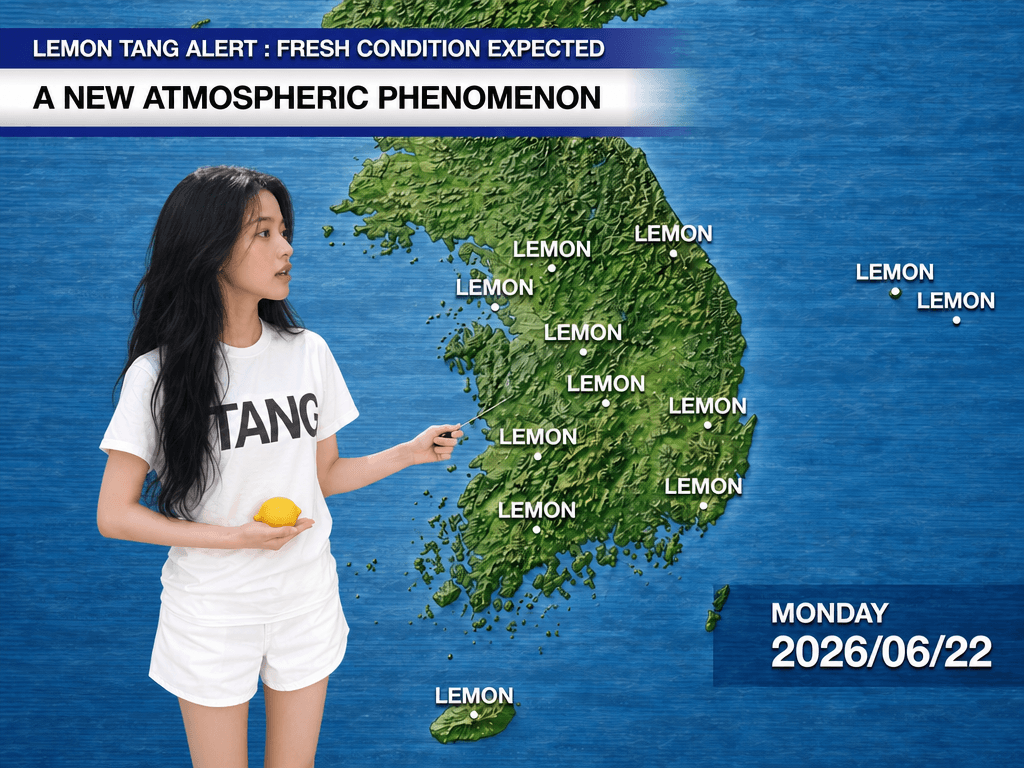
GPT Image 2 generated result for Lemon Weather Forecast Lemon Tang prompt

Lemon Weather Forecast

GPT Image 2· Image
Image 1 (frontal portrait) is REQUIRED. Image 2 (side profile) is OPTIONAL but improves hair accuracy. Image 1: PRIMARY identity source — face features and hair color/texture. Image 2: HEAD ANGLE REFERENCE — use this to rotate the face further toward the right, closer to a 3/4-to-side profile. Image 3 (https://assets.carat-api.im/upload_from_app/3052856/20260622/9b330b20-75b3-4586-a39d-441b29e86a85.jpg): Everything except the head direction is FINAL — hair, outfit, body posture, weather map background, all text overlays, lighting. CHANGE 1 — HEAD ANGLE (critical): Turn the head further right so the gaze lands naturally on the weather map beside her — not toward the camera. CHANGE 2 — EXPRESSION: Professional weather broadcaster mid-broadcast. Eyes alert and sharp. Brows slightly raised. Mouth slightly open mid-sentence. Engaged, confident, on-air energy. PRESERVE from Image 3: hair, outfit (white t-shirt and white shorts), right hand holding thin black pointer, left hand holding small yellow lemon, weather map background of Korea, text overlays "LEMON TANG ALERT" "A NEW ATMOSPHERIC PHENOMENON" "MONDAY 2026/06/22", flat studio lighting, landscape composition.

What are Idol Background Removal Prompts?

A collection of AI prompts for generating idol background removal images. Copy the Idol Background Removal prompts provided by Carat and paste them into an AI image generation tool to get professional-grade results.

How to Use Idol Background Removal Prompts

  1. Select and copy your desired prompt.
  2. Paste it into the Carat agent.
  3. Modify colors, styles, and composition as needed.
  4. Download the generated image and use it in your project.

Tips for Writing Idol Background Removal Prompts

Specify lighting, texture, composition, and lens information in detail for more precise results. Add "No text, no watermark" to prevent unwanted text overlays.

Idol Background Removal Prompt Applications

Idol Background Removal prompts are used across content creation, marketing, design, and educational resources. AI-generated images dramatically reduce production time while maintaining professional quality.

Idol Background Removal Prompt Optimization Guide

Choose the aspect ratio based on your use case: vertical (9:16) for social media, horizontal (16:9) for web banners, and square (1:1) for product images.


Frequently Asked Questions

Related Prompts

Fan Wallpaper

Fan Wallpaper

2 prompts

Fan Lyric Video

Fan Lyric Video

2 prompts

Fan Support Video

Fan Support Video

2 prompts

Fan Filter Video

Fan Filter Video

4 prompts

Carat Prompt Gallery

Create trending AI prompts instantly

Prompts

  • Logo
  • PPT Design
  • Thumbnail
  • Poster
  • Web Novel Cover
  • ID Photo
  • Caricature
  • Product Detail Page
  • Banner

Models

  • GPT Image 2
  • Seedance 2.0
  • NanoBanana Pro
  • NanoBanana 2

Carat

  • Get started
  • About
  • Blog
  • Careers
  • Contact
  • Partnership
  • Terms
  • Privacy

© 2026 Paradot.Inc All rights reserved.