carat

Prompt Gallery

/

Product on White Background

Login
Sign Up

Product on White Background

Product on White Background prompts. Copy and use Product on White Background image generation prompts from Carat right away.

2026.07.11

·
AI-generated { "subject": { "description": "A young adult woman sitting in a dim in… made with Midjourney

Vintage Flash Indoor Portrait

Midjourney· Image
{ "subject": { "description": "A young adult woman sitting in a dim indoor corner, facing the camera from a slightly low and close angle. The image feels like a vintage flash snapshot with a private-room atmosphere, quiet melancholy, and a slightly underground poster-wall aesthetic.", "mirror_rules": "Not a mirror selfie; keep it as a direct close-range seated snapshot. The camera should sit slightly below face level, with a little tilt, imperfect framing, and possible edge obstruction.", "age": "young adult woman, early 20s", "expression": { "eyes": { "look": "looking directly into the camera, calm and slightly vacant", "energy": "low-energy, restrained, faintly tired, emotionally withheld", "direction": "gaze slightly lowered from under the bangs toward the photographer" }, "mouth": { "position": "lips naturally closed with a soft lip line", "energy": "cool, quiet, no visible smile" }, "overall": "a still, distant expression, as if captured by flash right after she sat down quietly" }, "face": { "preserve_original": "Preserve the small rounded face shape, soft jawline, large eyes, thick bangs covering part of the forehead, and the realistic flash highlight across the face.", "makeup": "A cool vintage makeup style inspired by East Asian fashion aesthetics: soft matte base, muted pink-brown eyeshadow, thin eyeliner, natural under-eye highlight, low-saturation blush, and soft rose-brown lips. Keep it slightly imperfect, with subtle smudging, darkness, and snapshot realism." } }, "hair": { "color": "deep black or near black-brown", "style": "shoulder-length bob with thick straight bangs, softly inward-curled ends, side hair close to the cheeks", "effect": "soft but heavy silhouette in the dark, with faint cool-white flash reflections on a few strands; overall subdued by the night interior" }, "body": { "frame": "slim, small-framed body; the seated pose makes the silhouette feel compact and inward", "waist": "mostly hidden under the loose cardigan, only subtly suggested by the inward posture", "chest": "the V-neck cardigan reveals the collarbones, a small central upper-chest area, and a hint of the inner white layer; the focus should stay on the neckline shape rather than exaggeration", "legs": "both legs bent in the foreground; one knee is raised close to the camera, the other leg folds sideways below; thighs and knees are clearly visible and softly flash-lit", "skin": { "visible_areas": "Visible skin includes the face, neck, collarbones, a small upper-chest area, subtle hand or wrist shadow areas, thighs, knees, and the upper edge of the lower legs. Shoulders, back, waist, hips, and buttock-adjacent areas are mostly covered and should not be additionally exposed.", "tone": "light beige to warm ivory skin tone, appearing slightly cooler and paler under direct flash, with faint green-blue color shift in the shadows", "texture": "realistic human skin texture: visually fine and smooth, as if it would feel soft, cool, and lightly velvety to the touch. The legs have a mild flash sheen but should never look plastic or over-smoothed.", "lighting_effect": "direct on-camera flash hits the face, collarbones, and knee, creating local bright spots and fast-falling shadows. Highlights are slightly hard, shadows fall into dark greenish-black film grain, and edges are mildly soft." } }, "pose": { "position": "sitting on the floor or a low step, body tucked into the lower center of the frame", "base": "one leg raised near the lens, the other folded sideways; arms naturally gathered in front or hidden by long loose sleeves", "overall": "inward, quiet, slightly guarded posture, like a close candid photo taken in a narrow room or corridor corner" }, "clothing": { "top": { "type": "loose V-neck knitted cardigan with a pale camisole or tank top edge visible underneath", "color": "light gray cardigan with an off-white inner layer", "details": "soft fuzzy knit texture, long sleeves, relaxed neckline, slightly thick body, front buttons or a lightly closed placket", "effect": "the fabric looks thick, warm, soft, and slightly fuzzy to the touch; the oversized fit makes the figure appear smaller and more intimate" }, "bottom": { "type": "short bottom mostly hidden by the cardigan, paired with black knee-high or long socks", "color": "mostly black lower styling with dark socks", "details": "black socks cover the lower legs, ending below the knees; the exposed leg skin contrasts strongly with the dark socks" } }, "accessories": { "jewelry": "layered delicate necklaces, two thin chains with small pendants resting near the collarbones; possible tiny earrings but not visually dominant", "device": "no visible handheld device", "prop": "vintage posters, stickers, or magazine pages on the wall creating dense visual texture" }, "photography": { "camera_style": "low-light close-range flash portrait, like a compact digital camera, disposable film camera, or phone flash snapshot; keep grain, slight blur, color cast, dirt, and imperfect exposure", "angle": "slightly below eye level, mild upward angle; the subject tilts her face downward toward the camera; the frame feels slightly tilted and compressed", "shot_type": "close seated portrait from upper body to thighs, with knees and legs entering the foreground and the poster wall compressed behind the head", "aspect_ratio": "vertical 2:3 or 3:4", "texture": "high-ISO grain, old-photo haze, flash dust specks, shadow noise, slight motion blur, soft edges, dark vignette", "lighting": "main light is direct front on-camera flash, illuminating the face, neckline, cardigan, and knee; background exposure is uneven, posters catch partial glare, while the right side and lower frame fall into deep shadow; no polished fill light or rim light", "depth_of_field": "shallow to medium depth of field; the face is relatively clear, while legs and background are slightly soft, like an inexpensive camera autofocus result in darkness" }, "background": { "setting": "dim indoor room, corridor corner, or basement-like private space", "wall_color": "dark wall covered in posters, overall blue-green, gray-black, and dark brown tones", "elements": [ "dense vintage film or music posters", "blurred text and image collage", "dark vertical edge or doorframe on the right", "dark obstruction or shadow block on the left", "wooden or dark floor visible at the bottom" ], "atmosphere": "narrow, humid, nocturnal, private, slightly underground, like the moment after a quiet conversation had already happened", "lighting": "very weak ambient light, mostly dependent on camera flash; uneven background brightness, slight poster reflection, greenish-black noise in the shadows" }, "the_vibe": { "energy": "hushed, still, darkened, faintly rebellious yet tired", "mood": "vintage, lonely, intimate, cool, with a night-after feeling", "aesthetic": "East Asian / Japanese-inspired retro girl portrait, Y2K dark-room feeling, flash film snapshot, underground poster wall, non-commercial casual photography", "authenticity": "preserve imperfections: color cast, noise, flash overexposure, crushed blacks, off-center framing, messy posters, slight missed focus", "intimacy": "the photographer feels very close, like a familiar person taking a quiet late-night room snapshot", "story": "She had just sat in a corner covered with old posters; the room was dark, the flash suddenly fired, and it left behind a silent, cool moment.", "caption_energy": "like a short social caption: 'the things left unsaid that night.'" }, "constraints": { "must_keep": [ "young adult woman seated in a dark indoor corner", "black shoulder-length bob with thick bangs", "quiet cool expression looking directly at the camera", "loose light-gray V-neck knit cardigan", "collarbones and small upper-chest area visible", "bent seated legs with one knee close to the camera", "black long socks", "dense vintage poster wall background", "direct front-flash film snapshot look", "shadow noise, color cast, slight blur, and candid realism" ], "avoid": [ "overly commercial studio portrait", "plastic skin smoothing", "exaggerated sensual pose", "adding extra exposed skin not present in the reference", "bright clean modern bedroom", "perfectly symmetrical composition", "ultra-sharp noise-free image", "visible brand text, watermark, or username", "AI-looking facial features or hands" ] }, "negative_prompt": [ "overexposed studio light", "plastic skin", "perfect symmetry", "clean luxury room", "sharp commercial portrait", "extra fingers", "distorted hands", "bad anatomy", "heavy retouching", "glamour pose", "logo", "watermark", "readable text", "oversaturated colors" ] }

b900c8b6415bb719a8271c4e1d222c95
AI-generated Sister Mink From The Adventures of Brer Rabbit In Universal Cartoon St… made with Midjourney

Sister Mink Cartoon Character

Midjourney· Image
Sister Mink From The Adventures of Brer Rabbit In Universal Cartoon Studios Brilliant Animation Studios Wang Film Productions and Universal Studios Home Entertainment
d51ba53863bda257800c1875cb89831c
AI-generated Vertical 9:16 photorealistic full-body portrait, nostalgic Taiwanese i… made with Midjourney

Pink Bob Qipao Portrait

Midjourney· Image
Vertical 9:16 photorealistic full-body portrait, nostalgic Taiwanese idol drama style, early-2000s analog flash photography, soft highlight bloom, gentle halation, dreamy blur, film grain, slight noise. A young East Asian woman with a short pink bob haircut and blunt bangs wears a fitted red qipao with subtle floral jacquard texture and matching red high heels. She has a cool, cocky, rebellious expression and looks directly at the camera. Full-body composition, head-to-toe framing, her entire body visible including both legs, feet, and red high heels. Slight low-angle wide-lens perspective to make the legs look long and stylish while keeping realistic anatomy. She stands at the entrance of a nostalgic Taiwanese snack shop with vintage Chinese signage, warm ambient light, old storefront textures, retro street atmosphere, and worn 2000s idol-drama mood. Pose: both arms extended toward the camera, forming the classic C-BLOCK “以下范上” gesture. Left hand higher, palm inward, index and middle fingers pressed together pointing upward, thumb extended sideways. Right hand lower, palm inward, index and middle fingers pressed together pointing downward, thumb extended sideways crossing near the left thumb. Hands are closer to the lens but not too huge, face clearly visible between or above them. Keep fingers straight, natural, and readable. Preserve hand skin texture and clear finger details. Do not overexpose the hands. Avoid loose peace signs, single-finger pointing, claw-like hands, distorted anatomy, cropped feet, hidden shoes, or hands covering the face.
1a3ec7fbfee4702b8f550ef8d9c98b7d
AI-generated Create a single original cute fantasy creature for a cozy collectible… made with Midjourney

Mossbun Pixel Pet Character

Midjourney· Image
Create a single original cute fantasy creature for a cozy collectible card game. Creature number: 1. Creature name: Mossbun. Style: pixel art sprite, retro handheld game aesthetic, crisp pixel edges, no anti-aliasing, no gradients, no soft shading, no smooth painterly rendering. Use exactly two visible colors only: #ffffff and #8a8a8a. Transparent background is allowed. No black, no colored pixels, no additional gray shades, no highlights in other colors. Full body, centered, small magical pet-like creature, cute and collectible, clean readable silhouette, charming expression. The creature should be unique and recognizable with a few distinctive fantasy details, but simple enough to read clearly at small size. No environment, no scenery, no frame, no card border, no text, no logo, no watermark, no UI elements. Output: square pixel art sprite, transparent background, designed for 128x128 pixels.
9936745fd486c037d9304599cfe37a9c
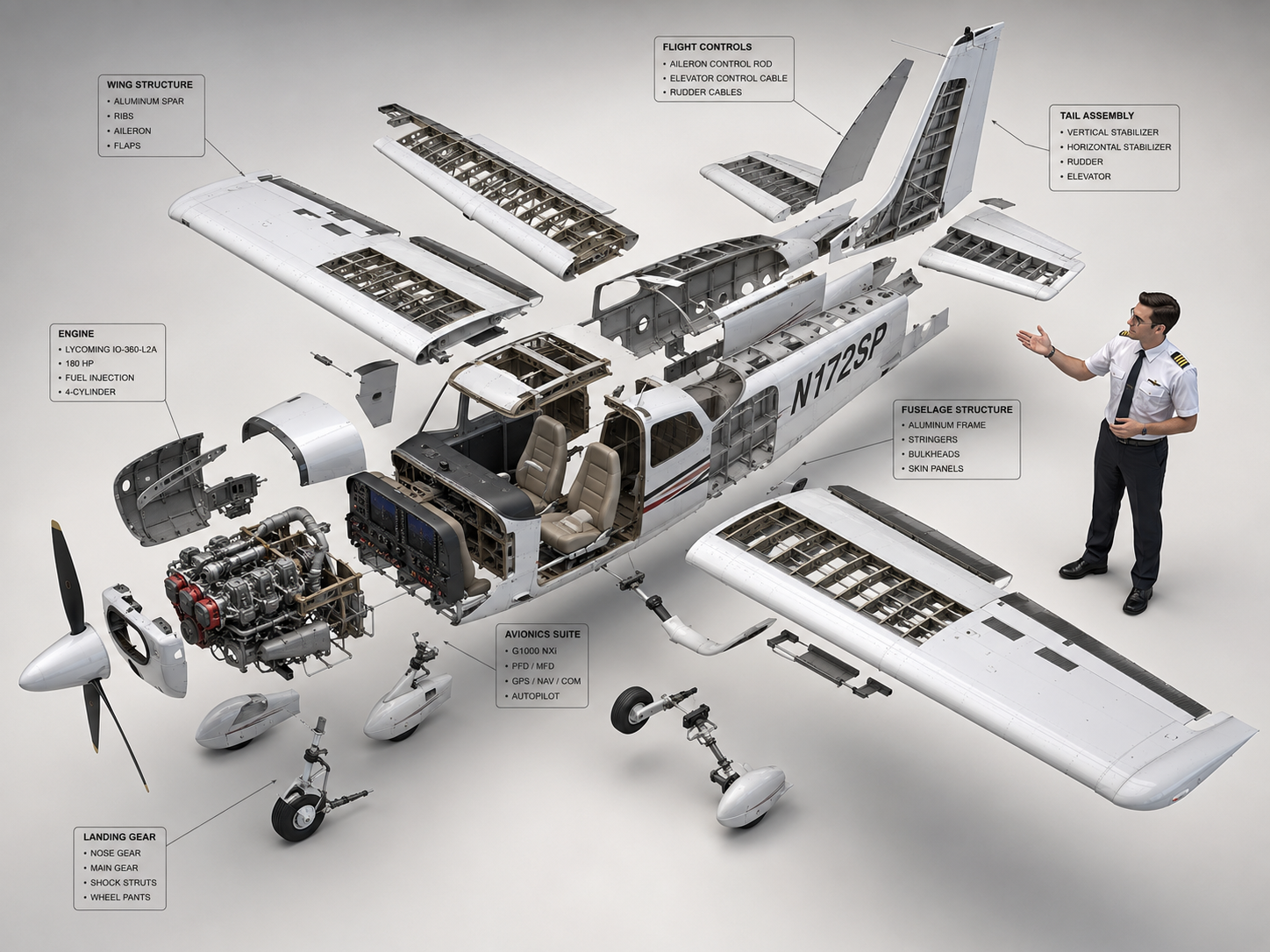
AI-generated Cessna 172 Exploded Diagram made with GPT Image 2

Cessna 172 Exploded Diagram

GPT Image 2· Image
High-end 3D CAD exploded view diagram of a Cessna 172, designed for CPL pilot training and technical reference. The aircraft is carefully disassembled into its main structural parts (fuselage, wings, engines, cockpit, tail stabilizer, and landing gear), floating symmetrically in a clean 3D space. A professional CPL pilot is positioned next to the components, gesturing towards the flight control systems as if demonstrating the aircraft parts. Industrial design aesthetic, precise technical lines, detailed plans, and realistic material textures (brushed aluminum and carbon fiber). Matte color palette. Clean, isolated background, isometric perspective, studio lighting with soft shadows, highlighting flight control systems and avionics for professional aviation study. --ar 4:3
c2284de1fa17e167135d711a164c5580
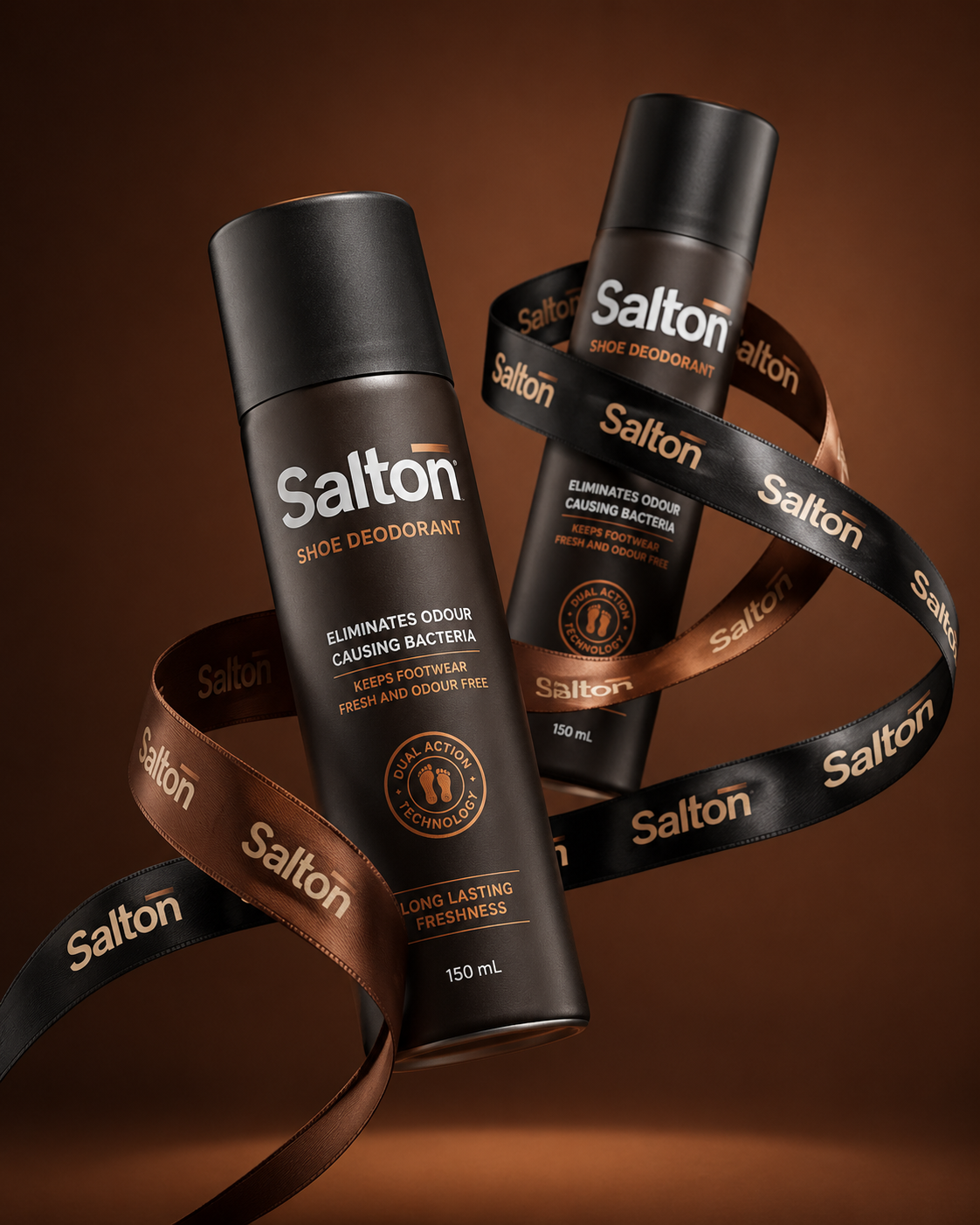
AI-generated Premium Shoe Deodorant Product Ad made with GPT Image 2

Premium Shoe Deodorant Product Ad

GPT Image 2· Image
A product photo in a premium advertising style. Two tall matte bottles of Salton Shoe Deodorant levitate in the air in a dynamic, balanced composition. The bottles are positioned at an angle to each other, creating a striking diagonal composition. One bottle is slightly forward, the other is slightly behind, creating depth and hierarchy. Both bottles are elegantly wrapped with a wide black and brown satin ribbon featuring the repeating "Salton" branding. The lettering is executed in a neat, contrasting font, legible without distortion, and is repeated evenly along the entire length of the ribbon. The ribbon flows smoothly between the bottles, uniting them into a single composition, without obscuring key messages on the packaging or clashing with the main branding on the bottles. Shot from a slightly lower angle, the bottles are slightly tilted, enhancing a sense of confidence, strength, and premium quality. The background is a solid studio color, a deep warm shade (chocolate, dark caramel or soft terracotta), clean and minimalist, without distracting details.
03c3bc0a085ce1071d7679a60522d627
AI-generated вескер из дбд стоит а спереди надпись стрим по дбд и вескер улыбается made with Midjourney

Wesker Game Stream Poster

Midjourney· Image
вескер из дбд стоит а спереди надпись стрим по дбд и вескер улыбается
ae411c47e654c8ca504cf1caca4b8d8b
AI-generated Design a premium app icon presentation board for a children's mobile g… made with GPT Image 2

Design a premium app icon presentation board for a children's mobile g…

GPT Image 2· Image
Design a premium app icon presentation board for a children's mobile game icon, inspired by Apple Human Interface Guidelines, Google Material Design documentation, and professional Behance case studies. Use a clean editorial layout with a minimalist white background, subtle light-gray construction grids, generous whitespace, and modern Swiss-inspired typography. The presentation should feel like it was created by a senior brand designer at a top mobile game studio.Place the final app icon as the hero element in the center, occupying approximately 60–70% of the page. Surround it with elegant technical annotations connected by thin gray leader lines. Include labels such as Safe Area, Adaptive Icon Mask, Optical Center, Visual Weight, Focal Point, Padding Zone, Keyline Grid, and Recommended Crop Area.Overlay a precise construction grid consisting of circles, squares, alignment guides, center lines, diagonal guides, proportional geometry, and adaptive icon boundaries. The grid should be subtle, using thin cyan or light-blue lines with low opacity, similar to Apple's icon construction documentation.Around the hero icon, include clean presentation sections with consistent spacing:Hero Icon ShowcaseConstruction GridSafe Area & Adaptive Icon MaskOptical AlignmentVisual Hierarchy DiagramColor Palette Swatches with HEX valuesTypography & Annotation StyleIcon Breakdown (Outline → Base Colors → Shading → Final Artwork)Small Size Preview (1024px, 512px, 256px, 128px, 64px, 48px)Platform Preview (Square, Rounded Square, Circle, Squircle)Use elegant monochrome labels, thin divider lines, subtle spacing, and professional alignment throughout the page. Typography should resemble modern design documentation with lightweight sans-serif fonts, small uppercase section titles, and minimal captions.The overall aesthetic should communicate precision, craftsmanship, and premium product design rather than marketing. Avoid gradients, decorative backgrounds, heavy shadows, colorful graphics, unnecessary icons, or visual clutter. The presentation should look like an official design specification created for a world-class mobile game studio and be suitable for Behance, Dribbble, or an AAA game design portfolio. Ultra-clean, highly organized, modern editorial design, perfect spacing, museum-quality layout, premium UI/UX presentation style.Avoid mockup devices, laptops, desks, hands, unnecessary 3D objects, colorful backgrounds, random decorative elements, excessive shadows, glassmorphism, neon effects, AI-style layouts, distorted grids, inconsistent spacing, low-resolution typography, cluttered composition, watermarks, logos, and marketing banners. Focus entirely on a clean professional icon specification sheet.
aacc56f2eccdceb35eb26a505aeb3232
AI-generated Hyperrealistic studio photograph of a majestic octopus with iridescent… made with GPT Image 2

Sunglasses Octopus Business Photo

GPT Image 2· Image
Hyperrealistic studio photograph of a majestic octopus with iridescent blue-grey mottled skin, wearing sleek minimal black sunglasses, positioned confidently on a glossy black obsidian pedestal in a seated, executive-like pose. Four tentacles each perform a distinct task simultaneously: one typing on a matte-black MacBook laptop, one holding a glowing smartphone displaying an upward revenue graph, one gripping a translucent holographic globe with pulsing connection nodes, one balancing a small stack of gold coins mid-transfer. Behind the octopus, five ultra-thin curved monitor screens arc in a 180-degree semi-circle, displaying SaaS dashboard interfaces, analytics charts, and a world map with glowing user-activity dots. Pure matte black studio background, no clutter, no extra props. Octopus skin rendered with ultra-fine photorealistic texture, subtle wet sheen on the suction cups. Shot on ARRI ALEXA 65 with a 50mm prime lens, shallow depth of field with the subject tack-sharp and the background screens falling into soft bokeh, dramatic single-source cool blue-white rim light from upper left, subtle warm red accent bounce light from lower right (hex ee4650), high-contrast chiaroscuro, glossy obsidian surface reflecting faint screen glow, ultra-detailed, 8k, commercial advertising photography --ar 4:5 --v 6.1 --style raw
2fd8674802b8a6aa04be8392eaa488d2
AI-generated 1. json prompt version ```json { "subject": { "description": "A croppe… made with Midjourney

Eyes in Editing Interface Close-up

Midjourney· Image
1. json prompt version ```json { "subject": { "description": "A cropped, low-resolution digital image of a person's eyes inside a rectangular selection box, resembling an image-editing canvas or screenshot. Only the eye area and eyebrows are visible; the rest of the face and body are cut off.", "mirror_rules": "Not a mirror selfie. Preserve the screen-capture / interface-editing feel rather than treating it as a conventional portrait.", "age": "adult or young adult, exact age unclear due to extreme crop and pixelation", "expression": { "eyes": { "look": "wide, direct, slightly tense gaze", "energy": "alert, uncanny, quietly confrontational", "direction": "looking straight toward the viewer" }, "mouth": { "position": "not visible", "energy": "not applicable" }, "overall": "fragmented and decontextualized, with the eyes carrying all emotional weight" }, "face": { "preserve_original": "Preserve the exact cropped eye-band framing, visible eyebrows, dark pupils, low-resolution halftone texture, and slight pink-gray screen tint.", "makeup": "No clear makeup is visible. The face should read as a raw, pixelated screen image rather than a polished beauty portrait." } }, "hair": { "color": "not visible", "style": "not visible", "effect": "not applicable" }, "body": { "frame": "not visible", "waist": "not visible", "chest": "not visible", "legs": "not visible", "skin": { "visible_areas": "Only a narrow strip of facial skin around the eyes, eyelids, under-eye area, bridge of the nose, and brow region is visible. No shoulders, chest, waist, hips, legs, back, or arms are visible.", "tone": "pale pink-gray skin tone distorted by screen pixels and scanline-like color separation", "texture": "The skin appears roughened by digital pixel structure, like it would feel visually grainy or screen-printed rather than physically smooth; any natural skin texture is obscured by the low-resolution display pattern.", "lighting_effect": "The skin is not lit by natural photographic light; it appears illuminated through a flat digital screen or screenshot, with no realistic shadow depth, only pixel-level contrast and faint magenta-gray banding." } }, "pose": { "position": "Only the eyes are framed horizontally inside a selected rectangular crop.", "base": "No body pose visible.", "overall": "The composition feels like a fragment being actively selected, edited, or dragged inside a design interface." }, "clothing": { "top": { "type": "not visible", "color": "not visible", "details": "not visible", "effect": "not applicable" }, "bottom": { "type": "not visible", "color": "not visible", "details": "not visible" } }, "accessories": { "device": "Implied computer interface or editing software canvas", "prop": "Multiple oversized black-and-white mouse cursor arrows surrounding and pointing toward the selected eye image" }, "photography": { "camera_style": "Not a traditional photograph; a screenshot-like digital collage or UI-capture aesthetic with a pasted low-resolution eye image.", "angle": "Straight-on, flat frontal view with no perspective depth.", "shot_type": "Extreme close-up crop of eyes embedded in a graphic interface composition.", "aspect_ratio": "Overall image is near 4:5 vertical canvas; the selected eye strip is a long horizontal rectangle.", "texture": "Visible pixel grid, moire-like vertical RGB scanlines, compressed low-res texture, hard-edged UI elements, clean white canvas background.", "lighting": "Flat screen illumination, no cinematic lighting, no natural directionality; contrast comes from the digital image and interface overlay.", "depth_of_field": "No optical depth of field; all elements appear flattened like a graphic screenshot." }, "background": { "setting": "Minimal white digital workspace or blank canvas", "wall_color": "white", "elements": [ "bright cyan-blue rectangular selection outline", "round blue resize handles on corners and midpoints", "small dark floating size tooltip near the top-right edge", "several repeated mouse cursor arrows arranged around the eye crop", "large empty white space above and below the selected image" ], "atmosphere": "Sparse, internet-art, meme-adjacent, slightly uncanny and obsessive", "lighting": "Pure digital white background with no physical environmental light" }, "the_vibe": { "energy": "hyper-focused, intrusive, glitchy", "mood": "uncanny, anxious, surveillance-like, absurdly intimate", "aesthetic": "early internet collage, screenshot art, low-res UI manipulation, digital found-image surrealism", "authenticity": "Should feel like an imperfect screenshot taken during editing, not a clean vector recreation or polished poster.", "intimacy": "The extreme eye crop creates uncomfortable closeness while the interface elements keep it emotionally detached.", "story": "It feels as if someone had been selecting a stranger's gaze on a blank canvas, and the repeated cursors are still converging on it.", "caption_energy": "something that was clicked too many times, a gaze trapped inside an editing box" }, "constraints": { "must_keep": [ "white blank background", "horizontal rectangular crop containing only both eyes and eyebrows", "cyan-blue selection box with circular resize handles", "visible pixelated / scanline texture across the eye image", "multiple large black-and-white cursor arrows pointing toward or around the eyes", "small size-tooltip near the upper right of the selection box", "flat screenshot-like composition", "uncanny direct gaze" ], "avoid": [ "do not turn it into a full-face portrait", "do not add visible body, clothing, hair, or environment", "do not make the image high-fashion or cinematic", "do not remove the UI selection handles", "do not smooth out the pixel grid", "do not replace the cursors with realistic hands or objects", "do not add dramatic shadows or realistic depth" ] }, "negative_prompt": [ "full body", "full face", "beauty portrait", "cinematic lighting", "realistic background", "smooth skin", "high resolution glamour", "fashion editorial", "hands", "extra facial features", "removed cursor arrows", "removed selection box", "3D depth", "polished vector art" ] } ``` 2. Natural language prompt Create a flat, screenshot-like digital collage on a mostly blank white canvas. In the center, place a long horizontal rectangular crop showing only a person's eyes, eyebrows, eyelids, under-eye area, and a narrow strip of pale pink-gray facial skin. The gaze should look straight at the viewer, wide and slightly tense, with an uncanny, alert emotional residue. Do not show the full face, mouth, hair, body, clothing, shoulders, chest, waist, hips, legs, arms, or any physical environment. The eye crop should look low-resolution and screen-captured, with visible pixel grid, vertical RGB scanline texture, faint moire, compression artifacts, and a slightly gray-magenta digital tint. The skin should not look polished or naturally lit; it should feel visually grainy, like a rough screen-printed or monitor-textured surface rather than smooth real skin. Lighting should be flat screen illumination with no realistic shadows, no cinematic directionality, and no depth-of-field blur. Surround the eye strip with a bright cyan-blue editing selection rectangle, including circular resize handles on the corners and midpoints. Add a small dark size-tooltip near the upper-right edge of the selected rectangle, as if the image is actively being resized in editing software. Place several oversized black-and-white mouse cursor arrows around the eye crop, some pointing toward the eyes and some overlapping the area below, creating a repetitive obsessive clicking energy. The composition should remain front-facing, flat, and graphic, with a near 4:5 vertical canvas and a large amount of empty white space above and below the selected eye strip. Preserve the imperfect screenshot feeling: slightly awkward placement, low-res texture, hard UI edges, and a casual internet-art quality. The image should feel as if someone had been selecting a stranger's gaze on a blank canvas, and the cursors are still converging on it. Avoid turning it into a full portrait, beauty shot, fashion editorial, cinematic scene, polished vector poster, or realistic environment. Keep the selection box, cursor arrows, pixelation, flat white background, and direct uncanny gaze as the core visual identity.
d1f13b0062b253274393e0ac28bf3555
AI-generated 面容特写, 异色眼睛瞳孔内呈现红色,皮肤质感细腻,层次感油腻光,厚斜刘海,长直发,侧光透过镜头外缝隙在脸上形成独特唯美花纹阴影效果,轻质感纱… made with Midjourney

Red-Eyed Anime Face Close-up

Midjourney· Image
面容特写, 异色眼睛瞳孔内呈现红色,皮肤质感细腻,层次感油腻光,厚斜刘海,长直发,侧光透过镜头外缝隙在脸上形成独特唯美花纹阴影效果,轻质感纱巾缠绕脖子,游戏CG,电影质感,阴影描边,二次元,日系,梦幻,唯美,微风,动态模糊,明暗对比强烈,暗色系 --ar 9:16 --profile zrondri --hd
d0b7d9fda92227198bea07638a2e18cf
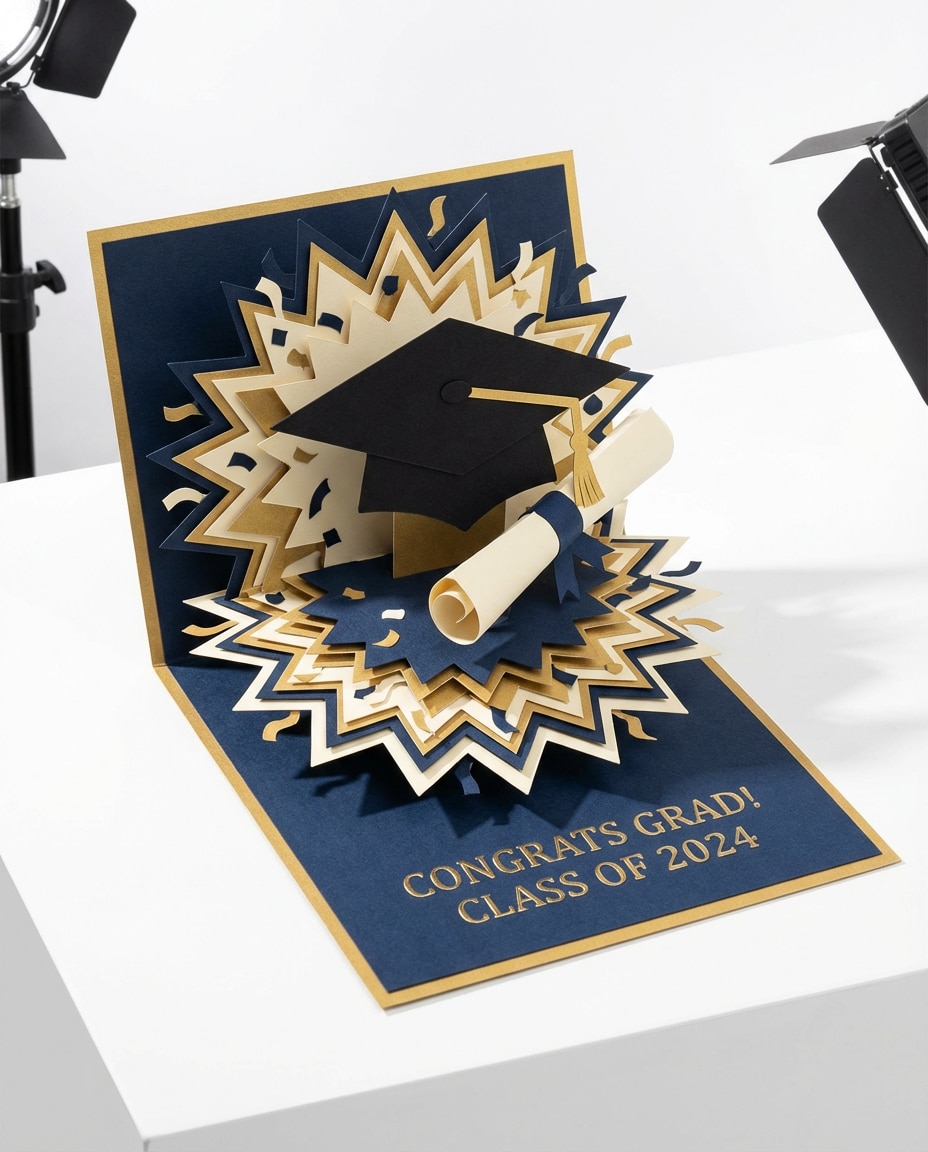
AI-generated Graduation Celebration Pop-up Card made with Nano Banana Pro

Graduation Celebration Pop-up Card

Nano Banana Pro· Image
A 3D pop-up graduation card with a cap and diploma bursting upward, layered starbursts and confetti shapes, navy and gold cardstock, embossed text on the base, bright crisp studio lighting, shot on Canon EOS R5 70mm, slight top-down angle, sharp focus, premium stationery product photography --ar 4:5
graduation-burst-pop

What are Product on White Background Prompts?

A collection of AI prompts for generating product on white background images. Copy the Product on White Background prompts provided by Carat and paste them into an AI image generation tool to get professional-grade results.

How to Use Product on White Background Prompts

  1. Select and copy your desired prompt.
  2. Paste it into the Carat agent.
  3. Modify colors, styles, and composition as needed.
  4. Download the generated image and use it in your project.

Tips for Writing Product on White Background Prompts

Specify lighting, texture, composition, and lens information in detail for more precise results. Add "No text, no watermark" to prevent unwanted text overlays.

Product on White Background Prompt Applications

Product on White Background prompts are used across content creation, marketing, design, and educational resources. AI-generated images dramatically reduce production time while maintaining professional quality.

Product on White Background Prompt Optimization Guide

Choose the aspect ratio based on your use case: vertical (9:16) for social media, horizontal (16:9) for web banners, and square (1:1) for product images.

Frequently Asked Questions

Related Prompts

Product with Transparent Background

Product with Transparent Background

12 prompts

3D Cartoon

332 prompts

Character

Character

254 prompts

Poster

Poster

502 prompts

Carat Prompt Gallery

Create trending AI prompts instantly

Prompts

  • Logo
  • PPT Design
  • Thumbnail
  • Poster
  • Web Novel Cover
  • ID Photo
  • Caricature
  • Product Detail Page
  • Banner

Models

  • GPT Image 2
  • Seedance 2.0
  • NanoBanana Pro
  • NanoBanana 2

Carat

  • Get started
  • About
  • Blog
  • Careers
  • Contact
  • Partnership
  • Terms
  • Privacy

© 2026 Paradot.Inc All rights reserved.