carat

Prompt Gallery

/

Winter Photo

Login
Sign Up

Winter Photo

Generate breathtaking winter landscapes and cozy seasonal photos with these professional AI prompts.

2026.07.04

·
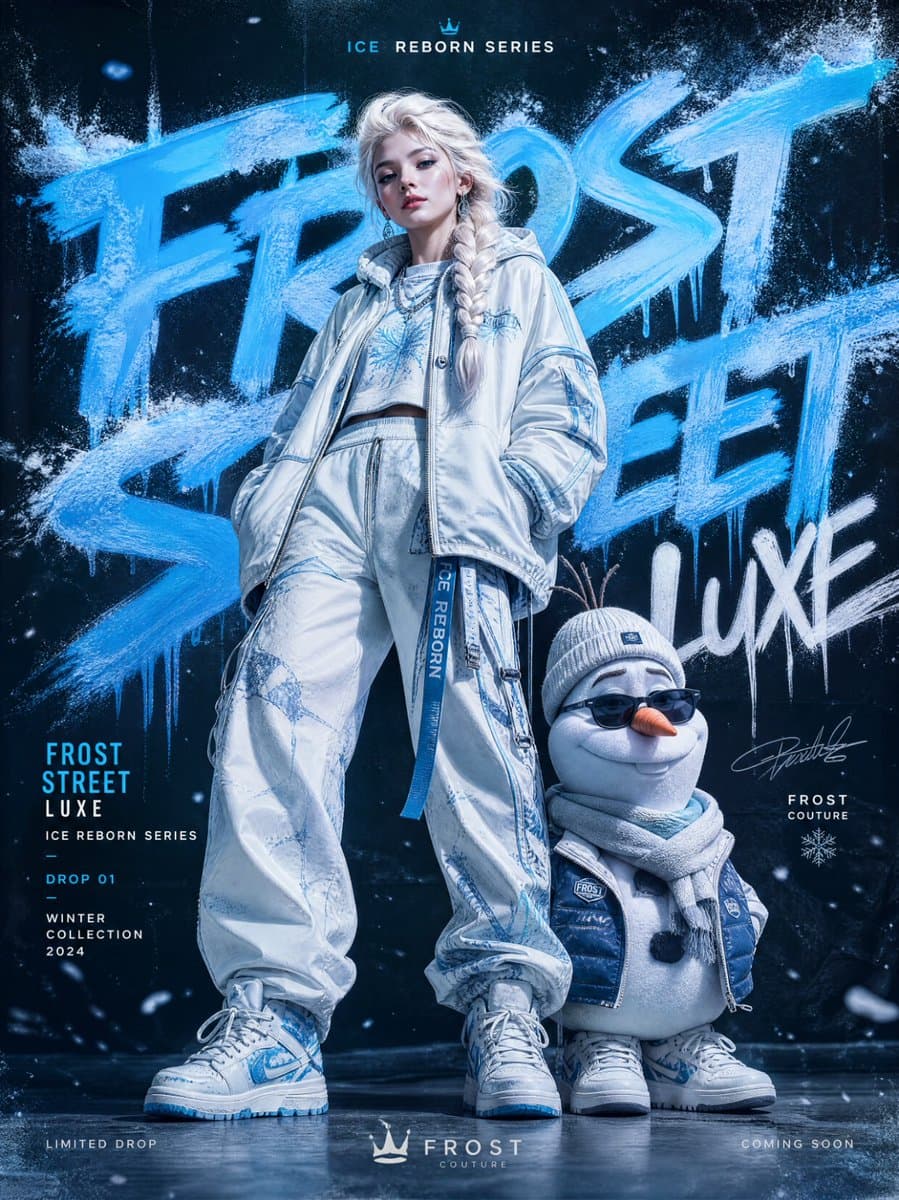
AI-generated Frozen Streetwear Fashion Campaign made with GPT Image 2

Frozen Streetwear Fashion Campaign

GPT Image 2· Image
URBAN GRAFFITI FASHION CAMPAIGN — ELSA & OLAF EDITION IMAGE TYPE Premium streetwear fashion poster, luxury editorial campaign, modern urban fashion advertisement featuring two hero subjects: Elsa and Olaf reimagined as high-fashion streetwear icons. CORE CONCEPT A bold fashion campaign built around TWO hero subjects: Elsa (ice queen-inspired fashion model) and Olaf (stylized streetwear companion character) blending luxury editorial photography, icy graffiti aesthetics, and winter-themed urban fashion culture. STYLE & ART DIRECTION Modern streetwear branding, graffiti art influence, high-fashion editorial styling, youth culture visuals, minimal luxury fashion advertising, bold typography composition, Instagram-ready campaign design. Mood: bold, icy, stylish, urban, futuristic, luxury streetwear, cinematic, modern. HERO SUBJECT SYSTEM CENTER COMPOSITION: TWO-FIGURE HERO SETUP ELSA (Primary Fashion Model): full-body editorial pose high-fashion ice queen reinterpretation luxury oversized streetwear layered outfit icy blue, white, silver color palette accents futuristic textures (frosted fabrics, crystal-like surfaces) calm, powerful runway presence OLAF (Secondary Stylized Character): reimagined as a cute-but-fashionable streetwear mascot minimalist snow-inspired design soft plush-like aesthetic with premium styling urban accessories (sneakers, scarf, streetwear jacket elements) expressive but refined, not cartoonish Together: a luxury fashion duo campaign GRAFFITI TYPOGRAPHY SYSTEM Oversized graffiti typography forming icy street-art background: spray paint frost effects frozen brush lettering snow mist textures crystal graffiti tags partially cropped typography Typography acts as: campaign branding + icy visual structure MINIMAL EDITORIAL LAYOUT clean luxury spacing large negative space structured composition balanced duo focus (Elsa dominant, Olaf complementary) Tone: premium, expressive, modern editorial clarity. COLOR PALETTE SYSTEM Dominant accent: icy electric blue Supporting tones: white silver frost gray soft neon ice highlights Must unify entire winter-fashion identity. DEPTH & LAYERING SYSTEM FOREGROUND: snow particles, ice dust, glowing frost fragments MIDGROUND: Elsa & Olaf hero subjects BACKGROUND: oversized icy graffiti typography + frozen gradient wall Depth = cinematic fashion + winter street energy LIGHTING SYSTEM High-end fashion editorial lighting: cool-toned studio lighting glossy icy highlights soft shadows with frost glow cinematic contrast control premium fabric realism Elsa should feel powerful and luminous; Olaf soft and stylized. BRANDING SYSTEM Include: campaign title (e.g., “FROST STREET LUXE”) collection label (“ICE REBORN SERIES”) minimal luxury logo placement drop information footer NEGATIVE SPACE SYSTEM clean breathable layout controlled composition focus on dual hero subjects no visual clutter FINAL QUALITY SYSTEM Must feel: luxury fashion editorial campaign icy urban graffiti art fusion high-end streetwear branding cinematic winter aesthetic globally polished commercial poster Instagram-ready iconic design STRICT RULES Only TWO hero subjects (Elsa + Olaf) No cartoon rendering style No messy graffiti overload No cluttered composition Must remain premium, clean, and editorial Olaf must be stylized, not comedic or chaotic
@ShamiWeb3
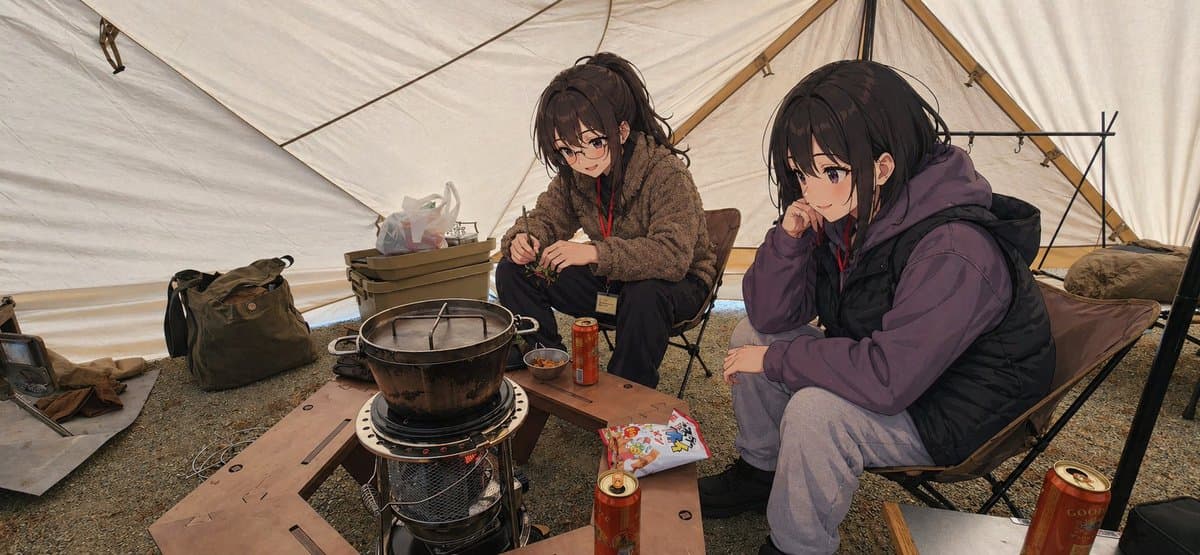
AI-generated Anime Campers Inside a Winter Tent made with GPT Image 2

Anime Campers Inside a Winter Tent

GPT Image 2· Image
A cozy winter camping scene inside a large beige canvas tent, rendered as a semi-realistic anime illustration with natural lighting and realistic environmental detail. Show exactly 2 seated young women around a compact kerosene heater used as a camp table, with a large black metal pot resting on top. The viewpoint is a candid wide-angle photo composition from slightly above seated height, making the scene feel like a casual snapshot taken inside the tent. The woman on the left has {argument name="hair color" default="dark brown"} hair tied in a high ponytail with loose bangs, and wears a fluffy brown fleece jacket, dark pants, and a red lanyard with an ID card. She sits in a low camping chair and leans forward, using chopsticks over a small bowl or food container in her hands. The woman on the right has {argument name="hair color" default="black"} shoulder-length hair and wears a muted purple hoodie layered under a black puffer vest, light gray sweatpants, and dark shoes. She sits in another low camping chair, resting her cheek on one hand in a relaxed, sleepy pose. Keep both faces obscured by a soft rectangular blur block, as if anonymized in a posted photo. Around them, include exactly 4 red beverage cans visible in the scene: 2 on the wooden table planks near the center, 1 cropped in the lower right foreground, and 1 farther back near the right side. Build a low U-shaped arrangement of 3 wooden bench planks surrounding the heater. Add small camping details: 1 olive duffel bag on the left ground, 1 plastic storage box with supplies behind the left woman, 1 white plastic shopping bag on top of the box, 1 small bowl on the table, 1 colorful snack package on the right-side plank, 1 soft brown cloth on the far left floor, and 1 black metal rack frame standing at the back right. The tent interior should have taut canvas walls, visible seams and support poles, a gravel ground, and a warm muted color palette. Preserve the feeling of a real camping photo where only the people have been turned into anime-style characters while the setting remains highly realistic.
@sub_raw_jin
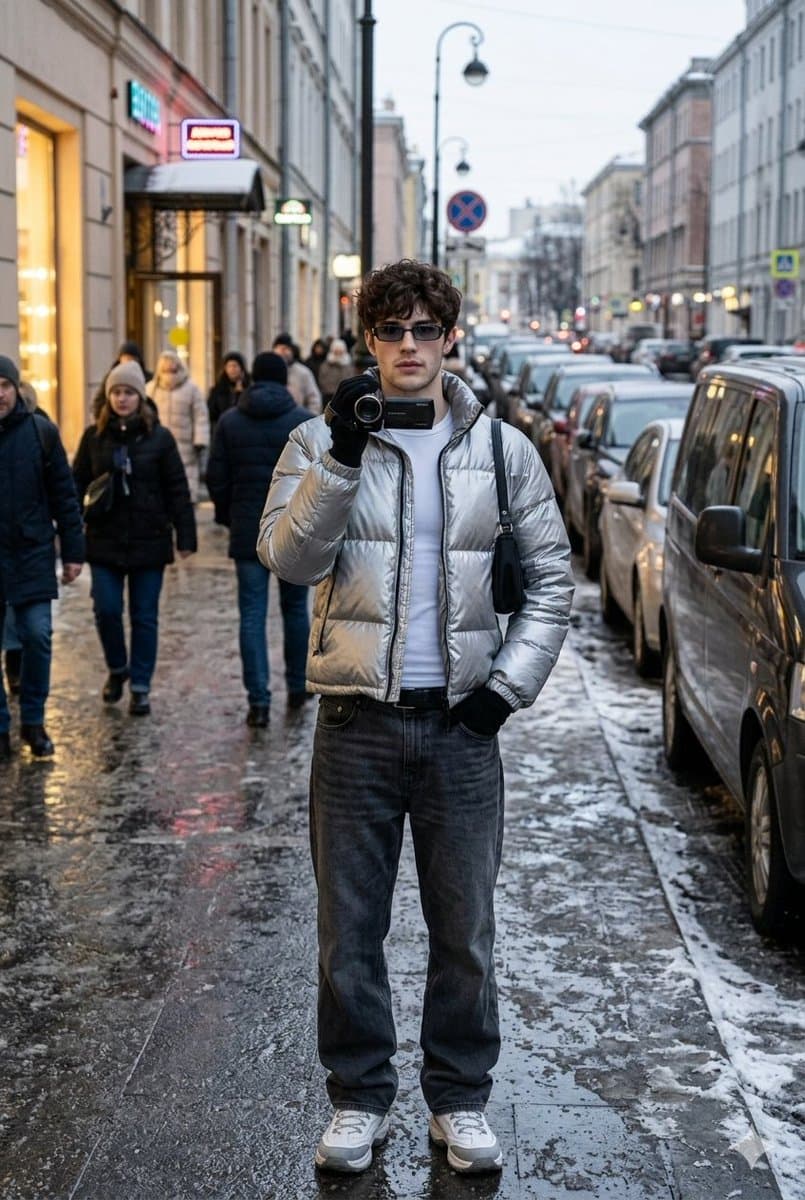
Example image of Winter Street iPhone Photoshoot generated with Nano Banana 2

Winter Street iPhone Photoshoot

NanoBanana 2· Image
Shot on iPhone, winter street photoshoot, ultra-realism, natural shot: SAVE FACE FROM UPLOADED PHOTO 1:1 — do not change features, proportions, age, facial expressions and similarity even by 1%, use the uploaded photo as the ONLY face standard), plot: a man in the center of a busy winter city street makes a "reporter's" street shot, holds a compact camera/camcorder to his face, as if he is filming in response, the pose is fixed, stance U2K confident, pelvis slightly shifted to the right, shoulders relaxed, one hand holds a compact camera to the lips/chin, the other hand deep in the pocket, elbow slightly pulled back, looking straight into the lens, expression calm and bold; the angle is fixed: shooting on an iPhone from chest level, slight wide-angle (26mm feel), the hero is strictly in the center, the frame is waist-deep, the perspective is minimal, without a "corridor" into the distance, the background is dense and close; the background is strictly defined: a winter evening in the city, wet asphalt and slush, behind the hero there is a wide street with closely parked cars in two rows, on the right next to (3-5 meters) a parked dark minivan, on the left the facade of a building with brightly lit shop-windows and an entrance, above the entrance there are 2-3 small neon signs without legible words, on the sidewalk around the hero there are 10-15 people in winter clothes (some are passing by, some are standing in a group near the shop-window), all the faces of passers-by are slightly blurred so that the focus remains on the model; a street lamp, road signs, reflections of lights in the wet asphalt are visible in the frame, no long horizon, a "wall" of buildings and cars in the background, short depth; The clothes are strictly defined (u2k unisex, winter): a short glossy down jacket "metallic silver" made of nylon with a high collar, under it a white tight-fitting thermal jacket without prints, bottoms: low-rise dark gray baggy jeans with a belt, shoes: winter sneakers/boots white and gray with a massive sole, accessories: narrow rectangular glasses u2k with dark lenses, black gloves, a small black shoulder-bag with a short strap over the shoulder, in hand a black compact camera/camcorder without logos; fixed light; winter evening mixed cold street + warm shop-window light, soft contrast, no flash, no studio light, natural shadows under the nose and chin, glare from the wet road; atmosphere: lively urban winter street, city noise, people moving, the feeling of a "captured moment" in the style of the 2000s; textures: hyper-realistic skin texture, natural pores and fine details, Subtle imperfections, slight reddening of cheeks from the cold, realistic lip gloss, detailed texture of the glossy nylon down jacket, visible seams and zipper, denim with a pronounced weave and creases, wet asphalt with reflections, grainy slush, camera plastic with small scratches; camera and processing: iPhone photo look, iPhone RAW, slight digital noise, soft compression, natural white balance, slightly muted colors, no retouching, no filters, sharpness on the face, moderately blurred background, slight micro-blur as in a live 3:4 frame.
@harboriis

What Are Winter Photo AI Prompts?

Winter Photo AI prompts are sophisticated text instructions designed to guide artificial intelligence in creating visual representations of cold-weather environments, snowy landscapes, and the unique atmospheric conditions of the winter season. These prompts focus on capturing the intricate details that define winter, such as the crystalline structure of snow, the soft diffusion of low-hanging sunlight, and the visible mist of breath in frozen air. From the magical, ethereal snowscapes reminiscent of a fantasy world to the gritty, realistic urban winter streets of a modern metropolis, these prompts allow creators to generate a wide array of seasonal imagery. They provide the necessary parameters for the AI to understand texture, light reflection on ice, and the color palette specific to the year's coldest months, enabling the production of evocative and high-fidelity visual assets.

Best Use Cases

The versatility of Winter Photo prompts makes them ideal for seasonal marketing campaigns, particularly in the fashion industry. Brands can use them to create lifestyle photoshoots featuring winter apparel in exotic snowy locations like the Swiss Alps or the streets of Tokyo without the logistical challenges of actual travel. They are also perfect for creating social media content, such as cozy "winter camping" anime illustrations or iPhone-style candid snaps of people enjoying the first snow. In the publishing world, these prompts help generate editorial portraits for winter-themed magazine covers or book illustrations. Furthermore, concept artists use them to visualize snowy environments for video games or film pre-visualization, ensuring that the cold atmosphere is palpable to the audience. For personal use, they are excellent for designing custom holiday cards or winter-themed digital wallpapers.

Why This Tag Works

The Winter Photo tag is a powerful tool because it allows for the precise control of environmental elements that are notoriously difficult to capture in traditional photography. By specifying the type of snow, the density of the fog, or the intensity of the frost, creators can achieve a level of consistency and detail that feels both authentic and hyper-real. It works effectively by leveraging the AI's learned understanding of "cool" versus "warm" contrast-such as the golden glow of a fireplace against a deep blue snowy night. This tag simplifies the process of creating high-impact seasonal content, saving time and resources while providing endless creative variations. It ensures that every image carries the distinct "soul" of winter, whether that's the quiet stillness of a forest after a snowfall or the vibrant energy of a winter festival.

Explore Related Prompts

Dive deeper into the seasonal aesthetic with these related prompt categories:

  • Street Photo : Capture the dynamic energy of urban winter life.
  • Fashion Photo : Showcase cold-weather styles and high-fashion winter gear.
  • Cinematic Portrait : Create dramatic, story-driven portraits in winter settings.
  • Profile Photo : Refresh your personal brand with a cozy winter-themed profile.
  • Night Photo : Explore the magical interplay of lights and snow after dark.
  • Editorial Portrait : Generate polished, professional winter shots for commercial use.
  • Illustration : Craft beautiful winter-themed artworks and drawings.

Prompt Building Tips

To create a truly compelling winter photo, start by defining the "weather state." Are you looking for "pristine, untouched powder snow" or a "slushy urban street after a storm"? Be specific. Next, describe the lighting to set the mood; "pale morning sun casting long shadows on snow" creates a serene vibe, while "vibrant blue hour lighting" adds a sense of mystery. For human subjects, add sensory details like "chapped lips," "woolen textures of a scarf," and "soft rim light highlighting the fur of a parka hood." Use technical modifiers like "subsurface scattering" for the snow to make it look realistic as light passes through it. Finally, specify a color grade, such as "teal and orange" for a cinematic look or "high-key white" for a clean, minimalist winter aesthetic. Don't forget to mention the camera lens, like "35mm for a natural street view" or "85mm for a beautiful bokeh background with blurred snowflakes.

Frequently Asked Questions

Related Prompts

Ocean Illustration

Ocean Illustration

54 prompts

Season Poster

Season Poster

44 prompts

Dress Illustration

Dress Illustration

155 prompts

Editorial

Editorial

193 prompts

Carat Prompt Gallery

Create trending AI prompts instantly

Prompts

  • Logo
  • PPT Design
  • Thumbnail
  • Poster
  • Web Novel Cover
  • ID Photo
  • Caricature
  • Product Detail Page
  • Banner

Models

  • GPT Image 2
  • Seedance 2.0
  • NanoBanana Pro
  • NanoBanana 2

Carat

  • Get started
  • About
  • Blog
  • Careers
  • Contact
  • Partnership
  • Terms
  • Privacy

© 2026 Paradot.Inc All rights reserved.