carat

Prompt Gallery

/

Mascara Style Transformation

Login
Sign Up

Mascara Style Transformation

Mascara Style Transformation prompts. Copy and use Mascara Style Transformation image generation prompts from Carat right away.

2026.07.12

·
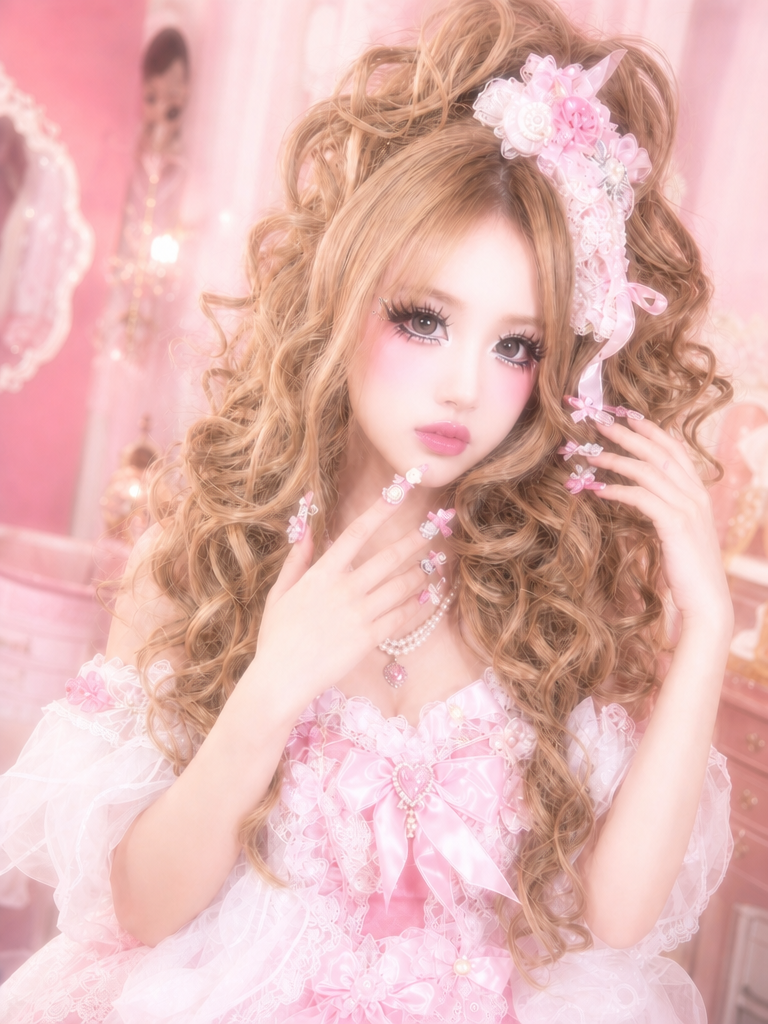
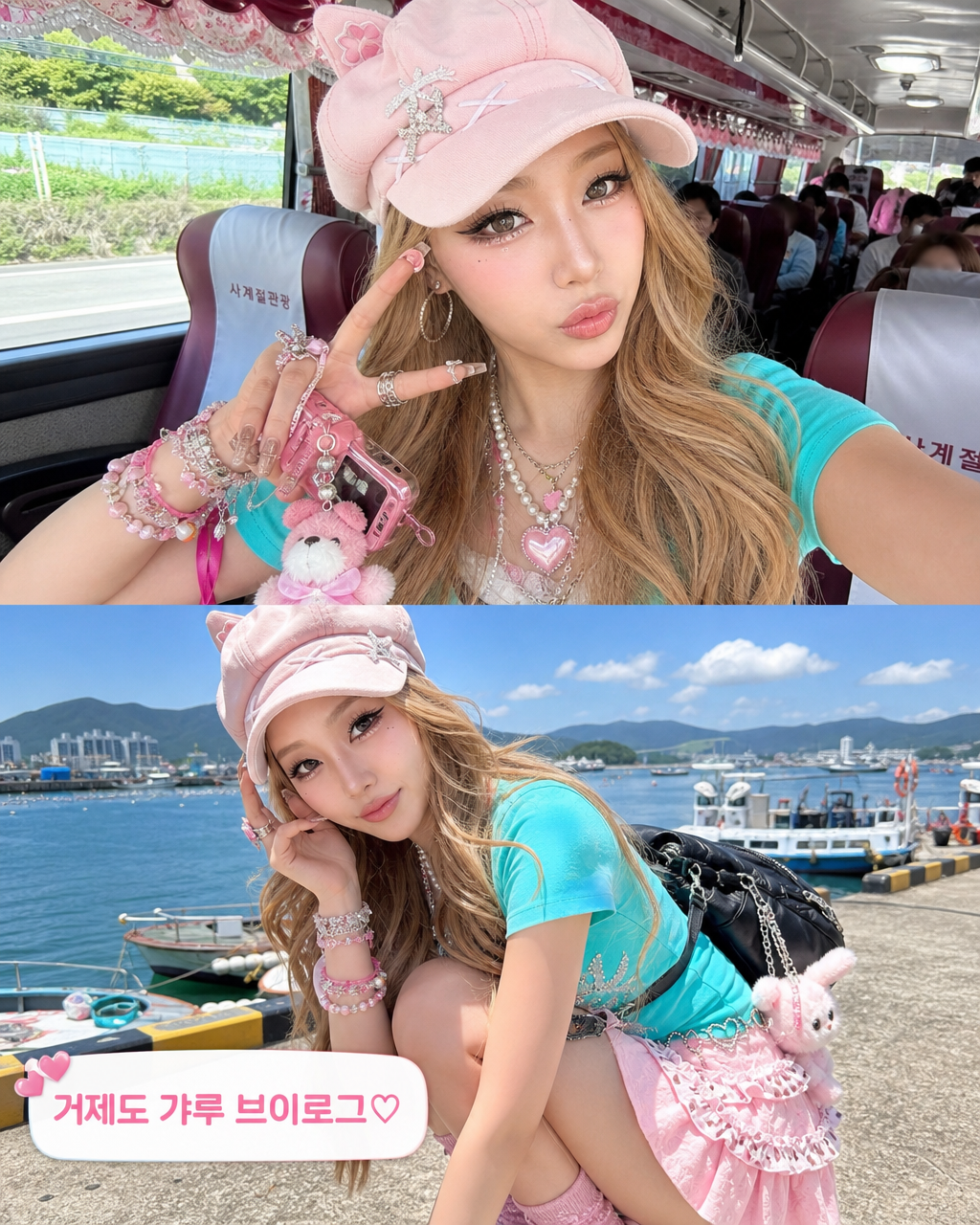
AI-generated Himegyaru princess gyaru style transformation made with GPT Image 2

Himegyaru Style Transformation

GPT Image 2· Image
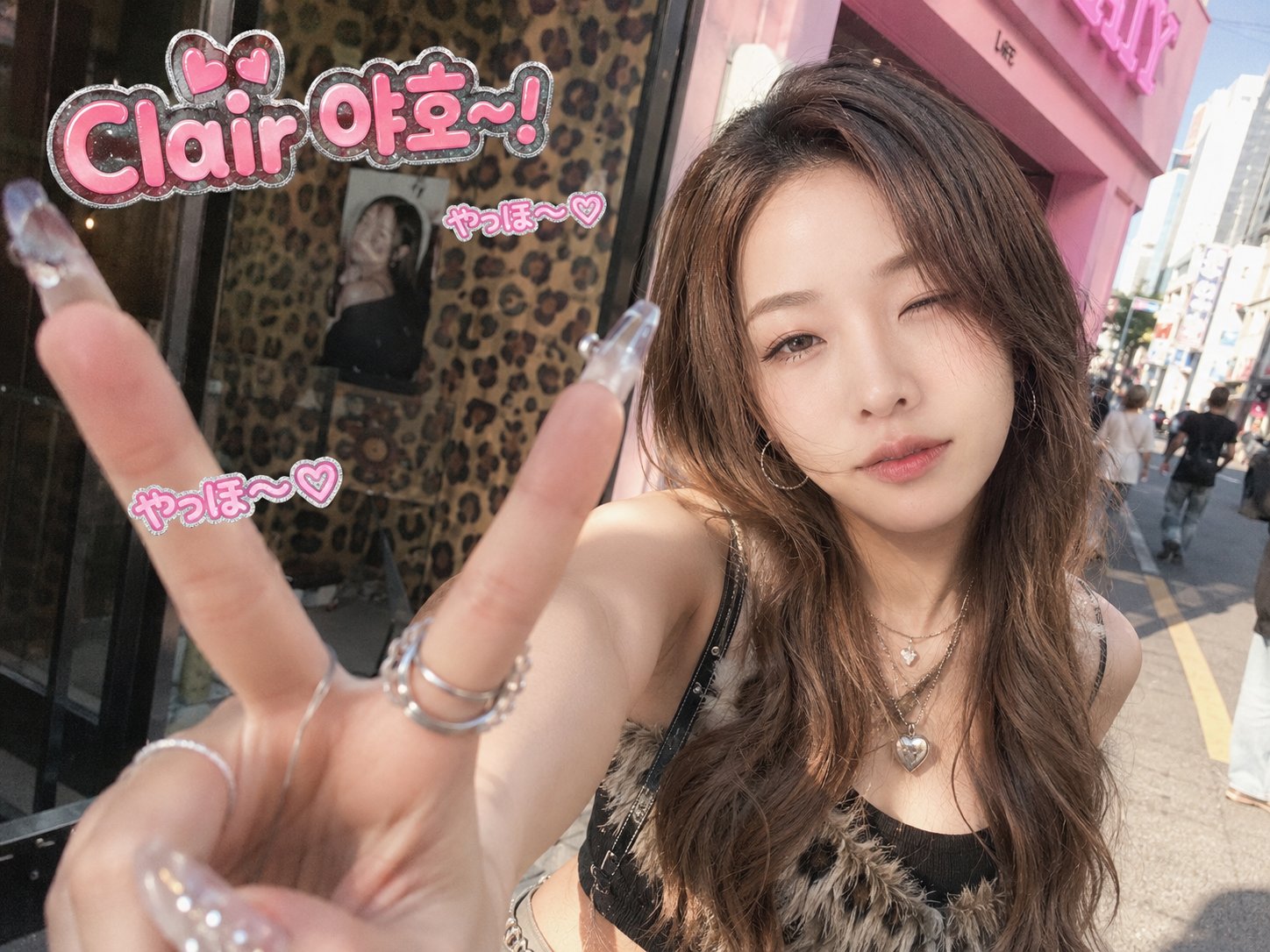
Transform this photo into a hime gyaru (姫ギャル) style image. CRITICAL RULES — DO NOT CHANGE: Keep the woman's exact face, facial features, skin texture, expression, pose, body position, camera angle and the original photo's portrait aspect ratio completely identical and untouched. Only modify her styling and background as follows: STYLE DIRECTION: This must look like a candid street snap taken on an iPhone — sharp, vibrant, and natural. NOT AI-generated, NOT illustration, NOT anime, NOT dreamy/soft filter. HAIR: Voluminous honey-blonde big spiral curl perm with dramatic bounce and volume, loose curls framing the face and cascading over shoulders. Small pink ribbon hair clip. Each hair strand must have natural detail, flyaways, and realistic light reflection — not smooth CGI hair. MAKEUP: Authentic hime gyaru makeup on real skin with visible pores and texture — multiple layers of thick false eyelashes on top and bottom lash lines (spiky, doll-like), heavy black winged eyeliner, white pearl shimmer on inner eye corners, concentrated rosy-pink blush on cheeks, overlined glossy pink lips. Must look like real cosmetics applied on real skin, not digitally painted. OUTFIT: Pink and white leopard-print top or cardigan layered with lace camisole, pearl necklace, rhinestone accessories — real fabric with visible weave and material texture. Hime gyaru street fashion style. NAILS: Elaborate 3D nail art with pink/white rhinestones, bows, and heart charms. BACKGROUND: Daytime Japanese city street — Shibuya/Harajuku urban scenery with kanji shop signs, crosswalks, pedestrians in the distance, utility poles. Shallow depth of field with natural bokeh, background softly out of focus. CAMERA/PHOTO QUALITY: Shot on iPhone. Sharp focus on the subject's face, high-contrast, moderate-to-high saturation with punchy vivid colors (especially pinks). Natural bright daylight, neutral-to-slightly-cool white balance. Clean digital sharpness. Realistic skin rendering with visible pores, subtle asymmetry, natural highlight reflections on nose and cheeks. No soft glow, no bloom, no dreamy filter — crisp and clean like a real street photo.
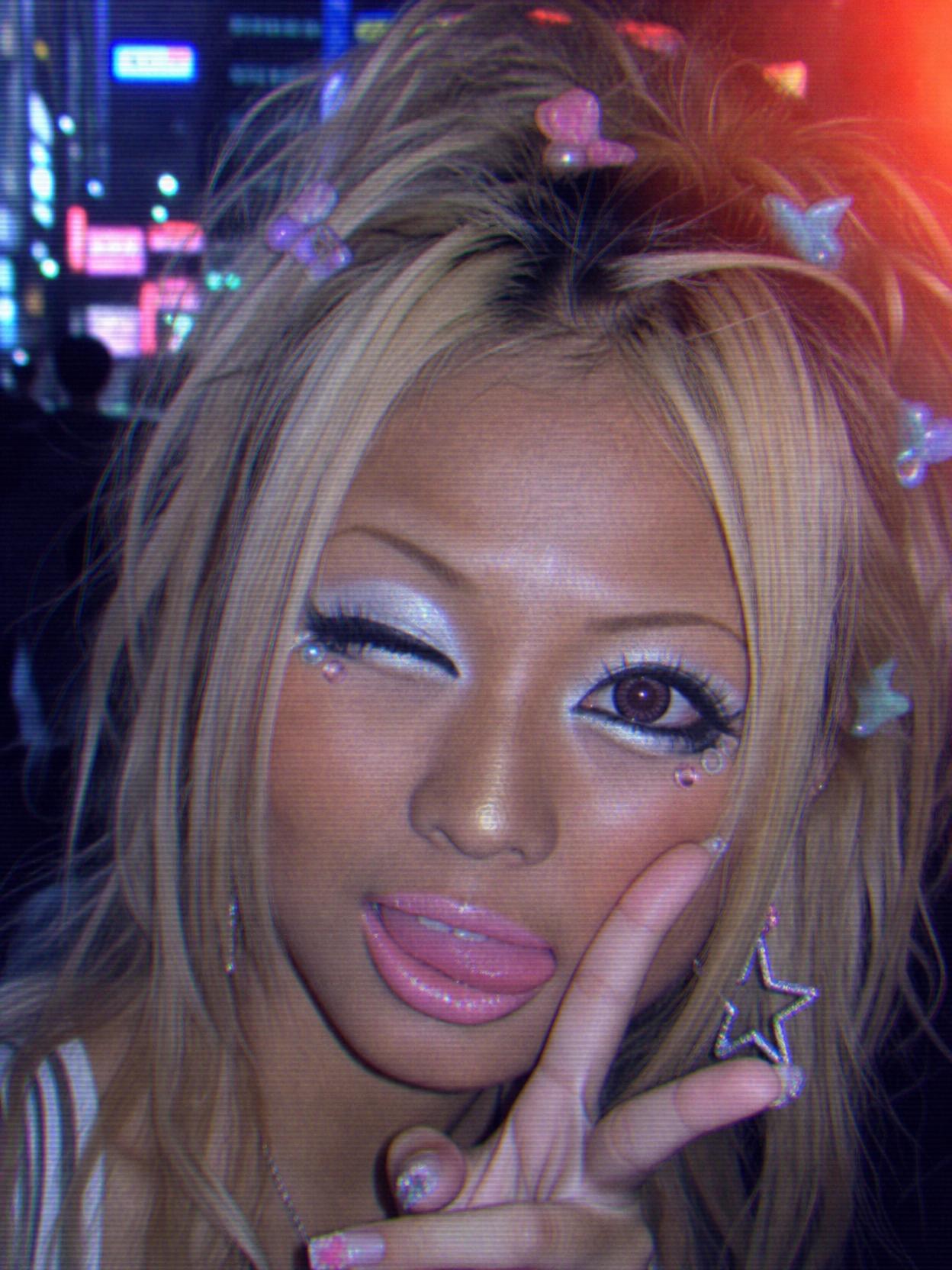
AI-generated 90s Kogal style transformation made with GPT Image 2

90s Kogal Style Transformation

GPT Image 2· Image
Transform this photo into a 90s Japanese Kogal (コギャル) style portrait. Apply the following changes while strictly preserving the original subject's face shape, facial features, expression, eye gaze direction, head angle, pose, body framing, and the image aspect ratio exactly as they are. Makeup transformation: Apply thick pearlescent white eyeshadow packed heavily on both eyelids. Add heavy black kohl liner on lower waterline extending outward. Small adhesive gem stickers placed under the outer corner of each eye. Ultra-thin overplucked arched eyebrows drawn with light brown pencil. Overlined bubblegum pink glossy lip gloss with visible shine catching the light. Sun-kissed deep tan skin tone across face and neck, with visible orange-toned foundation and slight jaw line demarcation. Hair transformation: Bleached platinum blonde hair with 2cm dark roots visible at the part. Voluminous chunky layered blowout framing the face. Face-framing tendrils with slight curl at the ends. Colorful plastic butterfly hair clips scattered throughout the hair. Outfit transformation: Navy blue Japanese school blazer worn open over a white dress shirt with a loose ribbon tie. If the original photo shows a skirt or lower body, change it to an extremely shortened plaid pleated school skirt. If ankles or feet are visible, add oversized chunky white loose socks scrunched and pooling over brown platform loafers. Only change what is visible in the original frame. Accessories: Dangly star-shaped earrings catching light. Colorful beaded bracelets on visible wrist area. Film aesthetic: Paused VHS tape on CRT look. Horizontal scan lines across the image. RGB fringing and chromatic aberration on edges. Smeared soft resolution. Analog video noise texture. Washed-out desaturated blue-gray color tone. Blacks lifted to murky gray-blue. Highlights blooming and smearing. Kodak Max 400 disposable camera harsh direct flash creating flat frontal lighting. Heavy film grain throughout. Red light leak on one corner. Warm orange light leak on upper right. Background: Replace background with blurred neon pink and blue lights of a Shibuya arcade at night, soft bokeh circles from signage. Do not add any date stamp, text overlay, or watermark. Do not alter the subject's face structure, expression, pose, or camera framing in any way.
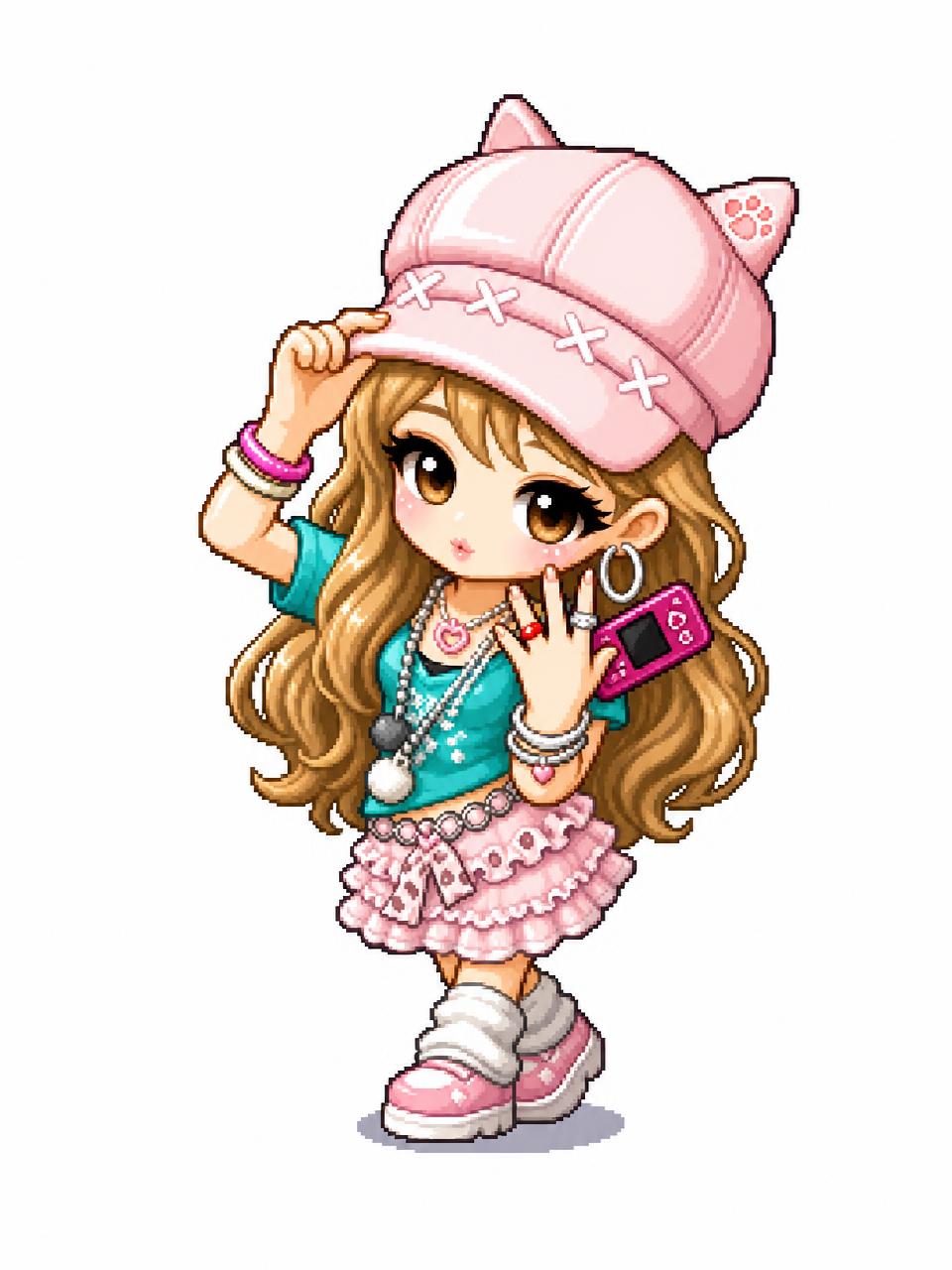
AI-generated MapleStory-Style Character Conversion made with GPT Image 2
MapleStory-Style Character Conversion

GPT Image 2· Image
Transform the uploaded image into a MapleStory-style 2D chibi game character illustration. This is a universal image-to-image character conversion prompt: whatever person, avatar, anime character, mascot, or fictional character appears in the uploaded image should be converted into an original MapleStory-inspired SD game avatar while preserving the key recognizable traits from the input image. Keep the subject count, main pose, silhouette, hairstyle impression, facial expression, outfit category, color relationships, and major accessories from the uploaded image, but redraw everything in a cute side-scrolling MMORPG character-art style. Style direction: MapleStory-like 2D online RPG avatar art, super-deformed cute proportions, oversized head, compact tiny body, large expressive eyes, simplified nose and mouth, clean thick outlines, crisp cel shading, glossy hair highlights, bright polished colors, soft gradient accents, sprite-like compact shape language, playful Korean online game aesthetic, high-resolution 2D illustration. Character conversion rules: - Preserve the uploaded image's identity cues and composition as much as possible. - If there is one subject, make one Maple-style avatar. - If there are multiple subjects, convert each subject into a matching Maple-style avatar while keeping their relative positions. - Translate real clothing or complex costume details into simplified cute game-avatar clothing. - Translate props, weapons, hats, hair ornaments, bags, or accessories into simplified fantasy game item details. - Keep the result original and game-avatar-like, not a direct copy of any existing franchise character. Composition: centered character portrait or full-body avatar depending on the uploaded image, clean simple background, polished character selection icon feeling. The final image must clearly look like a Maple-style 2D character conversion, not a realistic portrait, not a generic anime illustration, and not a 3D render. No text, no captions, no watermark, no logo, no photorealism, no 3D render, no realistic skin texture, no complex painterly realism.
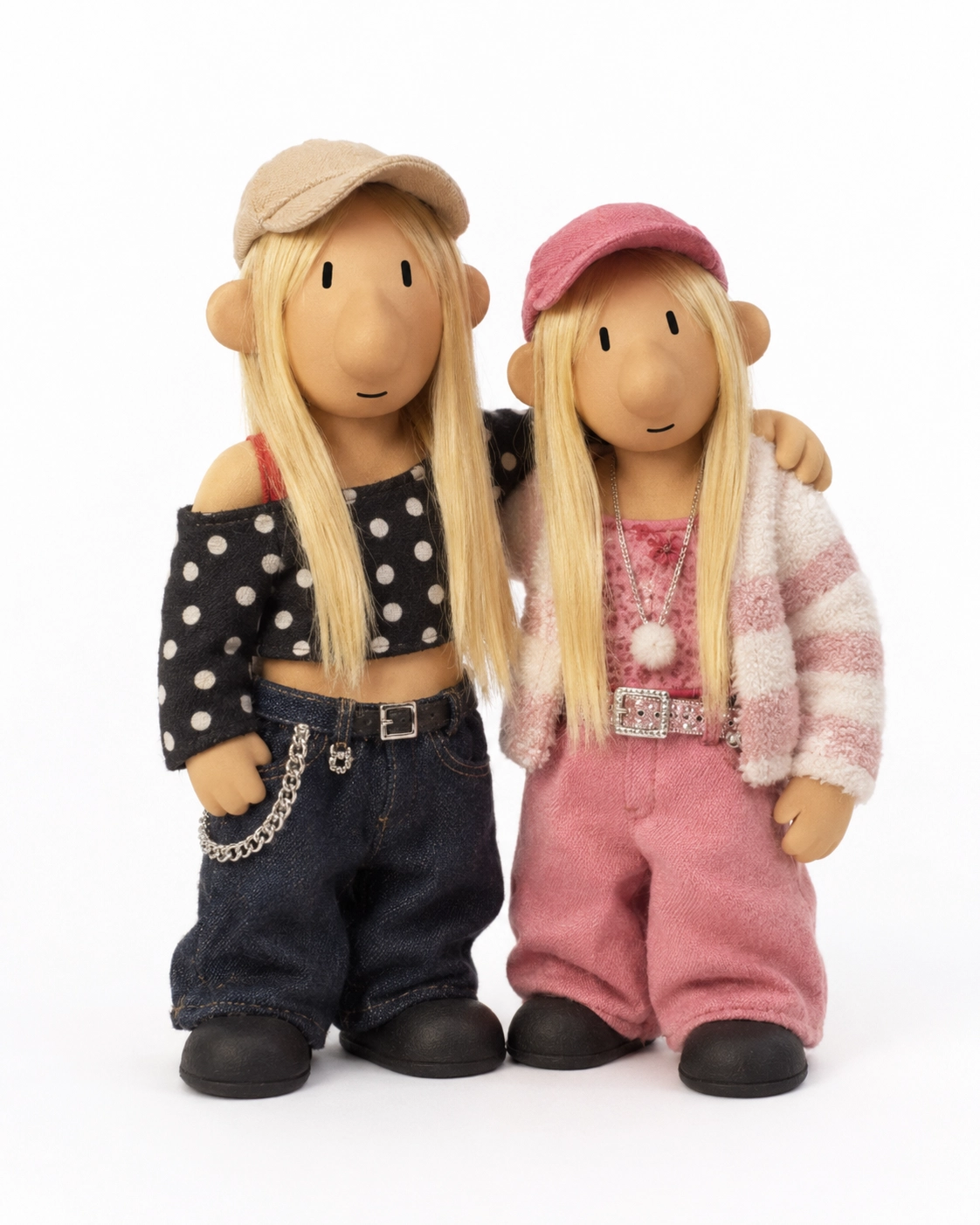
Pat & Mat style stop-motion puppet conversion generated with GPT Image 2

Pat & Mat Puppet Style

GPT Image 2· Image
Create a handmade stop-motion puppet group strongly inspired by the reference puppet duo style. **Reference image for puppet style:** https://assets.carat-api.im/upload_from_app/3052856/20260618/56b99a00-18f7-442a-8736-809fa66f6d44.webp The most important goal is to make the characters look like simple old European children's TV puppets, not cute fashion dolls, not polished toy figures, not anime dolls, and not pretty collectible dolls. Use the uploaded photo only as a styling reference for hairstyle, outfit colors, clothing shapes, accessories, and group pose. Reinterpret the people as awkward handmade puppets. Strongly preserve the original puppet reference proportions: short stubby legs, short arms, compact chunky torso, oversized round head, wide simple body, thick shoes, and a squat "short and chubby" silhouette. The characters must look clumsy, handmade, and slightly awkward. Facial style: very simple tan clay faces, tiny vertical black dot eyes, long rounded protruding nose, tiny straight-line mouth, no realistic facial features, no makeup, no eyelashes, no detailed eyes, no pretty face, no human-like beauty. The face should look plain, funny, and minimal, like the reference puppet duo. Hair and clothes: Apply the hairstyle, hair color, outfit colors, accessories, and overall styling from the uploaded photo, but simplify everything into handmade fabric and clay puppet materials. Hair should look like simple yarn, felt, or clay strips, not realistic silky hair. Clothes should look like miniature handmade fabric sewn onto puppets, slightly loose and imperfect. Composition: Keep the same number of main people from the uploaded photo, whether there are 2, 3, or 4 people. Keep their relative positions and main pose, but simplify it into a puppet group portrait. Background: plain white studio background, full-body product photo, soft even lighting, slight han
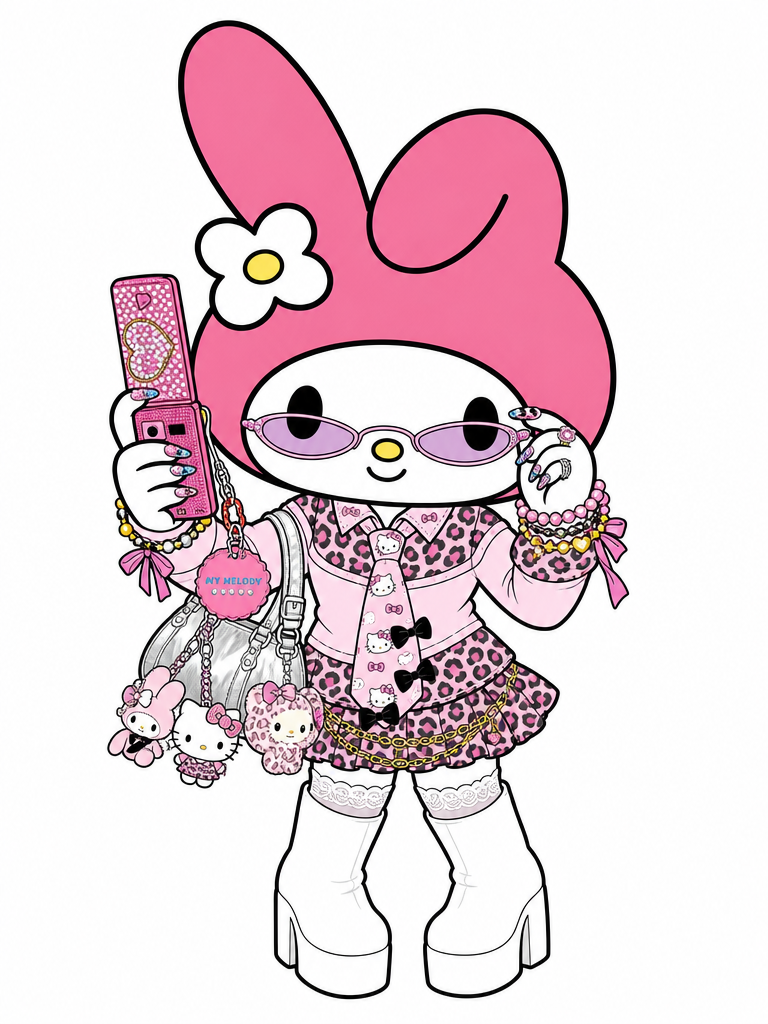
AI-generated My Melody Gyaru cosplay illustration made with GPT Image 2

My Melody Gyaru Cosplay Illustration

GPT Image 2· Image
Transform the person in this photo into the Sanrio character My Melody. Keep the EXACT same outfit, accessories, and pose from the photo — replicate every detail: clothing items, colors, patterns, bag, jewelry, socks, shoes, and any charms or keyrings. Replace the person entirely with My Melody in her original Sanrio cartoon illustration style: cute 2D chibi proportions, soft pink hood covering her head with two small round ears, sweet round white face with tiny black dot eyes and a small pink nose, no visible mouth. Do NOT make her look realistic or like a person wearing a mascot costume — she should look like official Sanrio character art. Plain solid white background (#FFFFFF). Output in 3:4 portrait ratio.
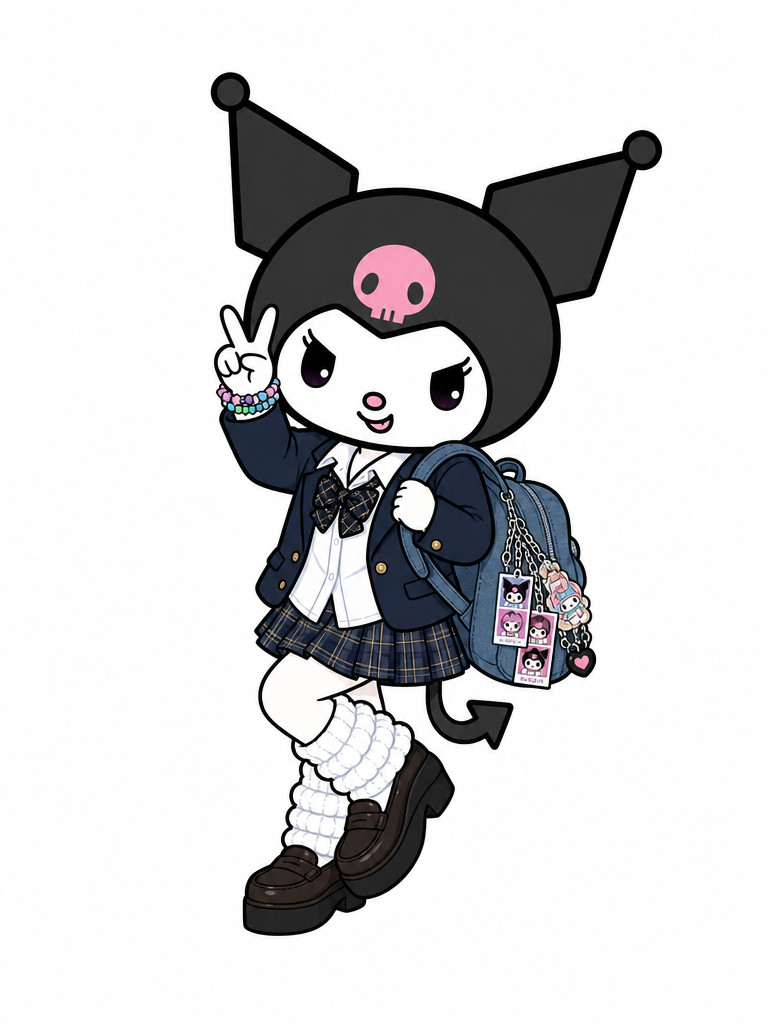
AI-generated Kuromi Gyaru cosplay illustration made with GPT Image 2

Kuromi Gyaru Cosplay Illustration

GPT Image 2· Image
Transform the person in this photo into the Sanrio character Kuromi. Keep the EXACT same outfit, accessories, and pose from the photo — replicate every detail: clothing items, colors, patterns, bag, jewelry, socks, shoes, and any charms or keyrings. Replace the person entirely with Kuromi in her original Sanrio cartoon illustration style: cute 2D chibi proportions, black jester hood with a pink skull on the forehead, expressive purple eyes, small white rabbit-like face, and a curly devil tail. Do NOT make her look realistic or like a person wearing a mascot costume — she should look like official Sanrio character art. Plain solid white background (#FFFFFF). Output in 3:4 portrait ratio.
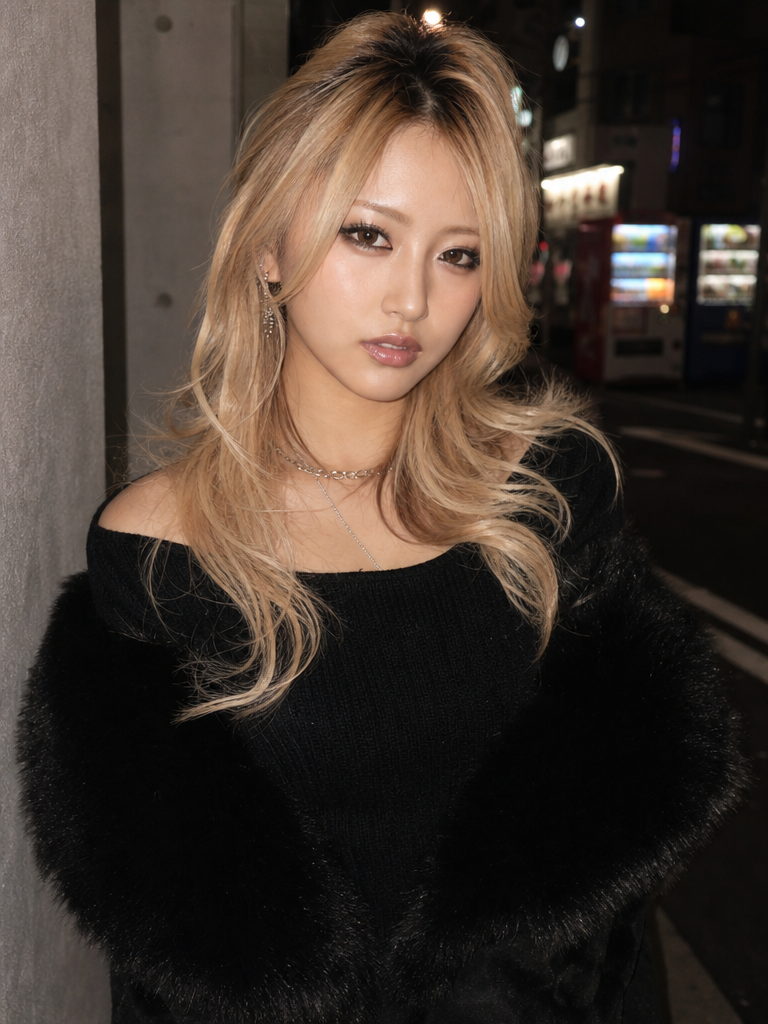
AI-generated Onegyaru glam style transformation made with GPT Image 2

Onegyaru Glam Style Transformation

GPT Image 2· Image
Transform this image into an Onegyaru (オネギャル, mature glamorous gyaru) style photograph. CRITICAL RULES — DO NOT CHANGE: Keep the woman's exact face, facial features, skin texture, expression, pose, body position, camera angle and the original photo's portrait aspect ratio completely identical and untouched. Only modify her styling and background as follows: Makeup: Apply full glamorous Onegyaru makeup with muted, desaturated, neutral tones — NOT pink. Matte brown-taupe eyeshadow across the lids with earthy brown in the outer corners for depth. Sharp precise black liquid eyeliner on the upper lash line with a lifted wing. Softly smudged light brown liner on the lower lash line. Dramatic voluminous clustered false lashes thicker toward the outer corners creating doll-like eyes. Subtle warm contour along cheekbones and jawline with dewy luminous skin finish. Barely visible warm-toned blush, not rosy. Muted nude-beige glossy lips slightly overlined — no pink tones. Hair: Change her hair to a multi-dimensional bleached blonde — dark natural roots melting into bright buttery platinum through mid-lengths and ends. Styled in loose voluminous big waves with lift at the crown, cascading in layers that frame the face. Fashion: Change her outfit to a fitted black ribbed off-shoulder knit top layered under a luxurious high-pile black faux-fur coat draped over her shoulders. Add layered delicate silver chain necklaces and minimalist dangling silver earrings. Background: Replace the indoor background with a dark moody Tokyo city street at night — neon signs, glowing vending machines, narrow alley with old Japanese signage in the blurred background. Cool-toned city lights contrasting with warm light on the subject. Lighting: Direct flash photography style — bright even highlights on her face with shadows cast behind. Raw street-snap aesthetic. Photorealistic, ultra detailed skin texture and makeup. No text, no watermark.
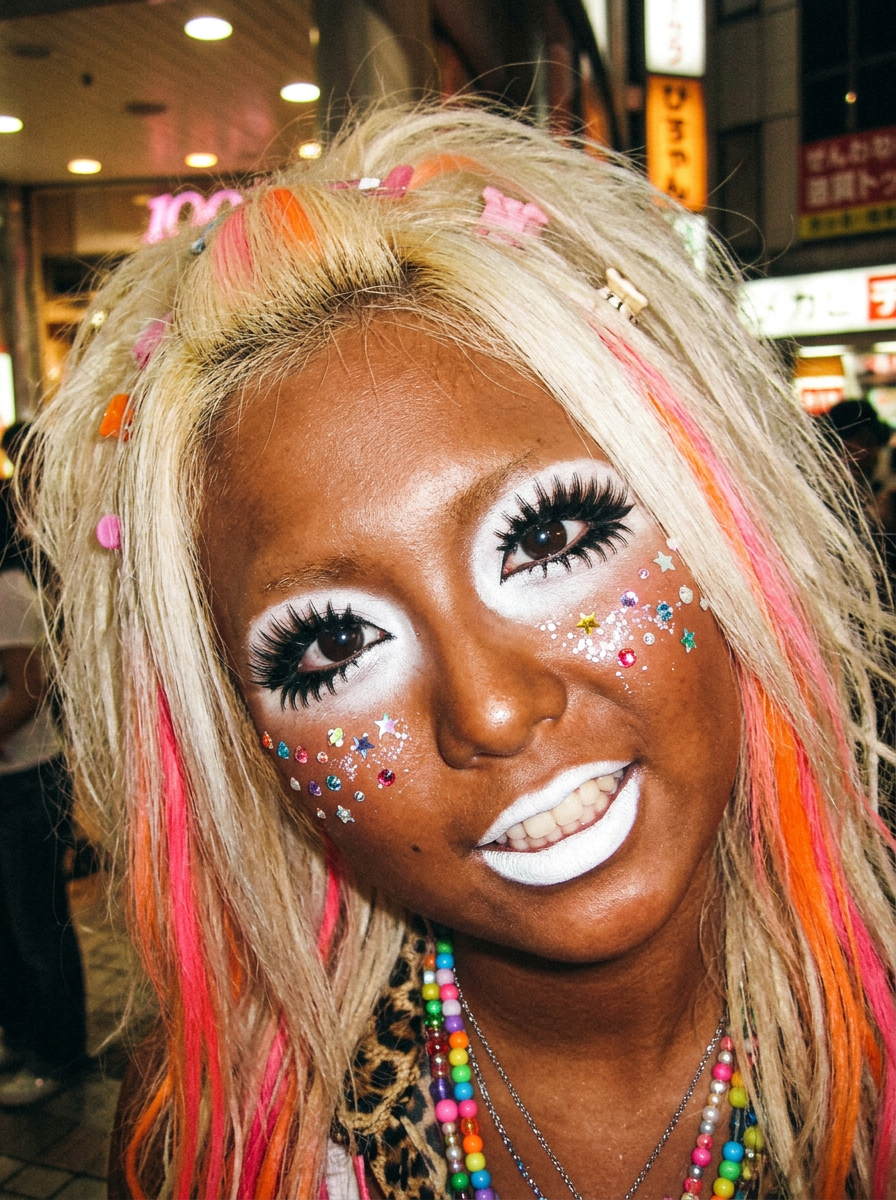
AI-generated Ganguro Manba Gyaru style transformation made with GPT Image 2

Ganguro Manba Gyaru Transformation

GPT Image 2· Image
Transform this portrait into an extreme ganguro manba gyaru style from early 2000s Shibuya, Japan. Only the makeup, skin tone, hair, accessories, and background should change. CRITICAL RULES — DO NOT CHANGE: Keep the woman's exact face, facial features, skin texture, expression, pose, body position, camera angle and the original photo's portrait aspect ratio completely identical and untouched. Only modify her styling and background as follows: Background: Replace the original background with a nighttime Shibuya, Tokyo street scene — neon shop signs in Japanese, bright colorful storefronts like Shibuya 109, and a crowded urban atmosphere with blurred city lights bokeh. The background lighting must naturally interact with the person — warm neon glow casting subtle colored reflections on her skin, hair, and clothes. The entire image should look like a single candid street photo taken on a night out, not a composite. Skin: Apply a deep, rich, uniform mahogany-bronze artificial dark tan across all visible skin. The finish should be slightly dewy, not matte. Eye makeup: Apply stark, opaque white cream concealer in large rounded circles around both eyes — extending from lash line up to brow bone and out toward temples, creating a dramatic reverse raccoon contrast against the dark tan. Add thin black kohl eyeliner at the lash line. Layer multiple sets of dense, spiky, long synthetic false lashes on both top and bottom lids, with bottom lashes fanning outward in a doll-like sun-ray pattern. Lips: Coat lips entirely in matte, opaque, stark-white lipstick with clean edges, no overlining. Face decorations: Cluster small adhesive rhinestones (colorful stars and dots) on both cheekbones, extending outward from the white eye circles. Add a light dusting of iridescent holographic face glitter over the rhinestones. Hair: Change hair to very light ash-toned platinum blonde base with chunky, clearly defined neon shocking-pink and vibrant orange streaks. Make the hair textured, slightly teased and voluminous. Scatter small colorful neon plastic hair clips randomly throughout. Accessories: Add layered neon plastic bead necklaces around the neck. The cream t-shirt can show a hint of leopard print pattern. Photography quality: Nighttime street photography lighting — dim ambient with neon color spill on the subject. Slight underexposure with lifted shadows, as if shot on a compact digital camera at night without flash. Early-2000s camera quality with warm color shift and minimal grain. No text, no watermark.

What are Mascara Style Transformation Prompts?

A collection of AI prompts for generating mascara style transformation images. Copy the Mascara Style Transformation prompts provided by Carat and paste them into an AI image generation tool to get professional-grade results.

How to Use Mascara Style Transformation Prompts

  1. Select and copy your desired prompt.
  2. Paste it into the Carat agent.
  3. Modify colors, styles, and composition as needed.
  4. Download the generated image and use it in your project.

Tips for Writing Mascara Style Transformation Prompts

Specify lighting, texture, composition, and lens information in detail for more precise results. Add "No text, no watermark" to prevent unwanted text overlays.

Mascara Style Transformation Prompt Applications

Mascara Style Transformation prompts are used across content creation, marketing, design, and educational resources. AI-generated images dramatically reduce production time while maintaining professional quality.

Mascara Style Transformation Prompt Optimization Guide

Choose the aspect ratio based on your use case: vertical (9:16) for social media, horizontal (16:9) for web banners, and square (1:1) for product images.
Frequently Asked Questions

Related Prompts

Transformation

22 prompts

Galupy Pose

Galupy Pose

9 prompts

Gyaru

Gyaru

16 prompts

Gyaru Style

Gyaru Style

16 prompts

Carat Prompt Gallery

Create trending AI prompts instantly

Prompts

  • Logo
  • PPT Design
  • Thumbnail
  • Poster
  • Web Novel Cover
  • ID Photo
  • Caricature
  • Product Detail Page
  • Banner

Models

  • GPT Image 2
  • Seedance 2.0
  • NanoBanana Pro
  • NanoBanana 2

Carat

  • Get started
  • About
  • Blog
  • Careers
  • Contact
  • Partnership
  • Terms
  • Privacy

© 2026 Paradot.Inc All rights reserved.