carat

Prompt Gallery

/

Photo Editing

Login
Sign Up

Photo Editing

AI photo editing prompts for skin retouching, low-res restoration, background removal, angle correction, and more. Natural results that preserve the original look.

2026.06.02

·
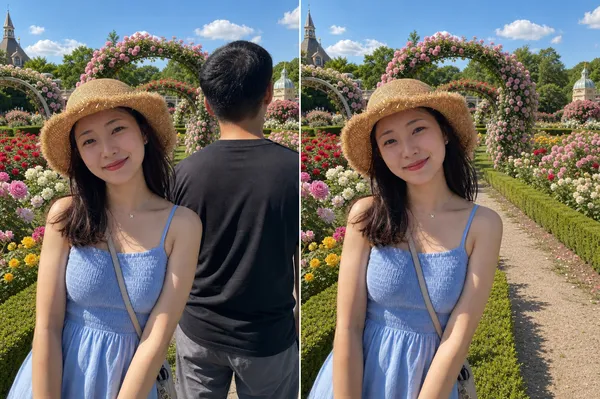
Generated with gpt-image-2: Background People Removal

Background People Removal

GPT Image 2· Image
Remove all unwanted people from the background while perfectly preserving the main subject, clothing, facial features, pose, and lighting. Reconstruct the background naturally where the removed people were located. Match realistic perspective, lighting direction, shadows, textures, architecture, and depth. Do not crop or stylize the image. The result should look like the original photo was taken without people in the background.
Generated with gpt-image-2: Old Photo Restoration

Old Photo Restoration
GPT Image 2· Image
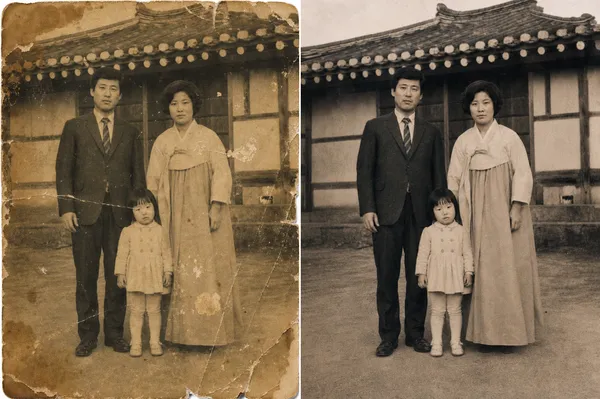
Restore and repair the old damaged photograph while preserving the person's real facial identity and historical authenticity. Repair scratches, folds, tears, fading, blur, stains, and damaged areas naturally. Enhance facial details, clothing texture, and image clarity while maintaining realistic vintage photographic texture. If appropriate, restore natural realistic color while respecting the original era and lighting. Preserve the nostalgic atmosphere and authentic photographic character. Photorealistic restoration with subtle high-resolution enhancement.
Generated with gpt-image-2: Dark Photo Recovery

Dark Photo Recovery

GPT Image 2· Image
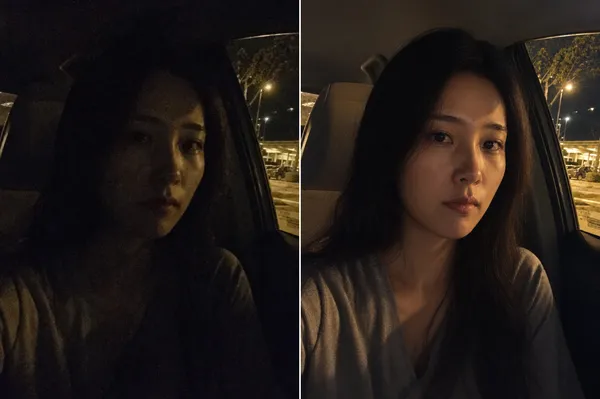
Correct the poor low-light exposure while preserving the person's real identity, skin texture, expression, pose, and image atmosphere. Brighten underexposed areas naturally while maintaining realistic shadows and contrast. Correct harsh flash shadows and remove unnatural color casts. Preserve realistic skin texture, hair detail, and background lighting. Do not create an AI-generated beauty look or artificial smoothing. The final image should look like a naturally well-exposed night photo captured with professional lighting.
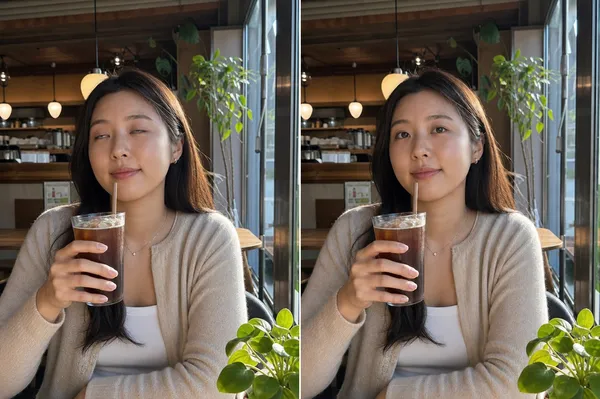
Generated with gpt-image-2: Closed Eyes Fix

Closed Eyes Fix

GPT Image 2· Image
Open the closed eyes naturally while fully preserving the person's facial identity, expression, head position, lighting, and image composition. Match realistic eye shape, gaze direction, eyelid position, skin texture, and lighting naturally. Do not alter any other part of the face or image. The result should look like the original photo was captured with the eyes naturally open in the same moment. Photorealistic and seamless correction only.
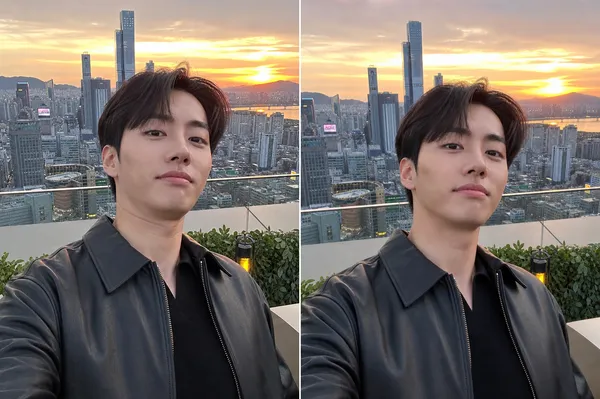
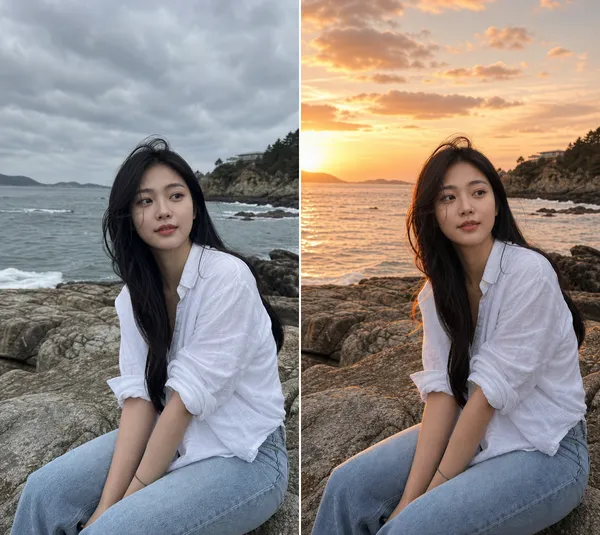
Generated with gpt-image-2: Sunset Glow Effect

Sunset Glow Effect

GPT Image 2· Image
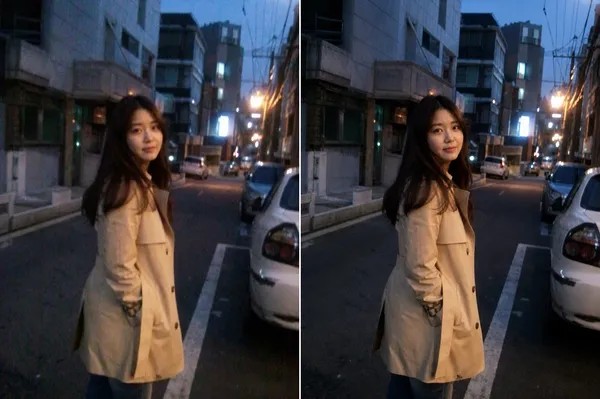
Add realistic warm golden hour sunlight to the photo while fully preserving the person's identity, pose, facial structure, hair, and composition. Create soft cinematic sunlight from the side with realistic warm highlights, gentle shadows, glowing skin tones, and subtle backlit hair strands. Maintain natural skin texture and realistic lighting behavior. Do not alter facial features or background structure. The result should feel like a naturally captured sunset portrait with cinematic Instagram aesthetics.
Generated with gpt-image-2: Unflattering Angle Fix

Unflattering Angle Fix

GPT Image 2· Image
Subtly correct the unflattering low camera angle while fully preserving the person's identity, facial structure, hairstyle, pose, and expression. Reduce the appearance of double chin or jaw compression caused by perspective distortion only. Simulate a slightly higher and more flattering eye-level camera angle naturally without changing the person's real facial anatomy. Preserve realistic shadows, neck proportions, and facial texture. No face slimming, no beauty filter, no plastic skin, no AI look. The result should feel like the same real photo captured from a slightly better angle.
Generated with gpt-image-2: Low-Res Photo Restoration

Low-Res Photo Restoration

GPT Image 2· Image
Ultra high-resolution restoration of the uploaded image while preserving the exact identity, pose, framing, composition, and lighting. Recover realistic facial details, hair strands, skin texture, clothing texture, and background detail naturally without hallucinating new features. Remove compression artifacts, blur, digital noise, and low-resolution softness while keeping the image photorealistic and true to the original. Maintain original colors and lighting direction exactly. No AI-generated look, no beauty filter, no over-sharpening, no fake details. Professional realistic 4K enhancement with natural texture preservation.
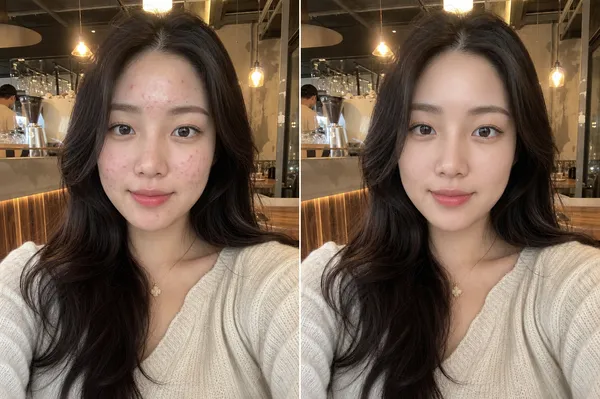
Generated with gpt-image-2: Natural Skin Retouching

Natural Skin Retouching

GPT Image 2· Image
Professional natural skin retouching while fully preserving the person's real identity and facial structure. Remove temporary acne, pimples, redness, skin irritation, blackheads, and uneven skin texture while keeping realistic pores and natural skin detail intact. Preserve natural skin tone, facial shadows, beard texture, eyebrows, eyelashes, and hair exactly as they are. Avoid plastic skin, beauty filter effects, over-smoothing, or artificial glow. Maintain realistic lighting and original image composition. The result should look like a professionally retouched DSLR portrait with invisible editing and natural healthy skin texture. Ultra realistic, photorealistic, high detail.
Warm cubist standing figure dissolving into ochre, umber, olive, and overlapping geometric color planes

Warm Geometric Cubist Figure

NanoBanana 2· Image
The subject : a standing portrait photograph of a person. Use the rough posture, hair mass, clothing color relationships, and main silhouette only as faint residues. The reference is the fixed painting-style reference and must dominate. Reconstruct the subject in that style: the human form itself should be blurry and indistinct, dissolving into warm overlapping geometric color fields. Do not keep a clear portrait, readable face, or sharp silhouette. Preserve only faint cues: vertical standing weight, key clothing color residues, a soft diagonal or linear accessory trace if present, and dark hair absorbed into muted planes. Use warm ochre, burnt sienna, raw umber, muted olive, beige, restrained blue-green shadows, translucent color layers, hazy plane intersections, smeared oil transitions, softened vertical bands, trapezoids, and overlapping color planes. The figure should feel like a memory inside color and plane. The final image should be the artwork itself, filling the entire frame edge to edge. No crisp contours, no pencil sketch, no stone texture, no photorealism, no realistic anatomy, no ghostly mood, no canvas object, no frame, no gallery wall, no border.
Orphism-style cubist abstraction made of concentric circles, rotating arcs, and portrait-derived colors

Orphism Circular Color Abstraction

NanoBanana 2· Image
Robert Delaunay Orphism style oil painting. Completely dissolve this figure into an explosion of overlapping concentric circles, rotating arcs, and radial geometric color planes — no face, no body, no recognizable human form remains. Multiple simultaneous viewpoints expressed as layered rotating disc fragments. Critically: derive the entire color palette exclusively from the colors present in this person's portrait — their skin tone, hair color, and clothing — and translate those exact colors into the cubist composition. The result should feel like this specific person's colors have been set in motion and spun into pure geometric rhythm. Thick impasto oil paint, visible brushstrokes, painterly and beautiful. Museum quality.
Picasso-inspired cubist portrait with bold black outlines and split flat color planes

Picasso-Inspired Cubist Portrait

NanoBanana 2· Image
Pablo Picasso oil painting in the style of Le Rêve (1932). Render this person with Picasso's signature face distortion: simultaneously show the face from frontal and profile viewpoints merged into one — the nose curves sideways while the eyes face forward, the face is split by a vertical line into two color zones. Organic rounded curves for the body and limbs, not angular. Bold thick black outlines defining every shape. Flat color planes with no shading. Background in a strong contrasting solid color. The figure is recognizable as a person but beautifully distorted in Picasso's dreamlike manner. Derive the entire color palette from this person's portrait — skin tone, hair, clothing — then translate into Picasso's bold flat color blocks: enrich and contrast them. Painterly oil texture. Museum quality. No signature, no text, no artist name, no watermark, no inscription of any kind.

What are Photo Editing AI Prompts?

A curated collection of AI prompts for naturally retouching and restoring photos — from skin blemishes and low resolution to dark exposure and unflattering angles. Get professional-level editing results while preserving the original identity and atmosphere, without over-processed beauty filters.

Key Use Cases

  • Remove acne, redness, and skin blemishes naturally
  • Restore old low-resolution photos to high quality
  • Remove unwanted people from travel and group photos
  • Fix unflattering selfie angles caused by low camera position
  • Add golden hour or sunset lighting to outdoor photos
  • Open closed eyes in group photos and selfies
  • Recover dark night photos and low-light selfies
  • Restore damaged old family photographs

Why This Tag is Useful

The key to photo editing is 'natural results.' These prompts precisely correct only what's needed while preserving original skin texture, lighting, and expressions — no over-smoothing or AI-generated look. Achieve professional Photoshop-level retouching with a single prompt.

Prompt Tips

  1. Specify the exact correction target (acne, blur, noise, etc.).
  2. Always include "preserve identity" and "realistic texture" keywords.
  3. Add anti-over-editing phrases like "no beauty filter" and "no AI look."
  4. Mention lighting, shadow, and skin texture preservation for natural results.

GPT Image 2 is the best model for photo editing as it precisely maintains the subject's original features while applying corrections.
Frequently Asked Questions

Related Prompts

Prop Design

Prop Design

1 prompts

Music Video

9 prompts

Outfit Design

Outfit Design

21 prompts

Drink Photo

Drink Photo

19 prompts

Carat Prompt Gallery

Create trending AI prompts instantly

Prompts

  • Logo
  • PPT Design
  • Thumbnail
  • Poster
  • Web Novel Cover
  • ID Photo
  • Caricature
  • Product Detail Page
  • Banner

Models

  • GPT Image 2
  • Seedance 2.0
  • NanoBanana Pro
  • NanoBanana 2

Carat

  • Get started
  • About
  • Blog
  • Careers
  • Contact
  • Partnership
  • Terms
  • Privacy

© 2026 Paradot.Inc All rights reserved.