carat

Prompt Gallery

/

Promotional Event Landing Page

Login
Sign Up

Promotional Event Landing Page

Learn how to plan a promotional event landing page with a hero banner, category tabs, product grid, and clear call to action using AI prompts.

2026.07.17

·
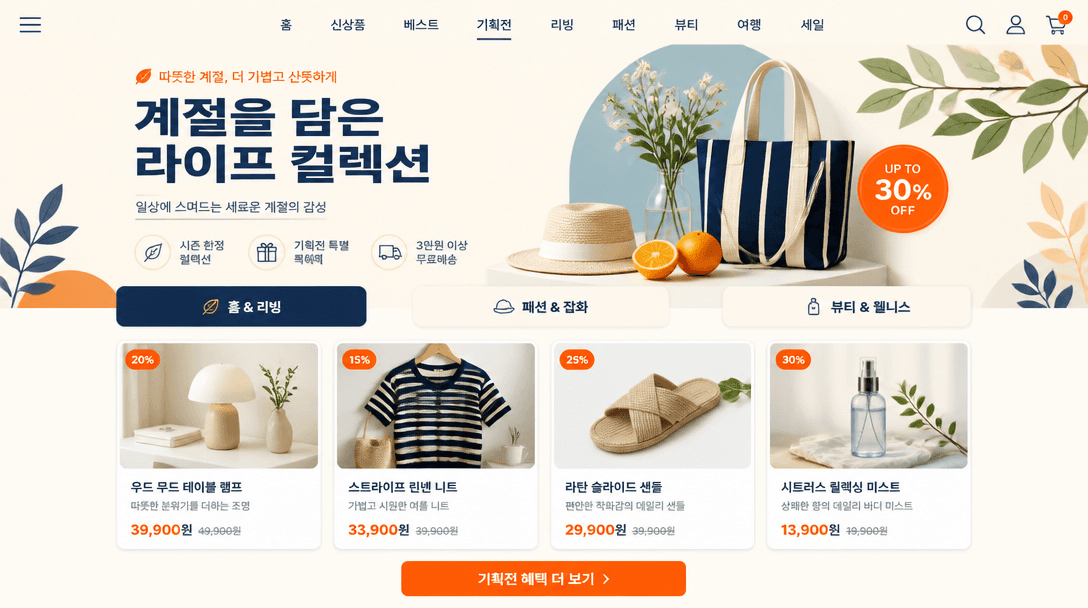
GPT 이미지 2로 생성한 기획전 페이지

기획전 페이지

GPT Image 2· Image
A clean Korean e-commerce promotional event landing page mockup with a hero banner, curated product grid, category tabs, and a clear call-to-action without real brands or personal data. clean commercial template design, product-friendly layout, clear content blocks, modern Korean design sensibility. diagonal composition with one strong focal point. soft pastel palette with warm highlights. Make the subject immediately recognizable at thumbnail size. Use clean composition, purposeful details, and no watermark. Keep the layout organized, readable, and purposeful; avoid clutter and illegible typography.

What Are AI Prompts for Promotional Event Landing Pages?

AI prompts for promotional event landing pages help teams visualize a themed shopping campaign before the real page is designed or developed. A directed concept can place a hero banner, category tabs, curated product cards, price blocks, and a clear call to action into one organized retail layout. This is useful for seasonal sales, brand weeks, lifestyle collections, and new-product curation. The image gives marketers and designers a shared view of information order, visual tone, and merchandising rhythm before product data and responsive behavior are finalized.

Common Use Cases

  • Exploring the first screen for a seasonal sale or brand week
  • Grouping products into a themed online promotion
  • Reviewing information priority across desktop and mobile concepts
  • Checking the relationship between banners, tabs, and product cards
  • Sharing a visual direction in campaign meetings and ad planning

What to Define First

A strong event page is about the order of action, not the number of elements. Put the campaign theme and key benefit in the hero area, then lead users toward tabs or curated products. Product cards should give the image, name, and price a clear hierarchy, while the primary button needs enough contrast from surrounding content. Assign roles to the palette, such as ivory for the base and navy with tangerine for navigation and emphasis, so the page feels branded without becoming noisy.

A Practical Prompt Structure

  1. Define the campaign theme, season, audience, and target screen.
  2. List the sequence of hero banner, tabs, product grid, price blocks, and CTA.
  3. Specify card count, aspect ratio, spacing, corners, and button treatment.
  4. Choose the background, accent colors, type mood, and screen presentation.
  5. Use generic product information and blank brand areas instead of real names or personal data.

Moving From Concept to a Real Page

An AI concept is best used to agree on content structure and visual direction. Before development, define responsive rules, accessible contrast, product data, prices, inventory, link behavior, and image performance separately. Compare variants with the same number of products and the same frame while changing only the hero color or card arrangement. Treat generated copy as placeholder content and replace it in the CMS or design file with verified product names, prices, and promotion terms before launch.

Frequently Asked Questions

Related Prompts

100-Day Celebration

100-Day Celebration

4 prompts

2D Anime

121 prompts

3D Avatar

3D Avatar

6 prompts

3D Cartoon

379 prompts

Carat Prompt Gallery

Create trending AI prompts instantly

Prompts

  • Logo
  • PPT Design
  • Thumbnail
  • Poster
  • Web Novel Cover
  • ID Photo
  • Caricature
  • Product Detail Page
  • Banner

Models

  • GPT Image 2
  • Seedance 2.0
  • NanoBanana Pro
  • NanoBanana 2

Carat

  • Get started
  • About
  • Blog
  • Careers
  • Contact
  • Partnership
  • Terms
  • Privacy

© 2026 Paradot.Inc All rights reserved.