carat

Prompt Gallery

/

UI Screen

Login
Sign Up

UI Screen

AI UI screen prompts you can use right away for app and web screen design. Quickly create mobile app screens, dashboards, and landing page mockups.

2026.05.22

·
AI-generated Ecommerce Product Page UI made with GPT Image 2

Ecommerce Product Page UI

GPT Image 2· Image
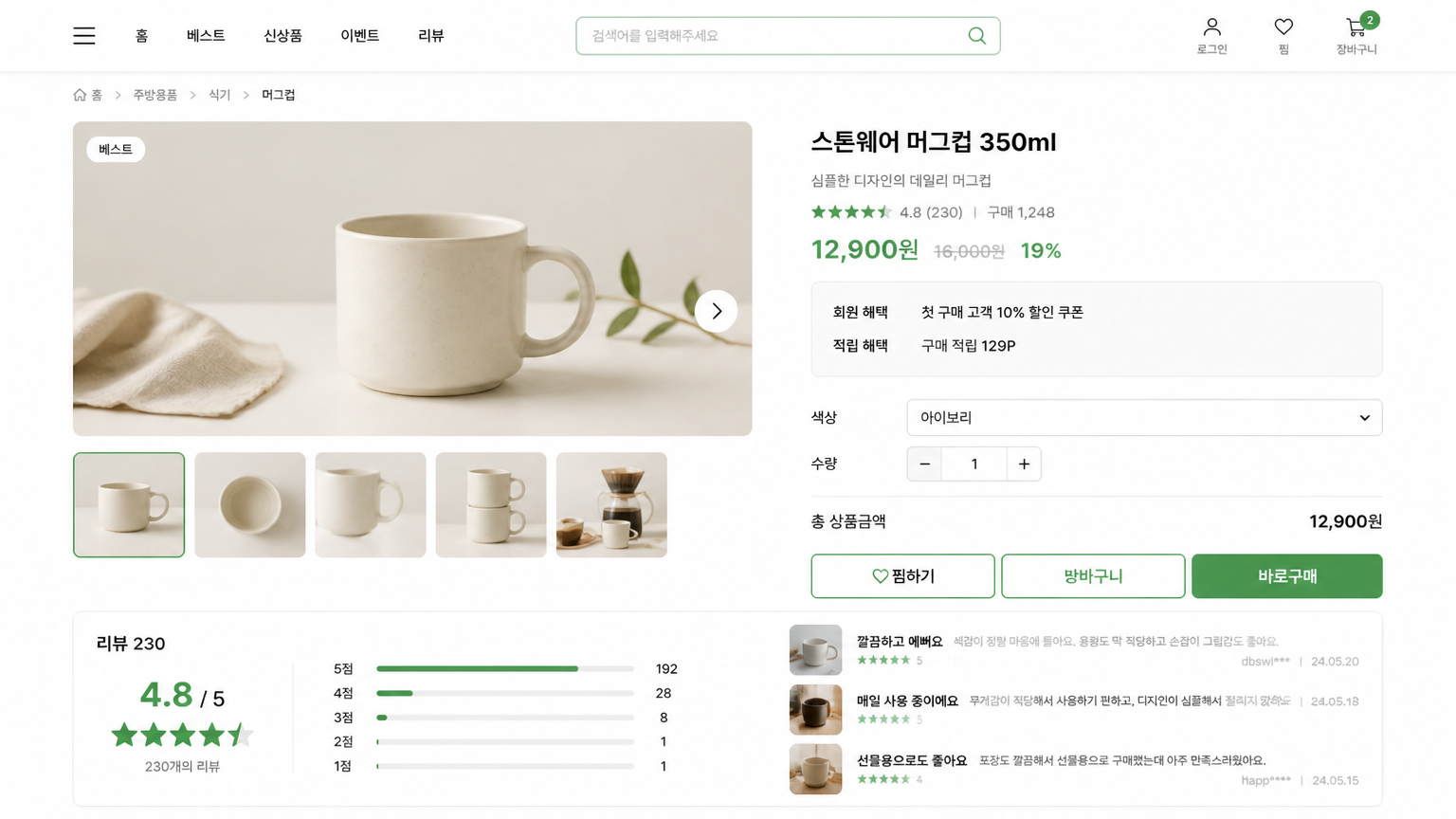
원하는 쇼핑몰 상품 정보를 바탕으로 데스크톱 상품 상세 페이지 UI를 만들어줘. 상단 내비게이션, 상품 이미지 갤러리, 상품명, 가격, 컬러/사이즈 선택, 구매 CTA, 배송 안내, 리뷰 요약, 추천 상품 영역을 포함한 16:9 웹 화면으로 구성해줘. 웜그레이 배경, 블랙 타이포, 베이지 포인트의 미니멀하고 고급스러운 커머스 UI로 만들어줘.
AI-generated Hotel Booking App UI made with GPT Image 2

Hotel Booking App UI

GPT Image 2· Image
원하는 숙박/여행 서비스 정보를 바탕으로 호텔 예약 앱 검색 결과 화면 UI를 만들어줘. 목적지 검색바, 날짜 선택, 필터 칩, 호텔 사진 카드, 평점, 가격, 편의시설 아이콘, 지도 보기 버튼, 하단 내비게이션을 포함한 9:16 모바일 화면으로 구성해줘. 아이보리/딥그린/뮤트 골드 톤의 프리미엄 여행 앱 분위기와 읽기 쉬운 한글 UI를 적용해줘.
AI-generated Food Delivery App UI made with GPT Image 2

Food Delivery App UI

GPT Image 2· Image
원하는 음식 배달 서비스 정보를 바탕으로 모바일 앱 홈 화면 UI를 만들어줘. 위치 표시, 검색바, 카테고리 칩, 추천 음식점 카드, 메뉴 그리드, 하단 탭 내비게이션을 포함한 9:16 모바일 화면으로 구성해줘. 웜화이트/토마토 레드/소프트 오렌지 톤, 둥근 카드형 컴포넌트, 실제 앱처럼 읽기 쉬운 한글 UI 텍스트와 음식 이미지 카드를 적용해줘.
AI-generated Fintech Dashboard UI made with GPT Image 2

Fintech Dashboard UI

GPT Image 2· Image
원하는 핀테크 서비스 정보를 바탕으로 데스크톱 대시보드 UI 화면을 만들어줘. 좌측 사이드바, 상단 요약 카드, 월별 지출 그래프, 카테고리 도넛 차트, 거래 내역 리스트, 저축 목표 카드가 포함된 16:9 웹앱 화면으로 구성해줘. 화이트 배경에 네이비와 민트 포인트 컬러, 현실적인 SaaS/Figma 스타일, 읽기 쉬운 한글 UI 텍스트와 정교한 여백을 적용해줘.
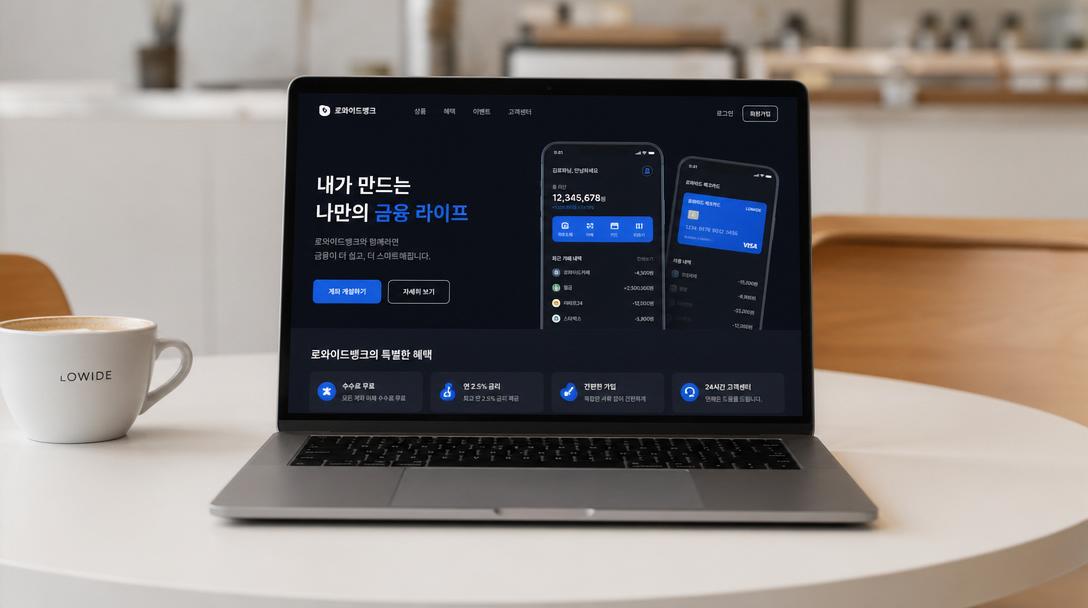
AI-generated Hyper-realistic Laptop Mockup on a Minimal White Korean Café Table made with GPT Image 2
Hyper-realistic Laptop Mockup on a Minimal White Korean Café Table

GPT Image 2· Image
Hyper-realistic laptop mockup on a minimal white Korean café table. The laptop screen displays a Korean mobile app UI — clean dark-mode fintech interface with Korean text labels, Noto Sans KR typography, blue-and-white color scheme. Soft studio lighting, shallow depth of field, premium product photo.
@ZaraIrahh
AI-generated Photoreal-Digital Split Product Poster made with Nano Banana Pro

Photoreal-Digital Split Product Poster

NanoBanana Pro· Image
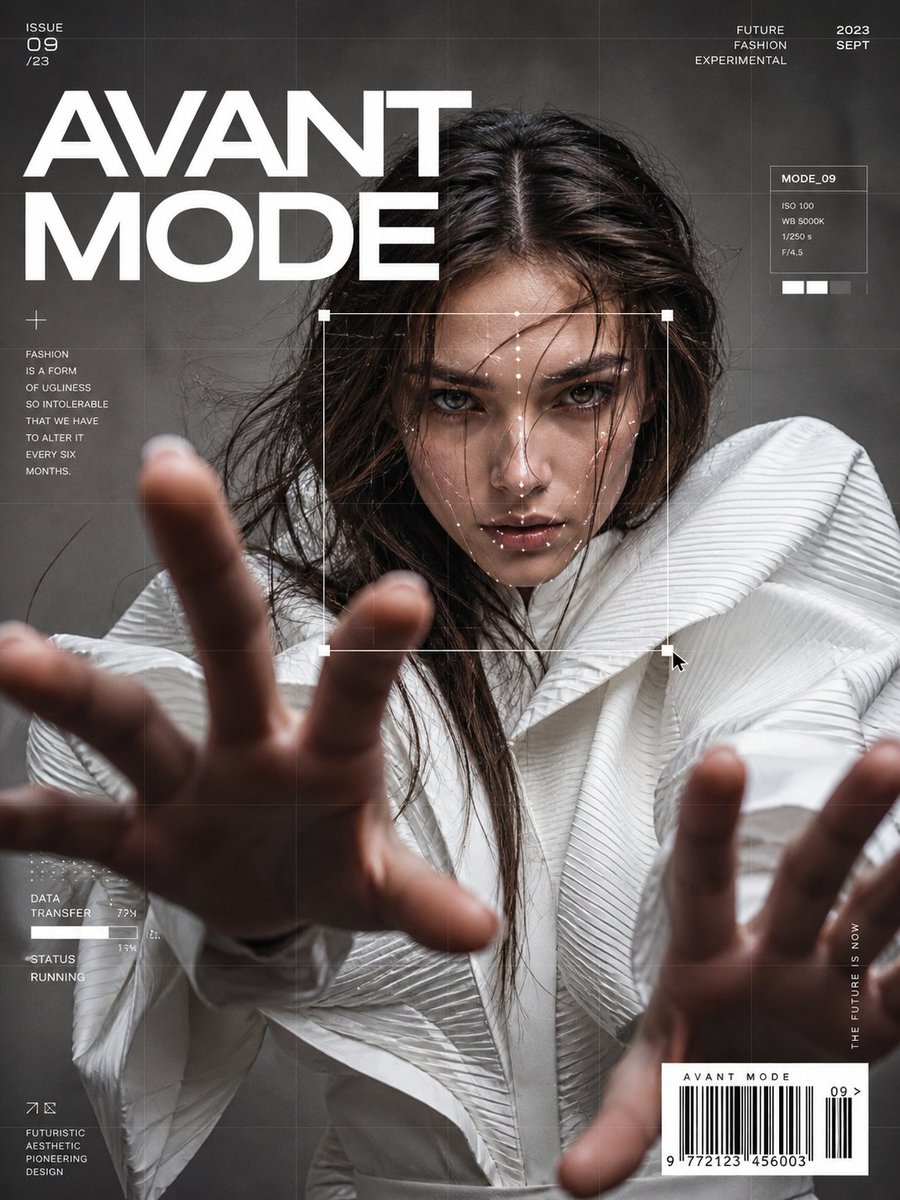
Create a 1:1 cinematic product poster (1080×1080) of [BRAND & PRODUCT], centered and fully visible, floating against a clean background inspired by the brand’s core color palette. The product must remain intact and uncut, but be conceptually split by design: • One half is photorealistic, showcasing accurate materials, textures, reflections, buttons, surfaces, and premium build quality • The other half transforms seamlessly into flat digital elements that represent the brand’s ecosystem — UI fragments, abstract tech shapes, interface cards, schematic overlays, soft holographic effects, or minimal glitch-style geometry Lighting: Cinematic, high-end studio lighting with controlled highlights and soft shadows, emphasizing form and depth. Typography: Bold double-exposure style text displaying the product or brand name, integrated cleanly into the composition. Official logo placed subtly and professionally in one corner.
@TechieBySA
AI-generated Pokemon-Style Pixel Art Game made with Nano Banana Pro

Pokemon-Style Pixel Art Game

NanoBanana Pro· Image
inspired by a classic pokemon gameboy screenshot but it's highly detailed beautiful pixel art, include cool effects from moves used, modern minimal ui
@ProperPrompter
AI-generated AI Image Editor UI made with GPT Image 2

AI Image Editor UI

GPT Image 2· Image
원하는 AI 이미지 편집 서비스 정보를 바탕으로 데스크톱 웹앱 UI 화면을 만들어줘. 왼쪽 도구 패널에는 프롬프트 입력창과 편집 옵션, 중앙에는 이미지 캔버스, 오른쪽에는 속성 패널, 상단 툴바, 하단에는 생성 히스토리 썸네일을 배치해줘. 다크 차콜 인터페이스에 바이올렛/시안 포인트 컬러를 사용하고, 실제 크리에이티브 툴처럼 정교한 여백과 읽기 쉬운 한글 UI를 적용해줘.
AI-generated App Branding Gradient Illustration made with GPT Image 2

App Branding Gradient Illustration

GPT Image 2· Image
Soft gradient illustration of [SUBJECT], smooth geometric forms, muted color palette, white minimal background, modern app branding style, premium digital art aesthetic.
@aleenaamiir
AI-generated Sports Booking App Flex Banner made with GPT Image 2

Sports Booking App Flex Banner

GPT Image 2· Image
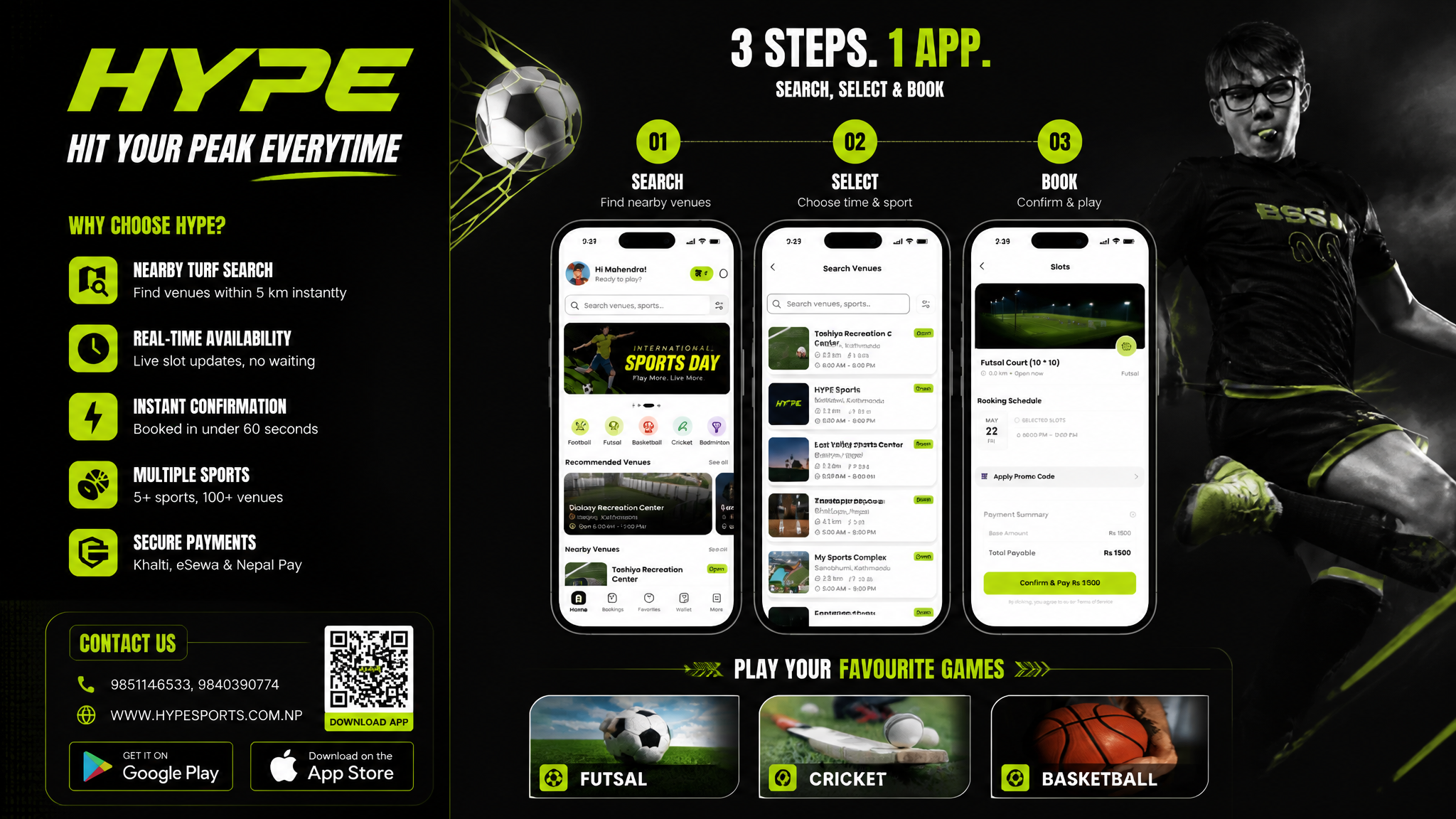
Based on the given layout Recommended Layout Structure (3ft × 5ft) horizontal flex banner. Overall Grid Use a 2-column layout:Left Column → Branding + Benefits + ContactRight Column → App Flow + Sports Icons Visual Hierarchy LEFT SIDE (40%)Logo Area Top-left large rectangle.Height: ~28%Keep lots of whitespaceUse bold premium typographyAdd tagline if needed Example:HYPE Book Your Sport Instantly Benefits Box Middle-left large box. Use 3–5 short benefit points:✓ Easy Booking ✓ Nearby Turf Search ✓ Instant Confirmation ✓ Multiple Sports Use icons beside each point. 3. Contact Strip Bottom-left horizontal strip. Include:PhoneWebsiteQR code (optional) Example:Call: +91 XXXXX XXXXX www.hypeplay.com RIGHT SIDE (60%) Mobile Screens Section Instead of plain rectangles, show actual mobile mockups. Use 3 phone cards: Screen 1 — SearchTurf listingMapSearch bar Screen 2 — SelectVenue detailsTime slots Screen 3 — BookPayment successConfirmation UI Sports Circles Section Instead of empty circles: Use:FootballCricketBadmintonBasketballTennis Add:Sport icon/photoSmall label below Example arrangement: ⚽ 🏀 🏏 Make circles slightly overlapping for modern look. Better Composition Your current sketch feels very boxed. Modern flex banners use:Consistent paddingLarger imageryFewer bordersStrong contrast Instead of outlines everywhere:Use background color blocksSoft shadowsMinimal separators mportant Design Improvements Avoid: Too many borders Centered italic text Uneven spacing Different box sizes without alignment Use: 24px consistent spacing Alignment grid Real app screenshots High contrast headings Best Layout Ratio Section Width Left Info Panel 35–40% Right Visual Panel 60–65% This creates better balance. Printing Tips For a 3ft × 5ft flex: Design in: 150 DPI minimum CMYK colors Keep text inside safe margin Avoid very thin fonts Extra Premium Touch Add: QR code → “Download App” App Store / Play Store badges Small stadium texture background Dynamic diagonal shapes behind screenshots That will make it feel like a real startup campaign banner instead of a simple poster. Logo colors: #c9fb07 , #0a0a0a
DIVINE MAHENDRA
AI-generated Horizontal App Launch Web Banner, 16:9 made with GPT Image 2

Horizontal App Launch Web Banner, 16:9

GPT Image 2· Image
Design a horizontal app launch web banner, 16:9. Main Korean headline: '하루를 정리하는 가장 쉬운 앱'. Show a central smartphone UI mockup card, soft gradient background, small feature chips, and CTA button '무료로 시작하기'. Modern SaaS/app marketing banner, clean Korean typography, spacious layout, blue and lavender palette.
AI-generated Couple Selfie with Your Bias made with GPT Image 2

Couple Selfie with Your Bias

GPT Image 2· Image
커플 셀카 생성 프롬프트 [인물 지정] * 첫 번째 업로드 사진 = 남성 * 두 번째 업로드 사진 = 여성 ⸻ [최우선 규칙 : 신원 보존] 업로드된 두 사진의 얼굴을 절대적인 Ground Truth로 사용한다. 얼굴 정체성 보존이 모든 요소보다 우선한다. 우선순위: 얼굴 보존 > 의상 > 구도 > 조명 > 분위기 > 화질 어떤 요소라도 얼굴 특징 변형을 유발한다면 해당 요소를 포기하고 원본 얼굴을 유지한다. 반드시 유지 * 눈 모양 * 코 모양 * 입 모양 * 얼굴형 * 턱선 * 광대 * 피부 질감 * 피부 특징 * 나이 * 헤어스타일 * 얼굴 비율 * 고유한 인상 * 원본 표정의 특징 절대 금지 * 얼굴 재생성 * 얼굴 재해석 * 얼굴 교체 * 얼굴 합성 * 평균화 * 스타일화 * 캐릭터화 * AI 미화 * 피부 보정 * 눈 확대 * 코 수정 * 입술 수정 * 턱선 수정 * 얼굴 비율 수정 * 대칭 보정 * 메이크업 추가 * 동안화 * 필터 적용 * 원본 특징 제거 최종 결과는 AI가 새로 만든 얼굴이 아니라 "실제 동일 인물을 다른 순간에 스마트폰으로 촬영한 사진" 처럼 보여야 한다. Identity Drift: 0% Face Similarity: 100% The uploaded faces are the ground truth. Any change to facial identity is considered a generation failure. ⸻ [촬영 상황] 실제 연인이 얼굴을 가까이 붙이고 아이폰으로 셀카를 찍는 순간. * 자연스러운 스마트폰 셀카 * 여성이 아이폰을 들고 전면 카메라 사용 * 상반신만 프레임에 포함 * 실제 연인의 자연스러운 거리감 * 얼굴이 프레임 중심에 위치 ⸻ [표정 및 시선] * 두 사람 모두 아이폰 전면 카메라를 바라봄 * 얼굴을 자연스럽게 가까이 붙임 * 따뜻하고 편안한 미소 * 자연스럽고 행복한 표정 * 눈동자는 정면 카메라를 향함 금지 * 무표정 * 과장된 웃음 * 어색한 시선 * 옆으로 힐끗 보기 * 서로 바라보기 ⸻ [여성 포즈] * 긴 소매로 코까지 완전히 가림 * 수줍은 듯 자연스럽게 미소 * 얼굴 정체성 유지 ⸻ [의상] 두 사람 모두 원본 사진의 착장을 그대로 유지한다. 금지 * 의상 변경 * 색상 변경 * 소재 변경 * 핏 변경 원본 의상의 주름과 디테일까지 유지. ⸻ [카메라 앱 라이브뷰] 아이폰 기본 카메라 앱이 실행된 상태. 화면 대부분이 라이브뷰로 보이며 다음 요소 포함: * 얼굴 인식 사각형 * 초점 프레임 * 노출 및 포커스 UI 일부 * 실제 촬영 직전의 라이브뷰 느낌 ⸻ [화면 재촬영 연출] 최종 이미지는 스크린샷이 아니다. 아이폰 카메라 앱이 켜진 스마트폰 화면을 다른 스마트폰으로 급하게 촬영한 실제 사진처럼 표현한다. 반드시 포함 * 미세한 화면 픽셀 구조 * OLED 디스플레이 질감 * 약한 모아레 패턴 * 디스플레이 반사광 * 균일하지 않은 화면 밝기 * 디지털 노이즈 * 저조도 컬러 노이즈 * 약한 손떨림 * 약간 기울어진 촬영 각도 * 화면 가장자리 원근 왜곡 * 미세한 초점 불균형 * 화면 외곽의 약한 Blooming * 실제 스마트폰 화면 촬영 시 나타나는 광학 특성 추가 규칙 * 스마트폰 화면 테두리 일부 노출 가능 * 완전 정면이 아닌 약간 비스듬한 각도 * 실제 사람이 손에 든 휴대폰을 촬영한 느낌 금지 * UI 목업 느낌 * 스크린샷 느낌 * 렌더링 이미지 느낌 ⸻ [조명 및 질감] * 은은한 실내 조명 * 저조도 환경 * 따뜻한 색온도 * 자연스러운 필름 그레인 * 약간의 디지털 노이즈 * 약한 모션 블러 * 살짝 흐린 초점 * 빈티지 감성 * 스마트폰으로 급하게 찍은 현실적인 사진 절대 금지 * HDR 느낌 * 스튜디오 조명 * 과도한 선명도 * 뷰티 필터 * AI 특유의 깨끗한 렌더링 * 과도한 샤프닝 * 과한 대비 * 광고 사진 느낌 * 화보 느낌 ⸻ [최종 목표] 저조도 실내 환경에서 실제 연인이 얼굴을 가까이 붙이고 셀카를 찍는 순간. SNS 화보가 아닌 일상 속 실제 생활 사진. 아이폰 카메라 앱 라이브뷰가 표시된 스마트폰 화면을 다른 스마트폰으로 급하게 촬영한 것 같은 현실적인 결과물. 가장 중요한 기준은 두 사람의 원본 얼굴 특징과 전체적인 인상을 완벽하게 유지하는 것이다.
@dangdang_104

What Are UI Screen AI Prompts?

UI screen prompts are AI prompts for quickly shaping screen design drafts for apps and web services. In Carat, you can generate UI mockup images with models like GPT Image 2, then keep going with follow-up work such as editing the result, changing the aspect ratio, removing the background, or upscaling.

Where You'll Use It

  • Mobile app screen drafts
  • Web landing pages
  • Dashboards and admin screens
  • Onboarding and checkout flows
  • UI mockups for portfolios

Why This Tag Is Useful

UI screens need clear layout, information hierarchy, color, and component placement. Since the structure shifts depending on whether it's mobile or web and what kind of service it is, starting from an example with a clear screen type and tone helps you find your direction quickly. When choosing a prompt, look first for examples that show the screen type, components, color, and style together.

Tips for Building Your Prompt

  1. Decide the screen type, device, and aspect ratio first.
  2. Spell out the key components, layout, color, and font mood in detail.
  3. If needed, separate out the service type, brand tone, and dark/light mode.
  4. After generating, check text legibility and layout alignment.

In Carat, once you run a prompt you can refine from the result you like, or continue with follow-up work like changing the aspect ratio, removing the background, or upscaling.
Frequently Asked Questions

Related Prompts

Drink Photo

Drink Photo

26 prompts

Prop Design

Prop Design

1 prompts

Music Video

50 prompts

Double Exposure

Double Exposure

4 prompts

Carat Prompt Gallery

Create trending AI prompts instantly

Prompts

  • Logo
  • PPT Design
  • Thumbnail
  • Poster
  • Web Novel Cover
  • ID Photo
  • Caricature
  • Product Detail Page
  • Banner

Models

  • GPT Image 2
  • Seedance 2.0
  • NanoBanana Pro
  • NanoBanana 2

Carat

  • Get started
  • About
  • Blog
  • Careers
  • Contact
  • Partnership
  • Terms
  • Privacy

© 2026 Paradot.Inc All rights reserved.