본문으로 건너뛰기

찬양대

찬양대 프롬프트. 캐럿에서 제공하는 찬양대 이미지 생성 프롬프트를 복사해 바로 사용해보세요.

2026.07.15

「찬양대」 원하는 대로 직접 만들어보세요「찬양대」 직접 만들어보세요

대화로 요청만 하면 최적화된 이미지·영상을 만들어줘요

매일 무료 100크레딧으로 바로 시작

·

실사 콘서트 장면

씨댄스 2.0· 영상
Photorealistic shot of a sold-out concert at Madison Square Garden. The lead singer drops to her knees at the edge of the stage, hitting the final note of the ballad with tears streaming down her face, with mic hold in her hands (no standing mic), as 20,000 fans hold up their phone flashlights and the entire arena falls into a breathless silence before erupting into applause.
GPT 이미지 2로 생성한 무대 일러스트

무대 일러스트

GPT 이미지 2· 이미지
Clean vector sticker illustration, flat colors, thick crisp black outline. A performance stage with a raised platform and dramatic red velvet curtains draped at the sides. Two bright white spotlight beams criss-cross from the top corners, illuminating the center stage. A classic vintage microphone stand stands prominently in the middle of the platform. Palette of deep red, vibrant gold, and crisp white. Centered composition, symmetrical layout, minimalist design, light grey background. No text, no watermark, no 3D render, no gradients, no shadows, no photo realism.
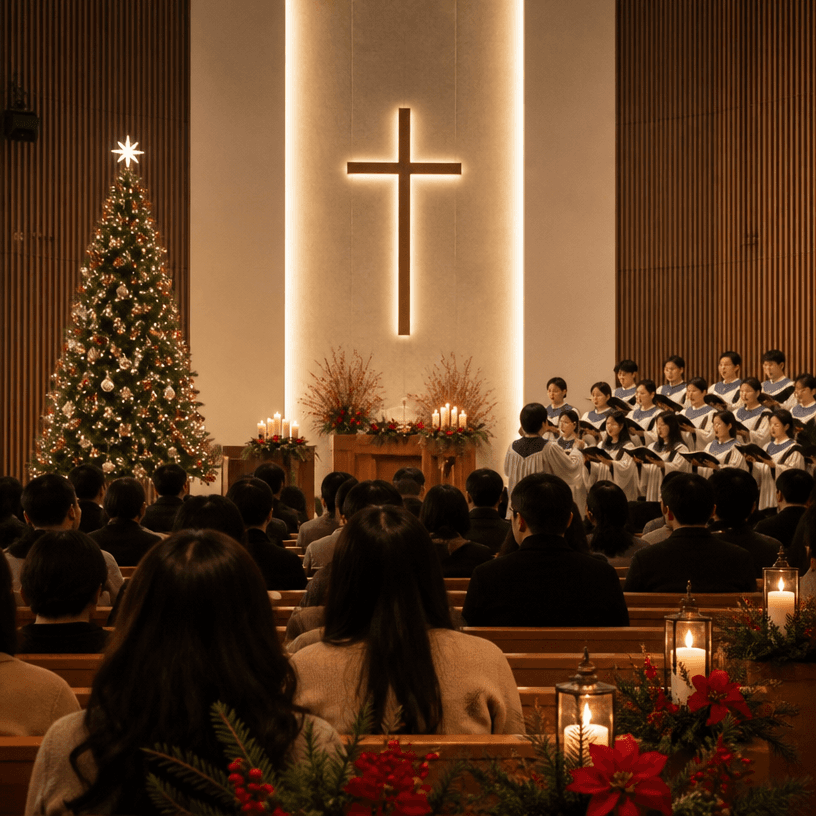
GPT 이미지 2로 생성한 성탄절

성탄절

GPT 이미지 2· 이미지
Square documentary-style photograph of a warm Christmas worship service inside a modern Korean church, congregation seen from behind facing a softly lit cross, choir in simple robes singing beside a decorated evergreen tree and glowing candles, subtle red and gold seasonal accents, reverent peaceful atmosphere, cinematic warm light, natural realistic composition, no identifiable faces, no readable text, no logos, no watermark.

찬양대 프롬프트란?

찬양대 이미지를 생성하기 위한 AI 프롬프트 모음입니다. 캐럿에서 제공하는 찬양대 프롬프트를 복사하여 AI 이미지 생성 도구에 붙여넣으면 전문가 수준의 결과물을 얻을 수 있습니다.

찬양대 프롬프트 활용 방법

  1. 원하는 프롬프트를 선택하여 복사합니다.
  2. 캐럿 에이전트에 붙여넣습니다.
  3. 필요에 따라 색상, 스타일, 구도를 수정합니다.
  4. 생성된 이미지를 다운로드하여 활용합니다.

찬양대 프롬프트 작성 팁

조명(Lighting), 질감(Texture), 구도(Composition), 렌즈(Lens) 정보를 구체적으로 명시하면 더 정밀한 결과를 얻을 수 있습니다. "No text, no watermark"를 추가하면 불필요한 텍스트를 방지할 수 있습니다.

찬양대 프롬프트 적용 사례

찬양대 프롬프트는 콘텐츠 제작, 마케팅, 디자인, 교육 자료 등 다양한 분야에서 활용됩니다. AI 이미지를 활용하면 제작 시간을 단축하면서도 전문적인 퀄리티를 유지할 수 있습니다.

찬양대 프롬프트 최적화 가이드

이미지 비율은 용도에 맞게 선택하세요. SNS용은 세로형(9:16), 웹 배너는 가로형(16:9), 제품 이미지는 정사각형(1:1)이 적합합니다.

자주 묻는 질문