GPT 이미지 2.5· 이미지
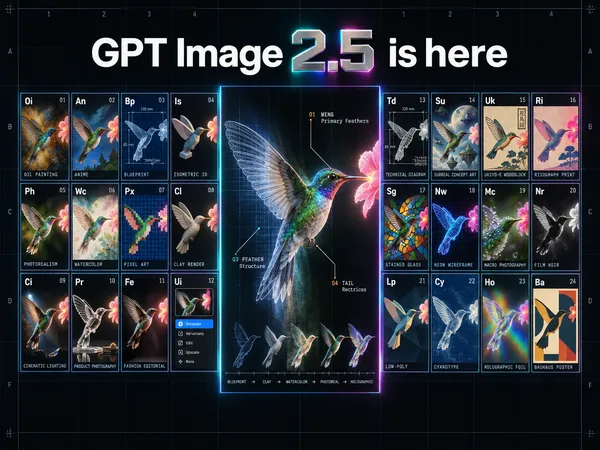
Create a high-end hero infographic announcing "GPT Image 2.5 is here."
CONCEPT
A futuristic periodic table of visual styles fused with a museum-grade anatomical specimen plate. The whole poster reads as one precision instrument: engineered, luminous, flawlessly clean. It should feel like a limited-edition print from a Swiss design studio crossed with a launch-keynote hero slide.
FORMAT
Landscape 16:9. Near-black obsidian background with a barely visible graphite grain. A faint hairline construction grid spans the canvas; row and column coordinates (A–F, 1–4) sit in the outer margins like an engineering drawing, with tiny registration marks in the corners.
HEADLINE
"GPT Image 2.5 is here" set large and centered in the top band, in a tight, sharply kerned geometric grotesk. "GPT Image" and "is here" are flat, crisp white type. The "2.5" is a physical object: a single block of machined, brushed titanium with beveled edges, a thin ribbon of spectral light refracting along the bevel and casting a soft cyan-to-magenta glow onto the background. Perfect letterforms, perfect spelling, zero distortion.
THE ONE-SUBJECT RULE
Every panel depicts the exact same subject — a hummingbird frozen in mid-hover, wings blurred, three-quarter view, drinking from a single glowing flower — re-rendered in 24 completely different visual styles. Same pose, same angle, same framing in every tile, so the grid demonstrates identity consistency across styles.
THE GRID (shaped like the periodic table)
Two symmetrical wings of 12 tiles each (3 rows × 4 columns) flank a tall central specimen panel, echoing the two-block silhouette of the periodic table. All 24 tiles are identical in size with mathematically equal gutters, edges locked to the construction grid, nothing cropped, nothing overlapping.
Each tile is styled as an element cell: a two-letter symbol top-left, a small index number top-right, the full style name in tiny monospaced caps along the bottom edge. Borders are 1px cool-grey hairlines with a faint edge-lit glow.
Left wing: Oi Oil Painting · An Anime · Bp Blueprint · Is Isometric 3D · Ph Photorealism · Wc Watercolor · Px Pixel Art · Cl Clay Render · Ci Cinematic Lighting · Pr Product Photography · Fe Fashion Editorial · Ui UI Mockup
Right wing: Td Technical Diagram · Su Surreal Concept Art · Uk Ukiyo-e Woodblock · Ri Risograph Print · Sg Stained Glass · Nw Neon Wireframe · Mc Macro Photography · Nr Film Noir · Lp Low-Poly · Cy Cyanotype · Ho Holographic Foil · Ba Bauhaus Poster
CENTRAL SPECIMEN PANEL
A tall hero panel showing the same hummingbird at large scale in one continuous style sweep: left to right it transitions seamlessly from blueprint linework → clay render → watercolor → photorealism → holographic foil, with no visible seams. Thin anatomical leader lines with numbered callouts extend from the beak, feather groups and wing edge outward toward the matching tiles in the wings, each carrying a tiny monospaced label. A faint diffraction spectrum bleeds along the gutters nearest the panel.
EMBEDDED PROOF-OF-CAPABILITY (subtle)
- All text on every tile is real, legible and correctly spelled, including micro-labels.
- The UI Mockup tile contains a readable miniature interface with actual words and coherent icons.
- The Technical Diagram and Blueprint tiles have accurate dimension lines and readable annotations.
- The Product Photography tile renders the hummingbird as a glass sculpture with physically correct refraction and reflections.
- The Ukiyo-e tile includes a correctly formed vertical Japanese caption block.
- All photographic tiles share one consistent key light from the upper left.
- Feathers, glass, metal and fabric render with no artifacts.
COLOR & FINISH
Restrained spectral palette on obsidian: electric cyan, hot magenta, acid lime and warm amber, used only as edge glows, callout accents and the hero bevel. Thin lines everywhere, generous negative space, strong hierarchy: headline → central specimen → tile grid → micro-labels. Extremely polished, premium, electric.
TYPOGRAPHY
One geometric grotesk for the headline, one monospace for all labels. Sharp, aligned, evenly spaced.
CONSTRAINTS
No date. No tagline. No extra caption. No logos or watermarks. The only text is the headline plus the tile and callout labels.