기업 아이덴티티와 카드 정보를 자연스럽게 보여 주는 사원증 목업 프롬프트입니다.
2026.07.17
「사원증 목업」 원하는 대로 직접 만들어보세요「사원증 목업」 직접 만들어보세요
대화로 요청만 하면 최적화된 이미지·영상을 만들어줘요

매일 무료 100크레딧으로 바로 시작
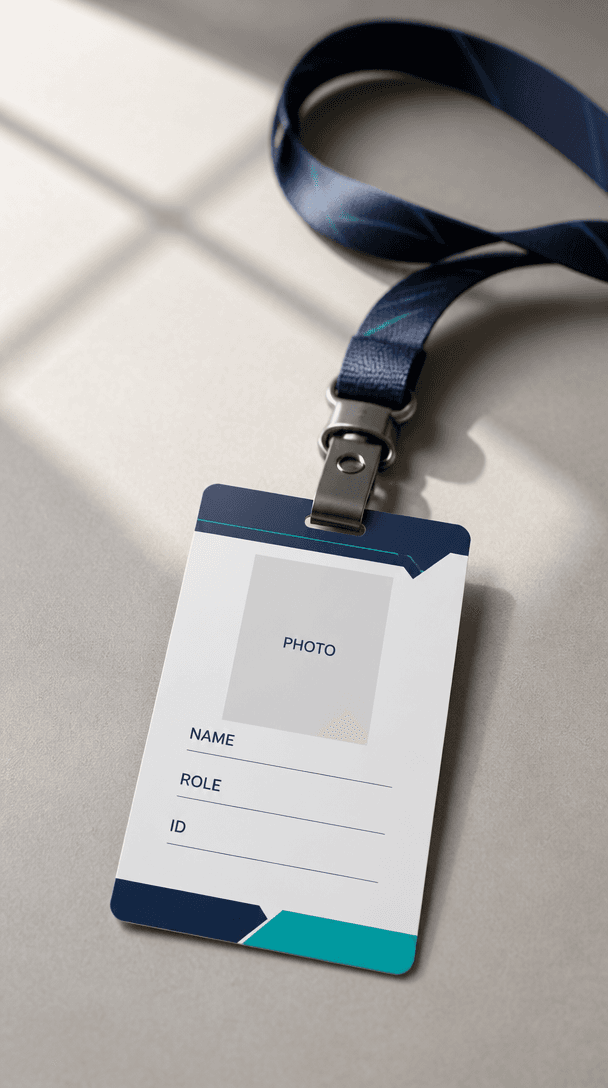
사원증 목업 AI 프롬프트는 기업용 ID 카드와 목걸이, 책상 위 연출을 실제 제품 사진처럼 보여 주는 시안을 설계하는 문장입니다. 카드의 비율, 색상 체계, 로고를 넣을 위치, 사진 영역, 이름과 직무 정보의 구조, 배경과 조명까지 지정하면 새 브랜드의 사원증 디자인을 검토하거나 기존 카드를 소개하는 이미지로 활용할 수 있습니다. 중요한 점은 실제 직원의 개인정보를 노출하지 않고 빈 필드와 가상 정보를 사용해 디자인 시스템만 보여 주는 것입니다.
프롬프트에는 카드 방향과 크기, 표면의 광택, 목걸이 색상, 배경 재질, 빛의 방향을 함께 적습니다. 카드 위에는 실제 이름이나 얼굴 대신 PHOTO, NAME, ROLE 같은 빈 자리표시자와 가상 브랜드명을 사용하면 구조가 잘 보입니다. 앞면은 얼굴 사진과 소속 정보를 중심으로, 뒷면은 바코드 자리와 안내 문구 영역처럼 역할을 나누면 검토가 쉬워집니다. 책상 위에 놓는 장면을 원한다면 카드가 화면에서 충분히 크게 보이고 그림자가 과하지 않도록 요청하세요.
브랜드의 주조색과 보조색을 HEX 값이나 색상 이름으로 지정하고, 카드 가장자리와 스트랩의 재질감을 구분해 보세요. 실제 로고 파일이나 직원 사진을 참고로 넣는 경우 사용 권한과 개인정보 보호를 먼저 확인해야 합니다. 생성된 글자와 QR 코드, 사번은 샘플일 수 있으므로 실제 발급용 파일로 바로 사용하지 말고 디자인 검토용으로만 활용하는 것이 안전합니다.
실제 직원의 얼굴, 이름, 사번, 연락처, QR 코드가 들어간 이미지를 공개 페이지에 올리지 마세요. 생성 단계에서는 가상 데이터와 빈 필드를 사용하고, 최종 시안에서도 민감한 정보가 보이지 않는지 확대해 확인합니다. 카드의 규격과 인쇄 여백, 색상 프로파일, 양면 정보의 순서를 인쇄소 기준과 대조하면 제작 단계에서의 재작업을 줄일 수 있습니다.



