본문으로 건너뛰기
루프 영상 만들기 →이미지 두 장을 추가하면 반복되는 영상을 만들 수 있어요.

루프 애니메이션
처음과 끝이 이어지는 루프 애니메이션을 설계하는 프롬프트. 도형·UI 상태·커서 움직임을 맞춰 반복 재생의 연결을 점검합니다.
2026.10.07
「루프 애니메이션」 원하는 대로 직접 만들어보세요「루프 애니메이션」 직접 만들어보세요
대화로 요청만 하면 최적화된 이미지·영상을 만들어줘요
매일 무료 100크레딧으로 바로 시작
·
삶의 순환 애니메이션
Claude Opus 5.5· 영상
make a dynamic 20-second motion graphics and animation video that shows what an incredible motion designer and animator you are, like it's your showreel for a résumé. make it about the cycle of life showing the same individual going from childhood to adolescence to the 9-5 cycle, to family life to elder life and death, then cutting ready to loop to the beginning. go all out , use whatever you need.
모핑 UI 상태 루프
Claude Opus 5.5· 영상
<inputs>
Ask me for: 8 to 12 UI states I want the shape to become (e.g. button, loader, player, slider, toggle, tabs, chart, command palette, toast), pure black and white or one accent color, and a royalty-free song around 120 BPM (e.g. Mixkit, free for commercial use).
</inputs>
<direction>
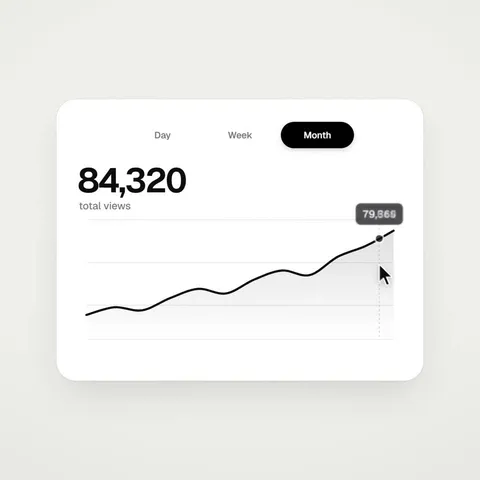
Dribbble-level UI motion. One shape, never cut: every state is the same element morphing its size, radius and color while its content swaps with a short blur. A cursor drives every change with real clicks and drags. Light warm-gray canvas, black and white components, one clean UI font (Geist). Springs everywhere, a tiny overshoot at most. The camera zooms so each state fills the frame. The last frame is the first frame, so it loops.
Banned: bouncy easing, particle bursts, glows, gradients on UI chrome, mismatched icon strokes, dead time, anything that looks like a template.
</direction>
<structure>
120 BPM, 7 bars, something happens on every beat.
Button → loader → check → dynamic island → music player with a play/pause morph → scrub the progress bar → it becomes a volume slider that stretches when dragged past max → a toggle flips on the beat → the knob becomes a liquid tab indicator → the tabs open into a chart that draws itself, with a tooltip on hover → it collapses into ⌘K → type to filter → enter → toast → back to the button.
</structure>
<build>
1. One HTML file, square 1440x1440. Every style is computed from time inside seek(t): no CSS transitions, no timers, no state carried between frames.
2. Springs are closed-form step responses. A value that changes target many times is the sum of one spring per change, so it stays a pure function of time.
3. The tab indicator's two edges ride different springs, so the leading edge stretches ahead of the trailing one. Same trick for the toggle knob.
4. Drags are direct manipulation: while the cursor is held, the value is computed from its position. On release it springs back from wherever it was.
5. Analyze the song with numpy for the beat grid and start on a downbeat. Place every UI sound by its measured peak.
6. Render with Playwright: 4 subframes per frame, blended with ffmpeg tmix for motion blur at 60fps.
7. Render one frame per beat before the full render. Fix anything off the grid, cramped or hard to read.
</build>
<gotchas>
Never put will-change on anything the camera scales or the text renders blurry. Text that swaps inside a morphing container needs its own enter and exit timing or it overlaps. Make the last frame identical to the first, cursor position and speed included, or the loop stutters.
</gotchas>
<start>
Ask me for the inputs, then show me the state list on the beat grid before you write any code.
</start>
UI 상태 변환 루프
Claude Opus 5.5· 영상
<inputs>
Ask me for: 8 to 12 UI states I want the shape to become (e.g. button, loader, player, slider, toggle, tabs, chart, command palette, toast), pure black and white or one accent color, and a royalty-free song around 120 BPM (e.g. Mixkit, free for commercial use).
</inputs>
<direction>
Dribbble-level UI motion. One shape, never cut: every state is the same element morphing its size, radius and color while its content swaps with a short blur. A cursor drives every change with real clicks and drags. Light warm-gray canvas, black and white components, one clean UI font (Geist). Springs everywhere, a tiny overshoot at most. The camera zooms so each state fills the frame. The last frame is the first frame, so it loops.
Banned: bouncy easing, particle bursts, glows, gradients on UI chrome, mismatched icon strokes, dead time, anything that looks like a template.
</direction>
<structure>
120 BPM, 7 bars, something happens on every beat.
Button → loader → check → dynamic island → music player with a play/pause morph → scrub the progress bar → it becomes a volume slider that stretches when dragged past max → a toggle flips on the beat → the knob becomes a liquid tab indicator → the tabs open into a chart that draws itself, with a tooltip on hover → it collapses into ⌘K → type to filter → enter → toast → back to the button.
</structure>
<build>
1. One HTML file, square 1440x1440. Every style is computed from time inside seek(t): no CSS transitions, no timers, no state carried between frames.
2. Springs are closed-form step responses. A value that changes target many times is the sum of one spring per change, so it stays a pure function of time.
3. The tab indicator's two edges ride different springs, so the leading edge stretches ahead of the trailing one. Same trick for the toggle knob.
4. Drags are direct manipulation: while the cursor is held, the value is computed from its position. On release it springs back from wherever it was.
5. Analyze the song with numpy for the beat grid and start on a downbeat. Place every UI sound by its measured peak.
6. Render with Playwright: 4 subframes per frame, blended with ffmpeg tmix for motion blur at 60fps.
7. Render one frame per beat before the full render. Fix anything off the grid, cramped or hard to read.
</build>
<gotchas>
Never put will-change on anything the camera scales or the text renders blurry. Text that swaps inside a morphing container needs its own enter and exit timing or it overlaps. Make the last frame identical to the first, cursor position and speed included, or the loop stutters.
</gotchas>
<start>
Ask me for the inputs, then show me the state list on the beat grid before you write any code.
</start>
루프 애니메이션 AI 프롬프트란?
마지막 상태에서 처음 상태로 자연스럽게 돌아오도록 만드는 애니메이션 제작 지시입니다. UI 예시는 버튼으로 시작해 여러 조작 상태를 거친 뒤 같은 버튼으로 돌아옵니다.
주요 활용 장면
- 반복 재생하는 UI 데모
- 버튼·토스트의 순환 전환
- 음악에 맞춘 상태 반복
- 커서 동선을 포함한 조작 루프
- 시작·끝 연결 프레임 검수
이 태그가 유용한 이유
첫 화면과 마지막 화면뿐 아니라 커서 위치와 속도까지 맞춰야 반복할 때 끊기는 느낌을 줄일 수 있습니다. 원문은 각 프레임을 시간의 함수로 계산해 이전 프레임의 상태에 의존하지 않도록 지시합니다.
프롬프트 구성 팁
- 첫 상태와 마지막 상태를 동일하게 정합니다.
- 커서 위치·속도도 연결 지점에서 맞춥니다.
- 텍스트의 입장·퇴장 시간을 따로 지정합니다.
- 반복 경계를 여러 번 재생해 끊김을 확인합니다.
예시 프롬프트는 UI 입력과 비트 배치 확인을 먼저 요청합니다. 캐럿 에이전트에서 Opus 5.5를 선택해 사용하세요.
자주 묻는 질문
끝과 시작을 연결해 반복 재생할 수 있도록 설계한 애니메이션입니다.
버튼에서 플레이어·슬라이더·차트·검색창·토스트를 거쳐 버튼으로 돌아오는 UI 상태를 반복합니다.
원문은 커서 위치와 속도도 동일하게 맞추도록 지시합니다.
원문은 seek(t) 안에서 시간을 기준으로 스타일을 계산하고 프레임 간 상태를 남기지 않도록 지시합니다.
원문은 약 120 BPM 음원과 7마디 비트 구성을 요청합니다.
원 제작자의 영상이므로 원 게시물에서 이용 조건을 확인하세요.
에이전트에서 Opus 5.5를 직접 선택한 뒤 프롬프트가 요청하는 입력에 답하세요.