carat

Prompt Gallery

/

Ticket Mockup

Login
Sign Up

Ticket Mockup

Ticket mockup prompts for presenting concert, exhibition, cinema, festival, and event ticket designs as realistic graphics.

2026.07.17

·
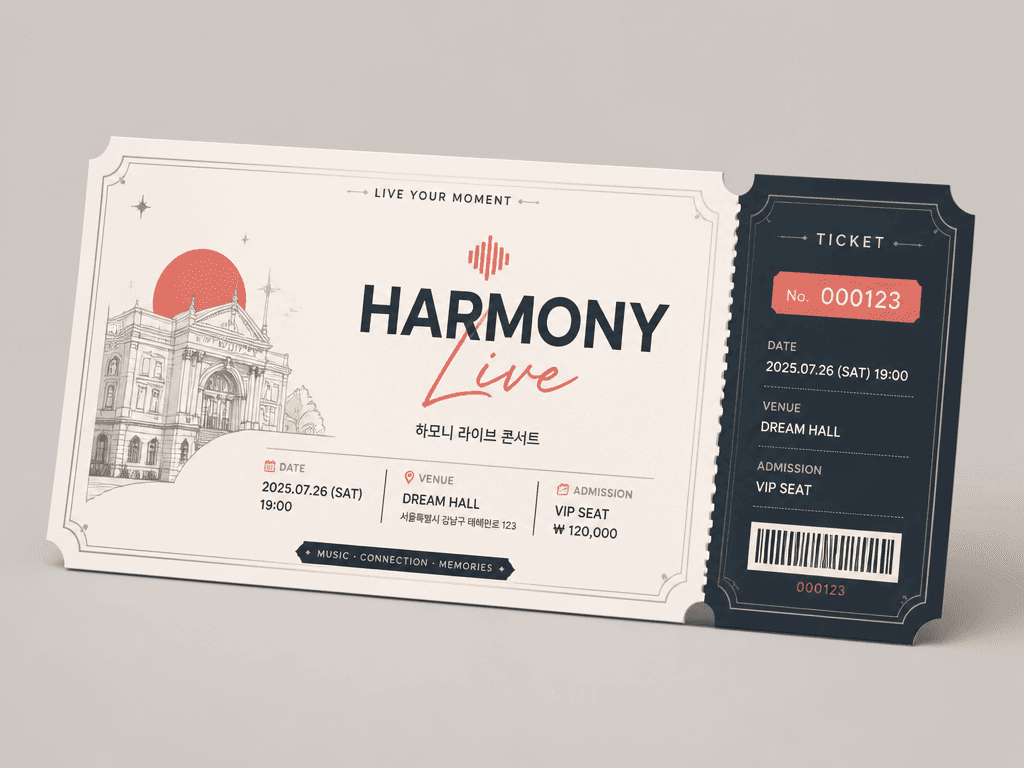
GPT 이미지 2로 생성한 티켓 디자인

티켓 디자인

GPT Image 2· Image
a modern event ticket design template with elegant decorative borders, serial number placeholder, admission section, date and venue fields, perforated tear-off stub, clean typography with brand color accents, horizontal layout, flat vector graphic design style. clean commercial template design, product-friendly layout, clear content blocks, modern Korean design sensibility. three-quarter view with clear silhouette and subtle depth. muted neutral palette with a vivid focal color. Make the subject immediately recognizable at thumbnail size. Use clean composition, purposeful details, and no watermark. Keep the layout organized, readable, and purposeful; avoid clutter and illegible typography.

What are ticket mockup AI prompts?

Ticket mockup AI prompts are instructions for presenting a ticket design as a physical print, a handheld invitation, or a mobile pass. They can define the ticket ratio, perforation, information hierarchy, barcode area, paper stock, finish, and the setting in which the ticket is shown. A flat artwork preview explains the layout, while a tabletop or handheld scene communicates scale and event atmosphere. Together they help a team review both the graphic direction and the way the ticket may appear in promotion.

Practical use cases

  • Concept presentations for concerts and performances
  • Invitations for exhibitions and film screenings
  • Festival, popup, and brand-event passes
  • Comparisons between printed and mobile tickets
  • Social cards and pitch-deck visuals for an event campaign

Building a clear ticket composition

Tickets often contain many details, so information hierarchy should lead the composition. Describe where the event name, date, venue, admission type, and seat information should appear. Reserve breathing room for the perforation and barcode area. A concert concept can use restrained stage light in the background, while a brand event may benefit from a clean material study focused on color and finish. A hand-held view gives viewers a sense of scale, but the fingers should not cover the main information area.

Prompting tips

Choose the event purpose and audience first, then specify paper, holographic foil, coating, corner shape, or screen frame. Describe the order of required information and reserve a blank area for a real barcode or QR code. Use sample wording or placeholders in the generated visual and replace final text in an editor. Coordinating the ticket palette with the event poster helps the pass and the campaign feel like one identity system.

Review before use

Generated dates, venues, prices, seat numbers, barcodes, and QR patterns must not be treated as official ticket data. Compare all copy with approved event information and insert tested codes separately. Check bleed, perforation, safe margins, color profile, and the printer's production template before ordering. During concept review, compare a flat front view with an in-context scene so graphic clarity is not confused with decorative staging.

Related prompt pages

  • Performance Poster
  • Poster

Frequently Asked Questions

Related Prompts

Ticket Design

Ticket Design

1 prompts

Concert Ticket Design

Concert Ticket Design

4 prompts

Poster, Branding & Graphic Design

Poster, Branding & Graphic Design

90 prompts

100-Day Celebration

100-Day Celebration

4 prompts

Carat Prompt Gallery

Create trending AI prompts instantly

Prompts

  • Logo
  • PPT Design
  • Thumbnail
  • Poster
  • Web Novel Cover
  • ID Photo
  • Caricature
  • Product Detail Page
  • Banner

Models

  • GPT Image 2
  • Seedance 2.0
  • NanoBanana Pro
  • NanoBanana 2

Carat

  • Get started
  • About
  • Blog
  • Careers
  • Contact
  • Partnership
  • Terms
  • Privacy

© 2026 Paradot.Inc All rights reserved.