GPT Image 2· Image
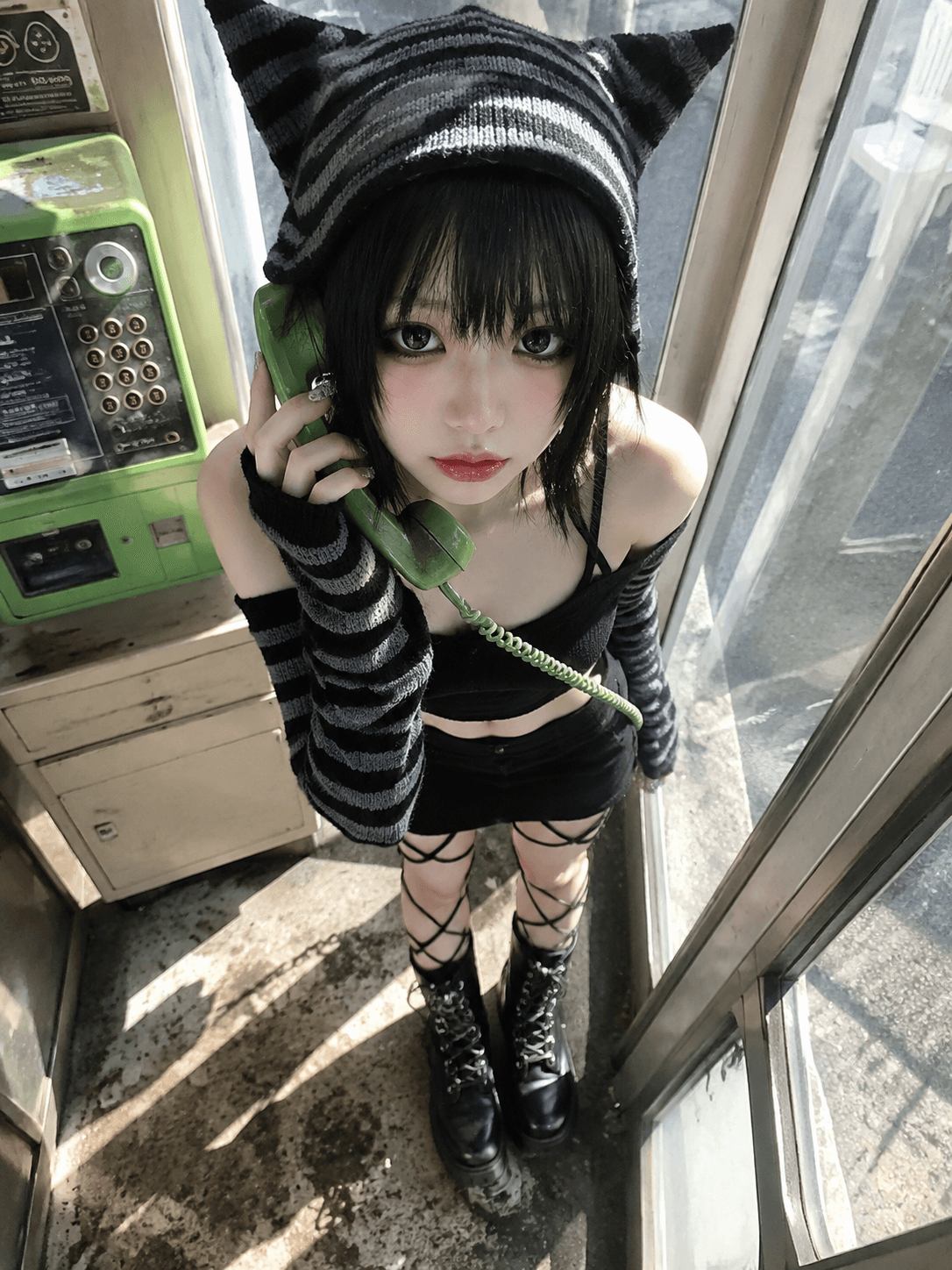
{ "subject": { "description": "A young adult woman standing inside or beside a narrow retro public phone booth, wearing a black-and-gray striped cat-ear knit look. She looks upward toward the camera, mixing goth-lolita, Y2K emo, Japanese street fashion, and doll-like styling. The image feels like a close friend captured her from above with a wide-angle phone camera under harsh sunlight.", "mirror_rules": "Not a mirror selfie; do not show a mirror or a phone covering the face. Keep the direct upward gaze toward a high-angle camera.", "age": "young adult, early 20s appearance; avoid childlike or underage styling", "expression": { "eyes": { "look": "large, glossy eyes with a quiet, slightly hollow, innocent doll-like gaze", "energy": "low-volume but focused, as if the phone was just picked up before she spoke", "direction": "looking upward into the camera from below" }, "mouth": { "position": "lips softly closed or lightly relaxed", "energy": "controlled, quiet, faintly distant" }, "overall": "cool, cute, slightly gloomy emo-doll expression" }, "face": { "preserve_original": "Preserve the small face shape, soft chin, large eye proportions, heavy eyeliner, lower-eye shadow, pale blush, and glossy gradient lips. Do not turn her into a mature glamour face or a commercial retouched beauty image.", "makeup": "Makeup inspired by East Asian goth-lolita and Y2K emo fashion: lifted black eyeliner, visible lower eyeliner and under-eye shadow, separated lashes, slight smoky eye contour, very soft blush, and glossy rose-red to translucent pink gradient lips." } }, "hair": { "color": "black or very dark brown-black", "style": "short to medium layered hair with thick broken bangs; fine strands are visible under the hard sunlight, with ends resting near the cheeks and neck", "effect": "slightly messy, lightly damp-looking or piecey texture; hard sunlight creates sharp highlights on the bangs and crown while keeping natural flyaways" }, "body": { "frame": "slender, small-framed, with a light shoulder and neck line; the high-angle wide lens makes the head and eyes feel more prominent while compressing the body downward", "waist": "only a small section of the midriff is visible between the black cropped top and the bottom garment; keep it subtle and not exaggerated", "chest": "the chest is mostly covered by the black top, with only the collarbones, shoulders, and upper chest edge visible; keep the focus on styling rather than body volume", "legs": "the legs are visible from the thighs down to the boots, with black crisscross straps or net-like leg details exposing small areas of thigh skin; chunky high-top boots anchor the frame", "skin": { "visible_areas": "Visible skin includes the face, neck, collarbones and upper chest edge, both shoulders, parts of the upper arms, hands, a small section of the midriff, and thigh skin seen between the crisscross straps. The back, buttocks, and full waist-hip line are not visible.", "tone": "fair cool ivory skin, bright under direct sunlight, with slight blue-gray and greenish reflections in the shadows", "texture": "the skin should feel soft, fine, slightly cool yet warmed by the sun, with faint powderiness, real pores, and gentle tonal transitions; avoid waxy or plastic smoothness", "lighting_effect": "hard sunlight enters diagonally through the phone booth glass and frame, striking the face, shoulders, hands, and legs with crisp bright patches, sharp shadows, and small overexposed areas; glass reflections tint some shadows green and blue-gray" } }, "pose": { "position": "standing inside or at the entrance of a narrow phone booth, leaning slightly forward, head lifted toward the camera above", "base": "one hand holds a green public phone receiver near the side of the face, while the other arm follows the line of the cord and body naturally; the legs stand close together", "overall": "the pose feels like she has just picked up the phone and was photographed in that instant, constrained by the cramped booth, quiet and slightly tense" }, "clothing": { "top": { "type": "black-and-gray striped cat-ear knit hood, black cropped top, and long striped arm warmers", "color": "black, charcoal gray, and pale gray-white stripes", "details": "the hood has pointed cat ears; the arm warmers have wide black-gray knit stripes; shoulders are exposed; the black top is close-fitting, giving a goth-lolita and emo streetwear impression", "effect": "the knit fabric has visible ribbing and thickness, the sleeves bunch around the wrists, and the black top absorbs the harsh light, creating strong contrast against the fair skin" }, "bottom": { "type": "black mini bottom with crisscross leg straps and chunky high-top boots", "color": "mostly black, with gray-black worn boots and slightly metallic hardware", "details": "black crisscross straps or net-like lines divide the leg area; the boots have multiple laces, buckles, eyelets, worn surfaces, and a heavy silhouette", "effect": "the leg straps create graphic geometry across the legs; the heavy boots feel worn, street-like, and slightly rough, contrasting with the cat-ear knit hood" } }, "accessories": { "headwear": "black-and-gray striped cat-ear knit hood fitted around the head, with clearly pointed cat ears", "device": "green public telephone receiver with a green coiled cord, held near the side of the face", "prop": "retro public phone booth or phone installation with a cream-colored base, green side structure, glass door, and metal frame" }, "photography": { "camera_style": "real wide-angle mobile-phone snapshot, close high-angle portrait under strong daylight, with digital sharpening, slight overexposure, noise, and compression artifacts", "angle": "strong overhead angle, camera placed above and in front of the subject; she looks up from below. The wide lens brings the face, eyes, and hand closer to the viewer while the boots stretch toward the bottom of the frame", "shot_type": "high-angle full-body close shot, including the cat-ear hood down to the boots, with the body framed tightly by the phone booth", "aspect_ratio": "vertical 3:4 mobile photo ratio", "texture": "harsh natural-light phone-photo texture, overexposed highlights, sharp shadows, glass reflections, floor stains, and real spatial clutter should remain visible", "lighting": "the main light is hard direct sunlight entering from outside the booth, not studio soft light; it passes through the glass and door frame, creating blocky highlights and strong shadows on the floor, face, shoulders, sleeves, and legs", "depth_of_field": "moderate depth of field; the subject is clear while the phone booth, glass, green telephone, and floor remain recognizable, with only slight background softness" }, "background": { "setting": "inside a retro public phone booth or street-side installation, enclosed by glass doors and a phone machine in a narrow space", "wall_color": "green phone casing, cream-colored machine body, blue-gray glass reflections, and gray concrete floor", "elements": [ "green public telephone", "green coiled phone cord", "glass door", "metal door frame", "cream-colored phone machine base", "rectangular sunlight patches", "floor stains and worn marks", "blurred white chair or outdoor object beyond the glass" ], "atmosphere": "cramped, bright, slightly retro public-facility mood, like an alternative fashion snapshot stolen in afternoon sunlight", "lighting": "ambient light comes from strong outdoor sun and glass reflections; the booth interior has high contrast, with the green phone subtly tinting the darker areas" }, "the_vibe": { "energy": "quiet, cramped, sweet-cold, with a dark-cute edge", "mood": "she had just picked up the phone; a past sentence seems to hang in the air, she is looking up now, and in the next second she might hang up", "aesthetic": "goth-lolita, Y2K emo, Japanese cat-ear street style, alternative doll-like styling, mobile snapshot", "authenticity": "keep the imperfections: high-angle pressure, blown highlights, stained floor, glass glare, crowded framing, and slight wide-angle hand distortion", "intimacy": "it feels like the photographer is standing very close outside the booth, looking down at her, creating a private and suddenly discovered feeling", "story": "She picked up a silent call inside a retro phone booth just as the sun cut through the glass, and the shutter clicked when she looked up.", "caption_energy": "“The call had not connected yet, but the sunlight arrived first.”" }, "constraints": { "must_keep": [ "black-and-gray striped cat-ear hood", "black short hair with broken bangs", "large-eyed heavy eyeliner doll makeup", "green public phone receiver", "green coiled phone cord", "high-angle overhead shot", "cramped phone booth space", "harsh direct sunlight and hard shadows", "black-and-gray striped long arm warmers", "black cropped top", "crisscross leg straps", "chunky high-top boots", "real mobile-phone photo texture" ], "avoid": [ "underage styling", "oversexualized pose", "commercial softbox lighting", "perfectly clean background", "over-smoothed skin", "plastic skin", "anime illustration look", "missing green telephone", "missing cat-ear hood", "excessive soft focus", "extra watermark or garbled text" ] }, "negative_prompt": [ "underage look", "oversexualized pose", "plastic skin", "over-retouched", "studio softbox", "perfect symmetry", "clean empty background", "missing phone receiver", "missing cat-ear hood", "wrong color phone", "anime style", "cartoon", "excessive blur", "extra fingers", "distorted hands", "fake watermark" ] }