인터뷰의 질문과 답변을 읽기 쉬운 소셜 카드 흐름으로 구성하는 AI 프롬프트입니다.
2026.07.16
「인터뷰 카드뉴스」 원하는 대로 직접 만들어보세요「인터뷰 카드뉴스」 직접 만들어보세요
대화로 요청만 하면 최적화된 이미지·영상을 만들어줘요

매일 무료 100크레딧으로 바로 시작
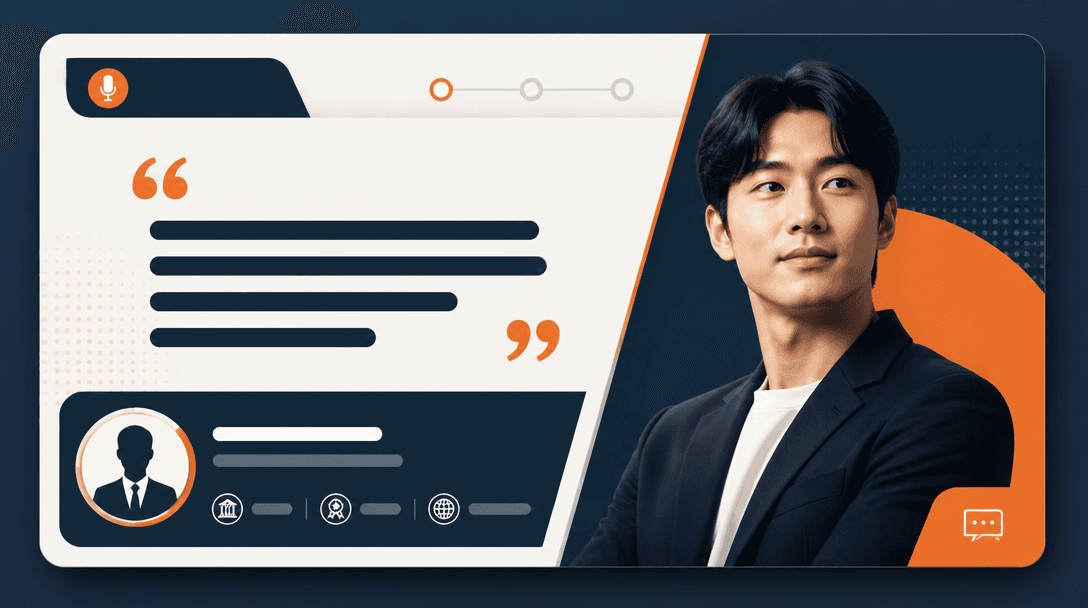
인터뷰 카드뉴스는 긴 대화를 모바일에서 부담 없이 읽도록 핵심 발언과 맥락을 나누는 편집물입니다. 첫 장에서 인물과 주제를 분명히 소개하고, 중간 장에서는 질문 하나와 답변 하나를 중심으로 흐름을 만들며, 마지막에는 전체 인터뷰나 다음 행동으로 연결합니다. 원문을 그대로 잘라 붙이기보다 독자가 이해하는 순서에 맞게 문장을 다듬어야 합니다.
표지에는 인물 사진, 이름, 역할, 인터뷰 주제를 배치하고 두 번째 장부터 질문의 배경을 짧게 설명합니다. 답변이 긴 경우 한 장에 모두 넣지 말고 하나의 주장과 근거를 분리합니다. 질문마다 색이나 번호 체계를 반복하면 독자가 현재 위치를 쉽게 파악할 수 있습니다. 핵심 문장만 크게 강조하고 나머지 설명은 충분한 여백을 두고 배치하세요.
사진은 인터뷰 대상의 표정과 맥락이 드러나는 이미지를 선택하되 과도한 보정이나 임의의 배경 합성을 피합니다. 인용문은 실제 발언의 의미를 바꾸지 않는 범위에서 줄바꿈과 길이를 조정해야 합니다. 강조 표시가 너무 많으면 모든 문장이 같은 중요도로 보이므로 카드마다 하나의 대표 문장만 선택하는 것이 좋습니다.
프롬프트에는 카드 비율, 표지와 본문의 역할, 인물 영역, 질문 번호, 인용문 블록, 페이지 간 색상 체계를 명시합니다. 정확한 이름, 직함, 발언은 모델이 생성하지 않도록 빈 텍스트 영역으로 남깁니다. 가짜 글자와 임의 로고를 금지하고, 사진을 넣을 위치와 후편집 가능한 여백을 확보하면 실제 콘텐츠를 적용하기 쉽습니다.
게시 전에는 녹취나 원문과 카드의 문장을 대조하고, 편집으로 인해 발언의 조건이나 뉘앙스가 달라지지 않았는지 확인합니다. 이름 표기, 직함, 사진 사용 동의, 링크와 태그를 점검하고 모바일 미리보기에서 글자 크기와 넘김 흐름을 봅니다. 마지막 카드에는 전체 인터뷰 링크나 명확한 다음 행동을 넣어 콘텐츠의 목적을 완성하세요.