carat

Prompt Gallery

/

Stop-Motion Animation

Login
Sign Up

Stop-Motion Animation

Create tactile stop-motion scenes with clay characters, miniature sets, handcrafted materials, and frame-by-frame movement cues.

2026.07.21

Make “Stop-Motion Animation” exactly the way you wantCreate your own “Stop-Motion Animation”

Just ask in plain language — Carat generates optimized images and videos for you.

Start now with 100 free credits daily

·

Paper-Cut Pompeii Eruption

Wan 3.0· Video
ARCHETYPE: Cinematic Narrative DURATION: 15 Seconds FORMAT: Pure motion-graphics explanation in exactly four visual acts AUDIO: No voice-over, only distant city ambience, volcanic rumbling and deep impacts CONCEPT: The Roman city of Pompeii is buried by the eruption of Mount Vesuvius in 15 seconds. The entire sequence is built from tactile paper cut-outs, cardboard architecture, ink silhouettes, layered ash paper and handmade textures. Every transition is a hard stop-motion jump. CAMERA DIRECTION: Mostly locked wide shots with tiny lateral drifts. No smooth cinematic camera movement, no morphing, no dissolves and no digital effects. Every major event should feel physically rearranged by hand. VISUAL STYLE: Ancient Roman paper theater with miniature cardboard villas, temples, columns, streets and layered volcanic clouds. Everything has visible paper fibers, torn edges, soft shadows and handmade imperfections. COLOR PALETTE: Terracotta, warm limestone, faded red, charcoal black, ash grey and volcanic orange. STORYBOARD — 4 ACTS: ACT 01 — 0.0–3.5s A prosperous Roman city stands beneath a peaceful mountain. Paper villas, temples, columns and market stalls fill the streets. Tiny human silhouettes move between buildings while carts cross the forum. ACT 02 — 3.5–7.5s Hard stop-motion jump. Mount Vesuvius suddenly erupts. A towering column of dark paper ash rises above the city as buildings tremble frame by frame and people begin fleeing through the streets. ACT 03 — 7.5–11.5s Hard stop-motion jump. Thick layers of ash and falling paper debris descend over Pompeii. Roofs collapse in stepped bursts. Streets disappear beneath accumulating grey paper as the city is rapidly buried. ACT 04 — 11.5–15.0s Hard stop-motion jump to the silent buried city. Only the upper edges of a few columns and rooftops remain visible beneath a vast layer of ash. The volcanic cloud hangs motionless above the landscape. Final static wide hold.
2090452242109210861

Claymation Lava Canyon Leap

MiniMax H3· Video
Claymation. A fox sprints to the edge of a cliff and launches without hesitation, making a dramatic heroic leap in slow motion over an immense lava canyon. Midair, the camera races beneath the fox’s belly in a bold dynamic move, revealing the terrifying depth of the chasm and the fully extended motion of its clay body.
@MiniMax_AI

What Are Stop-Motion Animation Prompts?

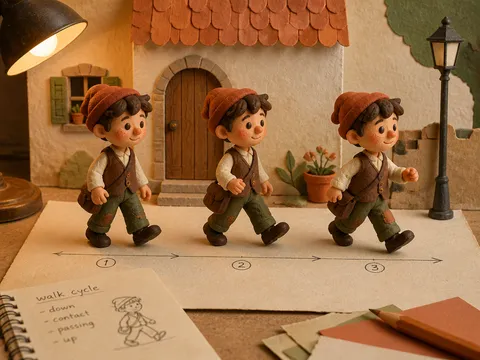
Stop-motion animation prompts describe scenes that feel photographed one frame at a time with physical models and props. They work well for claymation, paper puppets, miniature sets, toy-like worlds, fabric characters, and handmade product scenes. Instead of asking for a generic 3D render, describe fingerprints, brush marks, tiny asymmetries, material edges, and stable studio lighting so the result carries the warmth of a practical production.

Common Uses

  • A clay character walking or handing over an object
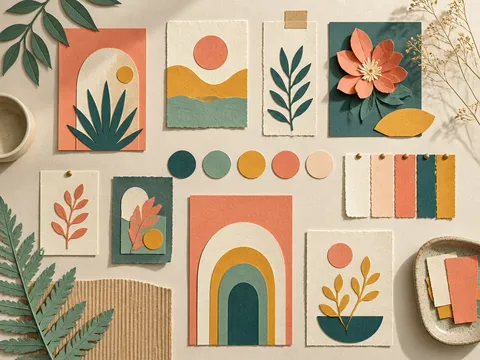
  • A storybook landscape made from paper and colored card
  • A product reveal inside a miniature advertising set
  • Ingredients moving one at a time for a recipe opening
  • A warm handcrafted scene for children and family content

Materials and Set Design

Choose the character and set materials first. Clay gives rounded shapes and visible fingerprints; paper gives folded edges and layered planes; wood adds grain; fabric adds seams and fibers. Keep the world small enough to feel like a tabletop miniature. Layer a few props to create depth, and use soft light with gentle shadows so the physical space remains legible.

Suggesting Frame-by-Frame Motion

A still image can imply movement through a walking pose, slightly offset props, layered paper frames, or a small controlled wobble. Keep one main action clear rather than duplicating many characters. When extending the prompt into video, move one joint or prop at a time and ask for a locked camera and consistent lighting to preserve continuity.

Production Checklist

List the material, set scale, camera distance, light direction, and character action in order. Perfect surfaces and excessive lens effects can weaken the handmade feeling. For a short sequence, design the opening and ending poses first, then keep the changes between them small and readable.

Explore related prompts:

  • Tilt-Up Camera Movement Video
  • Interview Composition
  • YouTube Intro Video

Frequently Asked Questions

Related Prompts

Animation Video

58 prompts

Paper Art Style

Paper Art Style

1 prompts

Stop Motion Video

Stop Motion Video

1 prompts

Paper Cut Style

Paper Cut Style

7 prompts

Carat Prompt Gallery

Create trending AI prompts instantly

Prompts

  • Logo
  • PPT Design
  • Thumbnail
  • Poster
  • Web Novel Cover
  • ID Photo
  • Caricature
  • Product Detail Page
  • Banner

Models

  • GPT Image 2
  • Seedance 2.0
  • NanoBanana Pro
  • NanoBanana 2

Carat

  • Get started
  • About
  • Blog
  • Careers
  • Contact
  • Partnership
  • Terms
  • Privacy

© 2026 Paradot.Inc All rights reserved.