carat

Prompt Gallery

/

Typography Video

Login
Sign Up

Typography Video

Typography video prompts for planning letter scale, rhythm, color, motion, transitions, and readable text areas.

2026.07.21

·
GPT 이미지 2로 생성한 타이포그래피 예시 2

타이포그래피 예시 2

GPT Image 2· Image
Kinetic typography design composition with layered oversized letters, gradient blue purple lighting, modern music poster mood, abstract unreadable text shapes.
GPT 이미지 2로 생성한 타이포그래피 예시 3

타이포그래피 예시 3

GPT Image 2· Image
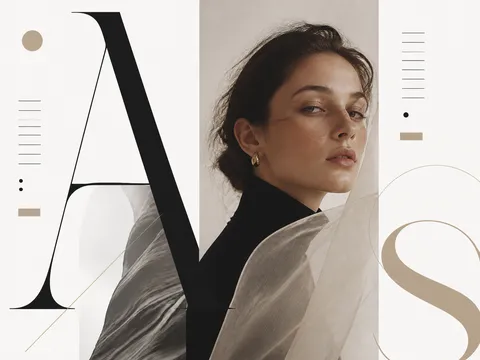
Elegant editorial typography layout, serif and sans serif letter shapes, generous white space, premium magazine cover style, no readable words.
GPT 이미지 2로 생성한 타이포그래피 예시 1

타이포그래피 예시 1

GPT Image 2· Image
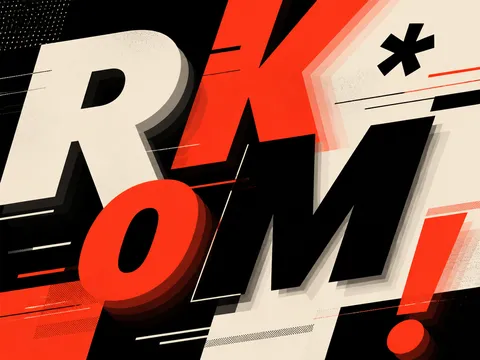
Experimental typography design poster, large abstract letterforms, black and cream palette with one red accent, Swiss grid layout, placeholder glyphs only, no readable words.

What are typography video AI prompts?

Typography video AI prompts treat letters as the main visual subject rather than as ordinary subtitles. Define sentence length, letter scale and weight, reveal order, negative space, rhythm, and transition speed to plan a lyric video, brand opener, event teaser, or motion graphic. Typography examples in the Carat gallery can help you study contrast, layout, and color systems before adapting the structure to your own message.

Practical use cases

  • Lyrics and album teaser videos
  • Key-message openers for brand campaigns
  • Teasers for talks, concerts, and exhibitions
  • Strong opening moments for short-form content
  • Motion graphics for product features and statistics

Connecting type and motion

Choose the one sentence viewers should read first. Make it large, then place supporting copy at a smaller scale so the hierarchy is obvious. A phrase that pops in, builds one letter at a time, or travels across the screen creates a different mood. Keep the background simple enough that movement remains readable, and use one or two accent colors to emphasize the most important words.

Prompting tips

List the message, type character, aspect ratio, background texture, reveal behavior, transition pace, and reserved copy area. If exact Korean or English wording matters, ask for short placeholder text or a clean text zone and add final lettering in an editor because generated text can be inaccurate. For music-led edits, define timing rules such as one word per beat or a scale increase at the chorus.

Review before publishing

Check lyrics, quotations, logos, and font permissions, then compare visible lettering with the approved copy. Inspect the video on a mobile screen to ensure fast transitions do not hide the message and that text remains inside the safe area. Verify every number and date against the source material, and obtain final approval for brand colors and restricted wording before release.

Frequently Asked Questions

Related Prompts

Kinetic Typography

Kinetic Typography

3 prompts

Korean Typography Design

Korean Typography Design

10 prompts

Typography Design

Typography Design

14 prompts

Concert Poster

Concert Poster

3 prompts

Carat Prompt Gallery

Create trending AI prompts instantly

Prompts

  • Logo
  • PPT Design
  • Thumbnail
  • Poster
  • Web Novel Cover
  • ID Photo
  • Caricature
  • Product Detail Page
  • Banner

Models

  • GPT Image 2
  • Seedance 2.0
  • NanoBanana Pro
  • NanoBanana 2

Carat

  • Get started
  • About
  • Blog
  • Careers
  • Contact
  • Partnership
  • Terms
  • Privacy

© 2026 Paradot.Inc All rights reserved.